

Keeping most of a site static while adding server-backed search
Astro Actions let a largely static site borrow server-side capability without rebuilding the whole project as a server application. Search is a natural fit: content sites that are generated at build time usually handle search purely on the client, through a SaaS service, or by converting the site into a server-rendered app. With Astro, most pages can still be generated during the build, while a small piece of server code runs the search through Fuse.js.
The demo searches a set of personal bookmarks that are generated at build time, but results are returned from a server call. The source project is available on GitHub and as a live demo.
Project scaffold and homepage cleanup
Start with a basic Astro project:
npm create astro@latestThe CLI asks a handful of questions. Answer them as follows:
- Where to create the project: the source author uses
./astro-search, but any directory works. - Starting template: the basic minimalist starter.
- Install dependencies: yes.
- Initialize a git repository: recommended.
Then open the directory and run npm run dev; the default Astro homepage appears.
Next, clear the default homepage: in /src/pages/index.astro, remove the <Welcome /> component. Add Tailwind for styling:
npx astro add tailwindThe astro add command installs Tailwind and generates the required boilerplate. Accept the CLI's offer to add the needed components, or copy the code from each step manually if anything fails. The CLI will also instruct you to import the styles into a shared layout; after that, add basic markup to the homepage:
---
// ./src/pages/index.astro
import Layout from '../layouts/Layout.astro';
---

<Layout>
  <div class="max-w-3xl mx-auto my-10">
    <h1 class="text-3xl text-center">My latest bookmarks</h1>
    <p class="text-xl text-center mb-5">This is only 10 of A LARGE NUMBER THAT WE'LL CHANGE LATER</p>
  </div>
</Layout>
Your page should now look like this:

Loading bookmarks through the Content Layer
A sample of the author's bookmarks is used here; the full set of 110 items is available on GitHub. Place the file at /src/data/bookmarks.json.
[
{
"pageTitle": "Our Favorite Sandwich Bread | King Arthur Baking",
"url": "<https://www.kingarthurbaking.com/recipes/our-favorite-sandwich-bread-recipe>",
"description": "Classic American sandwich loaf, perfect for French toast and sandwiches.",
"id": "007y8pmEOvhwldfT3wx1MW"
},
{
"pageTitle": "Chris Coyier's discussion of Automatic Social Share Images | CSS-Tricks ",
"url": "<https://css-tricks.com/automatic-social-share-images/>",
"description": "It's a pretty low-effort thing to get a big fancy link preview on social media. Toss a handful of specific <meta> tags on a URL and you get a big image-title-description thing ",
"id": "04CXDvGQo19m0oXERL6bhF"
},
{
"pageTitle": "Automatic Social Share Images | ryanfiller.com",
"url": "<https://www.ryanfiller.com/blog/automatic-social-share-images/>",
"description": "Setting up automatic social share images with Puppeteer and Netlify Functions. ",
"id": "04CXDvGQo19m0oXERLoC10"
},
{
"pageTitle": "Emma Wedekind: Foundations of Design Systems / React Boston 2019 - YouTube",
"url": "<https://m.youtube.com/watch?v=pXb2jA43A6k>",
"description": "Emma Wedekind: Foundations of Design Systems / React Boston 2019 Presented by: Emma Wedekind – LogMeIn Design systems are in the world around us, from street...",
"id": "0d56d03e-aba4-4ebd-9db8-644bcc185e33"
},
{
"pageTitle": "Editorial Design Patterns With CSS Grid And Named Columns — Smashing Magazine",
"url": "<https://www.smashingmagazine.com/2019/10/editorial-design-patterns-css-grid-subgrid-naming/>",
"description": "By naming lines when setting up our CSS Grid layouts, we can tap into some interesting and useful features of Grid — features that become even more powerful when we introduce subgrids.",
"id": "13ac1043-1b7d-4a5b-a3d8-b6f5ec34cf1c"
},
{
"pageTitle": "Netlify pro tip: Using Split Testing to power private beta releases - DEV Community 👩💻👨💻",
"url": "<https://dev.to/philhawksworth/netlify-pro-tip-using-split-testing-to-power-private-beta-releases-a7l>",
"description": "Giving users ways to opt in and out of your private betas. Video and tutorial.",
"id": "1fbabbf9-2952-47f2-9005-25af90b0229e"
},
{
"pageTitle": "Netlify Public Folder, Part I: What? Recreating the Dropbox Public Folder With Netlify | Jim Nielsen’s Weblog",
"url": "<https://blog.jim-nielsen.com/2019/netlify-public-folder-part-i-what/>",
"id": "2607e651-7b64-4695-8af9-3b9b88d402d5"
},
{
"pageTitle": "Why Is CSS So Weird? - YouTube",
"url": "<https://m.youtube.com/watch?v=aHUtMbJw8iA&feature=youtu.be>",
"description": "Love it or hate it, CSS is weird! It doesn't work like most programming languages, and it doesn't work like a design tool either. But CSS is also solving a v...",
"id": "2e29aa3b-45b8-4ce4-85b7-fd8bc50daccd"
},
{
"pageTitle": "Internet world despairs as non-profit .org sold for $$$$ to private equity firm, price caps axed • The Register",
"url": "<https://www.theregister.co.uk/2019/11/20/org_registry_sale_shambles/>",
"id": "33406b33-c453-44d3-8b18-2d2ae83ee73f"
},
{
"pageTitle": "Netlify Identity for paid subscriptions - Access Control / Identity - Netlify Community",
"url": "<https://community.netlify.com/t/netlify-identity-for-paid-subscriptions/1947/2>",
"description": "I want to limit certain functionality on my website to paying users. Now I’m using a payment provider (Mollie) similar to Stripe. My idea was to use the webhook fired by this service to call a Netlify function and give…",
"id": "34d6341c-18eb-4744-88e1-cfbf6c1cfa6c"
},
{
"pageTitle": "SmashingConf Freiburg 2019: Videos And Photos — Smashing Magazine",
"url": "<https://www.smashingmagazine.com/2019/10/smashingconf-freiburg-2019/>",
"description": "We had a lovely time at SmashingConf Freiburg. This post wraps up the event and also shares the video of all of the Freiburg presentations.",
"id": "354cbb34-b24a-47f1-8973-8553ed1d809d"
},
{
"pageTitle": "Adding Google Calendar to your JAMStack",
"url": "<https://www.raymondcamden.com/2019/11/18/adding-google-calendar-to-your-jamstack>",
"description": "A look at using Google APIs to add events to your static site.",
"id": "361b20c4-75ce-46b3-b6d9-38139e03f2ca"
},
{
"pageTitle": "How to Contribute to an Open Source Project | CSS-Tricks",
"url": "<https://css-tricks.com/how-to-contribute-to-an-open-source-project/>",
"description": "The following is going to get slightly opinionated and aims to guide someone on their journey into open source. As a prerequisite, you should have basic",
"id": "37300606-af08-4d9a-b5e3-12f64ebbb505"
},
{
"pageTitle": "Functions | Netlify",
"url": "<https://www.netlify.com/docs/functions/>",
"description": "Netlify builds, deploys, and hosts your front end. Learn how to get started, see examples, and view documentation for the modern web platform.",
"id": "3bf9e31b-5288-4b3b-89f2-97034603dbf6"
},
{
"pageTitle": "Serverless Can Help You To Focus - By Simona Cotin",
"url": "<https://hackernoon.com/serverless-can-do-that-7nw32mk>",
"id": "43b1ee63-c2f8-4e14-8700-1e21c2e0a8b1"
},
{
"pageTitle": "Nuxt, Next, Nest?! My Head Hurts. - DEV Community 👩💻👨💻",
"url": "<https://dev.to/laurieontech/nuxt-next-nest-my-head-hurts-5h98>",
"description": "I clearly know what all of these things are. Their names are not at all similar. But let's review, just to make sure we know...",
"id": "456b7d6d-7efa-408a-9eca-0325d996b69c"
},
{
"pageTitle": "Consuming a headless CMS GraphQL API with Eleventy - Webstoemp",
"url": "<https://www.webstoemp.com/blog/headless-cms-graphql-api-eleventy/>",
"description": "With Eleventy, consuming data coming from a GraphQL API to generate static pages is as easy as using Markdown files.",
"id": "4606b168-21a6-49df-8536-a2a00750d659"
},
]To fold that data into the build, use Astro's Content Layer API, configured in a content config file. Create /src/content.config.ts — the filename matters because Astro looks for that specific file.
import { defineCollection, z } from "astro:content";
import { file } from 'astro/loaders';

const bookmarks = defineCollection({
  schema: z.object({
    pageTitle: z.string(),
    url: z.string(),
    description: z.string().optional()
  }),
  loader: file("src/data/bookmarks.json"),
});

export const collections = { bookmarks };
The file imports three helpers: defineCollection to create the collection, z (Zod) to define types, and file, a content loader built for reading data files. defineCollection accepts an object with a required loader and an optional schema. The schema makes the content type-safe and enforces the expected shape; here it defines the three properties each bookmark carries. Every field you want available in templates must appear in the schema. The loader property receives the file loader pointed at the JSON file, and the collections variable is exported as an object holding all defined collections (only bookmarks in this project). Restart the dev server with npm run dev so the new data is picked up.
Displaying content on the homepage
Read the collection in the frontmatter of ./src/pages/index.astro with getCollection from astro:content:
---
import Layout from '../layouts/Layout.astro';
import { getCollection } from 'astro:content';

const bookmarks = await getCollection('bookmarks');
---
This stores the collection's data in a bookmarks variable, an array defined by the collection that can be looped over in the template.
---
import Layout from '../layouts/Layout.astro';
import { getCollection } from 'astro:content';

const bookmarks = await getCollection('bookmarks');
---

<Layout>
  <div class="max-w-3xl mx-auto my-10">
    <h1 class="text-3xl text-center">My latest bookmarks</h1>
    <p class="text-xl text-center mb-5">
      This is only 10 of {bookmarks.length}
    </p>

    <h2 class="text-2xl mb-3">Latest bookmarks</h2>
    <ul class="grid gap-4">
    {
      bookmarks.slice(0, 10).map((item) => (
      <li>
        <a
          href={item.data?.url}
          class="block p-6 bg-white border border-gray-200 rounded-lg shadow-sm hover:bg-gray-100 dark:bg-gray-800 dark:border-gray-700 dark:hover:bg-gray-700">
          <h3 class="mb-2 text-2xl font-bold tracking-tight text-gray-900 dark:text-white">
            {item.data?.pageTitle}
          </h3>
          <p class="font-normal text-gray-700 dark:text-gray-400">
            {item.data?.description}
          </p>
        </a>
      </li>
      ))
    }
    </ul>
  </div>
</Layout>
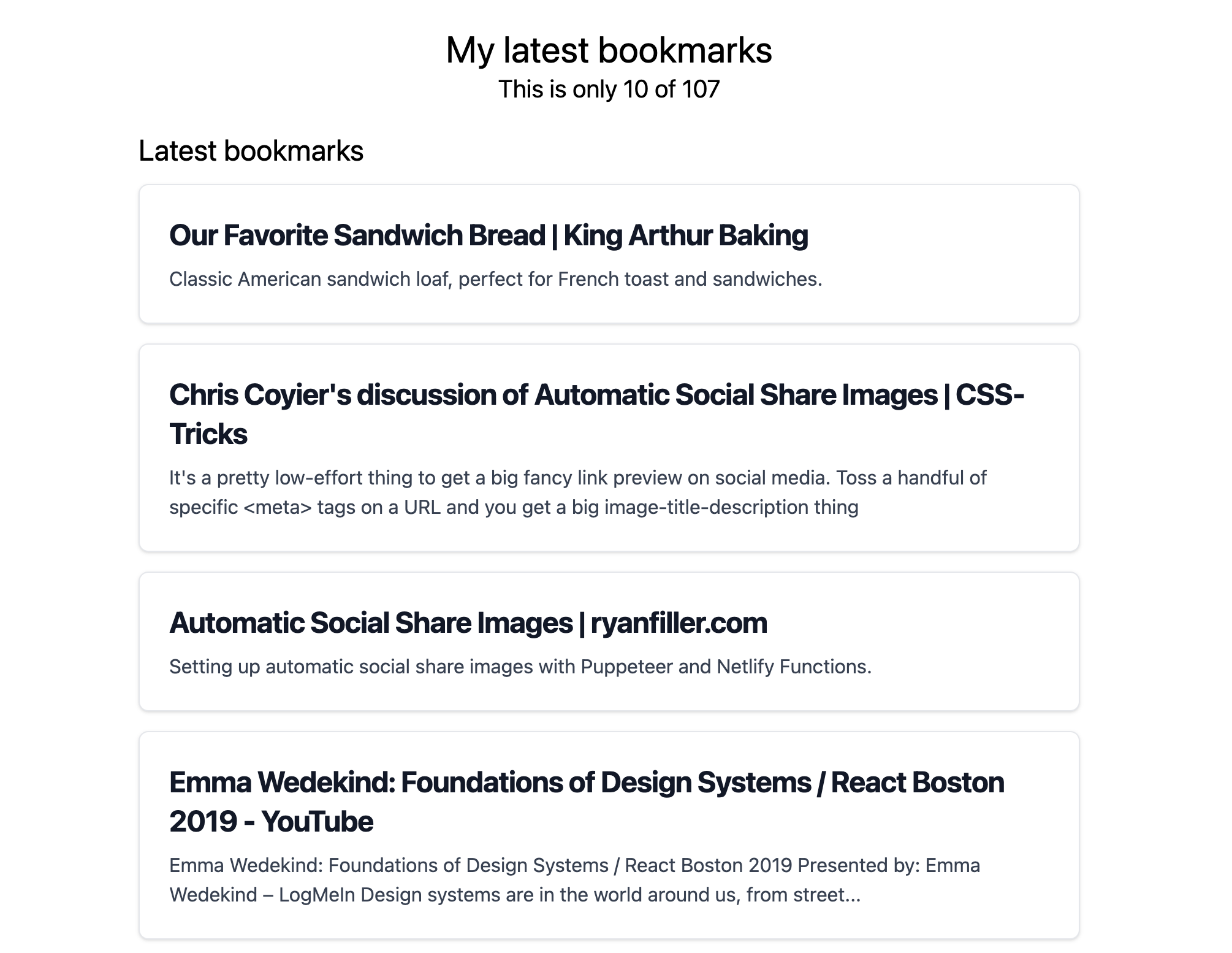
The template pulls the 10 most recent items and renders them with Tailwind styles. Note the data shape: each item's actual fields live under the data property. That separation lets Astro attach additional metadata to the object without colliding with the fields you define. The page should now look something like this:
Wiring up search
Scaffolding the Search component
The example uses vanilla JavaScript, but React, Svelte, or Vue client Islands work the same way with Actions. Create the component at ./src/components/Search.astro:
<form id="searchForm" class="flex mb-6 items-center max-w-sm mx-auto">
  <label for="simple-search" class="sr-only">Search</label>
  <div class="relative w-full">
    <input
      type="text"
      id="search"
      class="bg-gray-50 border border-gray-300 text-gray-900 text-sm rounded-lg focus:ring-blue-500 focus:border-blue-500 block w-full p-2.5 dark:bg-gray-700 dark:border-gray-600 dark:placeholder-gray-400 dark:text-white dark:focus:ring-blue-500 dark:focus:border-blue-500"
      placeholder="Search Bookmarks"
      required
    />
  </div>
  <button
    type="submit"
    class="p-2.5 ms-2 text-sm font-medium text-white bg-blue-700 rounded-lg border border-blue-700 hover:bg-blue-800 focus:ring-4 focus:outline-none focus:ring-blue-300 dark:bg-blue-600 dark:hover:bg-blue-700 dark:focus:ring-blue-800">
    <svg
      class="w-4 h-4"
      aria-hidden="true"
      xmlns="<http://www.w3.org/2000/svg>"
      fill="none"
      viewBox="0 0 20 20">
      <path
        stroke="currentColor"
        stroke-linecap="round"
        stroke-linejoin="round"
        stroke-width="2"
        d="m19 19-4-4m0-7A7 7 0 1 1 1 8a7 7 0 0 1 14 0Z"></path>
    </svg>
    <span class="sr-only">Search</span>
  </button>
</form>

<div class="grid gap-4 mb-10 hidden" id="results">
  <h2 class="text-xl font-bold mb-2">Search Results</h2>
</div>

<script>
  const form = document.getElementById("searchForm");
  const search = document.getElementById("search");
  const results = document.getElementById("results");

  form?.addEventListener("submit", async (e) => {
    e.preventDefault();
    console.log("SEARCH WILL HAPPEN");
  });
</script>
The markup defines a search form, an input, and a results area, each identified for JavaScript access. The script looks up those elements and attaches a submit listener to the form. That listener is where the search logic will live; a console log confirms the wiring for now.
Server mode and a first Action
Actions require the project to run in server or hybrid mode, which lets all or some pages render in serverless functions instead of being pre-generated as HTML during the build. This project uses hybrid mode, since the Action is the only server-side piece. That requires a server integration; Astro ships integrations for most major cloud providers plus a basic Node implementation. The example uses Netlify's integration, added via the CLI as with Tailwind:
npx astro add netlifyAfter this step, Astro runs in hybrid mode: most pages are pre-generated, and the Action executes as a serverless function when invoked.
Create ./src/actions/index.js. All Actions live in this file; splitting each one into its own file and importing it here is possible, but with a single Action it would be premature optimization. The search Action uses defineAction with a schema and a handler. The schema validates typed input from the client JavaScript; the handler defines what runs when the Action is called.
import { defineAction } from "astro:actions";
import { z } from "astro:schema";
import { getCollection } from "astro:content";

export const server = {
  search: defineAction({
    schema: z.object({
      query: z.string(),
    }),
    handler: async (query) => {
      const bookmarks = await getCollection("bookmarks");
      const results = await bookmarks.filter((bookmark) => {
        return bookmark.data.pageTitle.includes(query);
      });
      return results;
    },
  }),
};
The Action is named search and expects a schema of an object with one property, query, typed as a string. The handler fetches every bookmark from the content collection and uses native JavaScript .filter() to test whether the query appears in a bookmark title.
Calling the Action from the form
On submit, the query has to reach the Action. Rather than constructing a fetch request by hand, client-side code imports from astro:actions, whose actions object exposes every server Action created in the project. In the Search component, import the Action into the script and call it when the form is submitted:
<script>
import { actions } from "astro:actions";

const form = document.getElementById("searchForm");
const search = document.getElementById("search");
const results = document.getElementById("results");

form?.addEventListener("submit", async (e) => {
  e.preventDefault();
  results.innerHTML = "";

  const query = search.value;
  const { data, error } = await actions.search(query);
  if (error) {
    results.innerHTML = `<p>${error.message}</p>`;
    return;
  }
  // create a div for each search result
  data.forEach(( item ) => {
    const div = document.createElement("div");
    div.innerHTML = `
      <a href="${item.data?.url}" class="block p-6 bg-white border border-gray-200 rounded-lg shadow-sm hover:bg-gray-100 dark:bg-gray-800 dark:border-gray-700 dark:hover:bg-gray-700">
      <h3 class="mb-2 text-2xl font-bold tracking-tight text-gray-900 dark:text-white">
        ${item.data?.pageTitle}
      </h3>
      <p class="font-normal text-gray-700 dark:text-gray-400">
        ${item.data?.description}
        </p>
      </a>`;
    // append the div to the results container
    results.appendChild(div);
  });
  // show the results container
  results.classList.remove("hidden");
});
</script>
Search results now come back:
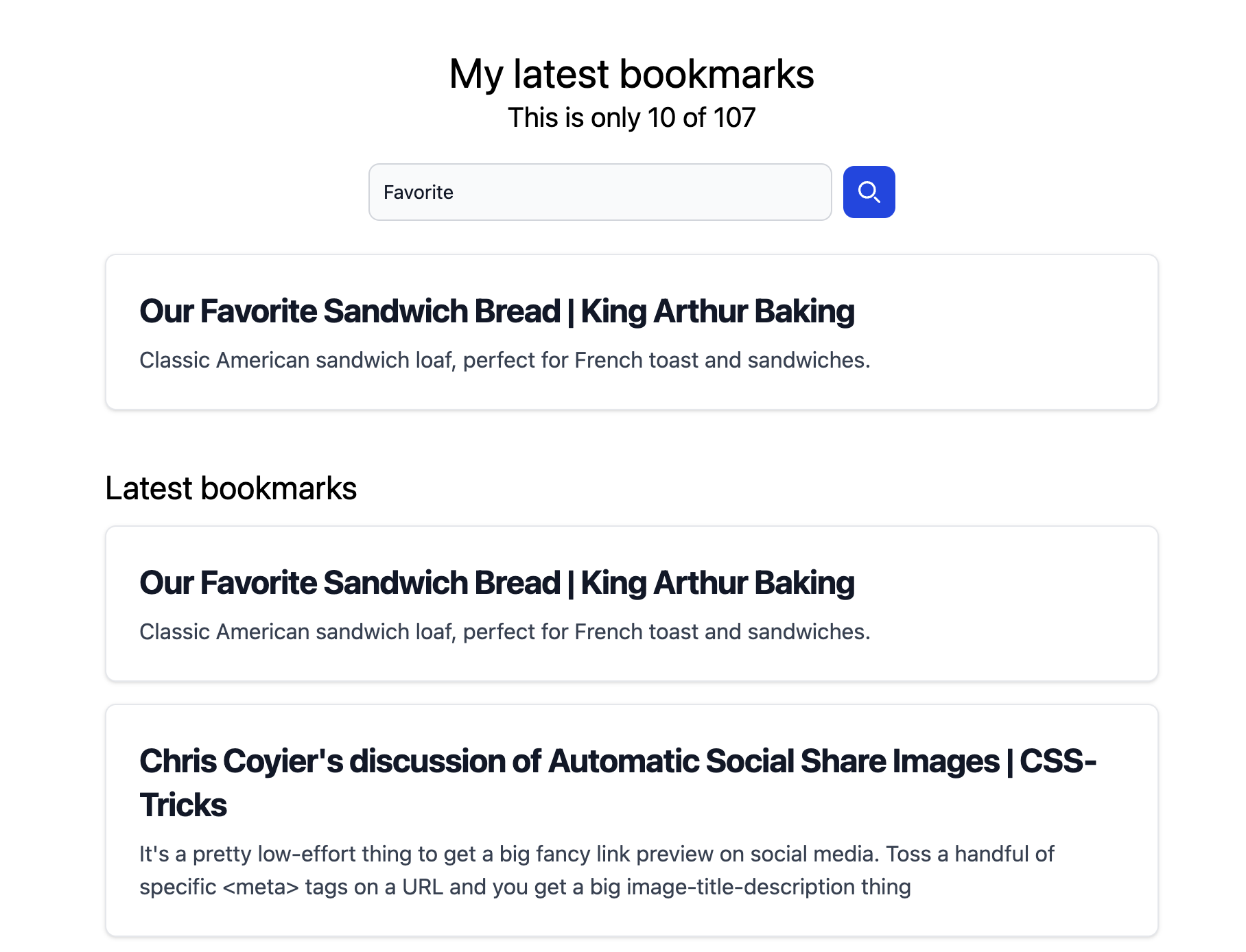
They are, however, fairly brittle. It is only a simple JavaScript filter: searching for "Favorite" returns the author's favorite bread recipe, but searching "favorite" without capitalization errors out.
Switching to Fuse.js
Fuse.js is a JavaScript package that simplifies fuzzy search. It takes a string and, based on a number of criteria and data sets, returns responses that closely match even when the match is imperfect. Depending on configuration, Fuse resolves "Favorite", "favorite", and even misspellings such as "favrite" to the same results. It is not as powerful as Algolia or ElasticSearch, but it is free and performs well. Install it first:
npm install fuse.jsThen import it in the Action file and create a Fuse instance over the bookmarks collection:
import { defineAction } from "astro:actions";
import { z } from "astro:schema";
import { getCollection } from "astro:content";
import Fuse from "fuse.js";

export const server = {
  search: defineAction({
    schema: z.object({
      query: z.string(),
    }),
    handler: async (query) => {
      const bookmarks = await getCollection("bookmarks");
      const fuse = new Fuse(bookmarks, {
        threshold: 0.3,
        keys: [
          { name: "data.pageTitle", weight: 1.0 },
          { name: "data.description", weight: 0.7 },
          { name: "data.url", weight: 0.3 },
        ],
      });

      const results = await fuse.search(query);
      return results;
    },
  }),
};
The instance is configured with several options. The threshold value, between 0 and 1, controls how fuzzy matching is; the right value depends on the use case and dataset, and 0.3 works well here. The keys array lists which fields are searched and permits different weighting per field — title is most important, then description, then URL — so keywords in any of these areas can match. Running fuse.search(query) returns an array of results.
Adjusting to Fuse's result shape
Fuse returns a different structure than the plain filter did: each result now carries refIndex and item, with the bookmark data on item. The front-end forEach needs to destructure the item off each result:
// create a div for each search result
data.forEach(({ item }) => {
  const div = document.createElement("div");
  div.innerHTML = `
    <a href="${item.data?.url}" class="block p-6 bg-white border border-gray-200 rounded-lg shadow-sm hover:bg-gray-100 dark:bg-gray-800 dark:border-gray-700 dark:hover:bg-gray-700">
      <h3 class="mb-2 text-2xl font-bold tracking-tight text-gray-900 dark:text-white">
        ${item.data?.pageTitle}
      </h3>
      <p class="font-normal text-gray-700 dark:text-gray-400">
        ${item.data?.description}
      </p>
    </a>`;
  // append the div to the results container
  results.appendChild(div);
});
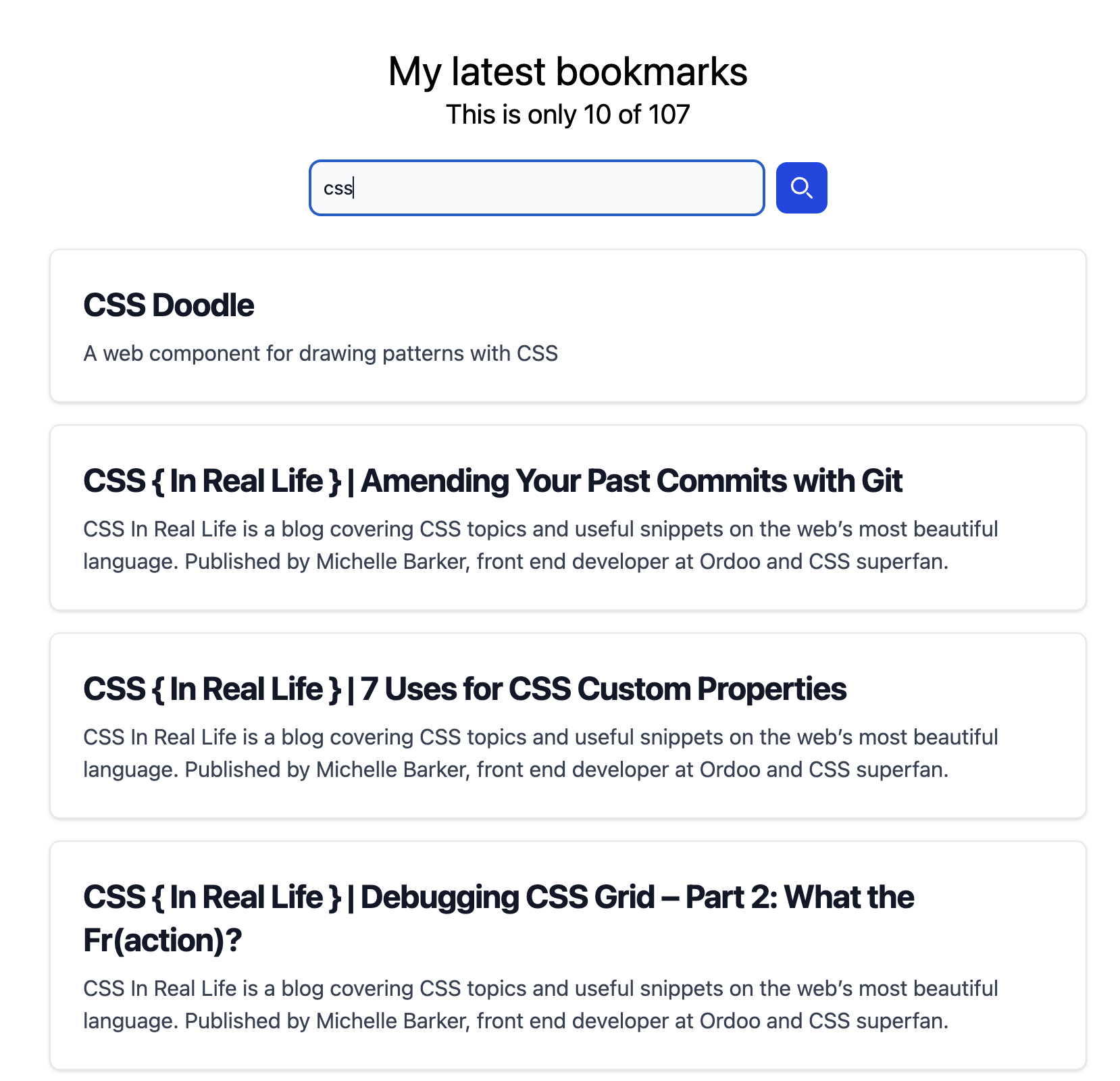
That completes a working search over the bookmarks:
Where to take it
This barely scratches the surface of Astro Actions. Error handling based on the returned error is one obvious addition. Another option is handling search at the page level, giving search its own page where the Action is used as a form action and the whole thing runs as a server request instead of front-end JavaScript. The vanilla JS could also be replaced with React, Svelte, or Vue.



