Standardizing commit messages for automatic versioning
Releasing software involves a string of repetitive chores: merging the PR, tagging the commit, pushing the release, then writing release notes by hand. Semantic versioning gives you a precise vocabulary for describing what changed, but the process only becomes efficient when it is wired into continuous deployment. The foundation for that automation is a standardized commit format — without it, nothing downstream can decide which version number to increment or what the release notes should say.
Semantic versioning in brief
A semantic version is three period-separated numbers, e.g. 1.4.10. Read it as Breaking . Feature . Fix: the first number signals a major change with breaking impact, the second a minor change that adds functionality, and the third a patch that fixes a bug. This leaves no room for interpretation.
The Angular commit convention
To increment the right digit automatically, commits must follow a consistent shape. The article's workflow adopts the Angular commit message convention. Each commit message has a header, a body, and a footer.
<header>
<optional body>
<optional footer>
Header fields

The header is mandatory and combines a type, an optional scope, and a subject. The type states the commit's impact on the next version and must be one of:
- feat: new feature
- fix: bug fix
- docs: documentation change
- style: changes that don't affect code meaning (white-space, formatting, missing semi-colons, etc.)
- refactor: neither a bug fix nor a feature
- perf: performance improvement
- test: adding missing tests or correcting existing ones
- chore: build process or auxiliary tooling changes, such as documentation generation
The scope names the subsystem touched — an API, an app's dashboard, user accounts — and an asterisk (*) is used when a commit spans more than one. The subject is a short description, written in the imperative present tense ("change", not "changed" or "changes"), starting lowercase, with no trailing period, and kept under 80 characters.
Body and footer
The body also uses the imperative present tense and explains the motivation for the change alongside how behavior differs from before. The footer is where breaking changes and issue references belong. Breaking change information begins with BREAKING CHANGE: followed by a space or two new lines, with the remainder of the message after it.
Enforcing the format with Commitizen
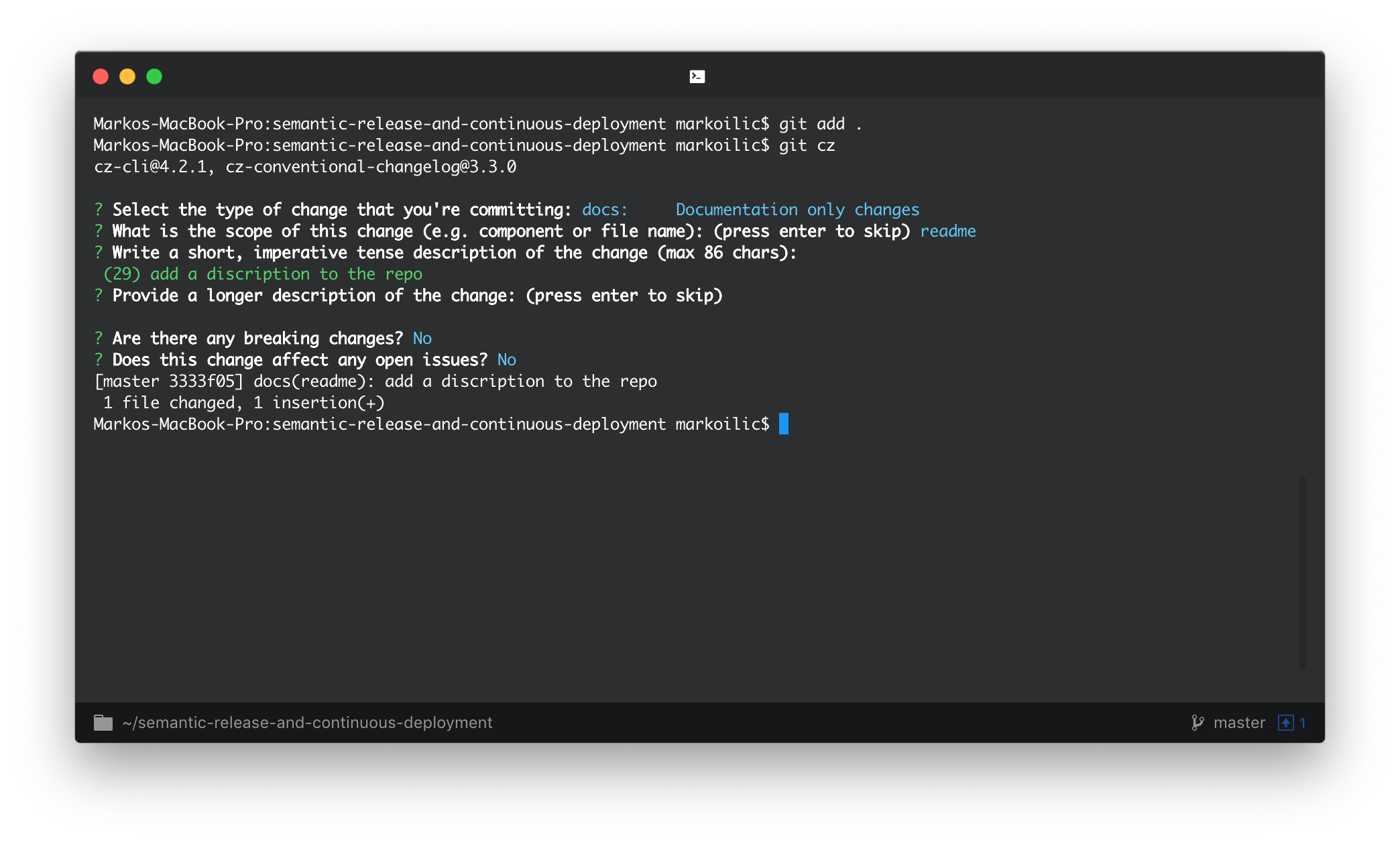
Getting a whole team to adopt a standard is the hard part. Commitizen, a command-line tool, eases consistency: once a repo is Commitizen-friendly, any team member can run git cz and receive a detailed prompt for composing the commit message.
Automating releases with semantic-release
With commits following the standard, release generation and release notes can be handed to semantic-release, a well-maintained package with support for multiple CI platforms. It performs the full sequence:
- Determine the last published version.
- Infer the release type from commits added since that release.
- Generate release notes for those commits.
- Update
package.jsonand create a Git tag for the new version. - Push the release.
Any CI system works; the walkthrough uses GitHub Actions. While semantic-release can be installed several ways, the step-by-step installer is semantic-release-cli. Running npx semantic-release-cli setup launches an interactive wizard.

The script runs npm adduser with the supplied NPM information to generate a .npmrc, creates a GitHub personal token, and updates package.json. It adds semantic-release to the manifest without installing it, so follow up with npm install to pull it in along with the other dependencies.
Wiring up the GitHub Actions workflow
The remaining piece is a release workflow at .github/workflows/release.yml, added manually to the repository.
name: Release
on:
  push:
    branches:
      - main
jobs:
  release:
    name: Release
    runs-on: ubuntu-18.04
    steps:
      - name: Checkout
        uses: actions/checkout@v2
      - name: Setup Node.js
        uses: actions/setup-node@v1
        with:
          node-version: 12
      - name: Install dependencies
        run: npm ci
      - name: Release
        env:
          GITHUB_TOKEN: ${{ secrets.GITHUB_TOKEN }}
        # If you need an NPM release, you can add the NPM_TOKEN
        #   NPM_TOKEN: ${{ secrets.NPM_TOKEN }}
        run: npm run release
The workflow triggers only on a push to the main branch; this can be widened to one, two, or all branches.
on:
  push:
    branches:
      - main
It then pulls the repo with checkout and installs Node so npm can install project dependencies. A test step can go here if desired.
- name: Checkout
uses: actions/checkout@v2
- name: Setup Node.js
uses: actions/setup-node@v1
with:
    node-version: 12
- name: Install dependencies
run: npm ci
# You can add a test step here
# - name: Run Tests
# run: npm test
Finally, semantic-release takes over:
- name: Release
run: npm run release
Push the changes and watch the actions run:

From then on, every commit made or merged to the specified branch triggers a release complete with generated notes.

Extending the pipeline
The setup is relatively simple and carries no downsides for tracking changes. semantic-release also offers a broad plugin ecosystem for more advanced automation — including a Slack release bot that posts to a project channel once deployment succeeds, so nobody has to visit GitHub for updates.