
Clean up before you measure
Before you start collecting performance metrics for an audit, run through a set of baseline checks. These quick wins help you fix obvious problems first and highlight areas that deserve deeper investigation. Document what you find and what you change — these improvements count as part of the audit, even if they happen before formal measurement.
Architecture and code quality
Start by removing anything that adds weight without value. Look for orphaned pages, redundant templates, unused images, and dead code or libraries. Use the coverage tools in your browser's developer tools to identify JavaScript and CSS that never executes.
Check the browser console for runtime errors — there should be none. Then run linting on your HTML, CSS, and JavaScript. Tools like HTMLHint, StyleLint, and ESLint can plug into your editor or run in your build pipeline and CI system (for example, Travis). Linting catches errors early and prevents regressions.
Test for broken links and images at build time and runtime. Browser extensions and Node-based tools such as Broken Link Checker can automate this. Replace or remove any legacy plugins like Flash or Silverlight: they are deprecated, pose security risks, and do not work on mobile devices. Lighthouse has a check for plugin usage.
Test in real-world conditions
Lab data is useful, but nothing substitutes for hands-on testing with actual devices, browsers, and network conditions. Some findings will be subjective, but they often reveal problems that directly affect perceived performance. A broken link wastes time and feels unresponsive; illegible text is slow to read.
Devices and viewports
Try multiple window sizes and at least one mobile and one desktop device. If possible, use a low-spec phone with a small screen. Check that text is readable, images are not broken, zoom works, touch targets are large enough, and interactions are smooth. Record screenshots or video of anything that fails.
Test on the browsers and operating systems your users actually run. Do not limit yourself to your primary development environment.
Connectivity
Test over Wi-Fi and cellular connections, not just a fast office network. Browser developer tools can emulate varying network conditions so you can see how the site behaves under constrained bandwidth and latency.
A practical example
The same page can look very different across devices:
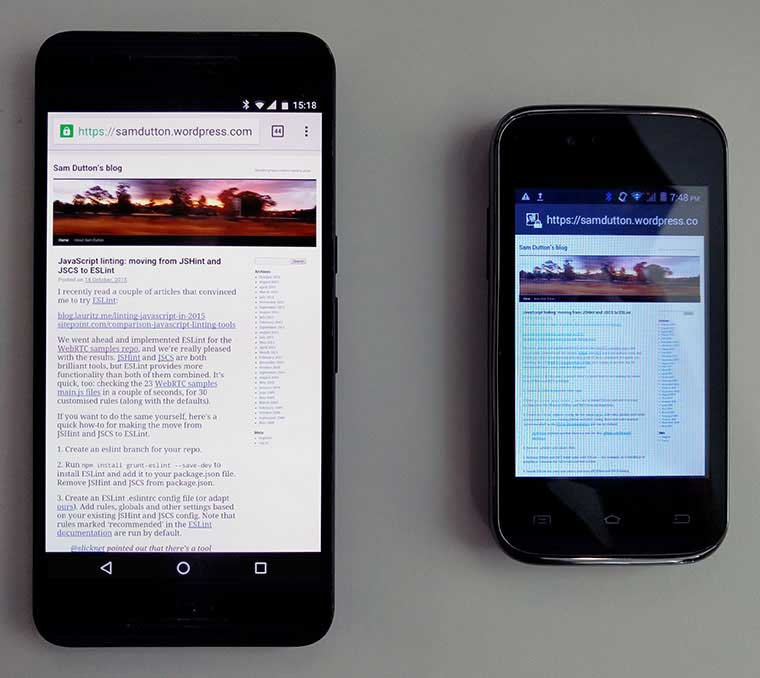
On a larger screen, text is small but legible. On a smaller phone, the browser renders the layout correctly, but the text is unreadable even when zoomed. The screen is blurry and has a color cast — white does not look white — which makes content harder to read. Findings like this matter more than obscure performance numbers.
Review UI, UX, and accessibility
Accessibility and usability
Lighthouse and similar tools can flag specific accessibility issues, but manual testing is essential. Understand the diversity of your audience: try reading, navigating, and entering data outdoors in sunlight, or on a moving train. Ask friends, family, and colleagues of different backgrounds to use the site.
Test with a screen reader such as VoiceOver on Mac or NVDA on Windows. Keep a written record of the accessibility audit; you will likely find simple improvements that benefit all users, not just those with disabilities.
Core interface problems
Open several pages and work through navigation and main features. Look for interactions that misbehave, content that overflows smaller windows, undersized tap targets, unreadable text, and janky scrolling. Also check images, audio, and video for overflow, incorrect aspect ratios, bad cropping, and quality issues.
Quick subjective checks
These questions can guide refactoring decisions, even if they are not relevant to every site:
- Is it immediately clear what this site offers when you land on it?
- Are you drawn to explore content and follow links?
- Is there a clear visual hierarchy, or does everything carry equal visual weight?
- Does the layout feel cluttered?
- Are there too many fonts in use?
- Could any images or content simply be removed?
Content design matters as much as interface design. Make sure text and images work well for both mobile and desktop contexts, and cut anything that does not earn its place.



