
Why the Main Thread Bottlenecks React
JavaScript runs on a single main thread in the browser. That thread does more than execute your code: it also processes clicks, keystrokes, network events, timers, animations, and layout or paint work. Any task that occupies the thread blocks everything behind it. When a task exceeds 50 milliseconds, it is classified as a "long task" — long enough that users may notice jank or delayed responses.
That 50ms threshold isn't arbitrary. To keep a smooth 60fps visual experience, a device needs a new frame every 16ms. The remaining time after frame rendering is budgeted for input handling and JavaScript execution, and the 50ms ceiling gives the main thread enough headroom for those duties while still meeting the frame rate.
Two metrics quantify the damage long tasks do to user experience:
- Total Blocking Time (TBT) sums the time by which tasks exceed the 50ms threshold, measured between First Contentful Paint (FCP) and Time to Interactive (TTI). If one task runs 30ms over and another runs 15ms over, TBT is 45ms.
- Interaction to Next Paint (INP), a Core Web Vitals metric, records the delay from a user interaction (like a click) to the next visible paint. INP collects all such measurements during a visit and reports the worst one.
These metrics matter most on pages dense with interactivity, such as e-commerce and social media, where every delayed paint is a lost user action.
How Synchronous Rendering Creates the Problem
React splits a visual update into two phases. The render phase is a pure computation that reconciles React elements against the existing DOM by building a new virtual DOM tree and diffing it against the current one. The commit phase applies those computed changes to the real DOM.
In pre-concurrent React, that whole pipeline ran synchronously. Every element in a component tree got the same priority, and a render — whether initial or from a state update — executed as a single, uninterruptible task. Once started, a component tree would always finish rendering before the main thread could handle anything else. If that render was expensive, the main thread stayed blocked, and the UI became unresponsive until the commit was done.
Consider an input field filtering a list of tens of thousands of cities. With synchronous rendering, every keystroke triggers a full re-render of the expensive CitiesList component. The input visibly lags behind the typing, and the performance profiler shows long tasks accumulating on every keystroke. Developers reached for third-party utilities like debounce to defer the work, but React itself offered no native way to prioritize one update over another.
The Concurrent Renderer
React 18 ships a concurrent renderer that changes this model. Instead of treating every render as an all-or-nothing task, React can mark certain updates as non-urgent. For low-priority renders, React yields control back to the main thread every 5 milliseconds to check whether a more important task—such as user input or a higher-priority state update—is waiting. If so, React pauses the current render, handles that higher-priority work, and resumes the background render later.
The concurrent renderer can also build multiple versions of a component tree in the background without committing any of them immediately. If the user interacts with one component while another is mid-render, React can pause the in-progress tree, prioritize and render the interacted component, then resume the first tree. Rendering is no longer a single indivisible operation.
Transitions and Non-Urgent Updates
The useTransition hook exposes this capability through startTransition. Wrapping a state update in startTransition tells React that the resulting visual change is non-urgent; React is free to defer or interrupt that render to keep the current UI interactive.
When a transition starts, the concurrent renderer prepares the new component tree in the background. The result is held in memory until the scheduler determines it can commit the changes to the DOM without hurting perceived performance — typically when the browser is idle and no higher-priority task is pending.
The cities filter demo illustrates the difference. Rather than deriving the huge filtered list synchronously from every keystroke, the implementation splits the state into two values. The input field reads a text state updated synchronously, so typing stays immediately responsive. The searchQuery state that drives the list render is wrapped in startTransition. As the user types, React renders the new tree for the filtered list in the background while the old list stays on screen and the input remains interactive.
Profiling the transition-based version shows far fewer long tasks and a dramatically lower total blocking time than the synchronous equivalent. That translates directly into better TBT and INP measurements — and a UI that feels responsive under CPU-heavy, high-frequency updates.
Server Components Change the Delivery Model
React Server Components are still marked experimental in React 18, but the framework is now considered ready for adoption by meta-frameworks like Next.js. That distinction matters before looking at how the rendering model has shifted.
Before React 18, rendering fell into two camps. Client-side rendering shipped a JavaScript bundle and built the entire component tree in the browser. Server-side rendering generated HTML on the server and sent it with a hydration bundle so the client could attach event handlers and rebuild the tree. In both cases, the synchronous React renderer had to reconstruct the component tree on the client — even though that same tree had already existed on the server.


React Server Components take a different path. Instead of sending HTML or a full JavaScript bundle, the server serializes the component tree itself into a format the client-side renderer understands natively. The client reconstructs the tree directly from that serialized payload, avoiding the redundant work of rebuilding what the server already produced.


The pattern combines renderToPipeableStream from react-server-dom-webpack/server with createRoot from react-dom/client.
// server/index.js
import App from '../src/App.js'
app.get('/rsc', async function(req, res) {
const {pipe} = renderToPipeableStream(React.createElement(App));
return pipe(res);
});
---
// src/index.js
import { createRoot } from 'react-dom/client';
import { createFromFetch } from 'react-server-dom-webpack/client';
export function Index() {
...
return createFromFetch(fetch('/rsc'));
}
const root = createRoot(document.getElementById('root'));
root.render(<Index />);
This is an over-simplified example of the CodeSandbox demo shown below. The full demo is available in the CodeSandbox link; the next section covers a more elaborate example.
Server Components are not hydrated by default because they aren't expected to use client-side interactivity — no window access, no useState, no useEffect. To opt a component into the client bundle and make it interactive, add the "use client" bundler directive at the top of the file. That directive signals the bundler to include the component and its imports in the client payload, and tells React to hydrate the tree to enable interactivity. These are called Client Components.
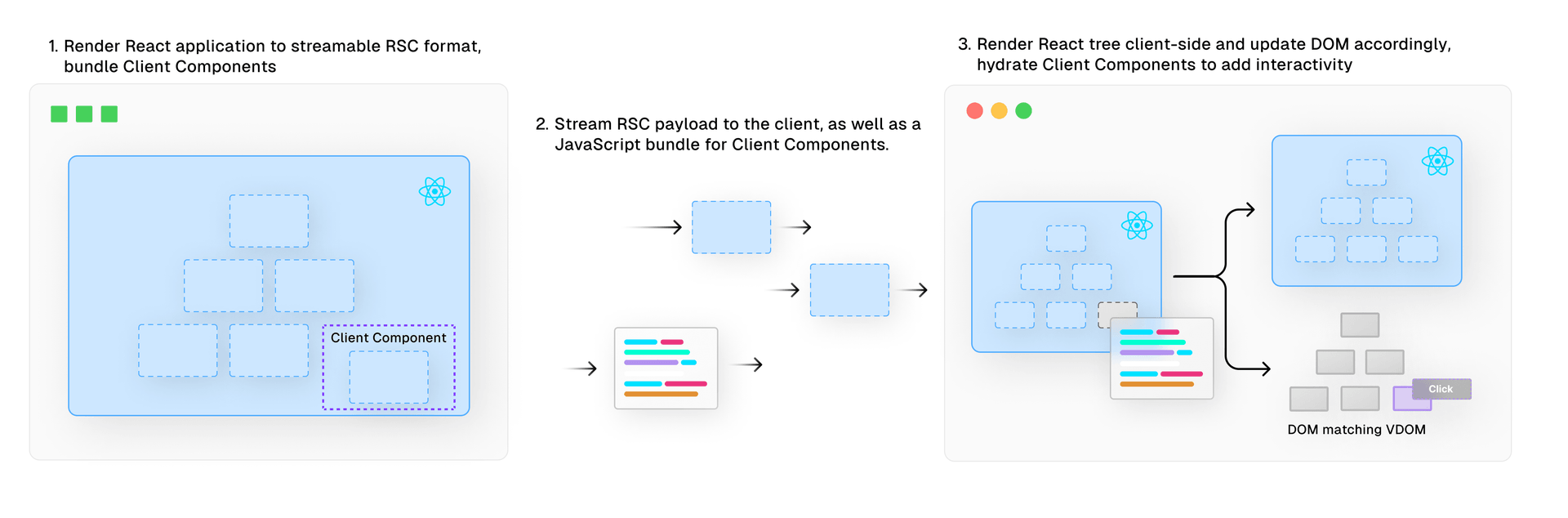

Framework implementations may differ. Next.js, for example, prerenders Client Components to HTML on the server, similar to traditional SSR. In the default case, however, Client Components are rendered more like CSR components.
Optimizing bundle size with Client Components remains the developer's responsibility. Two techniques help:
- Place the
"use client"directive only on the leaf-most node of the interactive component, which may require decoupling components. - Pass component trees as props rather than importing them directly. React can then render the
childrenas Server Components without adding them to the client bundle.
Suspense Goes Beyond Code-Splitting
Suspense is not new — React 16 shipped it for code-splitting with React.lazy. React 18 extends it to data fetching. With Suspense, a component's rendering can be deferred until a condition is met, such as data arriving from a remote source. During the wait, a fallback UI indicates the component is still loading. Declarative loading states remove the need for conditional rendering logic, and combining Suspense with React Server Components gives direct access to server-side data sources like databases or the file system — without a separate API endpoint.
async function BlogPosts() {
const posts = await db.posts.findAll();
return '...';
}
export default function Page() {
return (
<Suspense fallback={<Skeleton />}>
<BlogPosts />
</Suspense>
)
}
Suspense pairs seamlessly with Server Components, letting you define a loading state while the component is still resolving.
The real benefit comes from its integration with React's concurrent features. When a component suspends — for instance, while waiting on data — React doesn't sit idle. It pauses rendering of the suspended component and shifts attention to other work.


While suspended, React can render a fallback UI. When the awaited data is ready, React resumes rendering the suspended component in an interruptible way, much like transitions. React can also reprioritize based on user interaction. If a user interacts with a suspended component that isn't currently being rendered, React suspends the ongoing render and handles the user's component first.

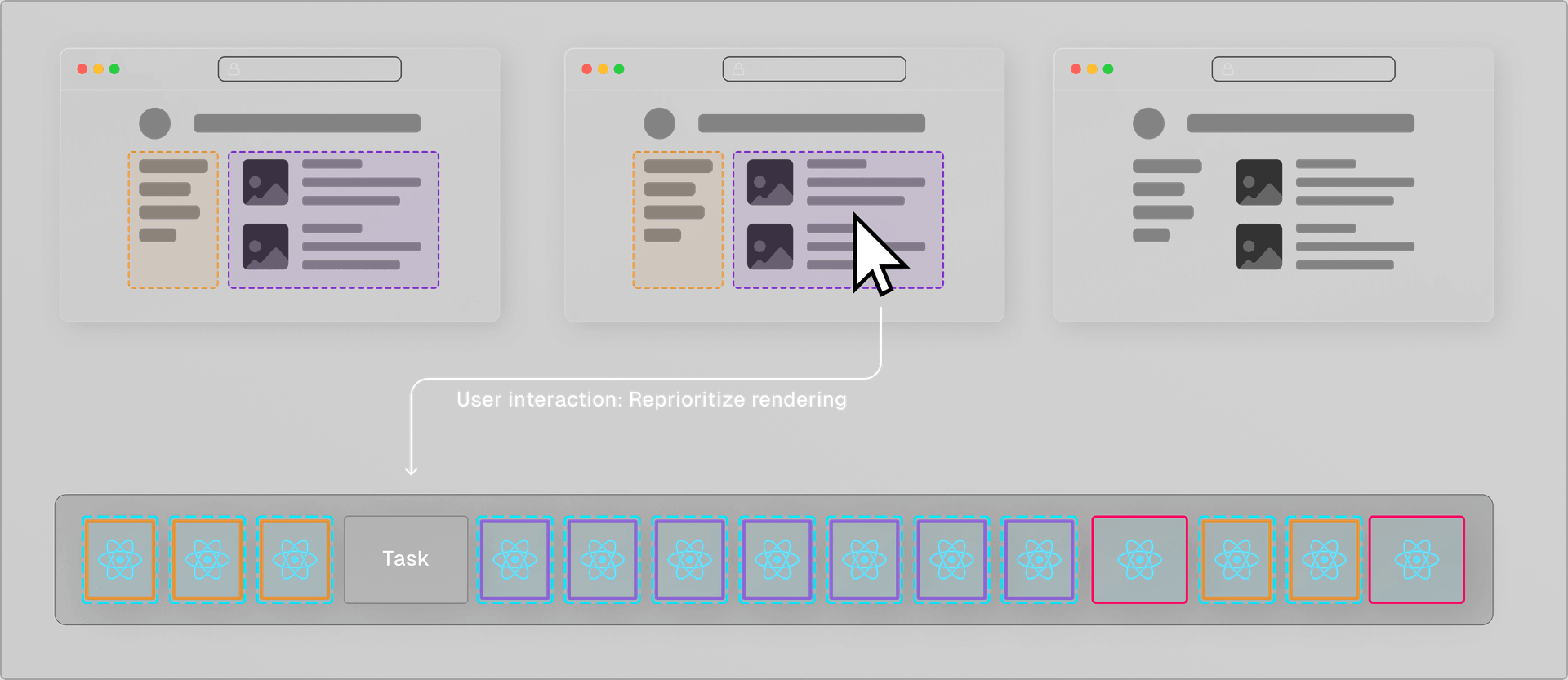
Once that interaction is committed to the DOM, React resumes the previous render. The result is that user input stays responsive even while lower-priority rendering is in progress.
Combining Suspense with the streamable Server Component format means high-priority updates can reach the client as soon as they're ready, without waiting for lower-priority work to finish. The client begins processing data sooner, and content appears progressively in a non-blocking way. For complex applications with significant data-fetching requirements, this interruptible mechanism delivers a smoother, more user-centric experience.
Memoization for Data Fetching
React 18 also adds a cache function that remembers the result of a wrapped function call. Calling the same function with the same arguments within the same render pass returns the memoized value without re-executing the function.
import { cache } from 'react'
export const getUser = cache(async (id) => {
const user = await db.user.findUnique({ id })
return user;
})
getUser(1)
getUser(1) // Called within same render pass: returns memoized result.
fetch calls get similar caching behavior by default in React 18, without needing to use cache explicitly. That reduces network requests within a single render pass, which lowers both latency and API costs.
export const fetchPost = (id) => {
const res = await fetch(`https://.../posts/${id}`);
const data = await res.json();
return { post: data.post }
}
fetchPost(1)
fetchPost(1) // Called within same render pass: returns memoized result.
These features matter for React Server Components, which can't access the Context API. Automatic caching in both cache and fetch means you can export a single function from a global module and reuse it across the application.


async function fetchBlogPost(id) {
const res = await fetch(`/api/posts/${id}`);
return res.json();
}
async function BlogPostLayout() {
const post = await fetchBlogPost('123');
return '...'
}
async function BlogPostContent() {
const post = await fetchBlogPost('123'); // Returns memoized value
return '...'
}
export default function Page() {
return (
<BlogPostLayout>
<BlogPostContent />
</BlogPostLayout>
)
}
What React 18 Delivers
The performance story across React 18's features is consistent:
- Concurrent React lets rendering pause, resume, or abort entirely. The UI can respond to input immediately even when a large render is underway.
- The Transitions API smooths data fetches and screen changes without blocking user input.
- React Server Components blend server-side efficiency with client-side interactivity, skipping the hydration cost of traditional SSR.
- Extended
Suspenseimproves loading by letting parts of an application render before slower, data-dependent sections are ready.
Teams on Next.js's App Router can already use the framework-ready features described here, including cache and Server Components. The Next.js App Router's use of these performance features is the subject of an upcoming post.



