
Why server-rendered HTML is faster for your users
Browsers are extremely good at parsing and rendering HTML that arrives from the server. On a traditional page load—sometimes called a hard navigation—the browser sends a request, and the server responds with HTML in chunks. Because the browser doesn't wait for the entire response, it can process those chunks as they arrive. This streaming behavior is a fundamental performance feature: the browser parses each chunk in its own task, yields to the main thread between chunks, and avoids creating long tasks. That means other work, including user interactions that happen during startup, isn't blocked.
In short, server-streamed HTML gives you incremental parsing and rendering, plus automatic main-thread yielding, with no extra work on your part.
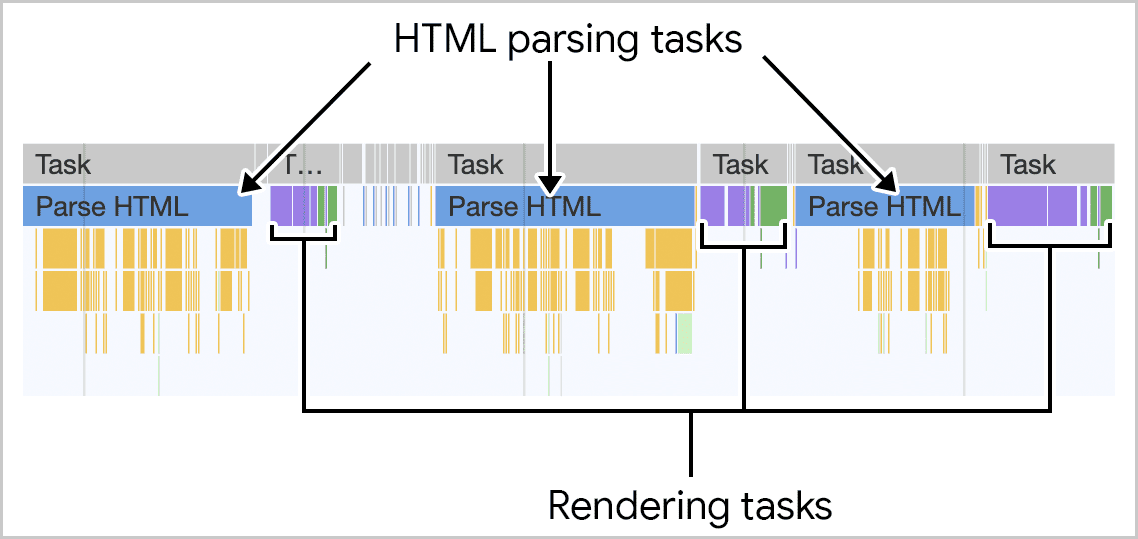
What happens when JavaScript builds the DOM
Single-page applications (SPAs) and other client-side rendering patterns take a different approach. The server sends a minimal HTML shell, and JavaScript assembles the page's content from data fetched from the server. Additional navigations—soft navigations—are handled entirely in the client. Even in multi-page applications (MPAs), you might add HTML dynamically for a specific widget or section.
Developers typically create client-side HTML in one of three ways:
- Setting the
innerHTMLproperty on an existing element, which the browser parses from a string into DOM. - Using
document.createElementto build elements programmatically, without browser HTML parsing. - Calling
document.write, which also triggers HTML parsing—but this method is strongly discouraged for numerous reasons.

The costs of client-side rendering are real:
- JavaScript tasks aren't automatically chunked the way streamed HTML parsing is. Creating large amounts of DOM in a single task can create long tasks that block the main thread and hurt your Interaction to Next Paint (INP).
- HTML created on the client during startup isn't visible to the browser's preload scanner. Resources like images, scripts, and stylesheets referenced in that markup won't be discovered early, which can negatively affect Largest Contentful Paint (LCP). This is a network-delay problem, not a runtime one, but it matters just the same.
Strategies to reduce the impact
If your site leans heavily on client-side rendering and your field data shows poor INP, the rendering work done on the main thread is a likely suspect. These approaches can help.
Send more HTML from the server
The browser's built-in handling of server-sent HTML breaks parsing and rendering into manageable chunks, minimizing long tasks and keeping Total Blocking Time (TBT) low. TBT correlates strongly with INP, so giving the browser more server-rendered HTML is a solid starting point.
If you're using a framework, server rendering is the lever to pull:
- For React, use the Server DOM API. Avoid the synchronous server-rendering methods, which can delay Time to First Byte (TTFB) and, in turn, First Contentful Paint (FCP) and LCP. Prefer the streaming APIs available for Node.js and other runtimes. If you're on Next.js, much of this is handled for you, including static generation for pages that don't vary by user.
- Vue also renders on the client by default, but it supports server-side rendering of component HTML. Use those APIs where possible, or adopt a higher-level framework like Nuxt to bake in the best practices.
- Svelte renders HTML on the server by default, unless a component depends on browser-only globals like
window. Where that's the case, look for an alternative approach rather than forcing client-side rendering. SvelteKit provides similar benefits to Next.js, embedding good defaults into your project.
Keep client-created DOM trees small
Larger DOMs require more processing when the browser has to render them. Whether you're building an SPA or injecting new nodes during an interaction in an MPA, smaller DOM trees mean less work at render time, which helps keep your INP values low.
Consider a streaming service worker architecture
For advanced cases, you can use a service worker to combine precached static HTML with dynamically fetched content. Store the static fragments of your pages in CacheStorage, and use the ReadableStream API to fetch the remainder from the server. This approach doesn't create HTML on the client; instead, it serves cached partials instantly while the rest streams in from the network.
Used well, this can make an MPA feel as fast as an SPA during navigation—while reducing the amount of HTML you request from the server—without any of client-side rendering's downsides. It doesn't replace the browser's navigation logic; it enhances it. Workbox offers tooling for this pattern, as described in the guide on faster multipage applications with streams.
Client-side rendering is often necessary, but it bypasses optimizations the browser applies automatically to server-rendered HTML. Understanding those trade-offs—and applying server rendering where you can—will help keep user interactions fast.
Embracing the Browser’s Strengths
The fundamental architecture of the web gives you a distinct performance advantage when HTML arrives from the server. As the browser streams in this markup, it can parse and render it incrementally, and it automatically yields to the main thread to prevent long tasks that would block user interaction. Server-side HTML delivery offloads a significant amount of work from the client’s CPU.
Sending the majority of your site’s HTML from the server is the most direct path to maximizing these built-in efficiencies.
The Cost of Client-Side Rendering
Rendering HTML on the client inherently introduces risks of performance bottlenecks. This approach can force the browser to do heavy processing in a single, uninterrupted block, creating long tasks that degrade responsiveness. While you can’t eliminate client-side rendering entirely—unique application needs will always require it—you can contain its damage.
- Minimize client-rendered HTML. Aim to shrink the size of the DOM that must be built on the client. Every extra node in the tree is wasted work on the main thread.
- Maximize server-sent markup. For any content that is static or can be precomputed, favor sending it as part of the initial server response.
- Consider alternative architectures. Evaluate whether patterns like streaming or edge rendering can deliver HTML faster while still leveraging the browser’s incremental parsing capabilities for initial content.
Benefits Beyond INP
Aggressively reducing client-side rendering responsibilities is a high-leverage optimization. While it directly benefits your Interaction to Next Paint (INP) by preventing main-thread blockages, the positive effects cascade to other core metrics. You can expect to see improvements in Largest Contentful Paint (LCP) and Total Blocking Time (TBT), and in some configurations, you might even reduce Time to First Byte (TTFB) by lessening the server’s load. The more you can delegate HTML rendering to the server, the more headroom you create for your site’s overall performance and user experience.



