

Two Repositories, One Codebase
Git repositories are all-or-nothing when it comes to access control — a repository hosting a private plugin cannot selectively expose some of its files while keeping others closed. For developers shipping both open-source packages and premium WordPress plugins from the same PHP codebase, this creates a practical problem: how do you keep proprietary code private without forgoing the benefits of developing everything together?
The multi-monorepo pattern answers that question with two linked repositories: a public upstream monorepo containing shared packages, and a private downstream monorepo that pulls the public one in as a Git submodule. The private monorepo then holds only the proprietary packages. This arrangement gives the downstream project access to all code — public and private — in a single local working tree.
Why Not Just One Repository?
Developing each PHP package in its own repository (the multirepo approach) forces you to release and publish each package to Packagist before other projects can consume it via Composer. That serializes work: test, tag, publish, then move to the next package. A monorepo sidesteps this by keeping all packages together, so they can be versioned and released in one operation.
Reaching the multi-monorepo setup described here was not a first attempt. It evolved gradually from a single repository, through multiple repositories, into a monorepo, and finally into the two-tier structure with a public upstream and private downstream. The tooling involved is Monorepo Builder (symplify/monorepo-builder), which builds on Composer for PHP projects.
Sharing Workflows via Submodules
The upstream monorepo at leoloso/PoP contains a GitHub Actions workflow (generate_plugins.yml) that produces distributable WordPress plugins when a release is created. Instead of hardcoding the plugin list in YAML, the workflow receives its configuration through PHP code — MonorepoBuilder loads an injected PHP data source class (PluginDataSource) to determine which plugins to build. That keeps the workflow generic; adding or removing a plugin is just a change to the PHP configuration.
The workflows and the PHP services behind them are exactly what the private monorepo wants to reuse. The private repository (leoloso/GraphQLAPI-PRO) embeds the public one inside a submodules directory, which keeps the layout extensible if additional upstream monorepos are ever needed. Cloning the downstream repository requires Git's recursive flag to also fetch the submodule:
git clone --recursive <private-repo-url>Copying Workflows; Not Forking Them
GitHub Actions only recognizes workflows under .github/workflows. Since the upstream workflows live in submodules/PoP/.github/workflows inside the downstream repo, they need to be duplicated into the expected location there. The copying process is a deliberate one-way operation: the upstream files remain the single source of truth; downstream copies are never edited directly.
A simple Composer script can copy the files, but the workflows also need surgical edits during the copy. The reason is a difference in checkout behavior: downstream repositories must be checked out with submodules (GItHub Actions input submodules: recursive), while upstream does not need that. To keep one source workflow for both, the checkout step reads its submodule setting from an environment variable, CHECKOUT_SUBMODULES, which stays empty upstream. On copy, a regex replacement flips it to recursive downstream.
Simple string replacement with a Composer script proved too brittle, so the copy logic moved into a PHP command (CopyUpstreamMonorepoFilesCommand) executed through Monorepo Builder. The underlying FileCopierSystem service copies files between directories and optionally applies content replacements. In the generate_plugins.yml workflow, a further replacement adjusts the path to the downgrade script (ci/downgrade/downgrade_code.sh) so it points at submodules/PoP/ci/downgrade/downgrade_code.sh in the downstream repo.
Configuration without Duplication
Monorepo Builder's configuration file, monorepo-builder.php at the repository root, declares where packages live. The downstream monorepo needs to see both its own packages and the upstream ones under /submodules/PoP. Rather than maintaining two near-identical configuration files that drift apart, the configuration itself can be organized through PHP classes, following DRY.
The upstream monorepo-builder.php defers to a ContainerConfigurationService class that assembles the configuration. Package paths are delegated to a PackageOrganizationDataSource class, which returns the list of package directories. The key parameter passed in is __DIR__, the monorepo root, used to build absolute paths to each package.
The downstream monorepo then overrides the configuration through inheritance. Its monorepo-builder.php references a downstream ContainerConfigurationService (in namespace PoP\GraphQLAPIPRO) rather than the upstream PoP\PoP one. That downstream class receives the upstream root path (submodules/PoP) as an extra constructor argument. From there it switches in a downstream PackageOrganizationDataSource that returns the union of upstream and private package paths.
Wiring Up the Autoloader
For the downstream monorepo's PHP to extend upstream classes, Composer must autoload the upstream source. The downstream composer.json therefore adds a PSR-4 reference to submodules/PoP/src. With that in place, downstream configuration classes can extend their upstream counterparts and override only what differs:
- the path prefix to the public packages;
- the addition of private package paths.
The result is a clean separation where the public monorepo remains the source of truth for workflows and configuration, and the private monorepo only carries the delta — its own packages plus the path adjustments. Both repositories benefit from the monorepo's ability to develop, test, and release packages together, while no proprietary code ever lands in the public repository.
Feeding Package Paths Into The Workflow
Monorepo Builder's packages-json command can inject package paths into a GitHub Actions workflow:
jobs:
  provide_data:
    steps:
      - id: output_data
        name: Calculate matrix for packages
        run: |
          echo "::set-output name=matrix::$(vendor/bin/monorepo-builder packages-json)"

    outputs:
      matrix: ${{ steps.output_data.outputs.matrix }}
The command returns a stringified JSON, which the workflow must convert to an object with fromJson:
jobs:
  split_monorepo:
    needs: provide_data
    strategy:
      matrix:
        package: ${{ fromJson(needs.provide_data.outputs.matrix) }}
There is a catch, however: packages-json outputs package names, not their paths. That works when every package shares a common parent folder such as packages/, but it fails when public and private packages live under different directories.
Monorepo Builder supports custom PHP services, so I wrote a command named package-entries-json (implemented in PackageEntriesJsonCommand) that returns the path for each package. The workflow was updated accordingly:
    run: |
      echo "::set-output name=matrix::$(vendor/bin/monorepo-builder package-entries-json)"
Run against the public monorepo, it yields entries like:
[
  {
    "name": "graphql-api-for-wp",
    "path": "layers/GraphQLAPIForWP/plugins/graphql-api-for-wp"
  },
  {
    "name": "extension-demo",
    "path": "layers/GraphQLAPIForWP/plugins/extension-demo"
  },
  {
    "name": "access-control",
    "path": "layers/Engine/packages/access-control"
  },
  {
    "name": "api",
    "path": "layers/API/packages/api"
  },
  {
    "name": "api-clients",
    "path": "layers/API/packages/api-clients"
  }
]
Run against the private monorepo, it yields entries like:
[
  {
    "name": "graphql-api-for-wp",
    "path": "submodules/PoP/layers/GraphQLAPIForWP/plugins/graphql-api-for-wp"
  },
  {
    "name": "extension-demo",
    "path": "submodules/PoP/layers/GraphQLAPIForWP/plugins/extension-demo"
  },
  {
    "name": "access-control",
    "path": "submodules/PoP/layers/Engine/packages/access-control"
  },
  {
    "name": "api",
    "path": "submodules/PoP/layers/API/packages/api"
  },
  {
    "name": "api-clients",
    "path": "submodules/PoP/layers/API/packages/api-clients"
  },
  {
    "name": "graphql-api-pro",
    "path": "layers/GraphQLAPIForWP/plugins/graphql-api-pro"
  },
  {
    "name": "convert-case-directives",
    "path": "layers/Schema/packages/convert-case-directives"
  },
  {
    "name": "export-directive",
    "path": "layers/GraphQLByPoP/packages/export-directive"
  }
]
The downstream monorepo config then contains both sets of packages, with the public ones prefixed by submodules/PoP.
Deciding When Public Packages Should Run Downstream
Including public packages in the downstream config is not always necessary. PHPStan already runs on all public packages in the public monorepo via the phpstan.yml workflow. Repeating it downstream would burn compute time, so the downstream workflow should target private packages only.
To make that possible, the downstream PackageOrganizationDataSource class accepts an input $includeUpstreamPackages that controls whether public packages are included:
namespace PoP\GraphQLAPIPRO\Config\Symplify\MonorepoBuilder\DataSources;

use PoP\PoP\Config\Symplify\MonorepoBuilder\DataSources\PackageOrganizationDataSource as UpstreamPackageOrganizationDataSource;

class PackageOrganizationDataSource extends UpstreamPackageOrganizationDataSource
{
  public function __construct(
    string $rootDir,
    protected string $upstreamRelativeRootPath,
    protected bool $includeUpstreamPackages
  ) {
    parent::__construct($rootDir);
  }

  public function getRelativePackagePaths(): array
  {
    return array_merge(
      // Add the public packages?
      $this->includeUpstreamPackages ?
        // Public packages - Prepend them with "submodules/PoP/"
        array_map(
          fn ($upstreamPackagePath) => $this->upstreamRelativeRootPath . '/' . $upstreamPackagePath,
          parent::getRelativePackagePaths()
        ) : [],
      // Private packages
      [
        'packages',
        'plugins',
        'clients',
      ]
    );
  }
}
The value is true or false per command. Instead of a single monorepo-builder.php, the downstream repo provides two config files: monorepo-builder-with-upstream-packages.php (where the flag is true) and monorepo-builder-without-upstream-packages.php (where it is false):
// File monorepo-builder-without-upstream-packages.php
use PoP\GraphQLAPIPRO\Config\Symplify\MonorepoBuilder\Configurators\ContainerConfigurationService;
use Symfony\Component\DependencyInjection\Loader\Configurator\ContainerConfigurator;

return static function (ContainerConfigurator $containerConfigurator): void {
  $containerConfigurationService = new ContainerConfigurationService(
    $containerConfigurator,
    __DIR__,
    'submodules/PoP',
    false, // This is $includeUpstreamPackages
  );
  $containerConfigurationService->configureContainer();
};
ContainerConfigurationService is updated to receive $includeUpstreamPackages and forward it to PackageOrganizationDataSource:
namespace PoP\GraphQLAPIPRO\Config\Symplify\MonorepoBuilder\Configurators;

use PoP\PoP\Config\Symplify\MonorepoBuilder\Configurators\ContainerConfigurationService as UpstreamContainerConfigurationService;
use PoP\GraphQLAPIPRO\Config\Symplify\MonorepoBuilder\DataSources\PackageOrganizationDataSource;
use Symfony\Component\DependencyInjection\Loader\Configurator\ContainerConfigurator;

class ContainerConfigurationService extends UpstreamContainerConfigurationService
{
  public function __construct(
    ContainerConfigurator $containerConfigurator,
    string $rootDirectory,
    protected string $upstreamRelativeRootPath,
    protected bool $includeUpstreamPackages,
  ) {
    parent::__construct(
      $containerConfigurator,
      $rootDirectory,
    );
  }

  protected function getPackageOrganizationDataSource(): ?PackageOrganizationDataSource
  {
    return new PackageOrganizationDataSource(
      $this->rootDirectory,
      $this->upstreamRelativeRootPath,
      $this->includeUpstreamPackages,
    );
  }
}
Each workflow call passes the matching config via the --config option:
jobs:
  provide_data:
    steps:
      - id: output_data
        name: Calculate matrix for packages
        run: |
          echo "::set-output name=matrix::$(vendor/bin/monorepo-builder package-entries-json --config=monorepo-builder-without-upstream-packages.php)"
The upstream workflows remain the single source of truth, and those commands do not need this distinction. The solution is to always pass --config in the upstream repo, with one config file per command — for example, the validate command uses validate.php:
  - name: Run validation
    run: vendor/bin/monorepo-builder validate --config=config/monorepo-builder/validate.php
The upstream repo does not hold such config files and does not need them. Monorepo Builder checks whether the named config file exists and falls back to the default if it does not, so nothing breaks. Downstream, the config files say explicitly whether upstream packages should be added for each command.
This is yet another spot where the multi-monorepo setup shows through the abstraction.
Overriding The Upstream Config
The last step is supplying the new configuration. In PluginDataSource, I override which WordPress plugins get generated, swapping the free set for the pro set:
namespace PoP\GraphQLAPIPRO\Config\Symplify\MonorepoBuilder\DataSources;

use PoP\PoP\Config\Symplify\MonorepoBuilder\DataSources\PluginDataSource as UpstreamPluginDataSource;

class PluginDataSource extends UpstreamPluginDataSource
{
  public function getPluginConfigEntries(): array
  {
    return [
      // GraphQL API PRO
      [
        'path' => 'layers/GraphQLAPIForWP/plugins/graphql-api-pro',
        'zip_file' => 'graphql-api-pro.zip',
        'main_file' => 'graphql-api-pro.php',
        'dist_repo_organization' => 'GraphQLAPI-PRO',
        'dist_repo_name' => 'graphql-api-pro-dist',
      ],
      // GraphQL API Extensions
      // Google Translate
      [
        'path' => 'layers/GraphQLAPIForWP/plugins/google-translate',
        'zip_file' => 'graphql-api-google-translate.zip',
        'main_file' => 'graphql-api-google-translate.php',
        'dist_repo_organization' => 'GraphQLAPI-PRO',
        'dist_repo_name' => 'graphql-api-google-translate-dist',
      ],
      // Events Manager
      [
        'path' => 'layers/GraphQLAPIForWP/plugins/events-manager',
        'zip_file' => 'graphql-api-events-manager.zip',
        'main_file' => 'graphql-api-events-manager.php',
        'dist_repo_organization' => 'GraphQLAPI-PRO',
        'dist_repo_name' => 'graphql-api-events-manager-dist',
      ],
    ];
  }
}
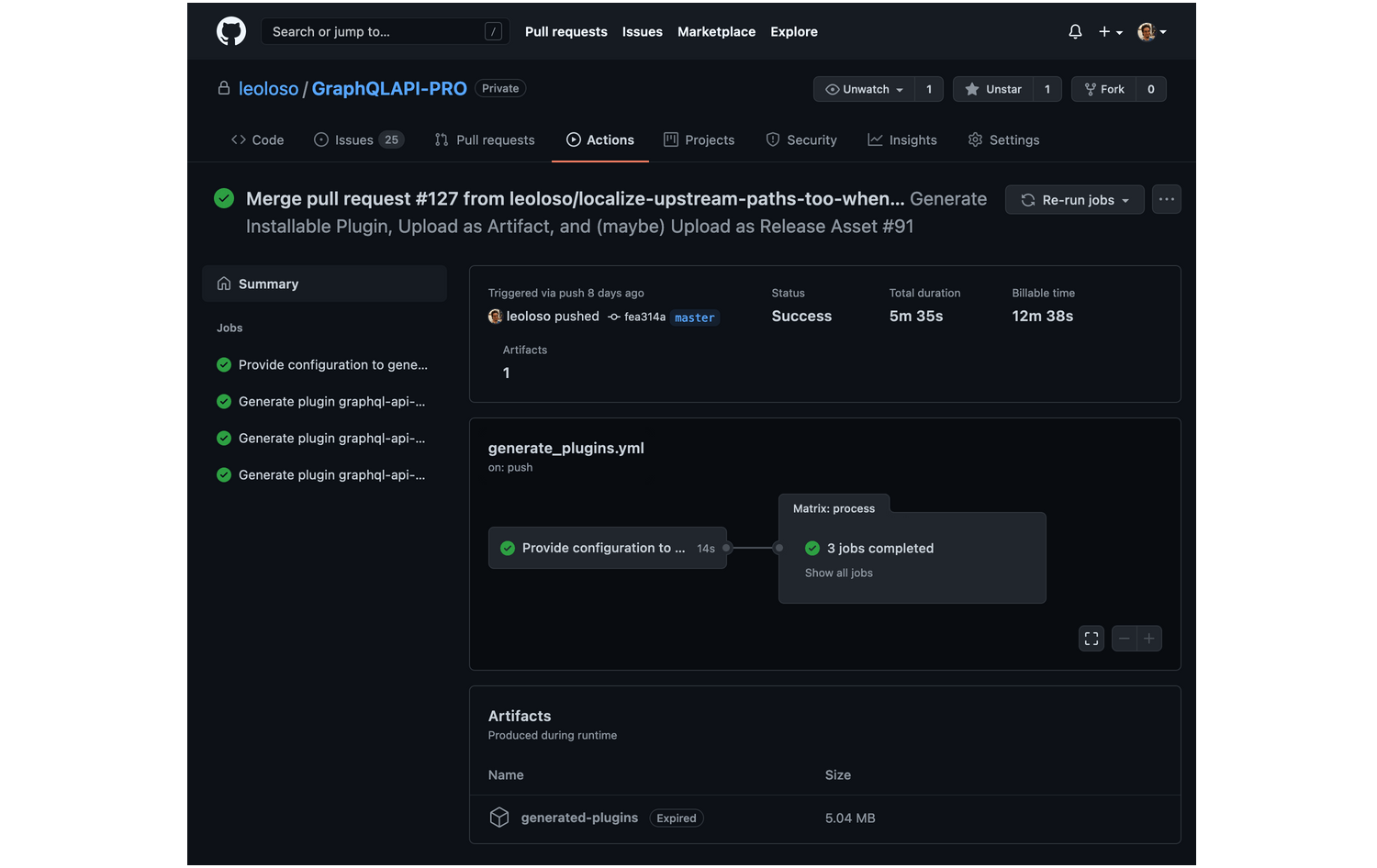
A new GitHub release triggers generate_plugins.yml, and the pro plugins are produced inside the private monorepo:
Is This Setup Worth It?
There is no universally best repository structure; the multi-monorepo is a pragmatic choice rather than a silver bullet. It suits plugin authors who ship a free plugin and then a pro extension, or agencies that customize plugins per client.
For my workflow it pays off. The initial configuration takes time, but it is a one-off cost. Afterward I can spend that time building features instead of juggling project management, and the savings compound quickly.



