

The “What Changed?” Problem in Large Git Repositories
Developers working in monorepos quickly hit a wall: commands like git status and git add grind to a halt as the worktree grows. The root cause is that Git must search the entire worktree on every invocation to discover what has changed relative to the index. Whether you run the command twice in a row or edit a single file, the search cost is the same—and in a monorepo with millions of files, that fixed cost becomes enormous.
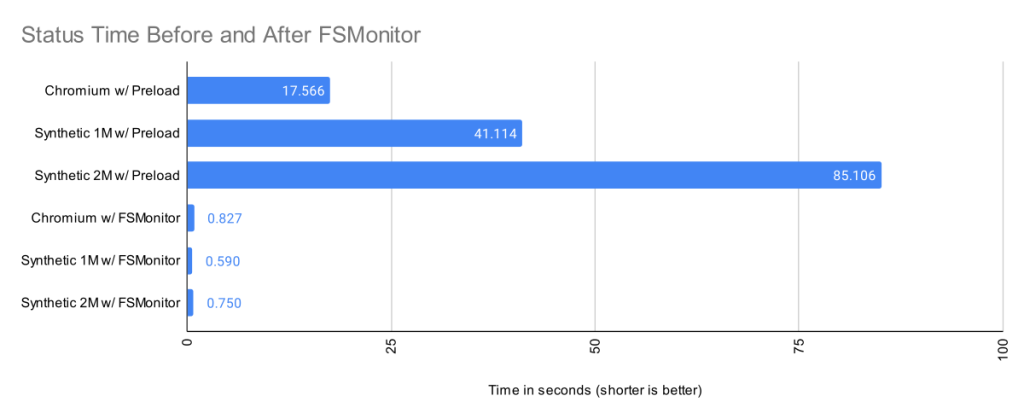
Git’s file system monitor (FSMonitor) feature attacks this problem directly. Instead of rescanning everything, it keeps a continuous watch on the worktree and tells Git exactly which paths have changed. The result is dramatic: on worktrees ranging from roughly 400K files (Chromium) to 2M synthetic files, git status times dropped from 17–85 seconds to under one second when FSMonitor was enabled.
The Builtin FSMonitor Daemon
Git version 2.37.0 introduced a native FSMonitor implementation, git fsmonitor--daemon. Unlike earlier approaches that required third-party tools, this version ships “in the box” and works on macOS and Windows with a single configuration change:
git config core.fsmonitor trueSetting core.fsmonitor to true causes the daemon to start automatically in the background on the next Git command. FSMonitor pairs well with the untracked-cache (core.untrackedcache), which we’ll cover shortly; enabling both is recommended.
$ time git status
On branch main
Your branch is up to date with 'origin/main'.

It took 5.25 seconds to enumerate untracked files. 'status -uno'
may speed it up, but you have to be careful not to forget to add
new files yourself (see 'git help status').
nothing to commit, working tree clean

real    0m17.941s
user    0m0.031s
sys     0m0.046s

$ git config core.fsmonitor true
$ git config core.untrackedcache true

$ time git status
On branch main
Your branch is up to date with 'origin/main'.

It took 6.37 seconds to enumerate untracked files. 'status -uno'
may speed it up, but you have to be careful not to forget to add
new files yourself (see 'git help status').
nothing to commit, working tree clean

real    0m19.767s
user    0m0.000s
sys     0m0.078s

$ time git status
On branch main
Your branch is up to date with 'origin/main'.

nothing to commit, working tree clean

real    0m1.063s
user    0m0.000s
sys     0m0.093s

$ git fsmonitor--daemon status
fsmonitor-daemon is watching 'C:/work/chromium'
One caveat: when the daemon first starts, it must synchronize with the current index state, so the first git status may be no faster—or slightly slower—than before. Subsequent commands should see the full benefit.
How the Daemon Watches the Worktree
FSMonitor is a long-running process, not a per-command hook. It performs three tasks:
- Registers with the operating system to receive change notifications for files and directories.
- Adds pathnames of changed items to an in-memory, time-sorted queue.
- Listens for IPC connections from Git client commands and responds with lists of recently modified paths.
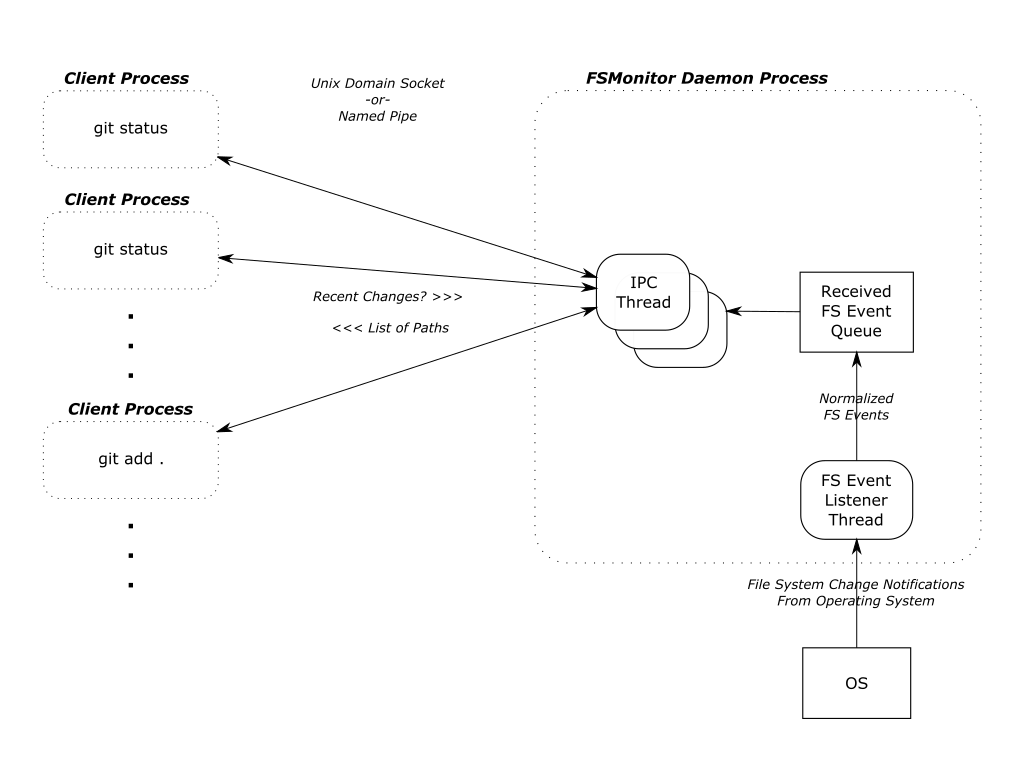
Because it runs continuously, it can capture changes that happen between Git commands. It can also service multiple, possibly concurrent, Git client processes.
Tokens and Synchronization
The daemon uses an opaque “token” to track state. Each token acts as a globally unique sequence marker. When file system events occur, the daemon creates new tokens and groups changes by them. A client sends a previously received token to ask, “What changed since this token?” The daemon responds with the changed pathnames and a new, current token.
git status stores the received token in the index before exiting. The next invocation reads that token and requests only the changes since then.
Tokens also carry two safeguards against incomplete data:
- Process ID (PID): If the daemon instance that issued a client’s token has been restarted, the current daemon cannot know about events before its own start. It responds with a “assume everything changed” message.
- File system synchronization ID (SID): Operating systems can drop notification events under heavy load, as can the daemon itself. When such gaps occur, the daemon restarts with a new SID. A mismatched SID triggers the same complete-rescan fallback.
In either case, the client performs a full worktree scan for that single command, but future commands return to fast, token-based operation.
Three Kinds of Worktree Files
When git status searches the worktree, it must account for three categories:
- Tracked files are under version control. Git compares their contents against index entries to find unstaged changes.
- Untracked files are not in the index—new source files, temporary files, or other loose files.
- Ignored files are a special subset of untracked files that match
.gitignorepatterns (e.g., build artifacts). Git skips them for normal operations but still must examine them during the search.
By default git status omits ignored files from output; the following example includes them to show all categories:
$ git status --ignored
On branch master
Changes to be committed:
  (use "git restore --staged <file>..." to unstage)
    modified:   README

Changes not staged for commit:
  (use "git add <file>..." to update what will be committed)
  (use "git restore <file>..." to discard changes in working directory)
    modified:   README
    modified:   main.c

Untracked files:
  (use "git add <file>..." to include in what will be committed)
    new-file.c

Ignored files:
  (use "git add -f <file>..." to include in what will be committed)
    new-file.obj
Two Expensive Worktree Searches
Git splits its worktree discovery into two expensive phases, plus one that is cheap:
- refresh_index: Scans tracked files for unstaged changes. This can require reading, cleaning, and hashing every tracked file’s content to compare against the index.
- untracked: Searches all directories to find files not tracked and not ignored.
- Staged changes: A comparison between index and HEAD commit. This works entirely on internal data structures and is fast; no worktree system calls are needed.
The first two phases require system calls and dominate runtime. Performance data from Git’s trace2 library illustrates the split:
| Worktree | Files | refresh_index with Preload | Untracked without Untracked-Cache | Remainder | Total |
| Chromium | 393K | 12.3s | 5.1s | 0.16s | 17.6s |
| Synthetic 1M | 1M | 30.2s | 10.5s | 0.36s | 41.1s |
| Synthetic 2M | 2M | 73.2s | 11.2s | 0.64s | 85.1s |
Without FSMonitor, refresh_index and untracked consumes nearly all of the execution time. With FSMonitor and the untracked-cache enabled, those columns shrink so dramatically that the entire bar is barely visible in the original chart. Even scaled 100×, the improvement is striking:
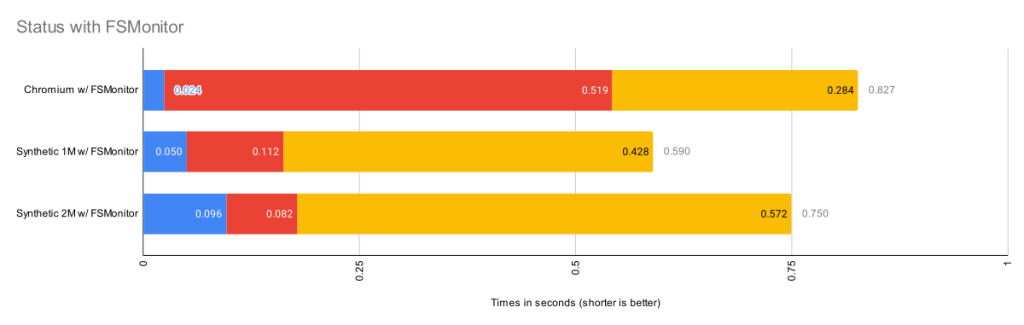
| Worktree | Files | refresh_index with FSMonitor | Untracked with FSMonitor and Untracked-Cache | Remainder | Total |
| Chromium | 393K | 0.024s | 0.519s | 0.284s | 0.827s |
| Synthetic 1M | 1M | 0.050s | 0.112s | 0.428s | 0.590s |
| Synthetic 2M | 2M | 0.096s | 0.082s | 0.572s | 0.750s |
More than Just git status
Though git status is the canonical example, the same worktree search underpins several other common commands:
git diffperforms the same discovery before printing differences.git add .searches for changes to stage them.git restoreandgit checkoutidentify files to overwrite.
In each case, the act of processing a known change is cheap relative to finding it in the first place. FSMonitor’s benefit therefore extends across the core Git workflow.
Phase 1: Making refresh_index Faster
The index holds one entry per tracked file. git ls-files shows this list, which can contain millions of entries in a monorepo:
$ git ls-files --stage --debug
[...]
100644 7ce4f05bae8120d9fa258e854a8669f6ea9cb7b1 0   README.md
  ctime: 1646085519:36302551
  mtime: 1646085519:36302551
  dev: 16777220 ino: 180738404
  uid: 502  gid: 20
  size: 3639    flags: 0
[...]
100644 5f1623baadde79a0771e7601dcea3c8f2b989ed9 0   Makefile
  ctime: 1648154224:994917866
  mtime: 1648154224:994917866
  dev: 16777221 ino: 182328550
  uid: 502  gid: 20
  size: 110149  flags: 0
[...]
At the start of refresh_index, every index entry is “unmarked”—Git doesn’t know whether the corresponding worktree file has unstaged changes. Determining that requires reading and hashing each file, a full scan that is extremely slow. Forcing a full scan on the Chromium worktree, for example, took nearly an hour.
Shortcut 1: The lstat() Heuristic
Git avoids hashing every file by using file modification times (mtimes). When Git writes a file during checkout or add, it stores the file’s mtime in the index entry. On later commands, an lstat() call retrieves the current mtime. If it matches the stored value, the file content must be unchanged.
This cuts the cost of a full content scan dramatically:
| Worktree | Files | refresh_index with lstat()
|
| Chromium | 393K | 26.9s |
| Synthetic 1M | 1M | 66.9s |
| Synthetic 2M | 2M | 136.6s |
However, Git still issues an lstat() for every tracked file, which on large repositories takes tens of seconds in a single-threaded loop. Since this shortcut leaves no unmarked entries in our clean-worktree test, the time shown is purely the cost of the lstat() calls themselves.
Shortcut 2: Preload with Threads
The core.preloadindex option (enabled by default since Git 2.1.0 on threaded platforms) partitions the index and distributes lstat() calls across CPU cores. It does not reduce the number of calls; it parallelizes them.
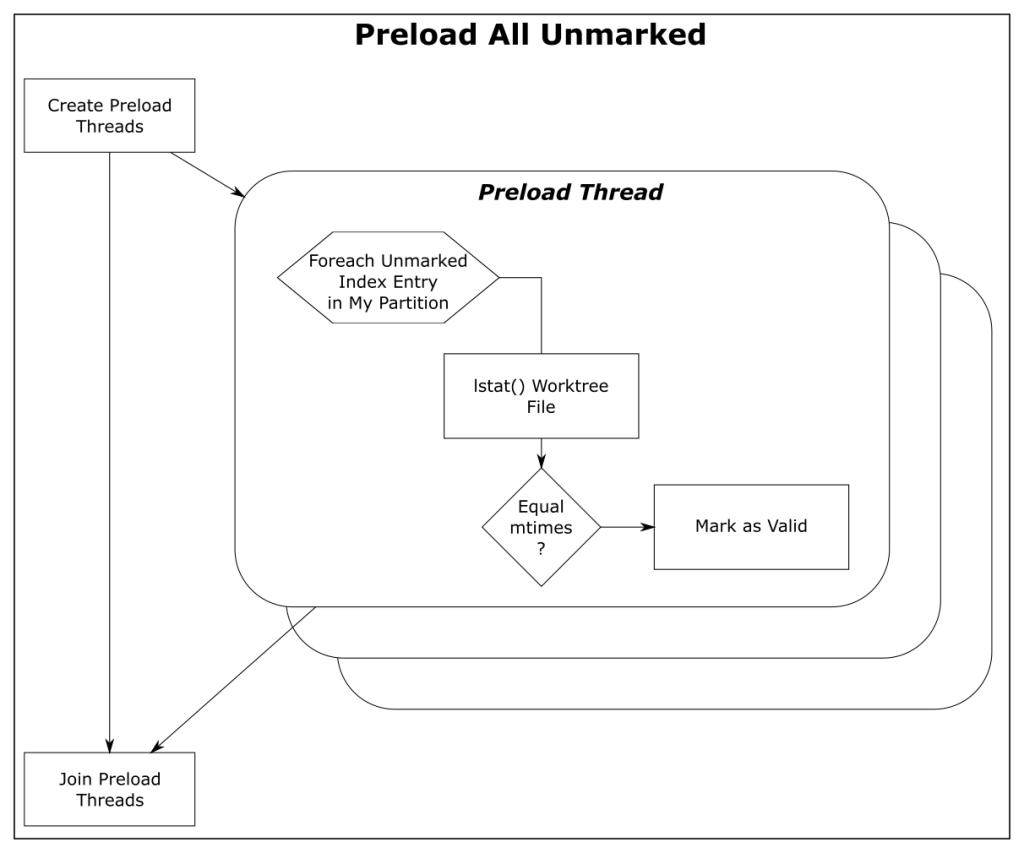
| Worktree | Files | refresh_index with Preload |
| Chromium | 393K | 12.3s |
| Synthetic 1M | 1M | 30.2s |
| Synthetic 2M | 2M | 73.2s |
This yields roughly a 2× improvement on a 4-core machine—better, but still expensive for million-file repositories.
Shortcut 3: FSMonitor
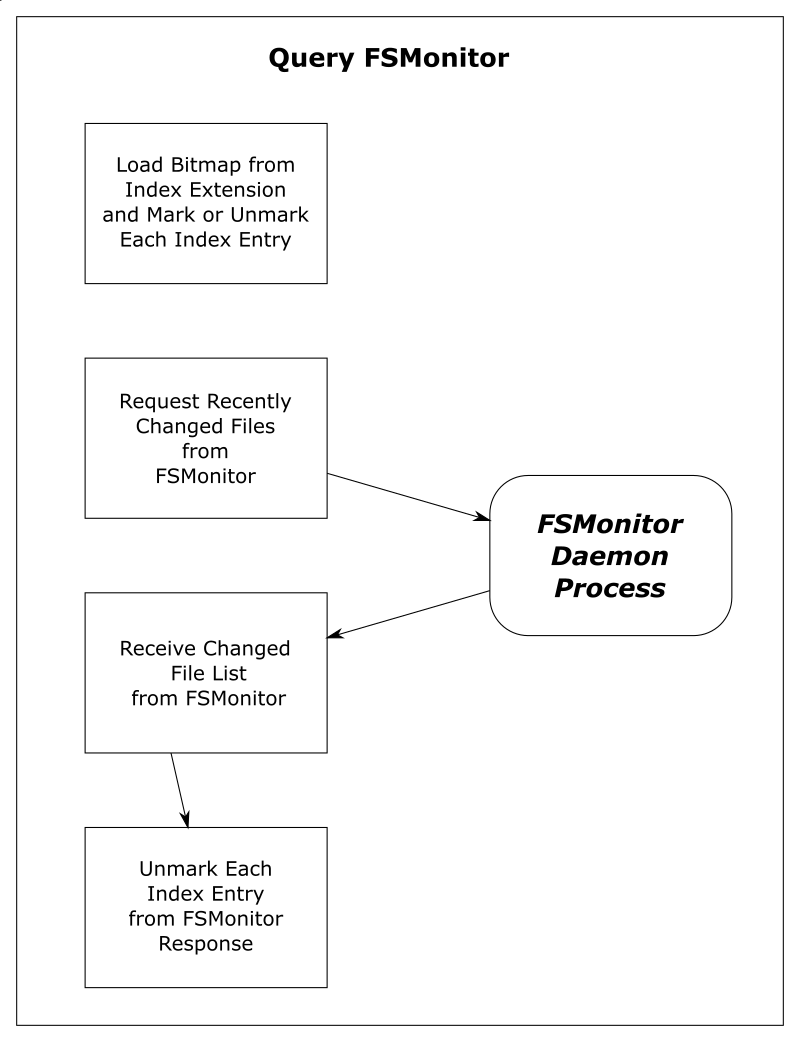
With FSMonitor enabled, the flow changes fundamentally:
- An FSMonitor index extension stores a token and a bitmap of index entries marked valid by the previous
git status. - The next
git statusrestores the marked state from that bitmap instead of starting fresh. - It sends the stored token to the daemon and receives the exact list of files with file system events since that token.
- Only those files are unmarked; everything else remains valid.
There is no search at all—the daemon’s IPC response identifies exactly what may have changed:
| Worktree | Files | Query FSMonitor | refresh_index with FSMonitor |
| Chromium | 393K | 0.017s | 0.024s |
| Synthetic 1M | 1M | 0.002s | 0.050s |
| Synthetic 2M | 2M | 0.002s | 0.096s |
With FSMonitor, the refresh_index phase drops to a fraction of a second, and the cost of the IPC round trip is trivial by comparison.
Phase 2: Taming the Untracked Search
The untracked phase is conceptually a full recursive enumeration of the worktree:
- List every directory and file.
- Check each pathname against the index (using a case-insensitive hash table on Windows/macOS).
- Apply
.gitignorerules to filter ignored files. - The remainder are untracked files.
With millions of files and many ignore rules, this is extremely expensive, and Git often prints an advisory message suggesting the untracked-cache:
$ git status
On branch main
Your branch is up to date with 'origin/main'.

It took 5.12 seconds to enumerate untracked files. 'status -uno'
may speed it up, but you have to be careful not to forget to add
new files yourself (see 'git help status').
nothing to commit, working tree clean
The Untracked-Cache
This feature stores per-directory records—including directory mtimes and lists of untracked files—in an index extension. On subsequent commands, Git still must lstat() every directory to validate cached entries. If a directory mtime matches, Git skips the opendir()/readdir() enumeration and reuses the cached list. For changed directories, it must re-enumerate, filter tracked and ignored files, and update the record.
Alone, the untracked-cache gives roughly a 2× speedup. Combined with FSMonitor, Git learns which directories may have changed from the daemon, eliminating many lstat() calls entirely:
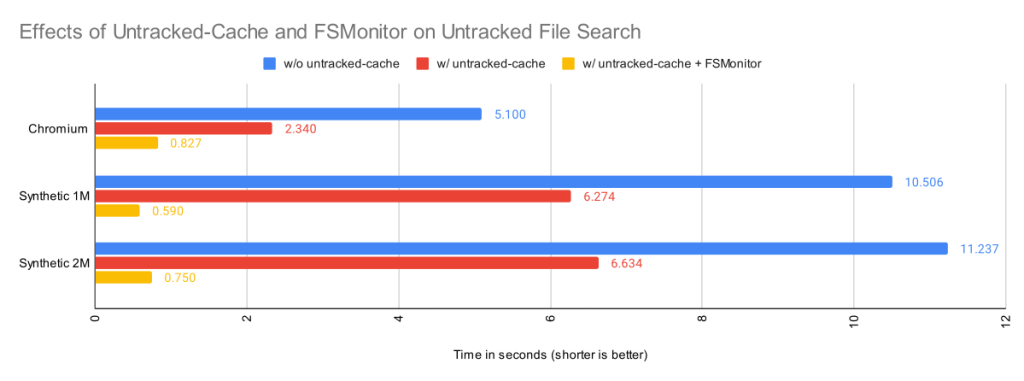
| Worktree | Files | Untracked without Untracked-Cache | Untracked with Untracked-Cache | Untracked with Untracked-Cache and FSMonitor |
| Chromium | 393K | 5.1s | 2.3s | 0.83s |
| Synthetic 1M | 1M | 10.5s | 6.3s | 0.59s |
| Synthetic 2M | 2M | 11.2s | 6.6s | 0.75s |
Ignored Files and Build Artifacts
Storing compiler outputs or other temporary files inside the worktree degrades performance even with FSMonitor. If every *.o file sits next to its source, builds churn their parent directories’ mtimes, invalidating untracked-cache entries and forcing re-enumeration despite no source changes. The Scalar project’s philosophy addresses this by encouraging a separate directory structure, such as keeping sources in <repo>/src/.
Sparse Checkout as a Complement
Sparse checkout reduces the worktree itself. Only needed paths are populated. This helps both expensive phases:
- refresh_index: Absent files cannot have unstaged changes. Index entries for unpopulated files are pre-marked with the
skip-worktreebit, so they are excluded from all checks. - untracked: Whole directory subtrees are never created, so there are fewer directories to visit, and the untracked-cache needs no entries for them.
These optimizations stack: FSMonitor reduces per-command work, while sparse checkout reduces the total amount of work that must be counted.
External FSMonitors and Hook Protocols
Before the builtin daemon, Git 2.16.0 added support for external tools like Watchman through the core.fsmonitor hook. Conceptually identical, both types involve a long-running process and use the returned path lists to optimize the same two searches. The difference is the transport: the builtin daemon uses Git’s simple IPC interface over Unix sockets or named pipes, while external monitors communicate through a proxy child process.
The hook interface evolved across two protocol versions:
- Version 1 (2.16.0): Timestamp-based queries in nanoseconds since the epoch. This has known race conditions and should not be used.
- Version 2 (2.26.0): Token-based queries using opaque tokens defined by the external monitor. Clients ask what changed since a previous token, avoiding absolute-time problems.
The hook protocol is not used by the builtin FSMonitor daemon—the two operate independently.
Enabling Watchman with the Sample Hook
Git ships a Watchman-compatible sample hook. Setup involves three steps. First, install Watchman and tell it to watch the worktree:
$ watchman watch .
{
    "version": "2022.01.31.00",
    "watch": "/Users/jeffhost/work/chromium",
    "watcher": "fsevents"
}
Then install the sample hook script:
$ cp .git/hooks/fsmonitor-watchman.sample .git/hooks/query-watchman
Finally, enable the hook in Git config:
$ git config core.fsmonitor .git/hooks/query-watchman
The hook protocol also permits custom executables. Dropbox engineers, for instance, reported significant speedups using a custom ~200-line hook implementation tailored to their monorepo.
A Tale of Two Implementations
FSMonitor support arrived in two phases. First came the external hook interface, which let Git interoperate with existing tools like Watchman and proved the core concept quickly. The builtin daemon followed to reduce setup complexity and eliminate third-party dependencies, and it opens the door to Git-specific features—such as understanding ignored files and omitting them from responses—that generic monitors are unlikely to provide.
Having both options lets users pick the best fit: the builtin daemon for zero-configuration use on macOS and Windows, or a third-party monitor where one is already deployed. Either way, FSMonitor directly addresses the discovery problem, making large-monorepo workflows far more usable.



