
Bringing Baseline into your Browserslist setup
Browserslist is widely used to declare the minimum browser versions a frontend project supports. You define a query in package.json or a .browserslistrc file, and tools such as Autoprefixer, Babel with @babel/preset-env, PostCSS via postcss-preset-env, ESLint with eslint-plugin-compat, Stylelint, and webpack all consume that configuration.
Historically, Browserslist queries required you to hand-pick browser versions. Now you can use Baseline feature sets directly in those queries, which removes the guesswork around which versions support which features.
Choosing a Baseline target
Before updating your config, decide which Baseline feature set fits your audience. Baseline Widely available includes every feature that has been supported in the core browser set for at least 30 months. Baseline year sets, like Baseline 2020, include whatever was newly available at the close of that year.
Your choice depends on your user base. If your users are mostly on current browsers, you might target Baseline Widely available. For stricter compatibility needs, pick an older Baseline year. Check your analytics or RUM data to see which browser versions actually visit your site.
Writing Baseline queries
Browserslist includes built-in support for Baseline queries. To target features that are newly available, use:
{
  ...
  "browserslist": [
    "baseline newly available"
   ]
  ...
}
For the Widely available set, specify:
{
  ...
  "browserslist": [
    "baseline widely available"
   ]
  ...
}
To lock into a specific year's feature set, write something like:
"browserslist": "baseline 2024"
You can use any year from baseline 2015 up to the current one.
Including downstream browsers
The core Baseline set covers Chrome, Edge, Firefox, and Safari. Chromium-based browsers outside that list should support whatever corresponding Chromium version offers. To pull them into your query, append with downstream:
"browserslist": "baseline widely available with downstream"
This modifier works with any of the queries above, so baseline newly available with downstream and yearly targets like baseline 2020 with downstream are also valid:
"browserslist": "baseline 2024 with downstream"
Effects on bundling
Switching from Browserslist defaults to a Baseline query alters what your build tooling produces. Babel's @babel/preset-env is a good example. With default settings, many modern JavaScript constructs are transpiled into older, more verbose syntax:
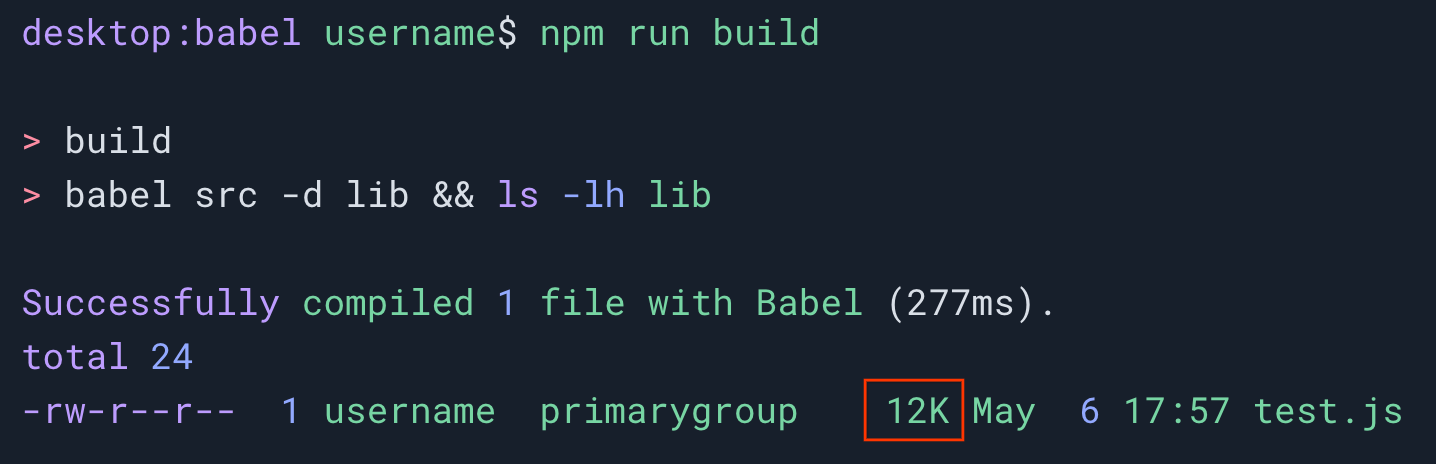
Targeting baseline 2020 for the same project cuts the output noticeably, because far fewer syntax transformations are needed:
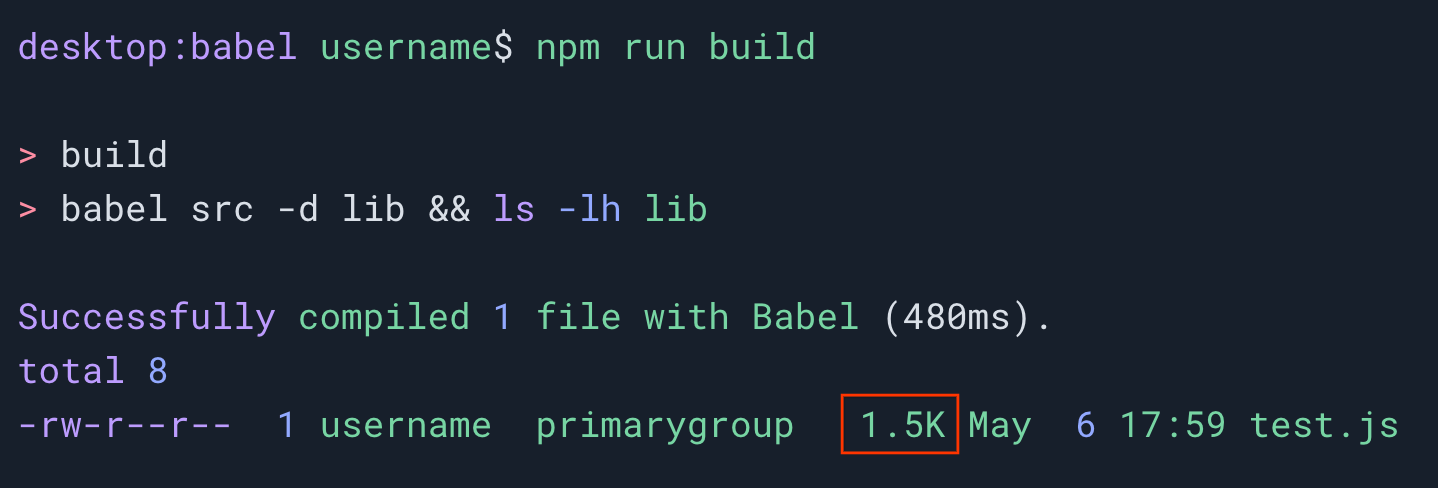
The example code is available in the baseline-demos repository.
Integration with linters
Linters that already hook into Browserslist can pick up these queries. Stylelint, for instance, can read a Browserslist config through the stylelint-browser-compat module. In stylelint.config.js you can set the extension to use a Baseline query:
module.exports = {
  plugins: ['stylelint-browser-compat'],
  rules: {
    'plugin/browser-compat': [
      true,
      {
        browserslist: ['baseline widely available'],
      },
    ],
  },
};
With that config, Stylelint flags CSS that falls outside your chosen Baseline set:
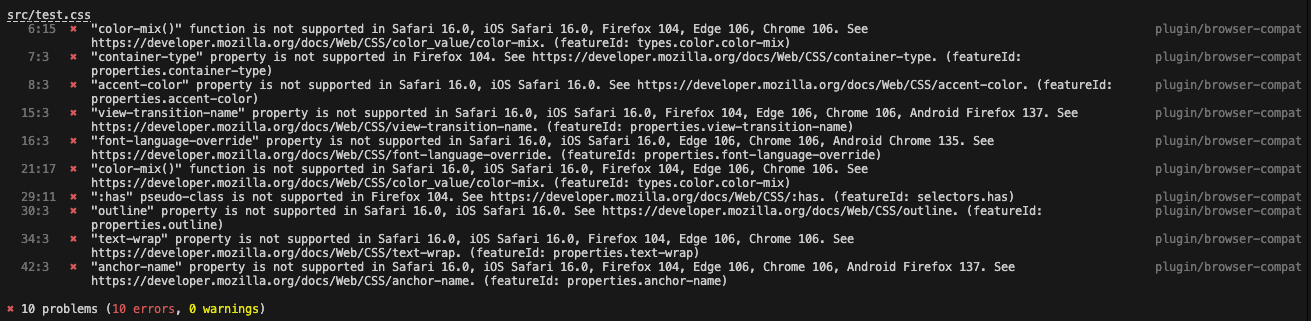
If you prefer a dedicated approach, Stylelint also offers the stylelint-plugin-use-baseline package for setting Baseline rules directly. However, when Browserslist already governs your compatibility config, its built-in Baseline queries integrate cleanly without an extra plugin.


