
Why Web Forms Deserve More Respect
On the surface, a web form looks like the simplest thing on a page: a couple of fields and a button. Underneath, it's a data capture system with real complexity — and real consequences for revenue. At Slack, the "Contact Sales" form alone has accounted for nearly half of all leads from conversational marketing since its launch in December 2018, and partner referral forms have driven millions in enterprise revenue.

Form submissions at Slack feed a pipeline that spans sales, marketing, and support. Depending on what a user submits, the data routes to Salesforce (sales leads) or Zendesk (support tickets), each with custom workflows. Building these forms well matters: getting validation, localization, or security wrong means lost deals or wasted support time.
The Input Element: More Than Meets the Eye
MDN describes the <input> element as one of the most powerful and sophisticated in HTML, thanks to its many types and attributes. Slack uses a handful of them to capture a potential customer's email address. A few worth understanding:
type— Determines how the field displays and behaves. Choosing the right type matters; a text type should only be used when it genuinely makes sense over a more specific type likeemail.required— Blocks submission until the field is filled. Fields that aren't required won't trigger the associated error messages.id— Used to query the field with JavaScript. Every field needs a unique one.name— Acts as the key for the field data sent to the server. Slack's Hack backend uses it to validate the field before routing the submission through Salesforce or Zendesk APIs.value— Lets you prefill fields when you already know something about the user, like their email if they're signed in.autocomplete— Helps users fill forms faster using the browser's built-in autocomplete features.placeholder— Shows default text like[email protected]to indicate what should be entered.data-value-missing— Custom error message when a required value is missing. This works through HTML5 alone, even without JavaScript validation.data-value-invalid— Custom error message when input is invalid. Withtype="email", for instance, a URL fails automatically.
Know Your Funnel: Analytics on Form Data
Without tracking what happens inside your forms, you can't diagnose where leads leak. Event-level analytics can show, for example, that of every 100 users who try to submit a form, 80 succeed, 10 fail on the company size field, and 10 abandon halfway. Of those 80 successes, such tracking can reveal that only 20 become qualified sales leads and 2 close — a 2% conversion rate from all submissions, or 10% if you only count qualified leads.
For analytics like this requires configuring every form field with your data platform. At Slack, that means piping events to a data warehouse optimized for complex queries over large volumes of data. The payoff comes from analyzing failures and closing the gap through changes like clearer error messages, redesigned fields, dropping an unnecessarily required field, or faster follow-up workflows.
Show Your Users It Worked
A form that gives no confirmation after submission is a user-experience disaster. Users may spam the button or abandon entirely. Slack's sales form redirects submissions to a separate thank-you page, and if the user has cookies enabled, the page is customized with relevant text. The plan is to extend that with per-lead emails after submission.
One Form, Nine Languages
Slack's forms are built with internationalization (i18n) at the core, which enables localization — adapting content for a region or language. Because only one form is authored and then translated, all nine locales rely on the same underlying implementation:
- English (US):
https://slack.com/contact-sales - Spanish (Latin America):
https://slack.com/intl/es-la/contact-sales - Portuguese:
https://slack.com/intl/pt-br/contact-sales - German:
https://slack.com/intl/de-de/contact-sales - Spanish (Spain):
https://slack.com/intl/es-es/contact-sales - French:
https://slack.com/intl/fr-fr/contact-sales - English (UK):
https://slack.com/intl/en-gb/contact-sales - Japanese:
https://slack.com/intl/ja-jp/contact-sales - English (India):
https://slack.com/intl/en-in/contact-sales
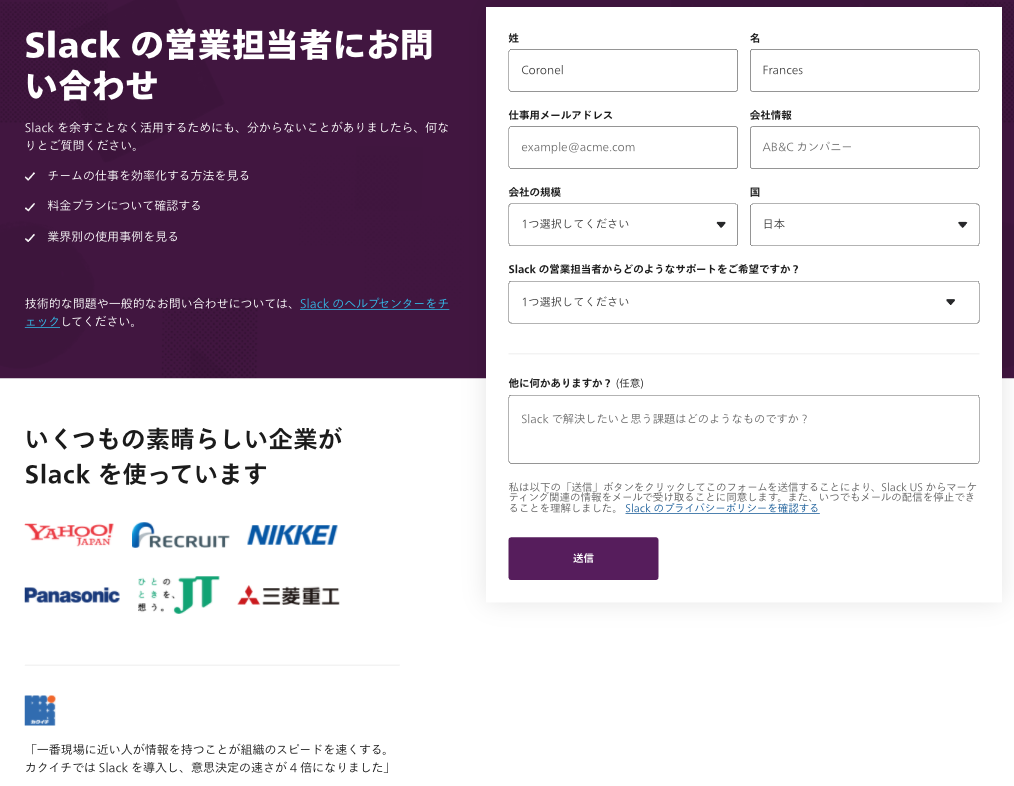
Localization goes beyond translation. In the Japanese version, customer logos are swapped and the first/last name fields are reversed so the family name appears first, matching local convention.
Validate Fast, Validate Twice
Client-side validation prevents the frustration of submitting a form and then being told, after a server round trip, that fields are missing or wrong. HTML5 provides built-in validation through attributes like required and type, and JavaScript can handle conditional rules — for example, certain fields are only required when others are selected.
Complex conditional validation is easiest with clean, well-documented HTML that avoids duplication. But client-side checks are only a UX convenience, not security. Malicious users can disable JavaScript and bypass them, so server-side validation is essential for anything that matters.
Rate Limiting and Routing
Slack also rate-limits form submissions: any user attempting to submit more than a few times per minute from the same IP address gets challenged with reCAPTCHA, Google's risk-analysis engine for keeping automated abuse out.
Every submission pipes into a Slack channel, and for the Contact Sales form, it also routes to Zendesk or Salesforce depending on the input. Along with the form data, Slack attaches metadata — Slack user ID, team ID, Zendesk tags, and any ad campaign the user came from — so support and sales teams have context without asking again. That extra information shortens resolution time and keeps the whole funnel moving.
Life After Launch
A well-built form doesn’t end at deployment. Slack’s Contact Sales form draws roughly 20,000 visits a month and generates between 25% and 35% of all leads — sometimes nearly half. The flip side is that even a brief outage or a confusing field can silently cost hundreds of potential leads. That pressure makes post-launch maintenance just as important as the initial build.
Testing Before Trusting
The first line of defense is rigorous testing. If you have a dedicated QA team, lean on them heavily — they catch the edge cases that slip past casual review. Without one, work through a structured checklist covering validation, error states, and submission flows. The goal is to find and fix issues before they ever reach production.
Small Changes, Big Wins
Once the form is live, set up a triage channel with stakeholders from support, sales, and marketing. This gives everyone a place to flag bugs, request tweaks, and suggest improvements based on real user feedback. For example, Slack’s Customer Success (CS) team handles hundreds of Zendesk tickets daily. When they asked for a tag on submissions lacking enough detail, the form team added it — letting CS automate follow-ups and cut down on back-and-forth.
Experiments That Pay Off
Continuous iteration means running A/B tests. A small change that helps even 10% of users submit faster can translate directly into more contract value. Slack tested whether explicitly marking required fields with asterisks improved conversion rates using Optimizely. The test confirmed it did, so the change was adopted.
Key Takeaways
Building a form that drives serious revenue comes down to a few repeated practices:
- Use HTML attributes to capture and validate the exact data you need.
- Analyze submission data to smooth out the user journey.
- Design a success state that confirms and clarifies what happens next.
- Localize content for international audiences.
- Add rate-limiting to block spam.
- Route submissions dynamically based on user input.
- Test thoroughly before and after launch.
- Iterate continuously with stakeholder feedback.
- Run experiments on small improvements.
The payoff is in the details — every field, label, and rule contributes to whether a user finishes the journey or abandons it.


