
GitHub CLI grows extension discovery and authoring tools
Since the GitHub CLI 2.0 release opened the door to extensions, the CLI team has been refining both sides of the experience: how users find and install extensions, and how developers build and ship them. The 2.20.0 release added two new discovery commands, the go-gh library hit 1.0 to share CLI internals with extension authors, and the gh-extension-precompile action now automates releasing prebuilt binaries.
Browsing and searching extensions from the terminal
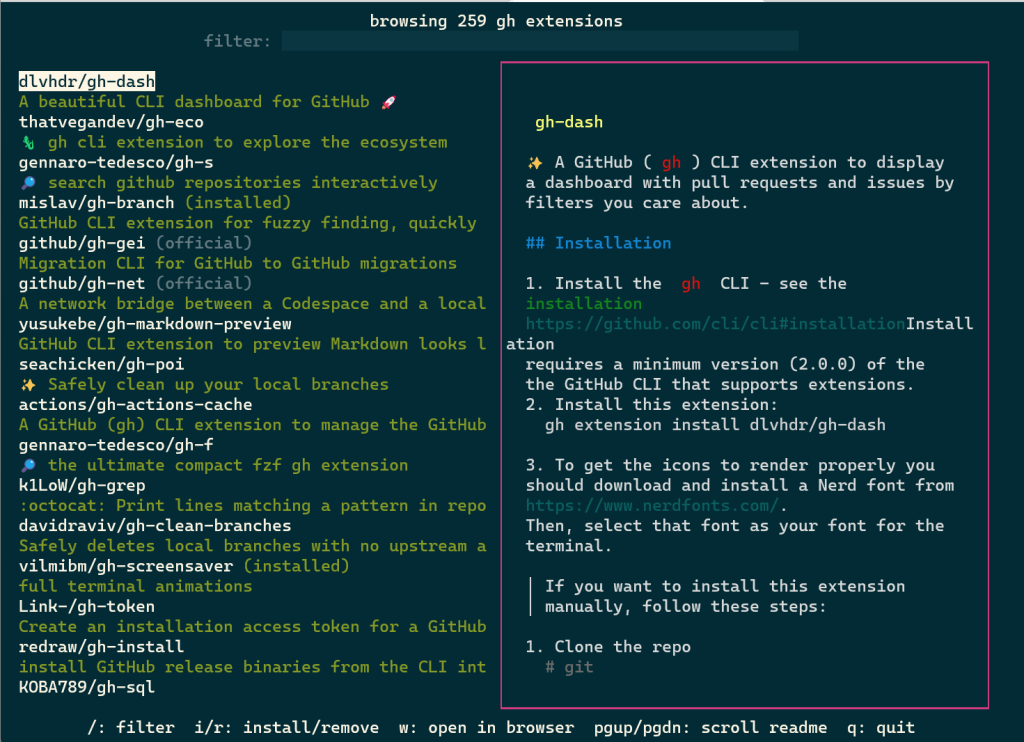
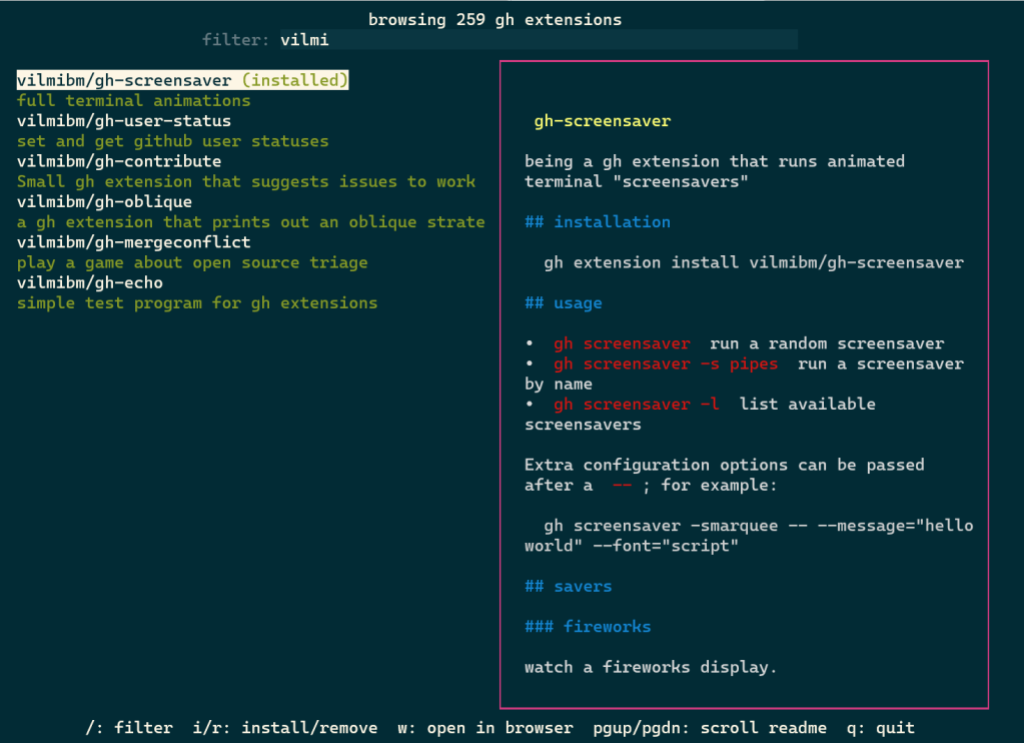
Extension discovery traditionally meant browsing the web or knowing exactly which repository you wanted. The new gh extension browse command (aliased under gh ext) replaces that with a fully interactive terminal UI. Once launched, it loads all published extensions sorted by star count. Arrow keys or j/k move through the list, / focuses a filter box to search by term, and i installs or r removes the highlighted extension. Pressing w opens that extension’s repository page in your default web browser.
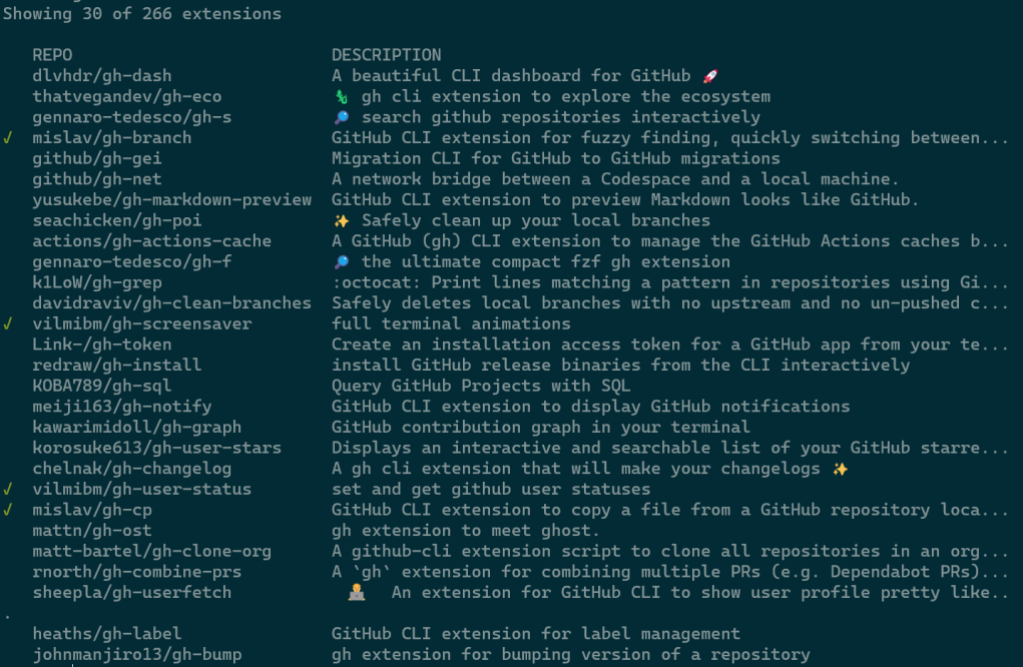
For scripted scenarios, gh extension search provides a conventional CLI interface. With no arguments, it prints the first 30 extensions by star count; the initial display shows a green checkmark next to ones you already have installed. Any arguments narrow the search, and several flags shape the output further.
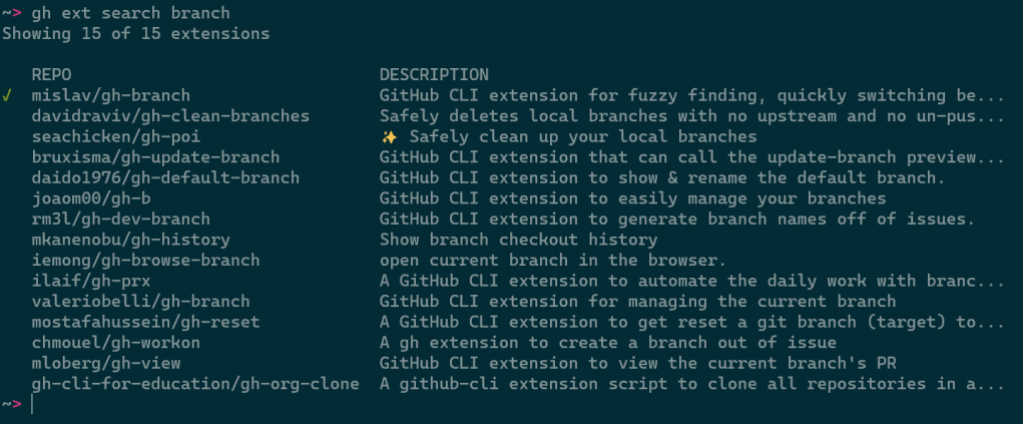
--limitfetches more results--ownerrestricts results to a single author--sortreorders results, e.g., by last updated--licensefilters by software license--webopens results in your browser--jsonemits results as JSON
Since the output is pipe-friendly, you can chain commands. This example installs every extension from a specific author:
gh ext search --owner vilmibm | cut -f2 | while read -r extension; do gh ext install $extension; done
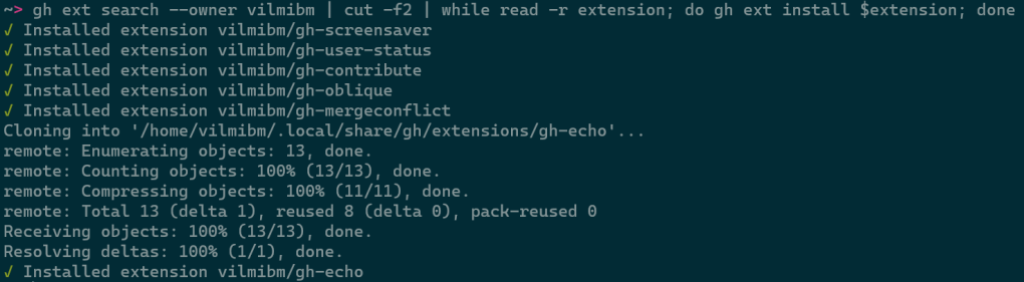
Full usage details appear in gh help ext search.
Reusing CLI internals with go-gh
To encourage more extensions and raise their quality, the CLI team extracted a library, go-gh, that contains much of the GitHub CLI’s own Go code. Since the CLI itself runs on this library, it’s held to production-grade standards. Extension authors get the same HTTP clients, terminal helpers, and formatting utilities the official CLI uses.
A common need is presenting output that looks good in a terminal but also works when piped to another tool. go-gh includes a tableprinter package that handles this automatically in a modest amount of code:
        if len(matches) == 0 {
                fmt.Println("No matching discussion threads found :(")
        }

    // old for loop was here

        isTerminal := term.IsTerminal(os.Stdout)
        tp := tableprinter.New(os.Stdout, isTerminal, 100)

if isTerminal {
                fmt.Printf(
                        "Searching discussions in '%s/%s' for '%s'\n",
                        repo.Owner(), repo.Name(), search)
        }

        fmt.Println()
        for _, d := range matches {
                tp.AddField(d.Title)
                tp.AddField(d.URL)
                tp.EndRow()
        }

        err = tp.Render()
        if err != nil {
                return fmt.Errorf("could not render data: %w", err)
        }
The crucial piece is calling term.IsTerminal(os.Stdout). When true, the extension is being run by a human at an interactive session, so the tableprinter uses a display width, applies color, and formats columns accordingly. When false — a script or a pipe — values are printed raw, with no color. As a result, the command neither produces visually noisy tables in scripts nor strips formatting that helps humans.
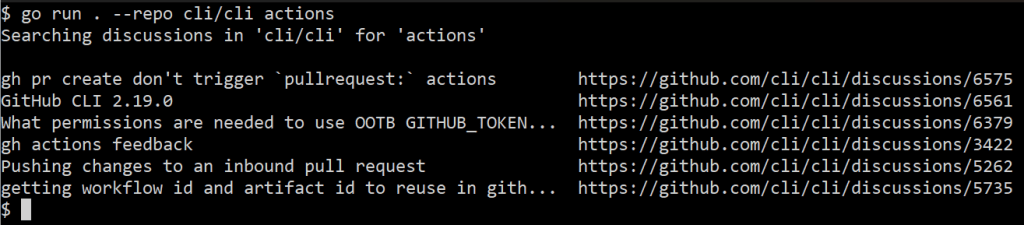
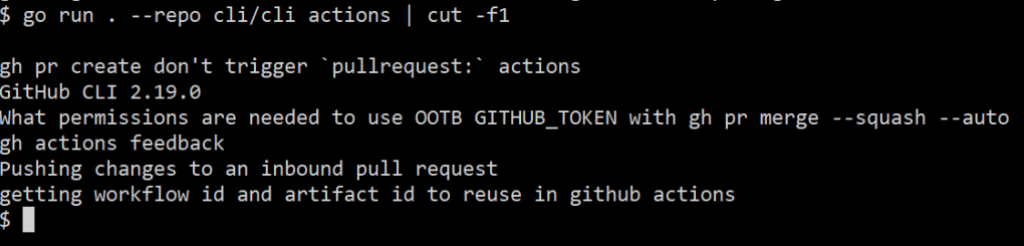
The same package set also includes a jq implementation. That means an extension can offer --json and --jq flags and let users process structured output without requiring jq to be installed separately. Building those options into an extension is relatively direct:
func main() {
    jsonFlag := flag.Bool("json", false, "Output JSON")
    jqFlag := flag.String("jq", "", "Process JSON output with a jq expression")
isTerminal := term.IsTerminal(os.Stdout)
        if *jsonFlag {
                output, err := json.Marshal(matches)
                if err != nil {
                        return fmt.Errorf("could not serialize JSON: %w", err)
                }

                if *jqFlag != "" {
                        return jq.Evaluate(bytes.NewBuffer(output), os.Stdout, *jqFlag)
                }

                return jsonpretty.Format(os.Stdout, bytes.NewBuffer(output), " ", isTerminal)
        }
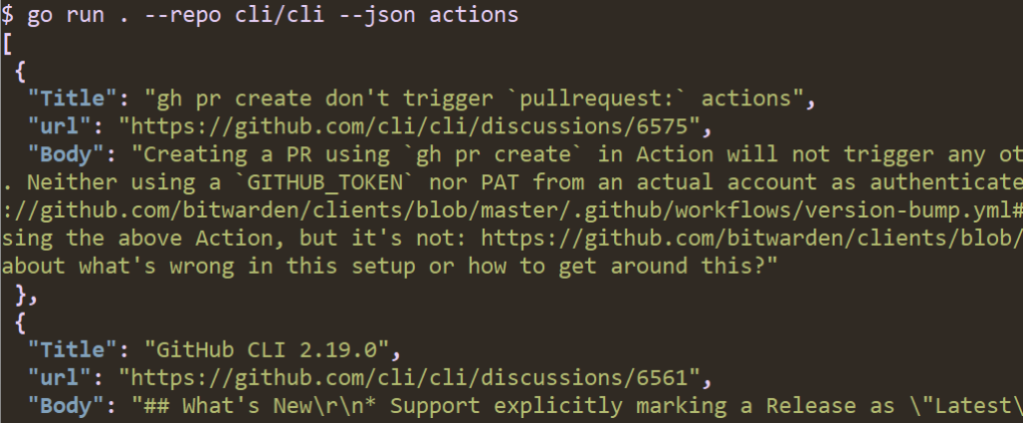
![A screenshot of running "go run . --repo cli/cli --json --jq '.[]|.Title' actions" in a terminal. The output is a list of discussion thread titles.](https://github.blog/wp-content/uploads/2023/01/image6.png?w=1024&resize=1024%2C212)
Releasing compiled extensions automatically
One friction point for authors is that compiled extensions need prebuilt binaries attached to every release before users can install them. The cli/gh-extension-precompile GitHub Action automates that process. For an extension started with gh ext create, the repository already includes its own .github/workflows definition.
name: release
on:
  push:
    tags:
      - "v*"
permissions:
  contents: write

jobs:
  release:
    runs-on: ubuntu-latest
    steps:
      - uses: actions/checkout@v3
      - uses: cli/gh-extension-precompile@v1
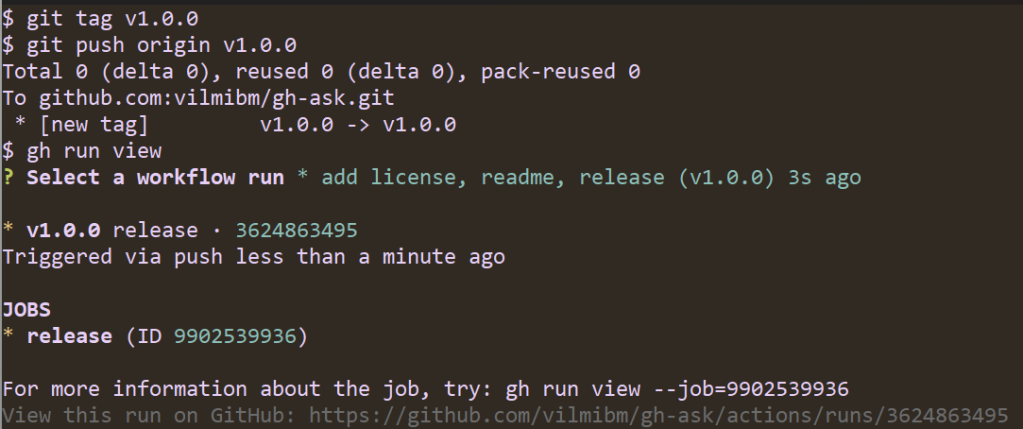
Triggering a release is just a matter of pushing a tag with the vX.Y.Z format. The workflow compiles the code and attaches binaries:
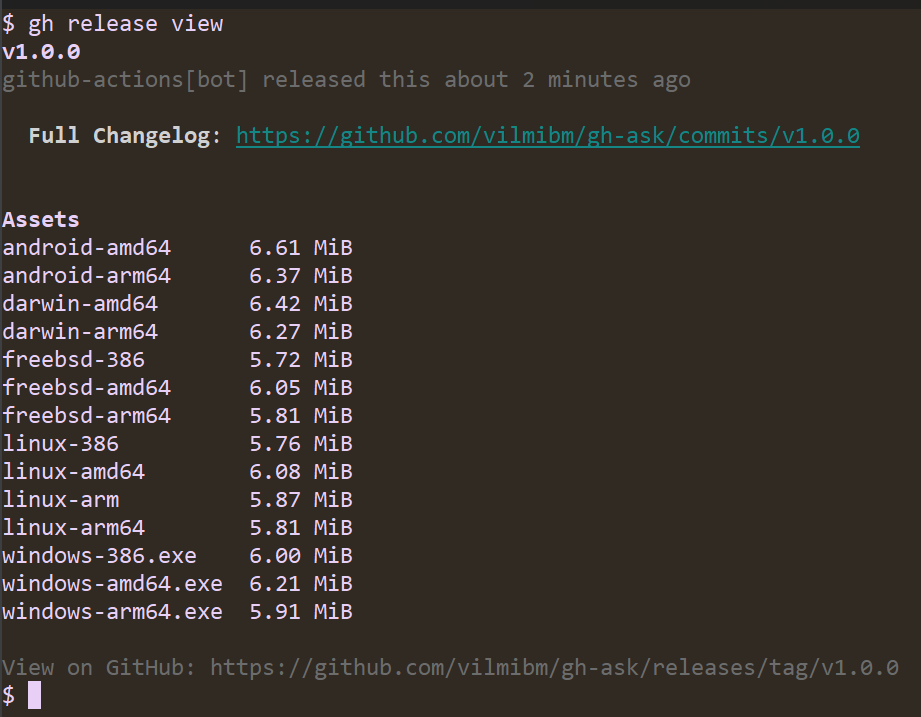
By default the action understands how to build Go code for Linux (amd64, 386, arm, arm64), Windows (amd64, 386, arm64), macOS (amd64, arm64), FreeBSD (amd64, 386, arm64), and Android (amd64, arm64). Extensions written in another language can still use this action through a build_script_override configuration that points to a custom build script.
name: release
on:
  push:
    tags:
      - "v*"

permissions:
  contents: write

jobs:
  release:
    runs-on: ubuntu-latest
    steps:
      - uses: actions/checkout@v3
      - uses: cli/gh-extension-precompile@v1
        with:
          build_script_override: "script/build.sh"
The custom script must produce executables in a dist directory at the repository root, following the naming convention {os}-{arch}{ext}, where the extension is .exe for Windows and blank elsewhere:
dist/gh-my-ext_v1.0.0_darwin-amd64dist/gh-my-ext_v1.0.0_windows-386.exe
Using the same OS/architecture naming as Go — the list is available at go.dev/doc/install/source — ensures the GitHub CLI can find the right asset for any user’s platform, regardless of the language used to write the extension.
Before releasing, authors should confirm the repository is marked with the gh-extension topic via gh repo edit --add-topic gh-extension. Without that marker, the extension will not surface in gh ext browse or gh ext search. Public repositories are generally desirable, although private repositories remain installable by anyone with read access.
What’s next for the extensions system
The GitHub CLI team has a few extensions-related improvements in the pipeline, focused on accessibility, usability, and developer tooling. A more screen-reader-friendly version of the extension browse command is planned, using a single-column interface. Nested extensions are also on the roadmap, which would allow an extension to be invoked as a subcommand of an existing gh command—for example, gh pr my-extension—so third-party tools fit more naturally into the existing command hierarchy. Documentation and flexibility for the gh-extension-precompile action are also slated for improvement.
If you have ideas for other features, the team welcomes feedback via a discussion or an issue in the cli/cli repository.
The takeaway
The goal of the extensions system is to let you build capabilities beyond what the core CLI offers. Whether that means something practical or purely for fun—like making gh run screensavers—you’re encouraged to experiment and share what you create.


