
From Per-Platform Freezers to a Shared Runtime
Dropbox has shipped a desktop client for Windows, macOS, and Linux for years, and much of that application is written in Python—going back to Drew Houston’s original Windows prototype built with pywin32. After years on Python 2.7, we started the move to Python 3 in 2015, and the transition is now complete: current builds run on a Dropbox-customized variant of Python 3.5.
Two sets of pressures drove the migration. On the language side, Python 3’s type annotation syntax (which pairs well with our heavy use of MyPy) and native async/await coroutine support were attractive for a codebase that leans on threading and Futures. On the toolchain side, Python 2 locked us into aging compilers: it still technically required Visual Studio 2008, which is unsupported and incompatible with the Windows 10 SDK, and older compilers blocked upgrades to dependencies like Qt, whose recent versions bundle Chromium via QtWebEngine and need modern build tools.
The Build System Was the Bottleneck
Originally we built native application bundles with "freezer" scripts: py2exe on Windows, py2app on macOS, and bbfreeze on Linux. This Python-centric setup, inspired by distutils, worked when the product was little more than a Python package. But the codebase has since become heterogeneous—today it mixes TypeScript/HTML, Rust, Python, Objective-C, and C++—and the central build-all.py script (our grown-up setup.py) became unwieldy.
The real tipping point was platform integration. Features like Smart Sync required kernel components that shouldn’t be written in Python, and vendors introduced proprietary deployment requirements such as code signing. On macOS 10.10, Apple added FinderSync, which is not a mere API call but a full .appex application package with its own lifecycle and IPC rules. Xcode handles such extensions natively; py2app does not support them at all.
That left us with two compounding problems: Python 2 blocked the new toolchains needed for modern OS APIs, and freezer scripts made shipping native code—especially app extensions—prohibitively difficult. We considered pyinstaller, but it lacked Python 3 support at the time and shares the same architectural limitation as other freezers: it wraps a Python-centric build rather than letting each platform’s native tooling do its job.
Embedding Python Behind Native Entry Points
Instead of propping up the freezers, we redesigned the application structure. The plan was to build platform-specific entry points with standard tools (Visual Studio, Xcode, make) and abstract Python behind a shared library. This lets teams mix languages freely while keeping each target compatible with its platform’s application model—including extensions like COM components on Windows and app extensions on macOS.
A useful side effect of this modular architecture was that it would allow a Python 2 library and a Python 3 library to coexist side by side during the migration. We could therefore stage the work: first implement the new structure around Python 2, then swap in Python 3.
Step 1: The Anti-Freeze
Starting in 2016, we removed the freezer scripts from the build. Since both bbfreeze and pywin32 lacked Python 3 support, the decision was effectively made for us. The first concrete piece was a new library, libdropbox_bootstrap, that handles configuring the Python runtime and starting Python threads—replacing what the freezers used to do, with two core responsibilities.
Packaging for On-Device Execution
We wanted to ship compiled Python bytecode rather than source files, and we wanted a single packaging format across all platforms, replacing each freezer’s idiosyncratic on-disk layout. The solution was:
- All Python bytecode
.pycfiles go into one ZIP archive (for example,python-packages-35.zip). - Native extensions (the
.pyd/.sofiles) are platform-native DLLs, so they sit where the OS loader expects them—on Windows, alongside theDropbox.exeentry point. - Packaging relies on
modulegraph, written by Ronald Oussoren ofpy2appandPyObjCfame.
Isolating the Interpreter
We also needed to guarantee that our app never picks up other Python installations on a user’s machine. Python 3 makes this kind of embedding far simpler—the Py_SetPath function, for instance, let us isolate cleanly without the contortions the freezers needed on Python 2. To keep the same behavior before we migrated, we back-ported Py_SetPath into our custom Python 2 fork.
Native Entry Points
With the bootstrap library in place, we created proper platform targets: Dropbox.exe on Windows, Dropbox.app on macOS, and dropboxd on Linux. Building these with Visual Studio, Xcode, and make let us remove the patchwork we had previously imposed on the freezers. On Windows, for example, configuring DEP/NX, embedding the application manifest, and including resources became straightforward.
One platform-specific note: moving off Visual Studio 2008 required picking a compiler that could build both Python 2 and 3, so we standardized on Visual Studio 2013—and had to heavily modify our Python 2 fork to compile with it. The expense of that effort only reaffirmed that Python 3 was the right destination.
A staging ground for Python 3
Flipping the entire client to Python 3 in one release was never an option. Dropbox ships to hundreds of millions of installs on a two-week cadence, and the codebase exceeds one million lines of Python. The team needed a way to run both interpreters side by side, expose a growing slice of users to Python 3, and catch defects before the migration touched everyone.
The embedded runtime design from the previous step made this practical. With Python abstracted into a library and package, adding a second variant for Python 3 was straightforward. The entry point itself — for example, Dropbox.app — picks the interpreter version during early initialization. On macOS and Linux the entry point links manually against libdropbox_bootstrap and then uses dlopen/dlsym; on Windows, the equivalent calls are LoadLibrary and GetProcAddress.
The Python version choice must happen before any interpreter is loaded, so the team exposed two ways to influence it: a command-line flag, /py3, for development, and a persistent on-disk setting that Stormcrow, Dropbox’s feature-gating system, could control remotely.
Testing, then measured exposure
With dynamic interpreter selection in place, the CI system gained new jobs that ran unit and integration tests against Python 3. Automated checks in the commit queue blocked any change that would regress Python 3 support.
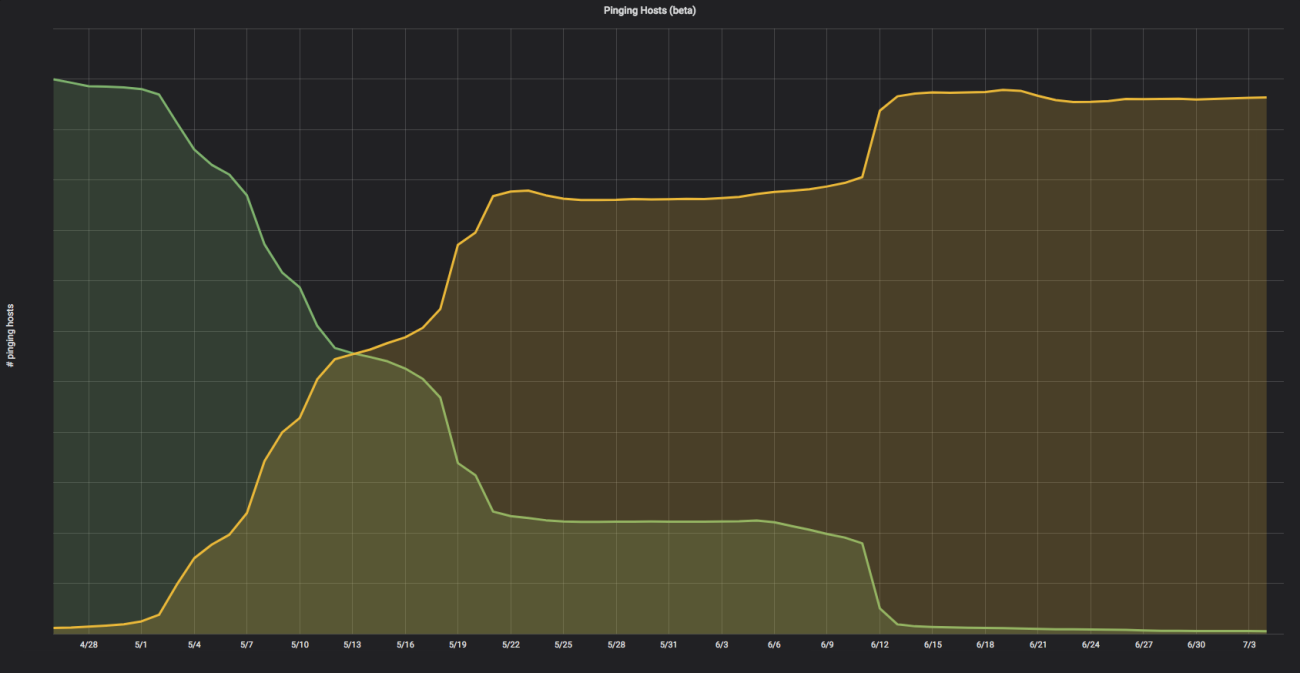
Once automated testing had reached a comfort level, the rollout to real users began. Dropbox employees were opted in first, which surfaced and fixed most underlying issues. Next came a subset of the Beta population — a more heterogeneous group in terms of OS versions. Finally, the Stable channel received the update.
The team enforced a strict quality policy: every migration-related bug had to be fully investigated and corrected before the exposed user base could grow. The Stable channel chart shows the gradual climb:
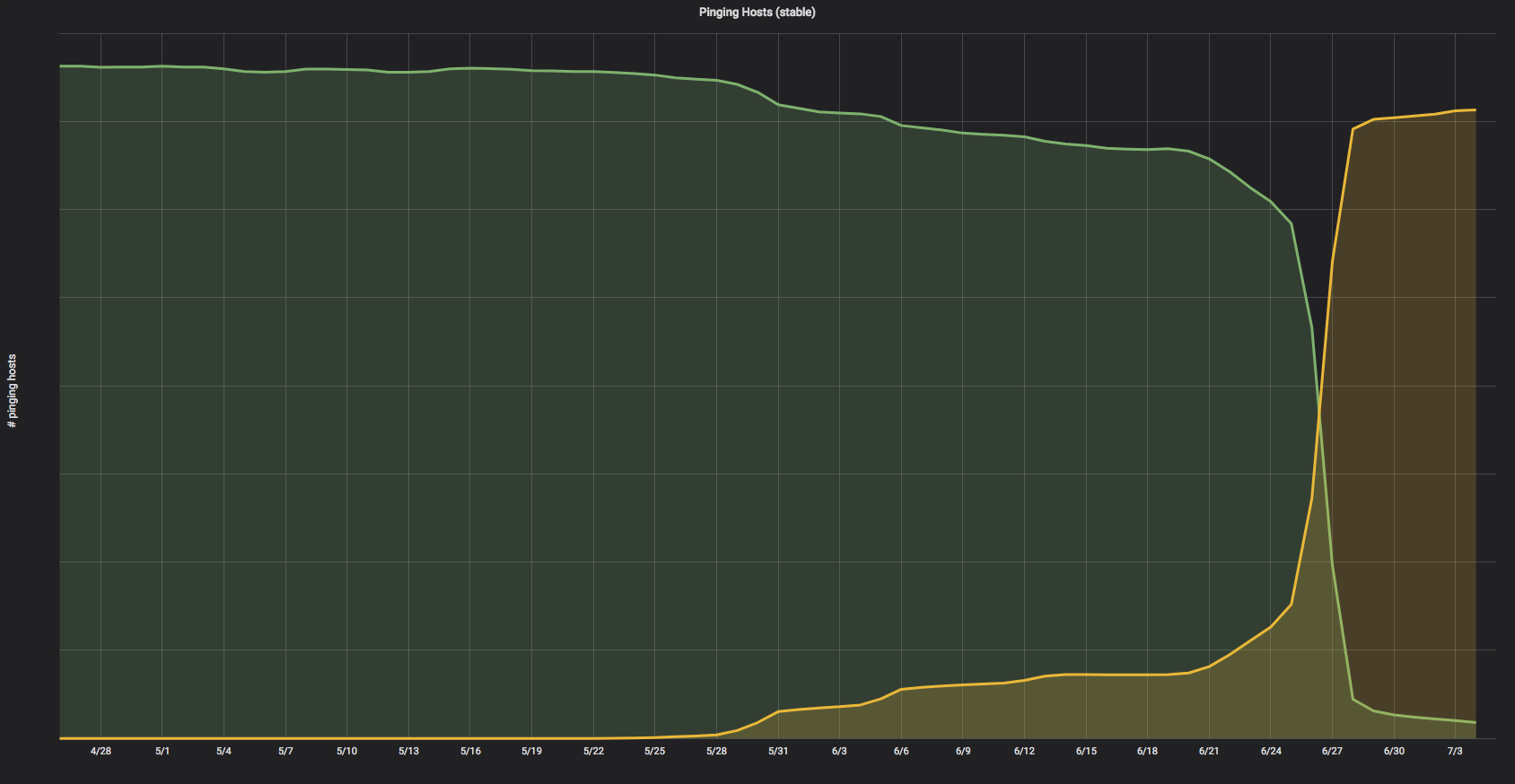
That process took seven months from first exposure to full coverage, and as of client version 52, Python 2 has been removed from the desktop client entirely.
Remaining notes
Dropbox says future posts will cover crash reporting on Windows and macOS for native and Python code, the tooling behind maintaining hybrid Python 2/3 syntax, and notable bugs and lessons from the migration. The company credits its engineering team, plus several external Python contributors for work on Windows and macOS support.


