

Live Reloading Without a Framework
Static site generators that rebuild on file changes are fast, but they still leave a gap: every edit requires a manual browser refresh. Live reloading closes that gap, and the author of this piece recently decided to build it into his own Go-based site generator rather than reach for a tool like Hugo. The result was a compact implementation built on two robust libraries: fsnotify for filesystem watching and Gorilla WebSocket for browser signaling.
Watching the Filesystem
The first half of the problem is detecting source changes. fsnotify wraps OS-level monitoring primitives and exposes them through a channel. Adding a directory to the watcher and receiving change notifications is straightforward:
watcher, err := fsnotify.NewWatcher()
...

err = watcher.Add("./content")
...

for {
    select {
        case event := <-watcher.Events:
            log.Println("event:", event)
    }
}
A change under the content directory produces an event like this:
2019/05/21 11:49:32 event: "./content/hello.md": WRITE
The Editor Problem
Real-world usage is messier than the basic loop suggests. Saving a file in Vim emits not one clean event but a burst of them:
2019/05/21 11:49:32 event: "./content/4913": CREATE
2019/05/21 11:49:32 event: "./content/hello.md~": CREATE
2019/05/21 11:49:32 event: "./content/hello.md": RENAME
2019/05/21 11:49:32 event: "./content/hello.md": CREATE
2019/05/21 11:49:32 event: "./content/hello.md": CHMOD
2019/05/21 11:49:32 event: "./content/hello.md~": REMOVE
2019/05/21 11:49:33 event: "./content/hello.md": CHMOD
That burst is the result of Vim's save procedure, which is designed to guard against data loss:
- Test write permissions by creating a temporary file named
4913. - Move the original file to a tilde-suffixed backup (
hello.md~). - Write new content to the original filename.
- Copy permissions from the backup to the new file.
- Remove the backup file on success.
None of these intermediate files affect the build output, so they would trigger wasteful rebuilds. The pragmatic fix is to filter events by filename:
// Decides whether a rebuild should be triggered given some input
// event properties from fsnotify.
func shouldRebuild(path string, op fsnotify.Op) bool {
    base := filepath.Base(path)

    // Mac OS' worst mistake.
    if base == ".DS_Store" {
        return false
    }

    // Vim creates this temporary file to see whether it can write
    // into a target directory. It screws up our watching algorithm,
    // so ignore it.
    if base == "4913" {
        return false
    }

    // A special case, but ignore creates on files that look like
    // Vim backups.
    if strings.HasSuffix(base, "~") {
        return false
    }

    ...
}
This sort of editor-specific special-casing is a practical trade-off. The build remains correct without it, but it would pay the cost of recompiling on irrelevant churn.
Debouncing the Build Loop
A second problem is bursty edit patterns. Kicking off a build immediately on the first event risks missing changes that land while that build is still running. The solution is coordination between two goroutines. A watcher goroutine collects filesystem events, and a builder goroutine consumes them. If events arrive during a build, they accumulate and trigger another build once the current one completes. The build code is incremental, so multiple pending changes are all accounted for in the next pass:
for {
    select {
    case event := <-watchEvents:
        lastChangedSources := map[string]struct{}{event.Name: {}}

        if !shouldRebuild(event.Name, event.Op) {
            continue
        }

        for {
            if len(lastChangedSources) < 1 {
                break
            }

            // Start rebuild
            rebuild <- lastChangedSources

            // Zero out the last set of changes and start
            // accumulating.
            lastChangedSources = nil

            // Wait until rebuild is finished. In the meantime,
            // accumulate new events that come in on the watcher's
            // channel and prepare for the next loop.
        INNER_LOOP:
            for {
                select {
                case <-rebuildDone:
                    // Break and start next outer loop
                    break INNER_LOOP

                case event := <-watchEvents:
                    if !shouldRebuild(event.Name, event.Op) {
                        continue
                    }

                    if lastChangedSources == nil {
                        lastChangedSources = make(map[string]struct{})
                    }

                    lastChangedSources[event.Name] = struct{}{}
                }
            }
        }
    }
}
The watcher loop uses an accumulating inner loop to handle this cleanly:
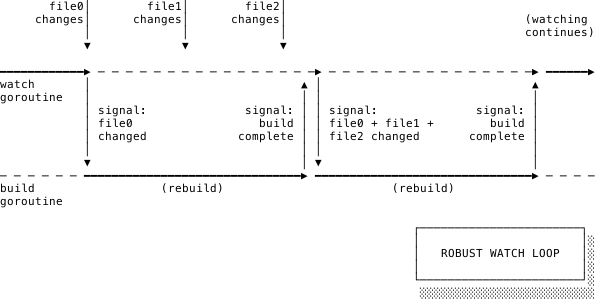
Pushing Updates Over WebSockets
Once a build finishes, connected browsers need to know. Gorilla WebSocket handles the connection mechanics, while signaling is done with a sync.Cond condition variable. A condition variable is the right tool here because it allows one controller to notify any number of waiting goroutines, each of which serves an open WebSocket:
var buildCompleteMu sync.Mutex
buildComplete := sync.NewCond(&buildCompleteMu)

// Signals all open WebSockets upon the completion of a
// successful build
buildComplete.Broadcast()
Each connection goroutine takes that notification and forwards it as a JSON message:
// A type representing the extremely basic messages that
// we'll be serializing and sending back over a websocket.
type websocketEvent struct {
    Type string `json:"type"`
}

for {
    select {
    case <-buildCompleteChan:
        err := conn.WriteJSON(websocketEvent{Type: "build_complete"})
        if err != nil {
            c.Log.Errorf("<Websocket %v> Error writing: %v",
                conn.RemoteAddr(), writeErr)
        }

    ...
}
A Minimal Client
The browser side is nearly as simple. A single WebSocket object and one callback handle the normal case; on a build_complete message, the script closes the socket and reloads the page:
var socket = new WebSocket("ws://localhost:5002/websocket");

socket.onmessage = function(event) {
  var data = JSON.parse(event.data);
  switch(data.type) {
    case "build_complete":
      // 1000 = "Normal closure" and the second parameter is a
      // human-readable reason.
      socket.close(1000, "Reloading page after receiving build_complete");

      console.log("Reloading page after receiving build_complete");
      location.reload(true);

      break;

    default:
      console.log(`Don't know how to handle type '${data.type}'`);
  }
}
Reconnecting After Disconnects
A few extra lines make the connection resilient. The onclose handler sets a five-second timeout to retry the connection. Because onclose fires on both failures and deliberate server shutdowns, this provides an automatic recovery path:
function connect() {
  var socket = new WebSocket("ws://localhost:5002/websocket");

  socket.onclose = function(event) {
    console.log("Websocket connection closed or unable to connect; " +
      "starting reconnect timeout");

    // Allow the last socket to be cleaned up.
    socket = null;

    // Set an interval to continue trying to reconnect
    // periodically until we succeed.
    setTimeout(function() {
      connect();
    }, 5000)
  }

  socket.onmessage = function(event) {
    ...
  }
}

connect();
In practice, this is enough to handle a developer stopping the backend to work on its Go source, then restarting it later. Previously opened browser tabs detect the new server and resume listening almost immediately.
Good Black Boxes
What stands out about this design is how little of the underlying complexity surfaces. fsnotify deals with three different OS-level APIs (inotify, kqueue, ReadDirectoryChangesW) internally; consumers only interact with a few function calls and channels. Similarly, the WebSocket handshake and framing are hidden behind an Upgrader object. The client implementation is a handful of JavaScript lines despite the protocol work happening underneath.
That pattern – dependable libraries with minimal, well-defined surface areas with all internals hidden – is what makes a tool like this possible to build in an afternoon. Reliable software is the result of stacking such black boxes, each expected to work as advertised without scrutiny of its interior.


