
Web Feeds: More Than Just RSS
Between Google Chrome’s experiment with a “follow” feature and growing dissatisfaction with algorithmic social feeds, there’s renewed interest in syndicated web feeds heading into 2022. RSS may have been declared dead at various points, but it remains widely used — virtually every podcast depends on it. Whether you’re returning to feeds or embracing them for the first time, there are established best practices for creating and curating them well.
The Three Main Feed Formats
RSS is just one format among several types of syndicated web feeds. The most common are RSS, Atom, and JSON Feed. While they accomplish the same goal, they differ in meaningful ways:
- Atom and RSS are XML-based; JSON Feed uses, naturally, JSON.
- All formats support extensions. JSON Feed does this by adding objects with keys starting with an underscore. Atom and RSS declare namespaces on the root element — podcast feeds, for instance, typically declare the iTunes namespace to use
<itunes:*>tags. - JSON Feed is newer, so support isn’t as broad as Atom or RSS. Podcasts specifically require RSS.
- All formats require unique identifiers per entry, but Atom additionally requires a unique identifier for the feed itself.
- HTML handling varies: JSON uses the
content_htmlkey with JSON-escaped HTML; Atom uses acontenttag withtype=htmlcontaining XML-escaped HTML; RSS uses the<description>tag or thecontentextension, with HTML either XML-escaped or wrapped in<![CDATA[]]>.
Beyond those differences, the formats are largely equivalent. Compression reduces any of them to a few kilobytes, so file size isn’t a deciding factor. Unless your use case mandates a specific format — like podcasts with RSS — providing multiple formats is harmless, though RSS and Atom have the broadest support.
What Makes a Feed Good?
Several practices separate a well-executed feed from a poorly maintained one.
Make It Discoverable
A feed is useless if nobody knows it exists. Link feeds in your site’s <head> so feed readers can discover them:
<head>
  <link rel="alternate" type="application/rss+xml" href="https://codelab.farai.xyz/index.rss.xml" title="Farai's Codelab's RSS Feed" />
  <link rel="alternate" type="application/feed+json" href="https://codelab.farai.xyz/index.feed.json" title="Farai's Codelab's JSON Feed" />
  <link rel="alternate" type="application/atom+xml" href="https://codelab.farai.xyz/index.atom.xml" title="Farai's Codelab's ATOM Feed" />
  <!-- etc. -->
</head>
Using all three formats is acceptable — you can specify multiple links, though some readers only recognize the first. The essential attributes are rel="alternate" and the MIME type; adding a title never hurts. Direct links in prominent site locations, like a footer, also help users subscribe manually, and some readers pick up those links even outside the <head>.
Naming conventions for feed URLs are flexible as long as they’re discoverable. Names like feed.json, feed.rss.xml, and feed.atom.xml work fine.
Leverage HTTP Features
Compression greatly reduces feed file size and download time; most servers handle gzip or Brotli automatically. Support for ETags or If-Modified-Since headers lets clients cache feeds and check for updates before downloading. Your server likely handles these too.
Enable permissive CORS so clients aren’t blocked from fetching the feed. Security implications are minimal for typical small-site feeds; a single header suffices:
Access-Control-Allow-Origin: *Show Full Content
Many publishers serve only summaries in feeds, hoping to drive clicks back to their site. But many users prefer reading in a feed reader specifically for legibility, and full-content feeds respect that preference.
Scraping concerns are unfounded — copying from a feed is no harder than copying from a web page. If ad revenue is the worry, static ads can be embedded directly into feed content. Some readers even parse the associated web page so entries are readable in-app regardless.
Summaries do make sense in some cases: feeds with many long-form entries, or rich content best viewed elsewhere, such as podcast show notes. Nielsen Norman Group’s RSS is a decent model, offering a summary plus an excerpt up to the first <h2> tag. If you do use summaries, include an image, an outline of main points, and a link to the canonical version — not just an awkward truncation.
Design for Reading
Feeds are often consumed outside browsers, where JavaScript and CSS are limited or absent. Embedded content is the trickiest part: some embeds (Twitter, CodePen) include fallback content in markup, but others don’t. Vimeo videos, for example, are restricted to certain domains, so they won’t appear in feed readers at all.
Good fallbacks keep content accessible. Twitter embeds degrade to a <blockquote> with a link to the tweet, readable even in clients like Outlook that lack embed support. NetNewsWire handles most embeds well, but YouTube occasionally fails there; descriptive links to the original video cover that case.
The guiding principle: know your readers and how they render content, then provide fallbacks accordingly.
Relative URLs Are a Problem
Resolving relative URLs is a recurring issue in feeds. Resolving against the feed’s canonical link can break if that link sits in a subdirectory. The xml:base attribute exists for XML formats but is only supported by Atom and ignored by most readers.
The robust solution is absolute URLs for every href and src in an entry’s content:
<p>Read <a href="https://css-tricks.com/archives/">all our articles</a>.</p>Not this:
<p>Read <a href="https://css-tricks.com/archives/">all our articles</a>.</p>And not this:
<p>Read <a href="archives/">all our articles</a>.</p>Automating this is hard, especially on statically generated sites. Options include rewriting relative URLs after compiling the feed in a build step, or configuring how your static site generator renders Markdown links and images. Hugo currently leads here with Markdown render hooks.
One exception: footnotes. Some readers detect and handle relative footnote jump links correctly:
<p>They’d managed to place 27.9MB of images onto the Critical Path.
Almost 30MB of previously non-render blocking assets had just been
turned into blocking ones on purpose with no escape hatch. Start
render time was as high as 27.1s over a cable connection<sup id="fnref:1">
  <a href="#fn:1" class="footnote">1</a></sup>.</p>

<div class="footnotes">
  <ol>
    <li id="fn:1">
     <p>5Mb up, 1Mb down, 28ms RTT. <a href="#fnref:1" class="reversefootnote">↩</a></p>
    </li>
  </ol>
</div>
Ads Inside Feeds
Feed readers generally lack JavaScript, so ad-server-driven ads won’t run. Any advertising must be baked into the content itself rather than injected at render time.

Don’t Stuff Everything In
Some feeds include every piece of content ever published, back to the first entry. Publishers posting dozens of items daily compound the problem. Whether you offer one feed or many, limiting the archive depth and considering multiple feeds for distinct content types is wise.
MacRumors’ feed posts dozens of new articles daily — nobody needs a decade of archive entries in that stream. Podcast feeds are the exception; storing every episode makes sense there. For most content, users care about newer items. Limiting entries reduces bandwidth and speeds up refresh cycles, which matters because feed readers must poll many feeds.
Ten to fifteen posts is a reasonable starting point, but the “right” number depends on your content’s timeliness and your publishing volume. Frequent publishers might eclipse a week’s worth of posts in a day; monthly publishers might store a couple of months.
Avoid overwhelming subscribers by either using summaries as an exception to the full-content rule, or offering category-specific feeds so users select what interests them.
Relocating a Feed
Moving a feed mirrors changing domains for a website. The critical preparation is ensuring every entry has a globally unique identifier — guid in RSS, id in Atom and JSON. GUIDs keep feed readers from fetching duplicate entries when a feed moves, which is harder to manage on static sites.
Permalinks tempt as identifiers but can change. The tag URI scheme is a better choice. A tag URI comprises four parts:
- an authority (the site domain)
- a date marking when that authority controlled the feed
- a specific path
- a fragment, often a timestamp
tag:<authority>,<YYYY-MM-DD>:<specific>#<fragment>For a site like CSS-Tricks, the <specific> portion could be the site’s home page path (/), and the fragment the published timestamp:
tag:css-tricks.com,2021-16-11:/#1637082038781The authority date protects against domain ownership changes. Static site generators can track domain history over time, making this workable there. Since Atom requires its id to be URL-formatted, tag URIs satisfy that requirement while also working for RSS and JSON.
With sound IDs in place, moving a feed is simply setting up a 301 redirect to the new location. The so-called XML redirect technique exists — placing a file with the new location at the old address — but implements no feed readers, so HTTP redirects are the practical route.
Validate Your Feeds
Malformed feeds fail to work correctly, just like invalid HTML. The W3C feed validator checks RSS and Atom feeds against best practices, producing a report of issues. Warnings are common and often innocuous, but two should never be ignored:
itemshould contain aguidelement: unique IDs prevent duplicated entries during feed moves.elementshould contain absolute URL references: readers struggle to resolve relative URLs.
For JSON feeds, use validator.jsonfeed.org or validate against the JSON Feed schema with any JSON schema validator.
Controlling Feed Access
Premium podcast feeds demonstrate access control: subscribers get a special feed URL hosting paid content. Two techniques manage access:
- HTTP basic authentication — prompting for credentials or embedding them in the URL, e.g.,
https://username:[email protected]/path. - A token query parameter — e.g.,
http://domain.com/path?token=xyz.
Over HTTPS, both offer equal security since URL paths and credentials are encrypted. Server-side authentication handling is a separate topic entirely.
The RSS Club
The RSS Club showcases purpose-built feeds. Its first rule, per founder Dave Rupert:
Don’t talk about it. Let people find it. Make it worthwhile.
Club members publish posts exclusive to their feeds — content that never appears on the site itself. It’s a way to reward subscribers and treat RSS as a first-class publishing medium. Implementation is straightforward on WordPress: create an “RSS Club” category, filter it from the main query, and serve either a dedicated category feed or a full feed including those posts.
Feeds Beyond Blog Posts
Web feeds serve purposes beyond articles. GitHub provides Atom feeds for issues, commits, pull requests, and releases. Feeds can also signal site changes — useful when multiple editors share responsibility for content.
Implementations could poll content periodically and trigger feed entries, but that’s resource-intensive. Webhooks offer another path, though managing notifications gets tedious. WebSub is worth examining: the publisher notifies a hub of changes, and the hub notifies subscribed systems. Publishers can use an existing hub such as Google’s PubSubHubbub Hub and reference the hub in their feeds. YouTube already implements this.
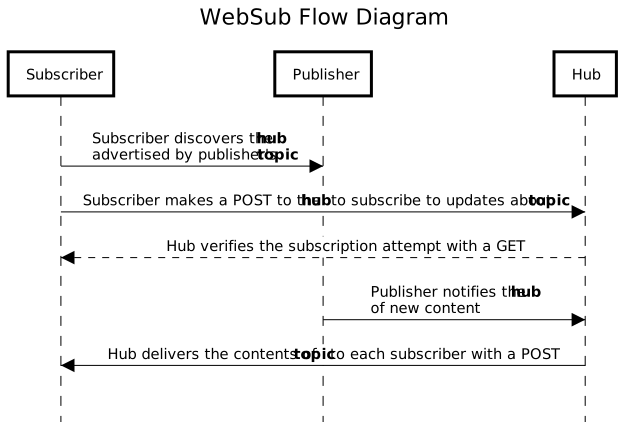
Copyright © 2018 World Wide Web Consortium, (MIT, ERCIM, Keio, Beihang).
Real-World Examples
Podcast RSS
CSS-Tricks runs a podcast covering web history, subscribeable via RSS. Podcasts require RSS with xmlns:content and xmlns:itunes extensions for episode metadata. Each audio file appears in an enclosure with its MIME type and size — RSS allows one enclosure per entry, while Atom and JSON support multiple.
<rss version="2.0" xmlns:content="http://purl.org/rss/1.0/modules/content/" xmlns:atom="http://www.w3.org/2005/Atom" xmlns:itunes="http://www.itunes.com/dtds/podcast-1.0.dtd">
  <channel>
    <atom:link href="https://adactio.s3.amazonaws.com/audio/narration/web_history/podcast.xml" rel="self" type="application/rss+xml" />
    <title>Web History</title>
    <link>https://css-tricks.com/category/history/</link>
    <language>en</language>
    <copyright>2020</copyright>
    <description>Written by Jay Hoffmann and narrated by Jeremy Keith.</description>
    <image>
      <url>https://adactio.s3.amazonaws.com/audio/narration/web_history/WebHistoryPodcast.jpg</url>
      <title>Web History</title>
      <link>https://css-tricks.com/category/history/</link>
    </image>
    <itunes:author>Jay Hoffman</itunes:author>
    <itunes:summary>The history of the web.</itunes:summary>
    <itunes:explicit>no</itunes:explicit>
    <itunes:type>episodic</itunes:type>
    <itunes:owner>
      <itunes:name>Jeremy Keith</itunes:name>
      <itunes:email>[email protected]</itunes:email>
    </itunes:owner>
    <itunes:image href="https://adactio.s3.amazonaws.com/audio/narration/web_history/WebHistoryPodcast.jpg"/>
    <itunes:category text="Technology"></itunes:category>
    <item>
      <title>Chapter 10: Browser Wars</title>
      <description>In June of 1995, representatives from Microsoft arrived at the Netscape offices. The stated goal was to find ways to work together—Netscape as the single dominant force in the browser market and Microsoft as a tech giant just beginning to consider the implications of the Internet. Both groups, however, were suspicious of ulterior motives.</description>
      <pubDate>Mon, 8 Nov 2021 12:00:00 -0000</pubDate>
      <link>https://css-tricks.com/chapter-10-browser-wars/</link>
      <itunes:title>Chapter 10: Browser Wars</itunes:title>
      <itunes:episode>10</itunes:episode>
      <itunes:episodeType>full</itunes:episodeType>
      <itunes:author>Jay Hoffman</itunes:author>
      <itunes:summary>In June of 1995, representatives from Microsoft arrived at the Netscape offices. The stated goal was to find ways to work together—Netscape as the single dominant force in the browser market and Microsoft as a tech giant just beginning to consider the implications of the Internet. Both groups, however, were suspicious of ulterior motives.</itunes:summary>
      <content:encoded>
        <![CDATA[
          <p>In June of 1995, representatives from Microsoft arrived at the Netscape offices. The stated goal was to find ways to work together—Netscape as the single dominant force in the browser market and Microsoft as a tech giant just beginning to consider the implications of the Internet. Both groups, however, were suspicious of ulterior motives.</p>
        ]]>
      </content:encoded>
      <itunes:duration>00:40:40</itunes:duration>
      <guid>https://adactio.s3.amazonaws.com/audio/narration/web_history/Chapter_10_Browser_Wars.mp3</guid>
      <enclosure url="https://adactio.s3.amazonaws.com/audio/narration/web_history/Chapter_10_Browser_Wars.mp3" length="19608877" type="audio/mpeg"/>
    </item>
</channel>
</rss>
Standard Blog Feed
CSS-Tricks’ main feed is more verbose than typical because of extensions declared on the <rss> tag. Some handle comments (xmlns:wfw), additional metadata (xmlns:dc), and feed refresh frequency (xmlns:sy).
<?xml version="1.0" encoding="UTF-8"?>
<rss version="2.0" xmlns:content="http://purl.org/rss/1.0/modules/content/" xmlns:wfw="http://wellformedweb.org/CommentAPI/" xmlns:dc="http://purl.org/dc/elements/1.1/" xmlns:atom="http://www.w3.org/2005/Atom" xmlns:sy="http://purl.org/rss/1.0/modules/syndication/" xmlns:slash="http://purl.org/rss/1.0/modules/slash/" xmlns:georss="http://www.georss.org/georss" xmlns:geo="http://www.w3.org/2003/01/geo/wgs84_pos#">
  <channel>
    <title>CSS-Tricks</title>
    <atom:link href="https://css-tricks.com/feed/" rel="self" type="application/rss+xml" />
    <link>https://css-tricks.com</link>
    <description>Tips, Tricks, and Techniques on using Cascading Style Sheets.</description>
    <lastBuildDate>Fri, 19 Nov 2021 15:13:49 +0000</lastBuildDate>
    <language>en-US</language>
    <sy:updatePeriod>
  hourly  </sy:updatePeriod>
    <sy:updateFrequency>
  1 </sy:updateFrequency>
    <generator>https://wordpress.org/?v=5.8.2</generator>
    <image>
      <url>https://i1.wp.com/css-tricks.com/wp-content/uploads/2021/07/star.png?fit=32%2C32&ssl=1</url>
      <title>CSS-Tricks</title>
      <link>https://css-tricks.com</link>
      <width>32</width>
      <height>32</height>
    </image>
    <site xmlns="com-wordpress:feed-additions:1">45537868</site>
    <item>
      <title>Parallax Powered by CSS Custom Properties</title>
      <link>https://css-tricks.com/parallax-powered-by-css-custom-properties/</link>
      <comments>https://css-tricks.com/parallax-powered-by-css-custom-properties/#respond</comments>
      <dc:creator>
        <![CDATA[Jhey Tompkins]]>
      </dc:creator>
      <pubDate>Fri, 19 Nov 2021 15:13:46 +0000</pubDate>
      <category>
        <![CDATA[Article]]>
      </category>
      <category>
        <![CDATA[animation]]>
      </category>
      <category>
        <![CDATA[custom properties]]>
      </category>
      <category>
        <![CDATA[GSAP]]>
      </category>
      <guid isPermaLink="false">https://css-tricks.com/?p=357192</guid>
      <description>
        <![CDATA[
]]>
      </content:encoded>
      <wfw:commentRss>https://css-tricks.com/parallax-powered-by-css-custom-properties/feed/</wfw:commentRss>
      <slash:comments>0</slash:comments>

      <post-id xmlns="com-wordpress:feed-additions:1">357192</post-id>
    </item>
  </channel>
</rss>
JSON Feed
A personal JSON feed shows how lean the format is. Lacking the extension ecosystem of RSS, JSON feeds remain uncluttered — just an object containing feed data rather than a verbose XML template.
{
  "author": {
    "name": "Farai Gandiya"
  },
  "feed_url": "https://codelab.farai.xyz/feed.json",
  "home_page_url": "https://codelab.farai.xyz/",
  "icon": "https://codelab.farai.xyz/fcl-logo.png",
  "items": [
    {
      "content_html": "...",
      "date_modified": "2021-11-13T05:26:07+02:00",
      "date_published": "2021-11-13T05:26:07+02:00",
      "id": "https://codelab.farai.xyz/1636773967",
      "summary": "...",
      "title": "Don't be afraid of the Big Long Page by Amy Hupe, content designer.",
      "url": "https://codelab.farai.xyz/links/long-content-ok/"
    }
  ]
}
Feed Support in CMSs and Static Site Builders
Most content management systems and static site generators ship with some form of feed support, typically RSS. WordPress is the most flexible of the group, offering both Atom and RSS natively. The Yoast SEO plugin lets you inject custom content before or after individual feed entries, and a dedicated JSON Feed plugin extends WordPress beyond the XML formats. Ghost supports customizable RSS output, while Shopify, Squarespace, and Wix provide straightforward RSS for blog content.
For static site generators, feed support is mostly plugin-based rather than built-in. Eleventy has an official RSS plugin, Hugo includes RSS templates out of the box, and Jekyll has the jekyll-feed gem. For JavaScript-based frameworks, Astro documents an RSS guide, Gatsby has an RSS feed how-to, Nuxt uses the @nuxtjs/feed community module, and Next.js developers typically add a custom route to generate rss.xml. Zola offers feed templates as part of its templating system.
Regardless of the platform, generating a standard feed usually comes down to knowing the XML or JSON structure and having a template that renders your posts into that format.


