
AI moves beyond autocomplete
GitHub is pushing its AI-assisted development efforts further, building on the Copilot pair-programming tool that uses OpenAI Codex to suggest code and whole functions in real time from the editor. The company's research has measured the impact of Copilot on developer satisfaction and productivity since it became generally available to individual users earlier this year.

Soon, organizations will be able to purchase and manage per-seat Copilot licenses for employees. That gives companies the productivity benefits of AI-assisted coding—GitHub cites a 55% developer productivity increase—along with administrative controls to allow or block suggestions that match public code. Interested organizations can join the waitlist.

Separately, GitHub Next is experimenting with voice interaction for Copilot. "Hey, GitHub!" lets developers talk to the AI pair programmer, reducing reliance on a keyboard while working in VS Code. The team sees potential to extend the benefits of Copilot to developers who have difficulty typing by hand. It is currently an experiment, and developers can sign up for the waitlist and provide feedback.
Environment setup gets easier
Getting a new codebase running can be a project in itself: dependencies, environment configuration, and hardware requirements all add friction. GitHub is expanding Codespaces to reduce that overhead, and improving code exploration on GitHub.com.

Individual GitHub users on Free and Pro plans now get up to 60 hours of Codespaces each month at no cost. The cloud development environment provisions on demand, so developers can start building in seconds. Since Codespaces launched for Team and Enterprise Cloud customers last year, GitHub has seen it cut onboarding time and streamline workflows; now the same applies to individual developers and open source maintainers, who no longer need a powerful local machine to contribute.

Through a partnership with JetBrains, developers can now use their IDE of choice in Codespaces. JupyterLab is also available in Codespaces as a public beta, giving data scientists and ML practitioners a full IDE experience. That becomes more powerful with GPU-backed codespaces, which are in private preview—access is by request. Developers can also try Codespaces through more than 50 LinkedIn Learning courses covering six languages, including data science and machine learning; those are free on LinkedIn Learning until February 2023.
A new way through the code
Code search gets a new interface with query suggestions, completions, and the ability to slice and organize results at speed. Code view is redesigned as well, tightly integrating search, navigation, and browsing so developers can jump between lines quickly and understand where code sits in the larger repository.

Both features are intended to change how developers move around GitHub.com, finding exact code faster and organizing work for better collaboration within and across repositories. They are on a waitlist for now.
Projects grows up
GitHub has shipped more than 100 features and updates to Projects since last year's Universe. The planning tool continues to gain capabilities for teams that want to track work where they build it.
A new roadmap view provides a visual timeline of work items, complementing existing table and board views so teams can plan over a period, track progress against a deadline, and share status with stakeholders.

Task lists get a reimagined interface, showing assignees and labels as metadata and letting developers break work into subtasks, convert them into full issues with one click, and visualize parent-child relationships. Deep integration with GitHub Projects adds "tracked by" and "tracks" fields for a complete view of hierarchies.

Both roadmap and the new task lists are landing soon; interested users can join the waitlist.
GitHub Projects is also coming to mobile. The GitHub Mobile app now includes access to Projects, the ability to run Actions workflows, and file editing in pull requests—all from a phone.

Users can jump to recent projects, edit custom fields, and switch views with readable metadata tags. The updated mobile experience is in beta on both the Google Play store and Apple's TestFlight.
Scaling Enterprise Security and CI/CD
GitHub’s enterprise tier — whether hosted in the cloud or self-hosted — now emphasizes observability and tighter credential control across the organization. The headline additions target large-scale CI/CD workflows, more powerful compute, and auditability.

New hosted runners handle bigger builds
With over 10 million daily builds running on GitHub Actions across Linux, Windows, and macOS, the platform’s next step is accommodating larger workloads. The new larger GitHub-hosted runners, still in beta, offer up to 64 cores and 256 GB of RAM on Linux and Windows, letting teams build, test, and deploy substantial codebases in minutes.
Actions Importer smooths CI/CD migrations
For teams already invested in other CI/CD platforms, the GitHub Actions Importer automates much of the migration planning and execution. Distributed as a Docker container and official GitHub CLI extension, it removes tedious, error-prone manual work — even for large CI/CD footprints. The tool is free for all GitHub customers and requires no professional services contract.
Fine-grained PATs give admins control
Fine-grained personal access tokens (PATs) now let developers limit permissions and target individual repositories. Organization administrators gain approval policies and full visibility into which tokens access their resources. Enterprise owners can also enable authentication token data in audit logs, allowing them to query for activity tied to specific tokens — a key capability for detecting and tracking compromised credentials before they lead to data exposure.

Arm tools arrive on GitHub Actions
A partnership with Arm brings Arm cross-compilation tools and Arm virtual hardware natively to GitHub Actions’ cloud-hosted runners, establishing an efficient CI workflow for IoT software development.
Enterprise Server 3.7 is generally available
GitHub Enterprise Server 3.7, now available for self-hosted customers, ships with more than 70 new capabilities. Security overview dashboards are available to all enterprise clients, and reusable GitHub Actions workflows can now be nested. New inner-source policies ease cross-team collaboration, including restricting repositories to specific organizations and allowing multiple forks within a single organization.
Securing the Full Development Lifecycle
Because open source underpins so much of modern software, the supply chain remains a major attack vector. New GitHub tooling aims to make vulnerability discovery and remediation straightforward, from private reporting to deeper scanning.
Private vuln reports for public repos
Security researchers and maintainers of public repositories no longer need to hunt for contact emails or use social media to report issues. Private vulnerability reporting provides a standardized, confidential channel for community members to submit reports directly through GitHub, and for maintainers to address them within their existing workflow.
CodeQL now scans Ruby by default
Ruby support for CodeQL has left beta and is enabled by default in GitHub.com code scanning, the CodeQL CLI, and the CodeQL extension for VS Code. The production release doubles the volume of default queries, covers all relevant OWASP categories out of the box, and is optimized so most users see results in under five minutes — based on beta telemetry from nearly 5,000 daily user runs. The GitHub Security Lab Bug Bounty Program is offering a $2,000 bonus for the first 10 high- or critical-scoring CodeQL queries that test Ruby open source projects, with submissions accepted through March 31, 2023.
Security overview gains risk and coverage views
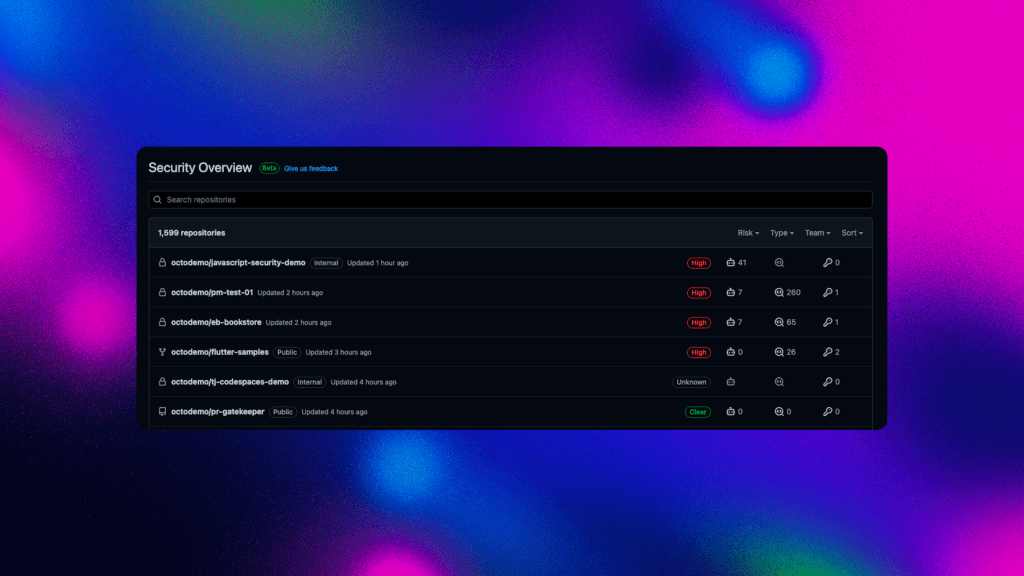
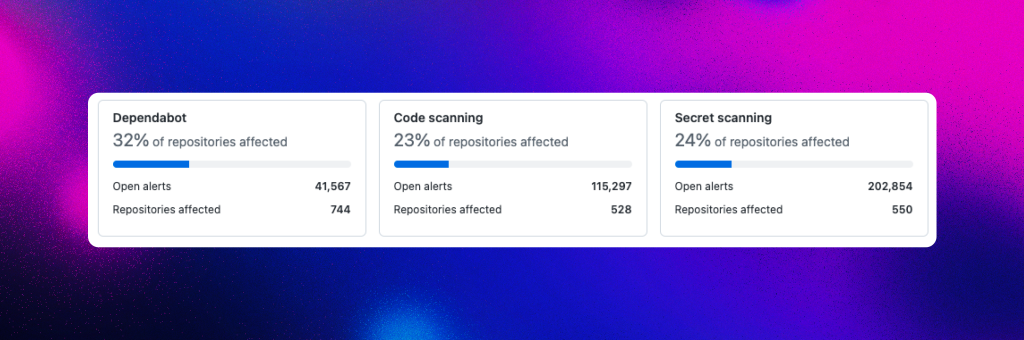
Enterprises managing hundreds or thousands of repositories get two new security overview perspectives. A coverage view shows which repos have security features enabled; a risk view aggregates all alerts. Dynamic filtering across teams, alert types, and severity levels helps administrators identify where patching efforts should concentrate.

Building a Sustainable Open Source Economy
Open source remains the backbone of modern software, and GitHub is putting new resources behind the maintainers who keep that ecosystem running. Three new initiatives announced at Universe 2022 — the GitHub Accelerator, a dedicated investment fund, and bulk sponsorship support — are aimed at making open source work as a viable career path, not just a side project.

One of the more playful contributions this year: GitHub open-sourced its signature typefaces, Mona Sans and Hubot Sans, both variable fonts available for use in outside projects.
Octoverse 2022: Business and Open Source Converge
This year's Octoverse report focuses on the relationship between open source and commercial interests. The data shows how connected those worlds have become: 90% of top open source projects by contributor count receive commercial backing, and new contributors are gravitating toward those commercially supported projects.
GitHub Accelerator: Full-Time Open Source Funding
A new program will directly fund maintainers who want to go all-in on open source. The GitHub Accelerator provides a full stipend and mentorship to 20 maintainers or teams, with the goal of turning their part-time open source work into a full-time career. The program also includes a specific track for cultivating enterprise sponsors through GitHub Sponsors. Applications are open until December 31, 2022.
GitHub Fund: A $10M Commitment
Alongside M12, GitHub announced a $10 million fund to invest in the next generation of open source companies. The goal is to ensure open source projects keep receiving the financial backing they need. Further details are available here.
Sponsor Your Dependencies in Bulk
GitHub also expanded GitHub Sponsors with bulk sponsorship support. Previously, sponsoring multiple projects meant checking out each one individually. Now you can upload a list of maintainers and dollar amounts and check out once, making it easy to support all your critical dependencies at the same time. GitHub used this feature to contribute half a million dollars to 900 dependencies it relies on for its own software, which let those maintainers spend more time fixing bugs, onboarding contributors, and addressing security issues.
Between the Accelerator stipends, the new fund, and bulk sponsorship, the goal is to build an open source economy that functions as more than a passion project.
The Full Development Lifecycle
Across the platform, GitHub covers the complete development workflow — task planning with Issues and Projects, cloud-based development environments with Codespaces, pair programming with Copilot and the "Hey, GitHub!" voice interface, code security checks, automated CI/CD with Actions, and pull request workflows. The announcements from Universe Day 1 are just the starting point; Day 2 registration is still available, and all sessions will be available on demand afterward.


