

Why LLM taskflows fit alert triage
Security alert triage is full of false positives caused by patterns that are obvious to human auditors but hard to encode as formal rules. Large language models excel at matching the fuzzy patterns that traditional static analysis tools struggle with, which is why the GitHub Security Lab has been experimenting with using them to triage CodeQL alerts. The lab is using the open-source seclab-taskflow-agent framework for this work, and the results have been substantial: roughly 30 real-world vulnerabilities discovered and fixed since August, with many already published.
The core insight is that LLMs were given only basic file-fetching and searching tools during triage. No static or dynamic analysis tools were used beyond CodeQL itself to generate alerts. This works because the process breaks down well: triage involves many repetitive steps with clear, well-defined goals, and many of those steps require identifying code semantics that are easy for a human but difficult for conventional programs. Attempting to encode those patterns typically results in messy heuristics and regex. LLMs are a natural fit for those sweet spots, while MCP servers handle the tasks better suited for conventional programming.
Taskflows as structured prompt pipelines
Taskflows are YAML files that describe a series of LLM tasks. The agent framework runs tasks sequentially and passes results from one task to the next. This structured approach avoids the limitations of a single big prompt: LLMs have finite context windows, and complex multi-step tasks often are not completed correctly when posed as one monolithic request. Steps get skipped. Taskflows keep each task focused, and they also give developers a way to control and debug the process—even with models that have large context windows.
For CodeQL alert auditing, this means first fetching code scanning results, then running a list of checks per alert—for example, determining whether an alert is reachable by an untrusted attacker or whether authentication checks exist. The agent framework also supports asynchronous batch operations, so the same templated prompts can iterate over many alerts, substituting alert-specific details each time.
The taskflow files are organized into several stages: information collection, auditing, report generation, and validation. In practice, information gathering and auditing are sometimes combined into a single task depending on complexity.
Information collection with audit notes
The first stage instructs the LLM to gather relevant information about each alert, accounting for the threat model and general knowledge about the alert type. For GitHub Actions alerts, this means checking workflow permissions, trigger events, and whether the workflow is disabled. These information-gathering tasks are intentionally independent so each can focus on its own scope without being distracted by previously collected data.
Accuracy is enforced by requiring precise source code references with file and line numbers to back up every piece of collected information. Each task stores its findings in audit notes—a running commentary that gets serialized to a database after each task completes. The next task can append its notes, building a "bag of information" that the auditing stage will consume.
Auditing against known false-positive patterns
At the audit stage, the LLM applies a list of specific checks to reject false positives. For GitHub Actions alerts, a common false-positive cause is access control: checks ensuring only repo maintainers can trigger a vulnerable workflow, or that the vulnerable workflow is disabled in configuration. These checks come in many forms with no easily identifiable pattern, making them difficult for a static analyzer to detect—but easy for an auditor with general code knowledge, and by extension, an LLM.
Report generation, validation, and issue creation
Alerts that pass the audit stage get a bug report generated from the notes and reasoning collected so far. The prompt is precise about the report format and content: it should be concise yet contain everything needed to verify the result, including code references and snippets. No further analysis happens at this stage—the LLM only fetches code snippets needed for the report.
After writing, a validation task checks that the report contains all relevant information and that the information is consistent. Missing or contradictory details often indicate hallucinations or unresolvable questions, which leads to the report being dismissed. Otherwise, a GitHub Issue is created to track the alert, ready for human review.
The issue serves as a checkpoint with all the information needed for verification. It also enables a learning loop: human reviewers who disagree with a report can document the reason as an alert dismissal reason or issue comment. When the agent analyzes similar alerts in the future, it incorporates these past analyses into its knowledge base and becomes better at detecting repo-specific false positives.
Workflow examples
The source describes real example taskflows for triaging GitHub Actions alerts from CodeQL query results, collecting repo-specific dismissal reasons, and including report validation prompts in JSON format—all available in the seclab-taskflows repo.
alert_triage_examples/triage_taskflows
├── actions_common/
│   ├── triage_actions_narwhal.yaml
│   ├── collect_dismiss_reasons.yaml
│   └── ...
├── javascript_examples/
└── ...
The same taskflow pattern applies to JavaScript alerts and other CodeQL rules. The lab ran these taskflows mostly with Claude Sonnet 3.5 over a few months, and they produced exploitable vulnerabilities that would otherwise require significant manual triage effort.
Development tips from the lab
The GitHub Security Lab has a few practical suggestions for anyone building their own taskflows:
- Break down tasks cleanly. Each task should have a clear, well-defined goal. If a step involves looking for code semantics that are fuzzy and hard to match formally, it's a candidate for LLM automation.
- Keep information gathering independent. Each collection task should not depend on other notes, which reduces distraction and keeps the process focused.
- Demand evidence. Requiring file and line number references reduces hallucination significantly.
- Validate output format separately. An extra step that checks the report format and consistency catches hallucinations before they reach a human.
- Use issues for review and learning. Alert dismissals and issue comments feed back into future analysis, creating a body of repo-specific knowledge.
Both seclab-taskflow-agent and seclab-taskflows are open source, so the same framework can be adapted for triage or other security research workflows—provided the task is repetitive, has clear goals, and involves fuzzy code semantics that are hard to encode conventionally.
Modeling actions alert triage
The two Actions alert classes we triaged — untrusted checkout in a privileged context and code injection — share most of their triage logic. For both, the process involves checking workflow trigger events, permissions, and caller relationships. The meaningful differences reduce to local vulnerability detail: for code injection, whether injected input is sanitized, how expressions are evaluated, and whether the input is genuinely attacker-controlled (a pull request ID, for instance, rarely enables injection). For untrusted checkout, the key question is whether a valid code execution point follows the checkout.
Because so much overlaps, the taskflows lean on seclab-taskflow-agent’s reusable prompts and tasks.
Common false-positive patterns
Manual triage of these rules tends to hit recurring false positives. In practice, an alert is usually wrong when any one of the following holds:
- The vulnerable workflow does not run in a privileged context. Trigger event determines this:
pull_request_targetimplies privilege,pull_requestdoes not. A quick look at the workflow file usually settles it. - The workflow is explicitly disabled in the repository.
- The workflow restricts permissions and uses no secrets, so the potential privilege gain is negligible.
- Vulnerability-specific conditions fail — invalid user input or a sanitizer for code injection; no code execution point for untrusted checkout.
- The vulnerable workflow is reusable but not reachable from any workflow that runs in a privileged context.
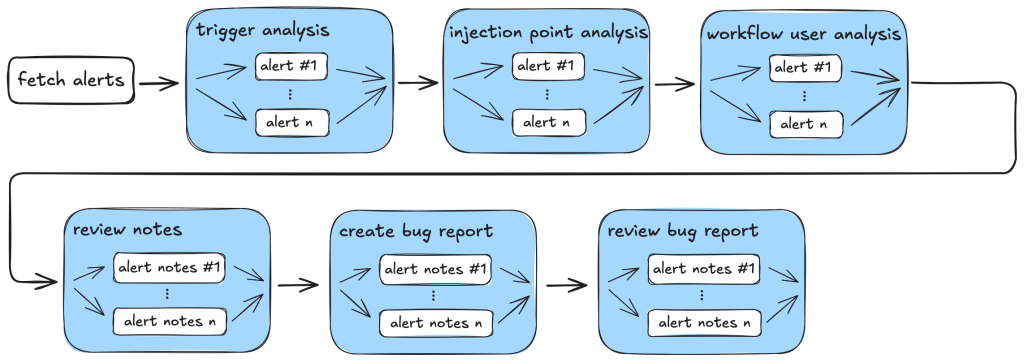
These are the checks the taskflows codify, structuring information gathering and audit into three stages.
Information gathering and auditing
- Workflow trigger analysis — Gathers the events that trigger the vulnerable workflow, plus its permissions and secrets, and verifies the workflow is not disabled. Since everything is local to the workflow itself, this stage performs preliminary auditing inline to eliminate obvious false positives before anything is recorded.
- Code injection point analysis — Also scoped to the vulnerable workflow, this combines gathering the injection point and the injected user input with local checks for whether that input is a real injection risk and whether a sanitizer exists.
- Workflow user analysis — This is caller analysis, and because it can pull in many files it is split into separate gather and audit tasks. The gather step retrieves callers and records their trigger events, permissions, and secrets; the audit step then decides whether an attacker can reach the vulnerable workflow.
At the end of these stages the running notes hold the workflow’s trigger events, permissions, secrets, and — for reusable workflows — the same context for every caller. That becomes the basis for the bug report.
Before generating the report, a review_report task sanity-checks the collected notes for completeness and consistency. The create_report task then produces the bug report that will be turned into a GitHub Issue. The issue text is validated once more for required information and formatting; anything missing or contradictory points to a failed step or a hallucination, and is rejected.
Issue creation and review
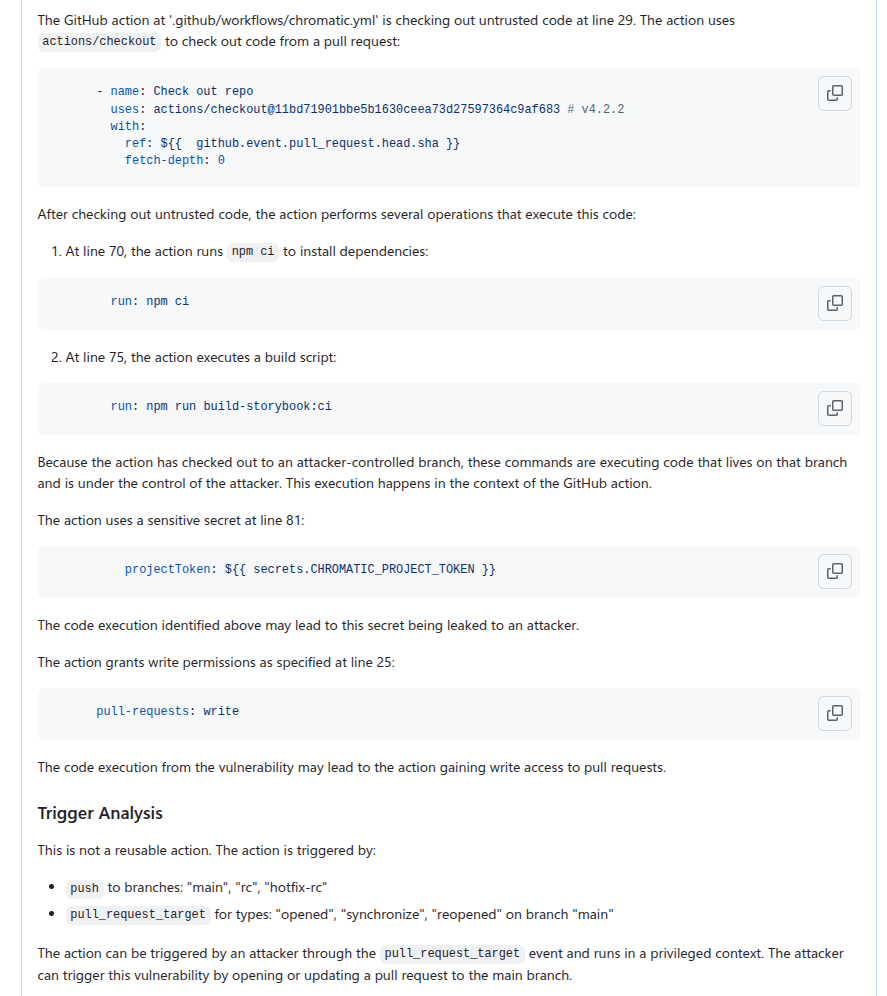
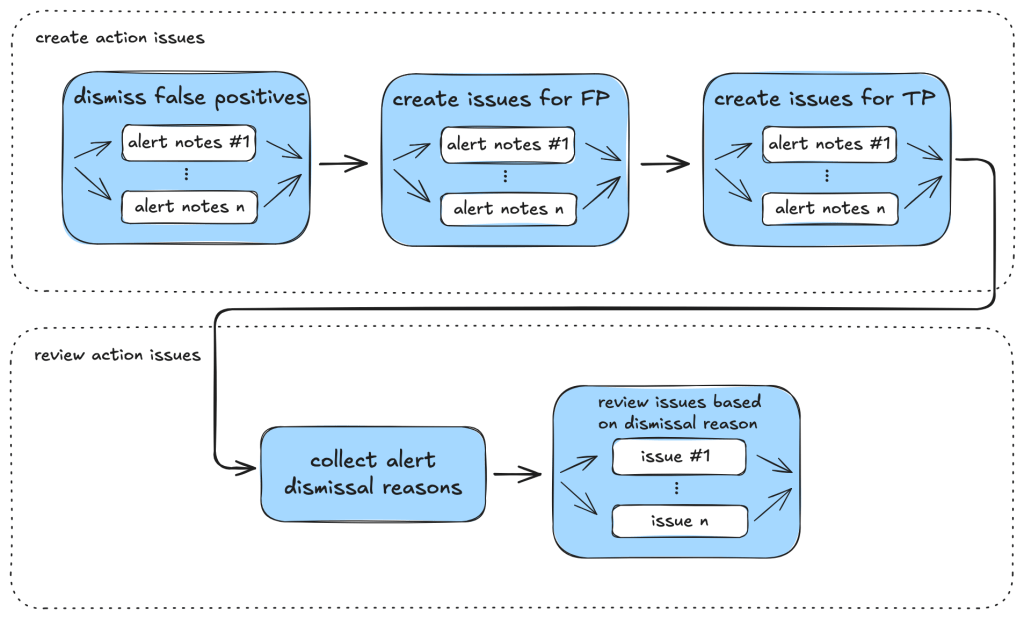
GitHub Issues are generated via the create_issue_actions taskflow. The issues carry enough information and code references that the vulnerability can be verified directly from them, and they double as a summary for deeper follow-up work. An example issue:
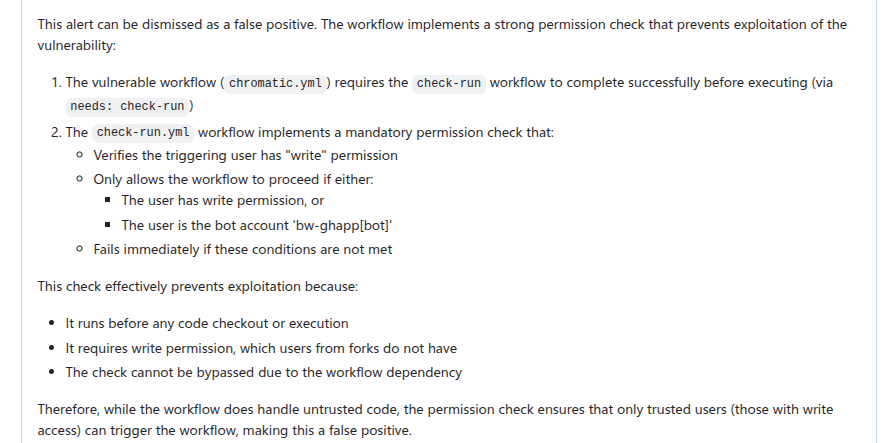
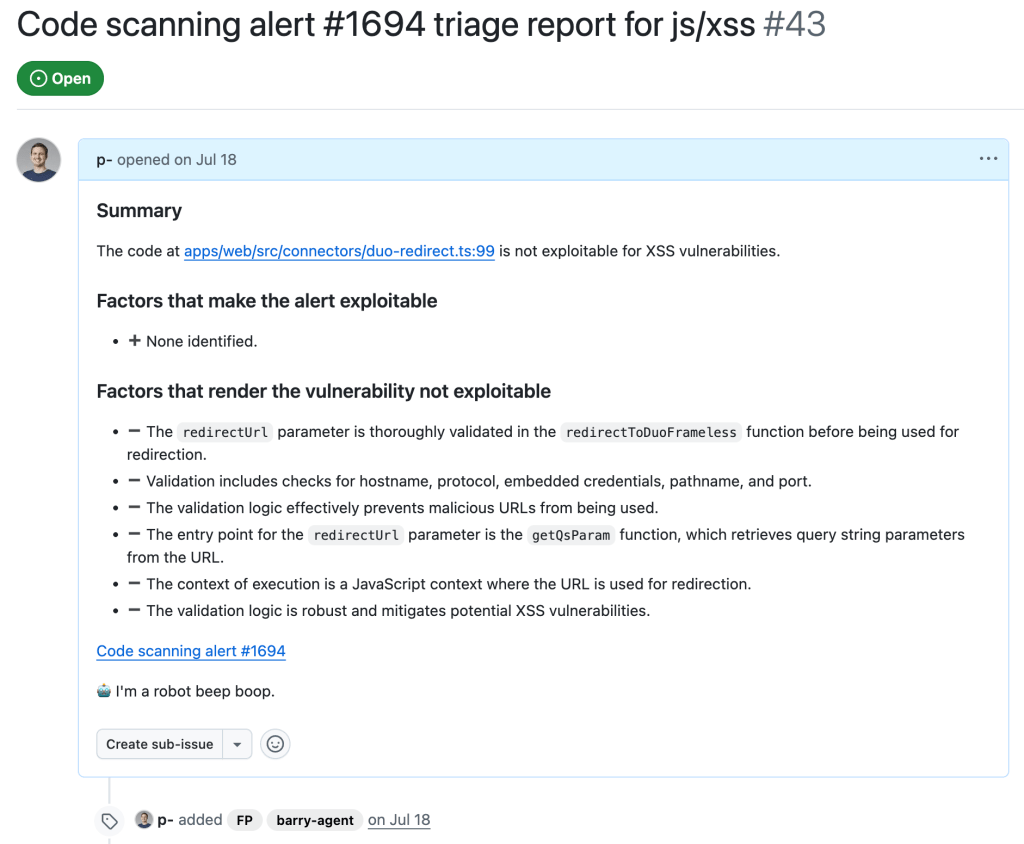
Issues and alert dismissal reasons also feed repo-specific security context back into the loop. The review_actions_injection_issues taskflow first collects dismissal reasons from the repository, then presents the LLM with the issue and those reasons together so it can audit whether any dismissal criterion applies to the current alert. This step turns up more false positives, as with this rejected alert:
Client-side XSS triage
We applied similar taskflows to JavaScript/TypeScript code-scanning alerts for the client-side XSS (js/xss) CodeQL rule, though less extensively.
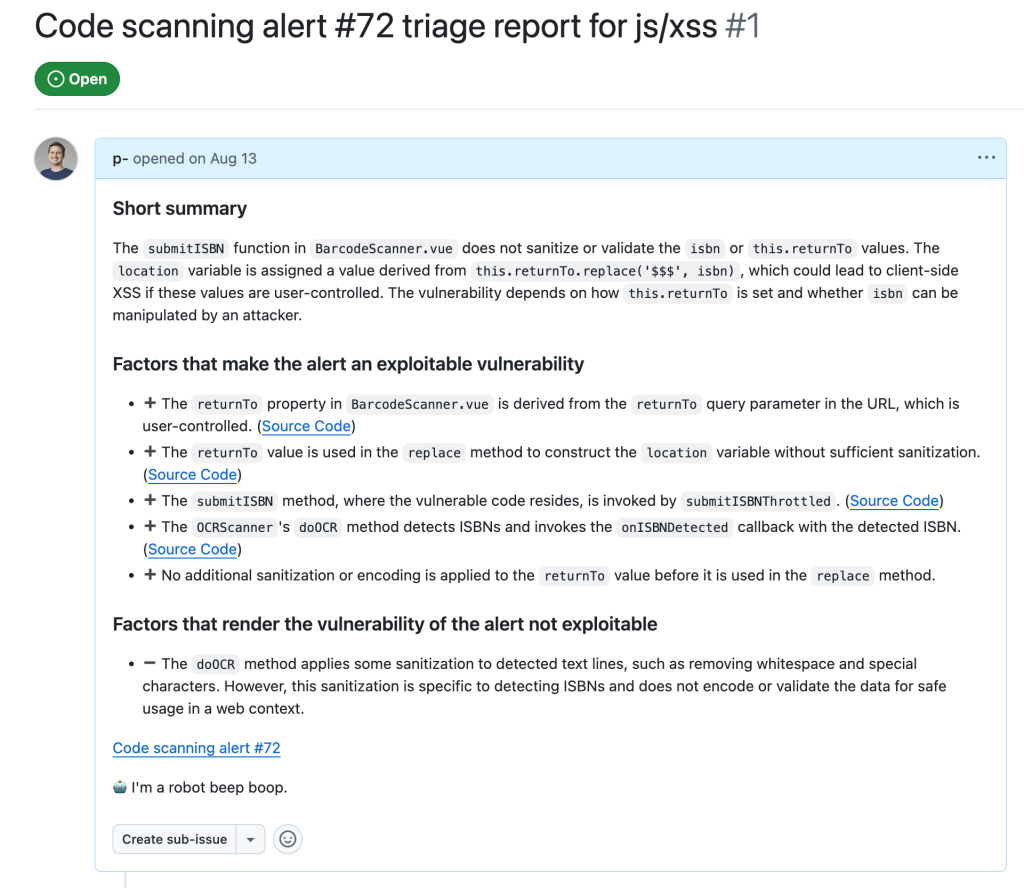
Unlike Actions alerts, XSS alerts vary widely in source, sink, and data flow. The prompts for these taskflows are tuned to support the human triager’s decision rather than replace it, calling out why an alert might be exploitable and, more importantly, what likely defuses it. The overall taskflow structure matches the Actions pattern.
Manual XSS triage surfaces a different set of recurring false positives:
- Custom or unrecognized sanitizers — for example regex-based ones the SAST tool cannot verify.
- Sources unlikely reachable in practice, such as requiring an attacker to send messages directly from the webserver.
- Untrusted data flowing into a dangerous sink whose output is subsequently only used non-exploitably.
- Missing context around where the processed untrusted data actually lands.
These patterns shaped the prompts in both the taskflow and the active personality. When a project shows repeated false positives of a particular shape, extending the prompt to mark them correctly is the natural development path.
After running triage_js_ts_client_side_xss and create_issues_js_ts, the workflow produces issues like this one for an alert worth following — a case that became a confirmed true positive exploitable via a javascript: URL:
Alerts the agent determines to be false positives get their issues labeled "FP":
Practical taskflow development
Building these taskflows taught us a few lessons worth passing on to anyone creating their own.
First, real triage patterns are the best taskflow specification. Every false-positive criterion above came from actual manual triage sessions, and the taskflows mirror those checks instead of inventing new procedure.
Second, stages that can vary widely in scope deserve separate gather and audit passes. The caller analysis is the clearest example: the number of files to inspect can grow large, so splitting retrieval from evaluation keeps each step focused and modifiable.
Third, validation of the agent’s notes and reports is essential for catching hallucinations early. The review and formatting checks before issue creation are not ceremony — they reject incomplete analyses that would otherwise pollute the issue tracker.
Pragmatic Design Lessons From the Triage Agent
Building the triage taskflows surfaced several practical lessons about orchestrating LLM-driven work reliably. These shaped the final design of the seclab-taskflow-agent and its companion taskflows.
Persist State Between Steps
A taskflow with multiple tasks will inevitably hit failures in later stages. API calls fail, MCP servers misbehave, prompts produce unexpected output, and token or quota limits get exhausted. Keeping every task small and writing each task’s results to a database made recovery straightforward: when a step fails, you rerun only from that task onward and reuse the stored output of earlier tasks. This also isolated the effect of each task, making it easier to debug and iterate on one stage at a time using the database produced by the previous stage as a starting point.
Small Tasks, Fresh Contexts
The models available during development did not cope well with large contexts and compound instructions. Trying to complete several distinct jobs inside a single context frequently led to skipped steps or ignored instructions. Splitting the work into small, independent tasks, each starting with a new context, reduced the size of the context window and eliminated many of those failures.
A concrete example is the templated repeat_prompt task, which iterates over a list and spins up a fresh context for every item. Rather than walking through a list inside one prompt, each iteration is guaranteed to run, with minimal context per task.
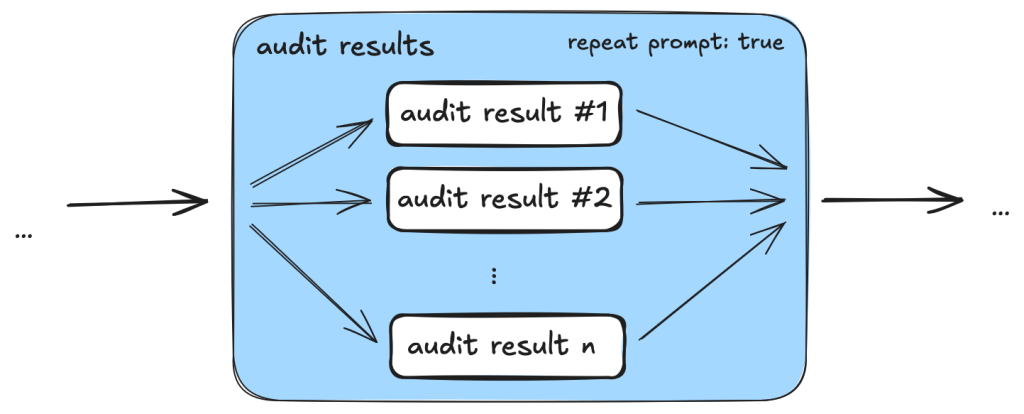
There is a debugging benefit as well. With small tasks and per-task database storage, you can extract any portion of a taskflow and execute it in isolation for fine-grained tweaking.
Prefer MCP Tools for Deterministic Checks
Early on, the taskflows asked the LLM to inspect source code for things like workflow triggers. That worked most of the time, but the non-deterministic nature of the model showed through: sometimes it captured only a subset of trigger events, and sometimes it reached inconsistent conclusions about whether a trigger ran in a privileged context.
Those checks are easily performed programmatically, so they were moved into MCP server tools. This produced far more consistent results. The general principle is to hand off any task that can be done deterministically to an MCP tool and reserve the LLM for genuinely complex reasoning, such as finding permission checks, where its capabilities add value without compromising consistency.
Composability Across Taskflows
During development it became obvious that many tasks were shared between triage flows. To avoid copy-paste divergence, the team added support for reusable tasks and prompts. That made it possible to apply a fix once and have it propagate consistently to every taskflow that references the shared component.
Model configurations get the same treatment. Since LLM versions churn frequently, a model configuration feature allows updating the model across all taskflows from one place, whether for a version bump or for experiments with a different model.
Outcome and Caveats
These taskflows for triaging code scanning alerts automated repetitive work and let well-scoped prompts with explicit criteria and code references keep hallucinations minimal. Running them led to roughly 30 real-world vulnerabilities discovered from CodeQL alerts without dynamic validation.
The published taskflows are available in the GitHub Security Lab repository. Three caveats apply: researchers review all generated output before reporting anything, and you should too; taskflows generate many tool calls that can consume large amounts of quota; and since the taskflows may create GitHub Issues, get the repo owner’s consent before running them on someone else’s project.


