Fighting z-index bugs without a real system
A z-index bug usually means one element is covering another. The usual quick fix is to add position: relative so that z-index applies at all, then nudge the value until the right element wins.
That habit tends to start a z-index arms race. Bumping a value here fixes one overlap and breaks another by covering up an element somewhere else. With a complex-enough stack of values, the real remedy is an abstraction rather than another increment. Since z-index values are often scattered randomly across a stylesheet, a central registry makes them referenceable from one place. A Sass map does that job:
$zindex: (
  modal     : 9000,
  overlay   : 8000,
  dropdown  : 7000,
  header    : 6000,
  footer    : 5000
);

.header {
  z-index: map-get($zindex, header);
}
OZMap by Rafi Strauss pushes this further, still as a Sass map, but configured like this:
$globalZIndexes: (
  a: null,
  b: null,
  c: 2000,
  d: null,
);
Most positions are generated automatically (the null entries), and you override them whenever you need to. A third-party component with a z-index you can't change gets plugged into the map, and the generated numbers account for it when layers are placed above. Layers can also be slipped between existing ones with very little effort.
When no z-index value can help
Centralized maps are useful, but they don't address stacking contexts. If an element sits in a stacking context that is beneath another stacking context, no z-index value will lift it on top. That bug is considerably harder to fix. As Andy Blum writes:
One of the great frustrations of front-end development is the unexpected interaction and overlapping of those same elements. Struggling to arrange elements along the z-axis, which extends perpendicularly through the computer screen towards and away from the viewer, is such a shared front-end experience that an element’s z-index can sometimes be used as a frustrate-o-meter gauging the developer’s mood.
The key to maintainable z-index values is understanding that z-index values can’t always be directly compared. They’re not an absolute measurement along an imaginary ruler extending out of the viewport; rather, they are a relative order between elements within the same stacking context.
Blum walks through a case where an RTL variant of a site includes a rule that uses a transform to reposition a video. That transform creates a new stacking context, which leaves a button unclickable.
Tooling for stacking contexts
Stacking contexts can be inspected with a browser extension available for Chrome and Firefox. A native DevTools feature for the same purpose may be worth imagining: badges, which see increasing use, could carry it. Chrome 94 added a new one for container queries.
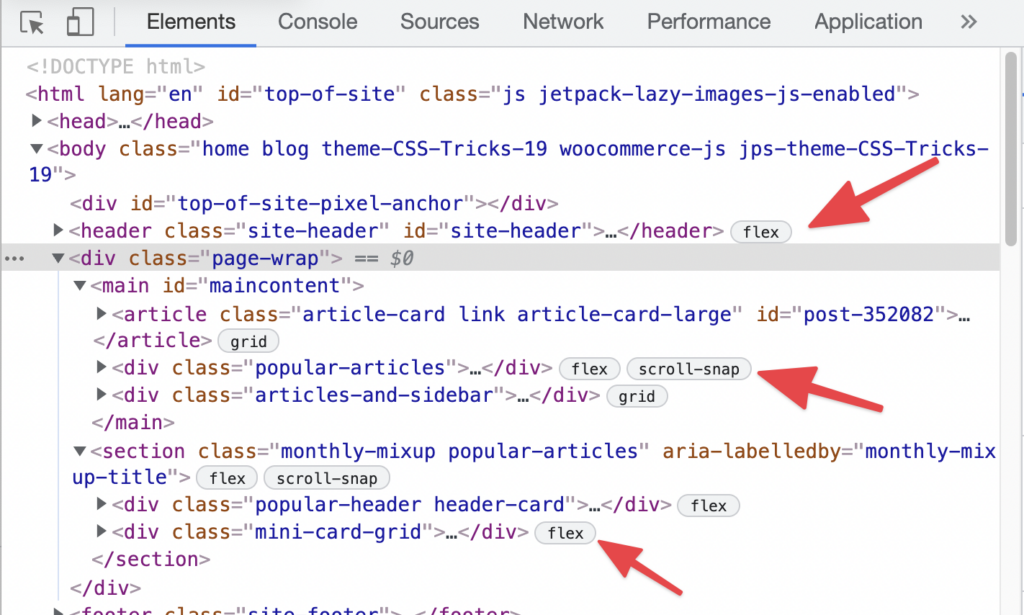
Badges usually open a dedicated UI when clicked — the flexbox and grid badges, for example, draw overlays for all grid lines. For stacking contexts, the equivalent could be color- or texture-coded, labelled regions showing each stacking context and the layering between them.



