WordPress is a PHP CMS built around a philosophy that puts user needs ahead of developer convenience. That philosophy forms an implicit contract between the people building themes and plugins and the people running a WordPress site. A GraphQL server, by contrast, is an interface for reading from and writing to the server, and its implementer can hold their own opinions about which behaviors to prioritize. The question is whether a server-side philosophy can coexist with a JavaScript-based query language that passes data through an API. The GraphQL API for WordPress plugin (referred to below as "GraphQL API") is a GraphQL server for WordPress—distinct from WPGraphQL, with a different feature set—that tries to bridge the two architectures.
Mapping WordPress expectations onto a GraphQL service
The table below pairs expected WordPress behavior with how a GraphQL service on WordPress can interpret it:
| Category | WordPress app expected behavior | Interpretation for GraphQL service running on WordPress |
|---|---|---|
| Accessing data | Democratizing publishing: Any user (irrespective of having technical skills or not) must be able to use the software | Democratizing data access and publishing: Any user (irrespective of having technical skills or not) must be able to visualize and modify the GraphQL schema, and execute a GraphQL query |
| Extensibility | The application must be extensible through plugins | The GraphQL schema must be extensible through plugins |
| Dynamic behavior | The behavior of the application can be modified through hooks | The results from resolving a query can be modified through directives |
| Localization | The application must be localized, to be used by people from any region, speaking any language | The GraphQL schema must be localized, to be used by people from any region, speaking any language |
| User interfaces | Installing and operating functionality must be done through a user interface, resorting to code as little as possible | Adding new entities (types, fields, directives) to the GraphQL schema, configuring them, executing queries, and defining permissions to access the service must be done through a user interface, resorting to code as little as possible |
| Access control | Access to functionalities can be granted through user roles and permissions | Access to the GraphQL schema can be granted through user roles and permissions |
| Preventing conflicts | Developers do not know in advance who will use their plugins, or what configuration/environment those sites will run, meaning the plugin must be prepared for conflicts (such as having two plugins define the SMTP service), and attempt to prevent them, as much as possible | Developers do not know in advance who will access and modify the GraphQL schema, or what configuration/environment those sites will run, meaning the plugin must be prepared for conflicts (such as having two plugins with the same name for a type in the GraphQL schema), and attempt to prevent them, as much as possible |
Schema construction and data access
As with REST, a GraphQL service must be built from PHP functions, which raises the question of who writes those functions and how.
Resolvers as PHP code
A GraphQL schema consists of types, fields, and directives, each handled by resolvers written in PHP. The best strategy is for the plugin to ship a schema covering the entities WordPress already knows about—posts, users, comments, categories, and tags—while keeping it simple to add new resolvers, for example for Custom Post Types. The User type serves as an example: its type resolver does not load objects from the database itself. That task is delegated to a TypeDataLoader object (here, UserTypeDataLoader), a decoupling that follows the SOLID principles so that responsibilities stay separated and the code remains maintainable, extensible, and understandable.
Fields such as username, email, and url are added to the User type through a FieldResolver. Defining a schema field and resolving it are split across several functions:
getSchemaFieldDescriptiongetSchemaFieldTyperesolveValue
Further functions handle other aspects of a field:
getSchemaFieldArgs: declares the field arguments, including name, description, type, and whether each is mandatoryisSchemaFieldResponseNonNullable: marks a field as non-nullablegetImplementedInterfaceClasses: defines the resolvers for interfaces the fields implementresolveFieldTypeResolverClass: defines the type resolver when the field is a connectionresolveFieldMutationResolverClass: defines the resolver when the field performs mutations
Spreading the work across these functions is more legible than cramming everything into one function or a configuration array, which makes resolvers easier to implement and maintain.
Querying raw custom post type data
Suppose a plugin such as WooCommerce registers a CPT for products but never adds a corresponding Product type to the schema. Can its data still be retrieved? For CPT entities, the answer is the GenericCustomPost type, a kind of wildcard covering any custom post type on the site. Records come back through Root.genericCustomPosts(customPostTypes: [cpt1, cpt2, ...]), where Root is the type and genericCustomPosts the field. A product query against CPT "wc_product" looks like this:
{
  genericCustomPosts(customPostTypes: "[wc_product]") {
    id
    title
    url
    date
  }
}
The catch is that only fields common to every CPT entity are available: title, url, date, and so on. A price stored by the product CPT is not exposed as a price field. Because wc_product is created by WooCommerce, either the plugin's developers or the site's developers must implement the Product type and its custom fields.
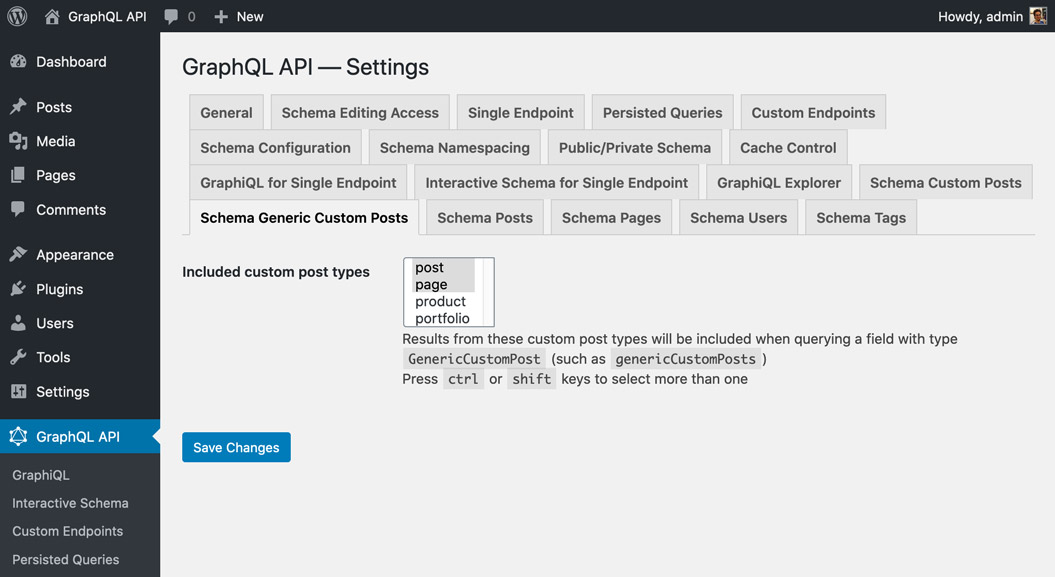
CPTs frequently hold private data that must not leak through the API. For that reason, GraphQL API exposes only the Page type out of the box, and the site owner must specify which other CPTs may be queried publicly:
Persisted queries as a REST migration path
WordPress ships built-in support for REST through the WP REST API, and developers moving to GraphQL may run into friction. A REST endpoint has its own URL and can be queried with GET; GraphQL normally uses a single endpoint reached only by POST. A REST endpoint queried via GET can be cached server-side, while the GraphQL endpoint normally cannot. REST therefore has better out-of-the-box caching, which makes applications more performant and lightens the server load; GraphQL instead leans on client-side caching, as provided by the Apollo client. It would be unfortunate if switching to GraphQL forced a client-side re-architecture just to get a caching layer.
Persisted queries address this by combining the two models: queries are written in GraphQL but published on their own URL, much like REST endpoints. A persisted query endpoint behaves like a REST endpoint—it is reachable via GET and can be cached server-side—yet it was authored in GraphQL syntax and the data it exposes is neither under- nor over-fetched.
Keeping the schema extensible
Publish-subscribe between fields and types
GraphQL API uses the publish-subscribe pattern so that fields "subscribe" to types. The User type does not know in advance which fields it will satisfy; the field resolver injects username, email, and url into it. Any plugin can therefore extend an existing type just by adding a field resolver—WooCommerce might add User.shippingAddress—or override how a field resolves, such as redefining User.url to return the user's website.
Code-first versus SDL-first
Plugins need to extend the schema: adding a Product type, a coauthors field on Post, a @sendEmail directive, or anything else. GraphQL API takes a code-first approach, generating the schema from PHP code at runtime. The alternative, SDL-first, requires the schema to be supplied in advance, for instance in a .gql file. The key difference is that a code-first schema is dynamic and can adapt to different users or applications—a fit for WordPress, where one site may power several applications (a website and a mobile app, say) customized per client. The plugin makes this explicit through its "custom endpoints" feature, which lets you create separate endpoints with separate schemas for separate users or applications. To avoid a performance penalty, the schema is cached to disk or memory and regenerated whenever a plugin that extends it is installed or the admin changes the settings.
Features ahead of the spec
Code-first also allows opting into features before the GraphQL spec supports them. Nested mutations have been requested for the spec but are not yet approved. By default, GraphQL API complies with the spec, using QueryRoot and MutationRoot for queries and mutations respectively. Enabling the opt-in "nested mutations" feature transforms the schema so that a single Root type handles both. In the query below, the post is fetched through Root.post, then mutation Post.addComment runs on it and returns the created comment, and then mutation Comment.reply runs on that comment and asks for some of its data (the commented-out first mutation logs the user in, which is required to add comments):
# mutation {
#   loginUser(
#     usernameOrEmail:"test",
#     password:"pass"
#   ) {
#     id
#     name
#   }
# }
mutation {
  post(id:1459) {
    id
    title
    addComment(comment:"That's really beautiful!") {
      id
      date
      content
      author {
        id
        name
      }
      reply(comment:"Yes, it is!") {
        id
        date
        content
      }
    }
  }
}
Directives as the hook equivalent
WordPress changes behavior through hooks—filters and actions—which are small pieces of code that can override a value or run a custom action when triggered. In GraphQL, directives can be considered the equivalent to some extent: like a filter hook, a directive is a function that modifies a field's value and augments other functionality.
Take a query that retrieves a list of post titles:
query {
  posts {
    title
  }
}
Its response:
{
  "data": {
    "posts": [
      {
        "title": "Scheduled by Leo"
      },
      {
        "title": "COPE with WordPress: Post demo containing plenty of blocks"
      },
      {
        "title": "A lovely tango, not with leo"
      },
      {
      "title": "Hello world!"
      },
    ]
  }
}
The titles come back in English. To translate them to Spanish, apply a @translate directive to the title field. The directive takes the field's value as input, calls the Google Translate API, and lets the result override the original input:
query {
  posts {
    title @translate(from:"en", to"es")
  }
}
And the response:
{
  "data": {
    "posts": [
      {
        "title": "Programado por Leo"
      },
      {
        "title": "COPE con WordPress: publica una demostración que contiene muchos bloques"
      },
      {
        "title": "Un tango lindo, no con leo"
      },
      {
        "title": "¡Hola Mundo!"
      }
    ]
  }
}
A directive does not care what kind of input it receives: here it was Post.title, but it could have been Post.excerpt, Comment.content, or any other field of type String. Field resolution and value override stay cleanly separated, and directives remain reusable.
WordPress increasingly interacts with outside services—Stripe for payments, Slack for notifications, AWS S3 for assets, and others—and the new value a directive produces need not come from a local function. The @translate directive above pulls its value from the Google Translate API, which is why GraphQL API makes it easy for directives to talk to external APIs, letting those services transform site data during query execution for purposes such as translation, image compression, sourcing through a CDN, and sending email, SMS, and Slack notifications. Directives are made as powerful as possible by treating them as low-level components of the server's architecture, to the point that query resolution itself is based on a directive pipeline. That gives directives the power to perform authorizations, validations, and response modification, among other jobs.
Localization, tooling, and access control
Localizing schema text
Servers using SDL-first have trouble localizing the information in their schema; the related spec issue has been open for more than four years without resolution. With code-first, GraphQL API localizes descriptions directly through the PHP function __('some text', 'domain'), pulling localized strings from a POT file matching the region and language selected in the WordPress admin. The field description code is one example.
class UserFieldResolver extends AbstractDBDataFieldResolver
{
  public function getSchemaFieldDescription(
    TypeResolverInterface $typeResolver,
    string $fieldName
  ): ?string {
    $descriptions = [
      'username' => __("User's username handle", "graphql-api"),
      'email' => __("User's email", "graphql-api"),
      'url' => __("URL of the user's profile in the website", "graphql-api"),
    ];
    return $descriptions[$fieldName];
  }
}
Open source clients
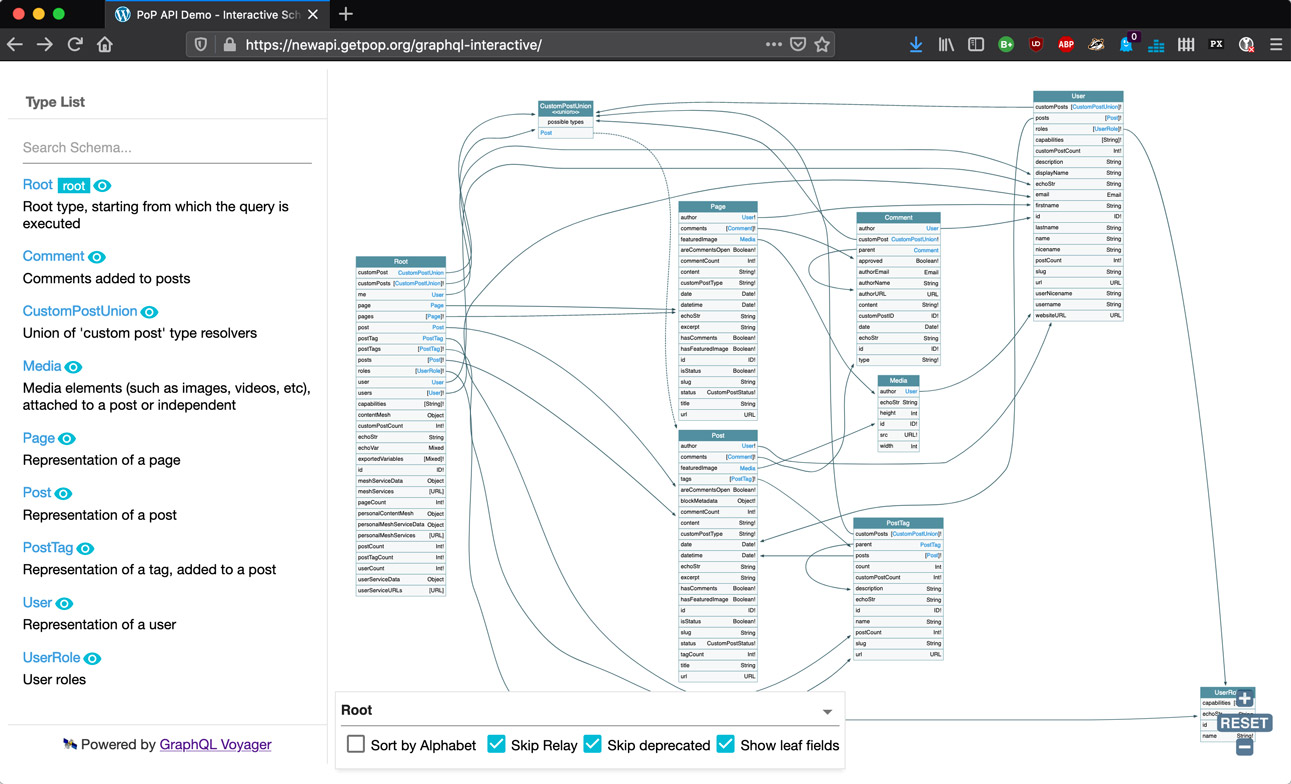
The GraphQL ecosystem offers plenty of open source tools for interacting with the service, many of which deliver the friendly experience WordPress users expect. GraphQL Voyager visualizes the schema, which is particularly useful when building your own CPTs and checking how they can be reached and what data they expose:
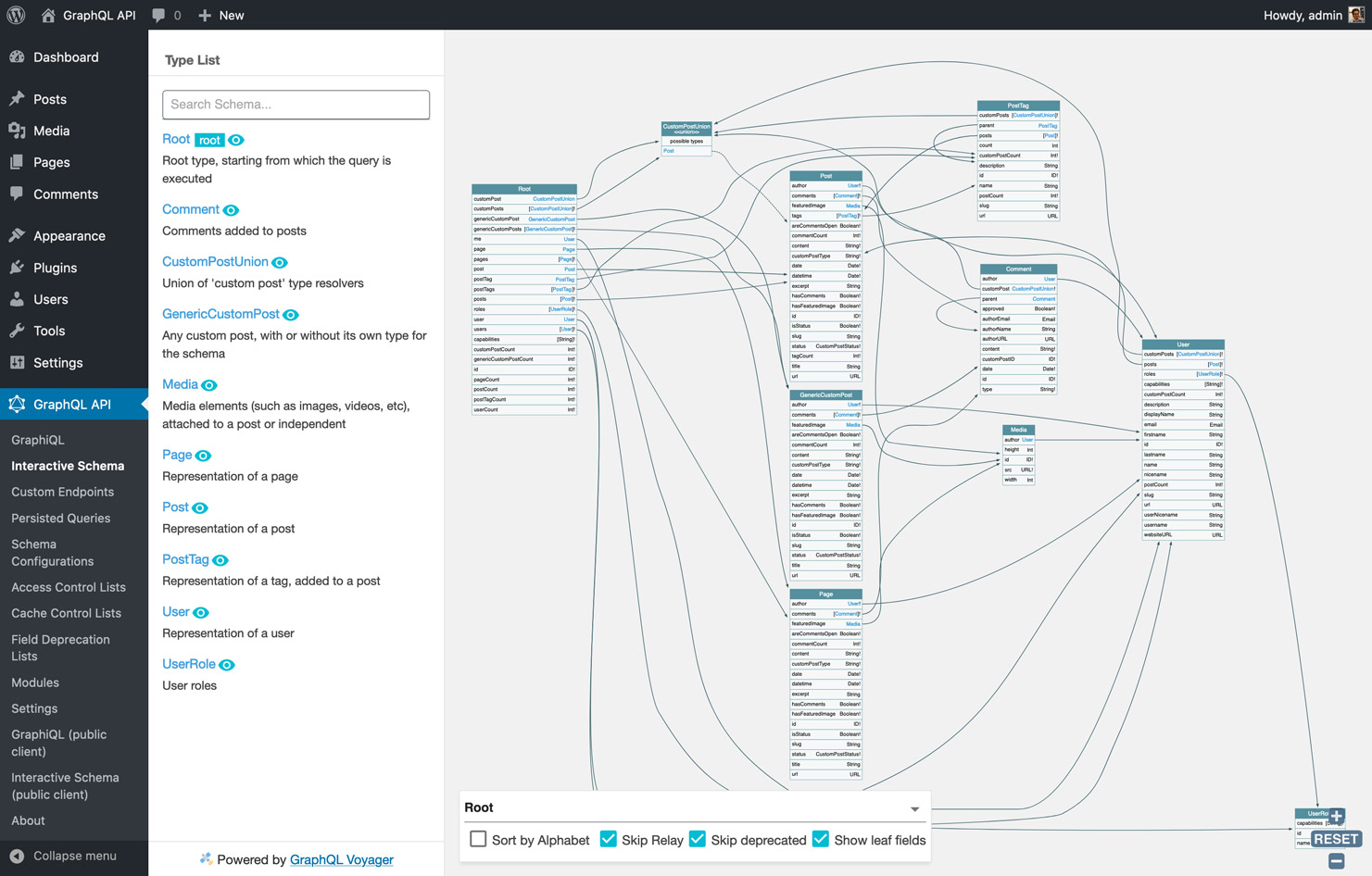
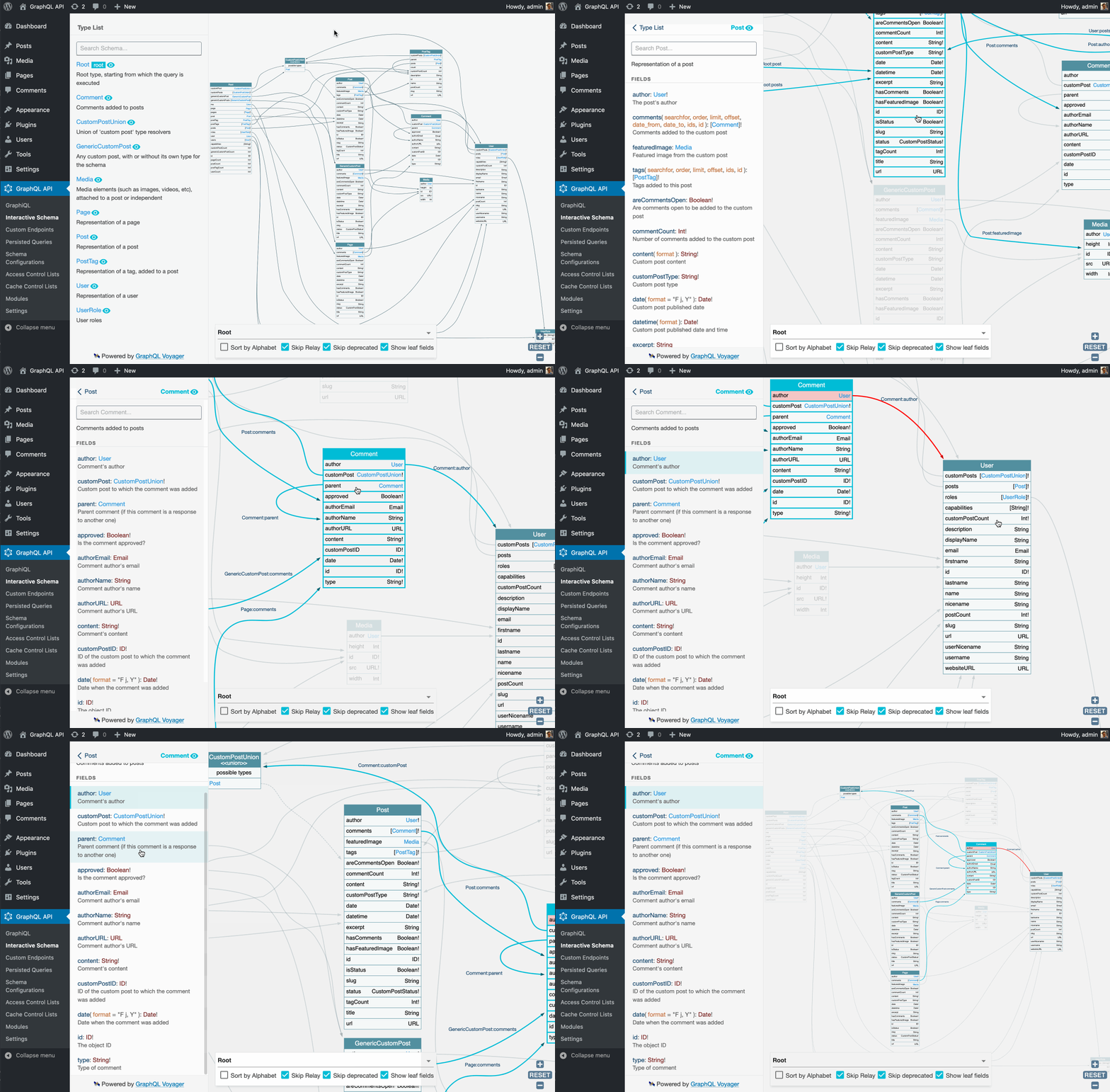
Queries run against the endpoint through GraphiQL:
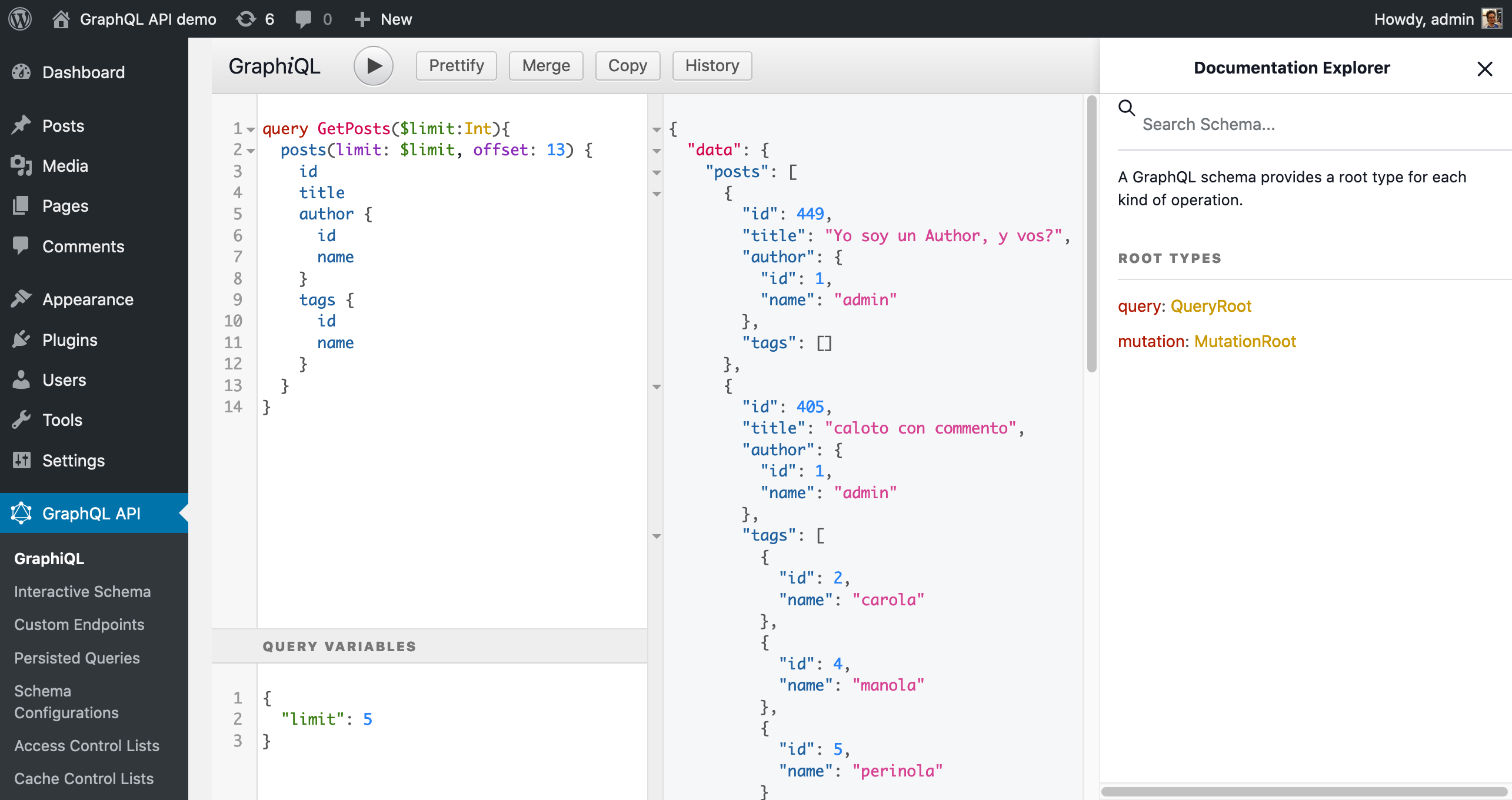
That tool still demands knowledge of GraphQL query syntax, so GraphiQL Explorer is installed on top of it to compose queries by clicking on fields:
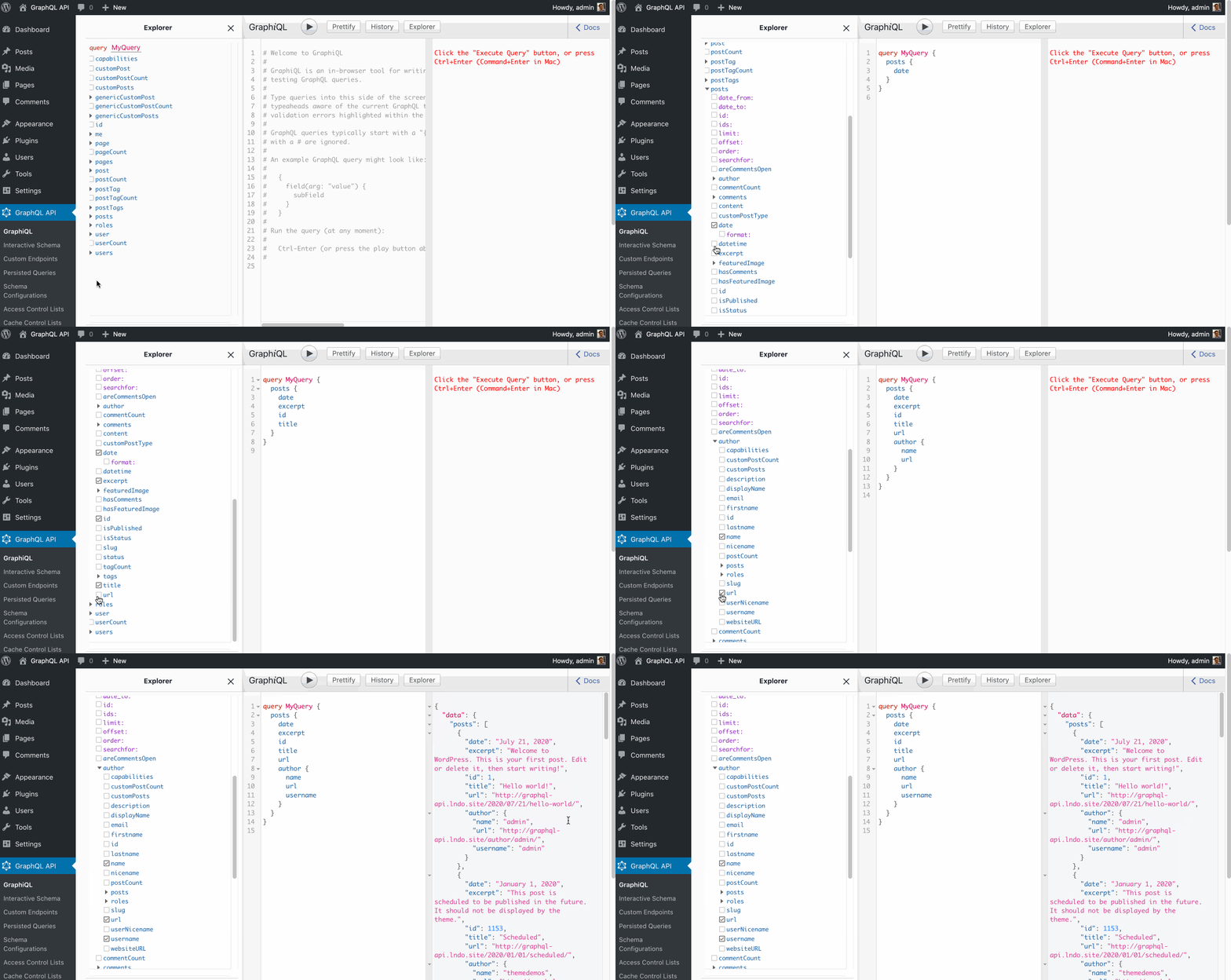
Who may access what
WordPress has roles (admin, editor, author, contributor, subscriber), and users may be logged in to wp-admin (staff), logged in to the public-facing site (clients), or have no account at all (visitors). GraphQL API must accommodate all of them with granular access. The plugin lets you configure who can reach the GraphiQL and Voyager clients to inspect the schema and run queries: only the admin, the staff, the clients, or everyone. For security, the default is admin only, and the service is not openly exposed on the internet. In the screenshots above, both clients live in wp-admin and are available only to the admin, who can extend access to editors, authors, and contributors through the settings:
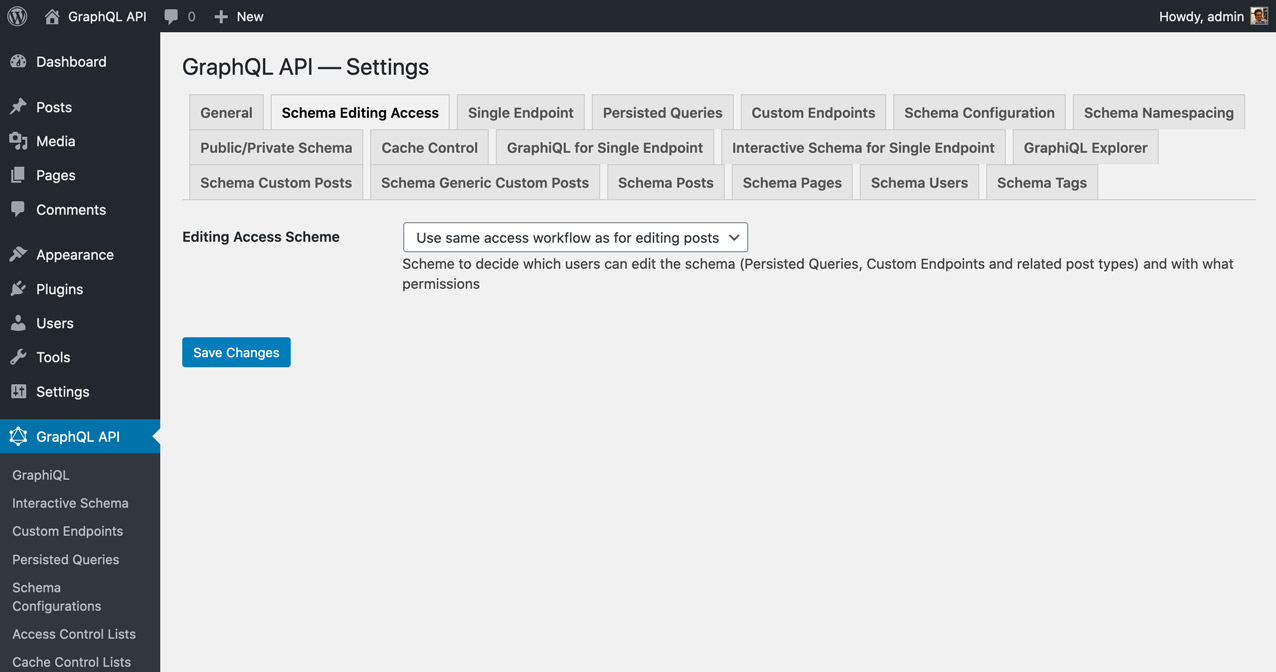
To serve clients or the open internet, you would not want to hand out wp-admin access. Instead, the settings can expose the tools under new public URLs (for example mywebsite.com/graphiql and mywebsite.com/graphql-interactive). Publishing these URLs is opt-in and must be explicitly set by the admin.
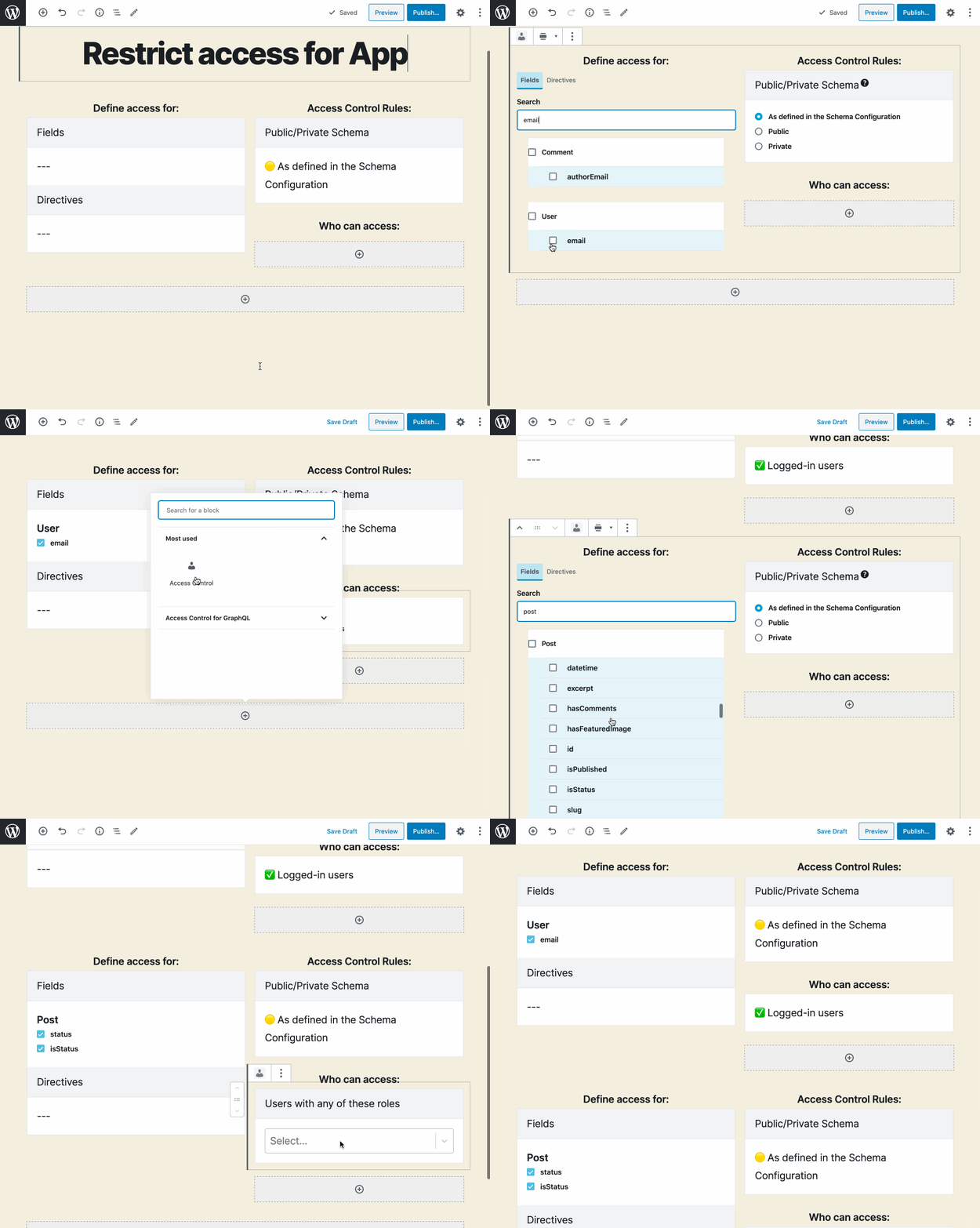
The WP REST API makes it hard to customize who may access an endpoint or a field within one: there is no user interface, and it has to be done in code. GraphQL API instead uses the metadata already present in the schema to configure the service through a user interface powered by the WordPress editor, so non-technical users can manage their APIs without writing code. Access control for fields and directives is set by clicking on them and choosing from a dropdown which users—those logged in, or those with specific capabilities—may access them.
Namespacing type conflicts
If two plugins give their types the same name, namespacing prevents a collision. Say WooCommerce and Easy Digital Downloads both implement a Product type; a query to fetch products becomes ambiguous. Namespacing renames them WooCommerceProduct and EDDProduct. Such a collision is not very likely, so the best strategy keeps namespacing off by default, preserving the simplest possible schema and enabling it only when needed. When enabled, the server namespaces types automatically using the corresponding PHP package name, following PSR-4. In the regular schema below:
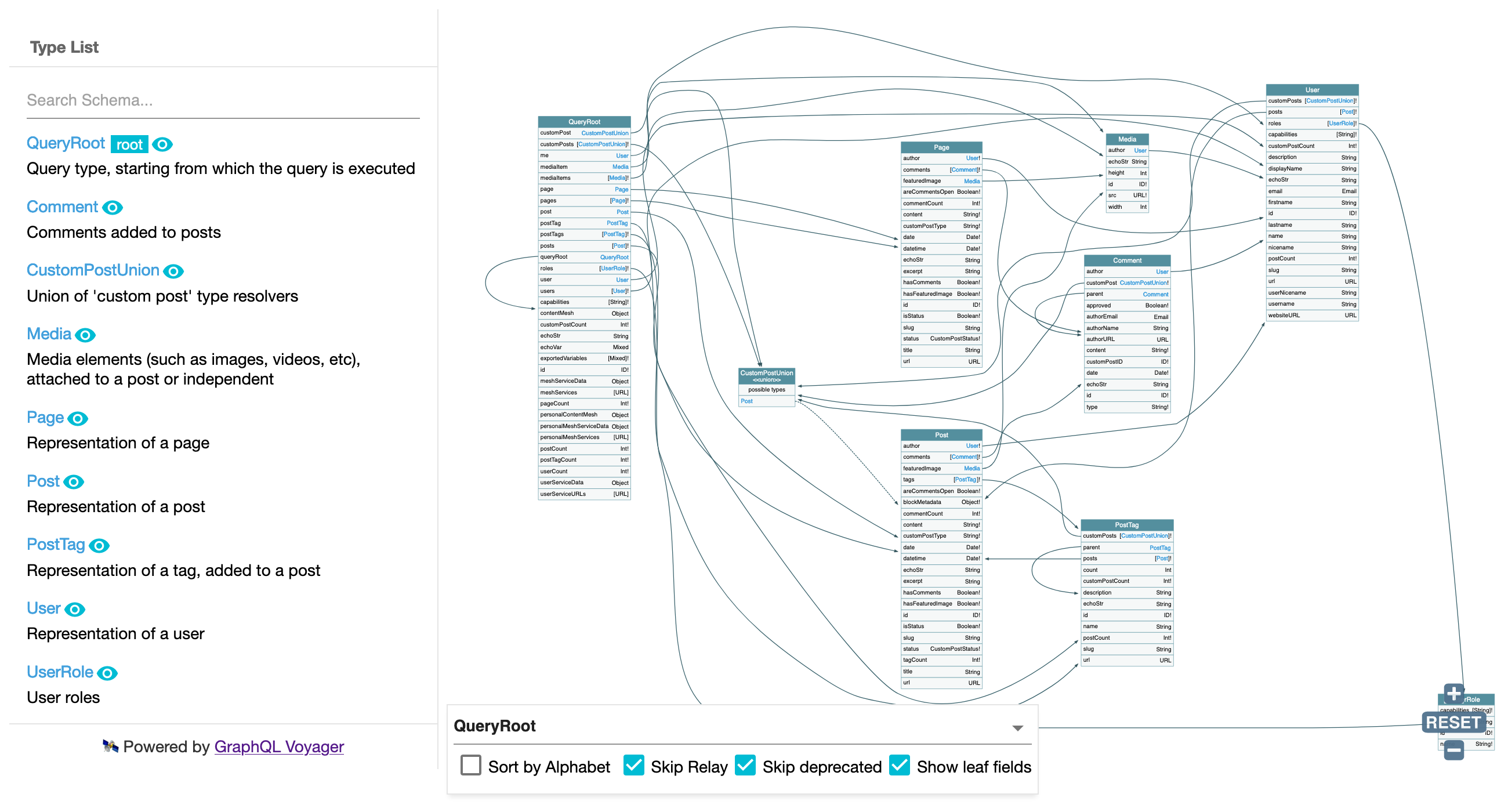
With namespacing enabled, Post becomes PoPSchema_Posts_Post, Comment becomes PoPSchema_Comments_Comment, and so on.