

A new home for CS teachers
GitHub has relaunched its education portal as Global Campus, a single dashboard aimed at computer science teachers. The site consolidates the company's existing education tools—teacher verification, GitHub Classroom management, community features, and event listings—into one place. GitHub says the platform already serves nearly two million students and teachers worldwide.
The headline addition for educators is free access to GitHub Codespaces through GitHub Classroom. For teachers who have spent class time wrestling with local development environments instead of reviewing student code, the browser-based IDE removes a significant source of friction. Any device with a browser—including Chromebooks and iPads—can now function as a development environment, and students no longer face the cost or hardware barriers of running a full local toolchain.
What teachers get with Global Campus
Once verified, teachers can use Global Campus to:
- Enable Codespaces in GitHub Classroom assignments. Codespaces is now a supported IDE option, so students can start coding immediately without configuring their own machines.
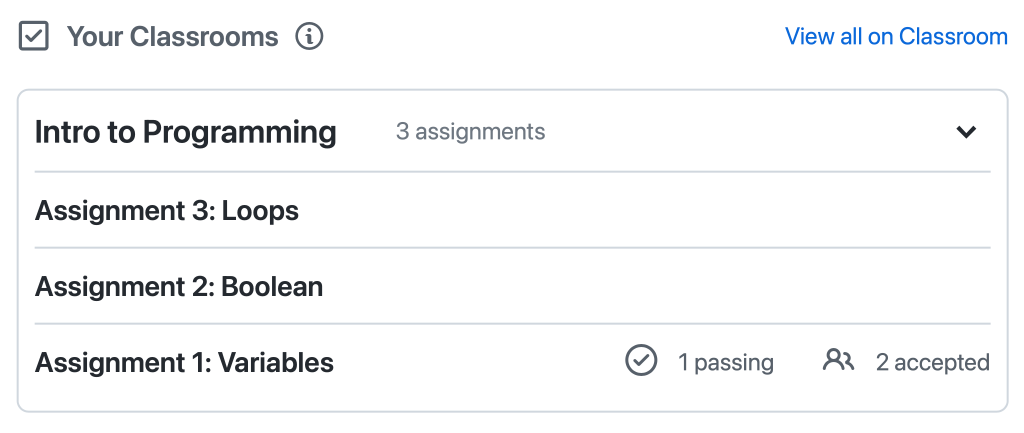
- Monitor active classrooms. The dashboard shows recent assignments and class progress at a glance.
- Upgrade organizations to GitHub Team. This includes automated repository management and increased GitHub Actions minutes, which can be applied to autograding workflows in Classroom.

- Connect with other teachers via GitHub Discussions. The community lets educators share practices and collaborate on course design.
- Discover student events. Listings cover hackathons, tech talks, cybersecurity topics, and career preparation, curated by GitHub Education and student leaders.

- Rewatch Campus TV episodes. These live and on-demand streams, produced by GitHub and student community leaders, cover topics relevant to student developers.
- Request classroom swag. Stickers, cheat sheets, and other materials are available to verified teachers.
Why Codespaces fits the classroom
Codespaces provides a Visual Studio Code-backed editor, terminal, and debugger with GitHub version control, running in the browser or on the desktop. For instructors, the main advantage is consistency: by standardizing environments, runtime versions, extensions, and editor settings, teachers eliminate the "works on my machine" problem. Every student works with the same setup, regardless of their personal hardware.
While GitHub Team and Enterprise customers normally pay for Codespaces on a usage basis, Global Campus teachers receive a free monthly allowance of Codespaces compute hours for classroom use. GitHub estimates this is sufficient for a class of 50 students completing five assignments per month on a 2-core machine, with one stored codespace per student. Billing details for usage beyond the allowance are documented on the Codespaces pricing page.
Getting started
Teachers who are not yet verified can apply for GitHub Education teacher benefits. Accepted applicants gain Global Campus access at education.github.com.
Already verified teachers simply sign in at that URL and are redirected to the Global Campus dashboard automatically.
From there, the workflow runs through GitHub Classroom. When creating an assignment, teachers can enable Codespaces and choose a language and environment template—either GitHub's defaults or a custom configuration. Students who accept the assignment receive a repository with Codespaces pre-enabled, ready to open in the browser.
GitHub says Global Campus will continue to expand with new resources and industry tools for educators. The immediate takeaway is straightforward: verified teachers now have a free, centralized route to industry-standard development tools for their courses. As GitHub puts it, this is intended to help prepare students for a career in tech—by letting them focus on code rather than configuration.


