
Gamepad API Basics for Web Games
Chrome's offline easter egg—the dinosaur game that appears when you lose connectivity—is better known than most hidden features. You can even reach it without going offline by navigating to about://dino. The game sees around 270 million plays monthly. Less known: in arcade mode you can play with a physical gamepad. Gamepad support arrived in a Chromium commit by Reilly Grant about a year before this writing, and the entire game remains open source within the Chromium project.
The Gamepad API itself has broad browser support across desktop and mobile. Feature detection is straightforward:
if ('getGamepads' in navigator) {
  // The API is supported!
}
How Browsers Model Gamepads
The browser exposes gamepads as Gamepad objects with these properties:
id: A string identifying the brand or style of the connected device.displayId: TheVRDisplay.displayIdof an associatedVRDisplay, if relevant.index: The gamepad's index in the navigator.connected: Whether the gamepad is still connected to the system.hand: An enum indicating which hand the controller is held in or most likely held in.timestamp: The last time the data for this gamepad was updated.mapping: The button and axes mapping in use, either"standard"or"xr-standard".pose: AGamepadPoseobject with pose information for a WebVR controller.axes: An array of axis values, linearly normalized to-1.0to1.0.buttons: An array of button states.
Individual buttons can be digital or analog, so they are represented as GamepadButton objects with their own structure:
pressed: Boolean pressed state.touched: Boolean touched state, where the button supports touch detection.value: For analog sensors, the pressed amount normalized to0.0through1.0.hapticActuators: An array ofGamepadHapticActuatorobjects for haptic feedback hardware.
Some browsers and devices also expose a vibrationActuator property. It supports two kinds of rumble: dual-rumble, produced by two eccentric rotating mass actuators (one in each grip), and trigger-rumble, produced by two independent motors in the triggers.
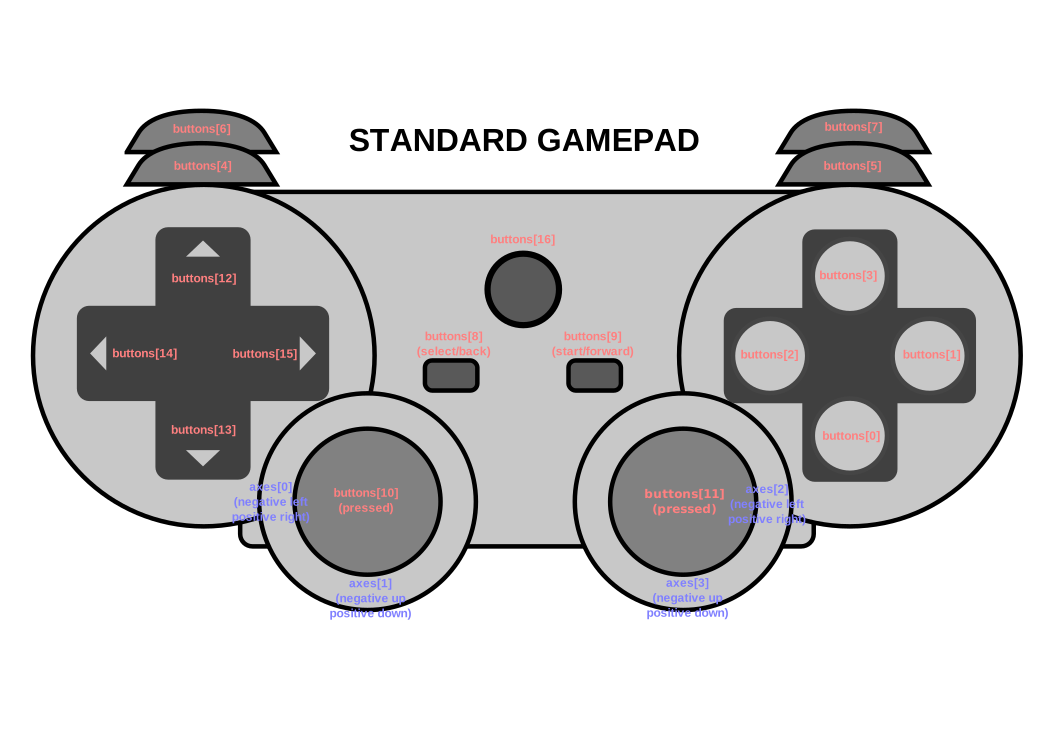
The layout above, taken from the spec, shows the standard arrangement of buttons and axes on a generic gamepad.
Connection and Disconnection Events
To detect when a gamepad is plugged in—via USB or Bluetooth—listen for the gamepadconnected event on the window object. When it fires, a GamepadEvent carries the device details in a gamepad property:
window.addEventListener('gamepadconnected', (event) => {
  console.log('✅ 🎮 A gamepad was connected:', event.gamepad);
  /*
    gamepad: Gamepad
    axes: (4) [0, 0, 0, 0]
    buttons: (17) [GamepadButton, GamepadButton, GamepadButton, GamepadButton, GamepadButton, GamepadButton, GamepadButton, GamepadButton, GamepadButton, GamepadButton, GamepadButton, GamepadButton, GamepadButton, GamepadButton, GamepadButton, GamepadButton, GamepadButton]
    connected: true
    id: "Xbox 360 Controller (STANDARD GAMEPAD Vendor: 045e Product: 028e)"
    index: 0
    mapping: "standard"
    timestamp: 6563054.284999998
    vibrationActuator: GamepadHapticActuator {type: "dual-rumble"}
  */
});
Disconnections work the same way, via the gamepaddisconnected event. The connected property on the event's gamepad is false in this case:
window.addEventListener('gamepaddisconnected', (event) => {
  console.log('❌ 🎮 A gamepad was disconnected:', event.gamepad);
  /*
    gamepad: Gamepad
    axes: (4) [0, 0, 0, 0]
    buttons: (17) [GamepadButton, GamepadButton, GamepadButton, GamepadButton, GamepadButton, GamepadButton, GamepadButton, GamepadButton, GamepadButton, GamepadButton, GamepadButton, GamepadButton, GamepadButton, GamepadButton, GamepadButton, GamepadButton, GamepadButton]
    connected: false
    id: "Xbox 360 Controller (STANDARD GAMEPAD Vendor: 045e Product: 028e)"
    index: 0
    mapping: "standard"
    timestamp: 6563054.284999998
    vibrationActuator: null
  */
});
Polling in Your Game Loop
To access gamepads directly, call navigator.getGamepads(), which returns an array of Gamepad items. The array has a fixed length of four in Chrome; slots with no connected gamepad are null. Check every item, and note that a gamepad remembers its slot rather than filling the first available position:
// When no gamepads are connected:
navigator.getGamepads();
// (4) [null, null, null, null]
If navigator.getGamepads() returns null despite a connected gamepad, press any button to wake the device. Then poll states inside your game loop:
const pollGamepads = () => {
  // Always call `navigator.getGamepads()` inside of
  // the game loop, not outside.
  const gamepads = navigator.getGamepads();
  for (const gamepad of gamepads) {
    // Disregard empty slots.
    if (!gamepad) {
      continue;
    }
    // Process the gamepad state.
    console.log(gamepad);
  }
  // Call yourself upon the next animation frame.
  // (Typically this happens every 60 times per second.)
  window.requestAnimationFrame(pollGamepads);
};
// Kick off the initial game loop iteration.
pollGamepads();
Vibration Effects
The vibrationActuator property returns a GamepadHapticActuator object representing the controller's haptic motors or actuators. Call Gamepad.vibrationActuator.playEffect() to play an effect; only 'dual-rumble' and 'trigger-rumble' are valid effect types.
Dual Rumble
Dual-rumble uses unequal eccentric rotating mass motors in each handle. Because the two masses differ, their vibrations combine to form more complex patterns. The effect is defined by four parameters: duration in milliseconds, startDelay in milliseconds, plus strongMagnitude and weakMagnitude, each normalized to 0.0 through 1.0:
// This assumes a `Gamepad` as the value of the `gamepad` variable.
const dualRumble = (gamepad, delay = 0, duration = 100, weak = 1.0, strong = 1.0) => {
  if (!('vibrationActuator' in gamepad)) {
    return;
  }
  gamepad.vibrationActuator.playEffect('dual-rumble', {
    // Start delay in ms.
    startDelay: delay,
    // Duration in ms.
    duration: duration,
    // The magnitude of the weak actuator (between 0 and 1).
    weakMagnitude: weak,
    // The magnitude of the strong actuator (between 0 and 1).
    strongMagnitude: strong,
  });
};
Trigger Rumble
Trigger-rumble uses two independent motors, one in each trigger:
// This assumes a `Gamepad` as the value of the `gamepad` variable.
const triggerRumble = (gamepad, delay = 0, duration = 100, weak = 1.0, strong = 1.0) => {
  if (!('vibrationActuator' in gamepad)) {
    return;
  }
  // Feature detection.
  if (!('effects' in gamepad.vibrationActuator) || !gamepad.vibrationActuator.effects.includes('trigger-rumble')) {
    return;
  }
  gamepad.vibrationActuator.playEffect('trigger-rumble', {
    // Duration in ms.
    duration: duration,
    // The left trigger (between 0 and 1).
    leftTrigger: leftTrigger,
    // The right trigger (between 0 and 1).
    rightTrigger: rightTrigger,
  });
};
Permissions Policy Integration
The Gamepad API spec defines a policy-controlled feature identified by the string "gamepad", with a default allowlist of "self". A document's permissions policy determines whether its content may access navigator.getGamepads(). When disabled, the gamepadconnected and gamepaddisconnected events also stop firing:
<iframe src="index.html" allow="gamepad"></iframe>
A Playable Demo
A gamepad tester demo lets you verify your device works in the browser; its source lives on GitHub. Connect a gamepad over USB or Bluetooth, then press buttons or move axes to see the live readings.
The same API powers a Chrome dino build with gamepad support. That demo rips the game out of the Chromium source, hosts it standalone, and extends the original implementation with ducking, vibration effects, a full-screen mode, and a dark mode contributed by Mehul Satardekar. Its polling code in trex-runner.js shows how to translate gamepad input into emulated key presses.
For further reading, the Gamepad API spec, the Gamepad API extensions spec, and the spec's GitHub repository cover the details.


