Gamepad support arrives on the Web
Physical game controllers have long been the missing piece for serious browser-based gaming. Keyboard shortcuts and touch gestures work well enough for casual titles, but racing games, platformers, and arcade-style action titles really want a dedicated controller. With the introduction of the Gamepad API, now in Chrome 21 and behind a flag in Firefox, web applications can finally read the state of connected gamepads directly through JavaScript.
We put the API through its paces during development of the Hurdles 2012 Google doodle and learned a few things worth sharing.

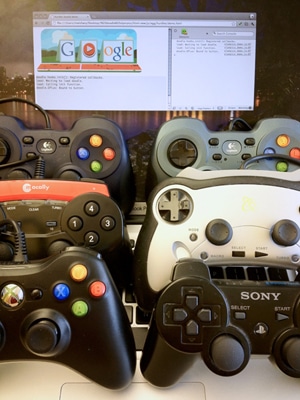
An interesting note from our testing: the API generally supports any gamepad your operating system recognizes natively. We validated this against off-brand USB controllers on PCs, a PlayStation 2 pad connected through a dongle to a Mac, and Bluetooth controllers paired with a Chrome OS laptop. If something isn't working as expected, the best approach is to verify against the newest browser version and file a bug if the problem persists.
Feature detection and gamepad discovery
Simple feature detection works in Chrome using navigator.webkitGetGamepads:
var gamepadSupportAvailable = !!navigator.webkitGetGamepads || !!navigator.webkitGamepads;
Firefox's event-driven implementation makes that particular check ineffective there, so we used Modernizr's Gamepad API detection instead:
var gamepadSupportAvailable = Modernizr.gamepads;
A crucial quirk worth planning for: the browser won't "see" a connected gamepad until the user presses at least one button or moves a stick. This is a privacy measure against fingerprinting, but it creates a user-experience challenge. If someone plugs in a controller without pressing anything, you can't reliably detect it to show gamepad-specific instructions.
Polling vs. events
The current Chrome implementation uses a polling model. You call navigator.webkitGetGamepads() to receive an array of gamepad objects, each containing the full state of its buttons and sticks. A subtle migration note: Chrome 21 still exposes the older navigator.webkitGamepads[] array; the function call arrives in Chrome 22. Google recommends the function call going forward.
Because there are no events to subscribe to, we set up polling inside requestAnimationFrame(). In the Hurdles doodle, we ran this in a loop separate from the one driving graphics—simpler to implement, no performance concern in practice:
/**
 * Starts a polling loop to check for gamepad state.
 */
startPolling: function() {
    // Don't accidentally start a second loop, man.
    if (!gamepadSupport.ticking) {
    gamepadSupport.ticking = true;
    gamepadSupport.tick();
    }
},

/**
 * Stops a polling loop by setting a flag which will prevent the next
 * requestAnimationFrame() from being scheduled.
 */
stopPolling: function() {
    gamepadSupport.ticking = false;
},

/**
 * A function called with each requestAnimationFrame(). Polls the gamepad
 * status and schedules another poll.
 */
tick: function() {
    gamepadSupport.pollStatus();
    gamepadSupport.scheduleNextTick();
},

scheduleNextTick: function() {
    // Only schedule the next frame if we haven't decided to stop via
    // stopPolling() before.
    if (gamepadSupport.ticking) {
    if (window.requestAnimationFrame) {
        window.requestAnimationFrame(gamepadSupport.tick);
    } else if (window.mozRequestAnimationFrame) {
        window.mozRequestAnimationFrame(gamepadSupport.tick);
    } else if (window.webkitRequestAnimationFrame) {
        window.webkitRequestAnimationFrame(gamepadSupport.tick);
    }
    // Note lack of setTimeout since all the browsers that support
    // Gamepad API are already supporting requestAnimationFrame().
    }
},

/**
 * Checks for the gamepad status. Monitors the necessary data and notices
 * the differences from previous state (buttons for Chrome/Firefox,
 * new connects/disconnects for Chrome). If differences are noticed, asks
 * to update the display accordingly. Should run as close to 60 frames per
 * second as possible.
 */
pollStatus: function() {
    // (Code goes here.)
},
Reading just one gamepad is straightforward:
var gamepad = navigator.webkitGetGamepads && navigator.webkitGetGamepads()[0];
Handling multiple simultaneous controllers, games disconnecting mid-play, and other edge cases takes a few more lines. Our tester's pollGamepads() function in the open source code shows one way to approach that complexity.
Firefox follows the emerging spec more literally by exposing events instead of requiring polling:
MozGamepadConnected and MozGamepadDisconnected. These fire when a pad is plugged in, or more precisely, when it's initially announced by a button press. The event object includes a .gamepad property reflecting the live object you can read from afterward.
/**
 * React to the gamepad being connected. Today, this will only be executed
 * on Firefox.
 */
onGamepadConnect: function(event) {
    // Add the new gamepad on the list of gamepads to look after.
    gamepadSupport.gamepads.push(event.gamepad);

    // Start the polling loop to monitor button changes.
    gamepadSupport.startPolling();

    // Ask the tester to update the screen to show more gamepads.
    tester.updateGamepads(gamepadSupport.gamepads);
},
Our initialization code in the tester covers both the Chrome polling model and the Firefox event model:
/**
 * Initialize support for Gamepad API.
 */
init: function() {
    // As of writing, it seems impossible to detect Gamepad API support
    // in Firefox, hence we need to hardcode it in the third clause.
    // (The preceding two clauses are for Chrome.)
    var gamepadSupportAvailable = !!navigator.webkitGetGamepads ||
        !!navigator.webkitGamepads ||
        (navigator.userAgent.indexOf('Firefox/') != -1);

    if (!gamepadSupportAvailable) {
    // It doesn't seem Gamepad API is available – show a message telling
    // the visitor about it.
    tester.showNotSupported();
    } else {
    // Firefox supports the connect/disconnect event, so we attach event
    // handlers to those.
    window.addEventListener('MozGamepadConnected',
                            gamepadSupport.onGamepadConnect, false);
    window.addEventListener('MozGamepadDisconnected',
                            gamepadSupport.onGamepadDisconnect, false);

    // Since Chrome only supports polling, we initiate polling loop straight
    // away. For Firefox, we will only do it if we get a connect event.
    if (!!navigator.webkitGamepads || !!navigator.webkitGetGamepads) {
        gamepadSupport.startPolling();
    }
    }
},
Anatomy of a gamepad object
Every connected gamepad exposes an object that looks like this:
id: "PLAYSTATION(R)3 Controller (STANDARD GAMEPAD Vendor: 054c Product: 0268)"
index: 1
timestamp: 18395424738498
buttons: Array[8]
    0: 0
    1: 0
    2: 1
    3: 0
    4: 0
    5: 0
    6: 0.03291
    7: 0
axes: Array[4]
    0: -0.01176
    1: 0.01961
    2: -0.00392
    3: -0.01176
id: a human-readable descriptionindex: an integer that identifies the pad among multiple controllerstimestamp: last state change time (Chrome only, currently).buttons[]: an array of button states.axes[]: stick positions
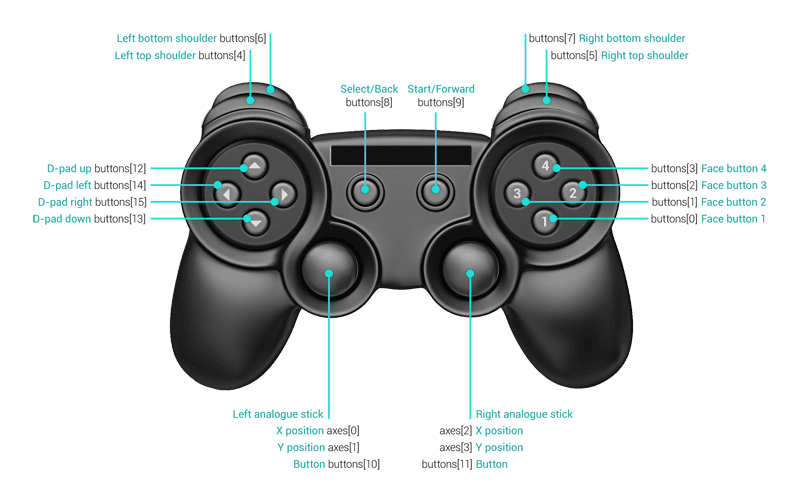
Modern controllers generally expose sixteen buttons and two sticks. The browser maps the primary set to fixed semantics:
gamepad.BUTTONS = {
    FACE_1: 0, // Face (main) buttons
    FACE_2: 1,
    FACE_3: 2,
    FACE_4: 3,
    LEFT_SHOULDER: 4, // Top shoulder buttons
    RIGHT_SHOULDER: 5,
    LEFT_SHOULDER_BOTTOM: 6, // Bottom shoulder buttons
    RIGHT_SHOULDER_BOTTOM: 7,
    SELECT: 8,
    START: 9,
    LEFT_ANALOGUE_STICK: 10, // Analogue sticks (if depressible)
    RIGHT_ANALOGUE_STICK: 11,
    PAD_TOP: 12, // Directional (discrete) pad
    PAD_BOTTOM: 13,
    PAD_LEFT: 14,
    PAD_RIGHT: 15
};

gamepad.AXES = {
    LEFT_ANALOGUE_HOR: 0,
    LEFT_ANALOGUE_VERT: 1,
    RIGHT_ANALOGUE_HOR: 2,
    RIGHT_ANALOGUE_VERT: 3
};
Don't assume all sixteen buttons or four axes will be present. Undefined entries are common, especially on simpler or unusual controllers. Button values range from 0.0 (released) to 1.0 (fully pressed); stick axes go from -1.0 (hard left or up) through 0.0 (center) to 1.0 (hard right or down).
Analogue input handling
Buttons marked as "digital" can still report analogue values, especially shoulder triggers. Compare against a threshold rather than simply testing for 1.0—dirt in a pot can mean it never fully registers. The doodle handled this with a dead zone:
gamepad.ANALOGUE_BUTTON_THRESHOLD = .5;

gamepad.buttonPressed_ = function(pad, buttonId) {
    return pad.buttons[buttonId] &&
            (pad.buttons[buttonId] > gamepad.ANALOGUE_BUTTON_THRESHOLD);
};
The same logic applies to sticks, which can also be used as a digital substitute:
gamepad.AXIS_THRESHOLD = .75;

gamepad.stickMoved_ = function(pad, axisId, negativeDirection) {
    if (typeof pad.axes[axisId] == 'undefined') {
    return false;
    } else if (negativeDirection) {
    return pad.axes[axisId] < -gamepad.AXIS_THRESHOLD;
    } else {
    return pad.axes[axisId] > gamepad.AXIS_THRESHOLD;
    }
};
Event-style button handling through polling
Continuous state checks make sense for simulators, but for a title like the hurdles game, you want discrete button-down/button-up events analogous to keyboard or mouse input. The spec describes such events, but no browser implements them yet.
In the meantime, you recreate them by diffing the current frame's state against the previous view:
if (buttonPressed(pad, 0) != buttonPressed(oldPad, 0)) {
    buttonEvent(0, buttonPressed(pad, 0) ? 'down' : 'up');
}
for (var i in gamepadSupport.gamepads) {
    var gamepad = gamepadSupport.gamepads[i];

    // Don't do anything if the current timestamp is the same as previous
    // one, which means that the state of the gamepad hasn't changed.
    // This is only supported by Chrome right now, so the first check
    // makes sure we're not doing anything if the timestamps are empty
    // or undefined.
    if (gamepadSupport.prevTimestamps[i] &&
        (gamepad.timestamp == gamepadSupport.prevTimestamps[i])) {
    continue;
    }
    gamepadSupport.prevTimestamps[i] = gamepad.timestamp;

    gamepadSupport.updateDisplay(i);
}
The doodle's approach: keyboard emulation
Because Hurdles 2012's default input is keyboard, we decided the gamepad should impersonate one:
- The game only needs three actions—run and jump—so we mapped all sixteen buttons and sticks onto those actions rather than the other way around. Users could tap alternating buttons or can use the d-pad for steering:
newState[gamepad.STATES.LEFT] =
    gamepad.buttonPressed_(pad, gamepad.BUTTONS.PAD_LEFT) ||
    gamepad.stickMoved_(pad, gamepad.AXES.LEFT_ANALOGUE_HOR, true) ||
    gamepad.stickMoved_(pad, gamepad.AXES.RIGHT_ANALOGUE_HOR, true),

newState[gamepad.STATES.PRIMARY_BUTTON] =
    gamepad.buttonPressed_(pad, gamepad.BUTTONS.FACE_1) ||
    gamepad.buttonPressed_(pad, gamepad.BUTTONS.LEFT_SHOULDER) ||
    gamepad.buttonPressed_(pad, gamepad.BUTTONS.LEFT_SHOULDER_BOTTOM) ||
    gamepad.buttonPressed_(pad, gamepad.BUTTONS.SELECT) ||
    gamepad.buttonPressed_(pad, gamepad.BUTTONS.START) ||
    gamepad.buttonPressed_(pad, gamepad.BUTTONS.LEFT_ANALOGUE_STICK),
All analogue inputs get assigned a discrete semantic via the threshold utilities described above.
The gamepad polling loop synthesizes actual DOM keydown/keyup events with the proper keycodes shuttled back to the underlying keyboard handling code:
    // Create and dispatch a corresponding key event.
    var event = document.createEvent('Event');
    var eventName = down ? 'keydown' : 'keyup';
    event.initEvent(eventName, true, true);
    event.keyCode = gamepad.stateToKeyCodeMap_[state];
    gamepad.containerElement_.dispatchEvent(event);
Care and feeding for gamepads
- Nothing shows up until a first button press on the pad.
- If you're testing in several browsers at once, only one will be connected to the controller at a time. Close other tabs or browsers during testing
- Occasionally a browser will hold onto the pad even after the tab is closed. A system-level restart remains the reliable reset.
- Use Canary or Firefox Nightly for the freshest patches and treat current stable releases' quirks as temporary.
Native browser events, rumble support, gyroscope data, and vendor-agnostic implementations are all on the way. The basics are already strong in modern browsers. For anything that's still lacking, filing a solid bug on chromium or Bugzilla with your controller model helps the effort.


