Getting to 200 ms or better
Interaction to Next Paint (INP) measures how quickly a page responds to user input by tracking the latency of every qualifying interaction during a visit. The metric reports the longest interaction observed, and the goal is 200 milliseconds or less at the 75th percentile across page loads, split by mobile and desktop.
Not every page sees heavy interaction. A mostly static content page might have few or no qualifying interactions, while an app like a text editor or game can generate hundreds or thousands. Either way, a high INP signals a poor experience worth fixing.
Find the slow interactions first
Improving INP starts with understanding where the bottlenecks are. You need field data to confirm whether INP is actually poor, then you can move into the lab to diagnose specific interactions.
What field data tells you
Real User Monitoring (RUM) is the best starting point. A good RUM setup provides not just the page's INP value but also context: which interaction triggered the high latency, whether it happened during or after page load, the interaction type (click, keypress, tap), and other details that point to the cause.
If you don't have a RUM provider, PageSpeed Insights can give you Chrome User Experience Report (CrUX) data for a high-level view of your site's INP. CrUX covers millions of sites, but it lacks the per-interaction context that makes RUM data actionable. A RUM provider is still the recommended approach, whether you license one or build your own to complement what CrUX offers.
Diagnosing in the lab
Once field data confirms slow interactions, move to the lab for detailed diagnosis. If you have no field data, you can still identify problems by following common user flows and testing interactions along the way. Also try interacting with the page while it loads, since the main thread is typically at its busiest then — that's often where the worst interactions occur.
Breaking down interaction latency
Once you can reliably reproduce a slow interaction in the lab, the next step is figuring out where the time is going. Every interaction can be divided into three distinct phases:
- Input delay — from the moment the user initiates the interaction until the event callbacks begin executing.
- Processing duration — the time required for the event callbacks to run to completion.
- Presentation delay — the time until the browser paints the next frame showing the visual result.
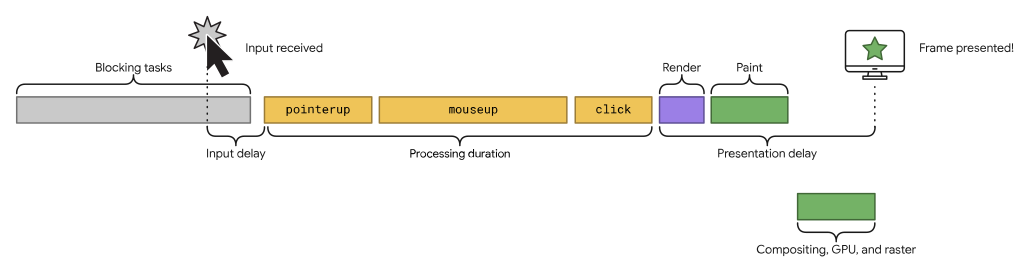
The total interaction latency is simply the sum of these three parts. Since each contributes to the overall INP score, reducing any one of them improves responsiveness. The strategies differ for each phase.
Cutting input delay
Input delay is often the result of main-thread contention. Script loading, parsing and compilation, fetch handling, timer callbacks, and even overlapping interactions can all keep the main thread busy when a user tries to interact. The goal is to make sure event callbacks can start as soon as possible after the user acts.
Startup is a special case
During page load, a page can be rendered but not yet fully functional. Users may attempt to interact at precisely this point. A major contributor to input delay during startup is script evaluation: after a JavaScript file is fetched, the browser must still parse it for syntax, compile it to bytecode, and then execute it. For large scripts, this work can create long tasks that block the main thread and postpone any response to user input.
Streamlining event callbacks
The processing phase is where the event callbacks themselves run. The simplest advice is to keep the work minimal, but that isn't always achievable when interaction logic is complex. When you can't reduce the work, you can at least break it up.
Yield to the main thread
Splitting event callback work across multiple tasks prevents a single long task from monopolizing the main thread. A straightforward way to do this is with setTimeout, since its callback executes in a new task. You can use it directly or wrap it into a helper for a cleaner async/await yield pattern.
Yielding is always better than not yielding, but an even more targeted approach is to yield only after the event callback code that updates the user interface. This lets rendering logic run sooner instead of waiting for all deferred work.
Deferring non-visual work
Consider a rich text editor that must respond to each keystroke. Several tasks follow a character entry, but only one is needed before the next frame can be painted:
- Update the text box with what the user typed and apply formatting.
- Update the word count display.
- Run spell-checking logic.
- Save changes locally or to a remote database.
Only the first item is required for the immediate visual result. The rest can be pushed to later tasks. Structuring the code this way might look like this:
textBox.addEventListener('input', (inputEvent) => {
  // Update the UI immediately, so the changes the user made
  // are visible as soon as the next frame is presented.
  updateTextBox(inputEvent);

  // Use `setTimeout` to defer all other work until at least the next
  // frame by queuing a task in a `requestAnimationFrame()` callback.
  requestAnimationFrame(() => {
    setTimeout(() => {
      const text = textBox.textContent;
      updateWordCount(text);
      checkSpelling(text);
      saveChanges(text);
    }, 0);
  });
});

Using setTimeout() inside a requestAnimationFrame() call is a somewhat unusual pattern, but it works reliably in all browsers to ensure non-critical code doesn't delay the next frame.
Avoiding layout thrashing
Layout thrashing — also called forced synchronous layout — happens when JavaScript updates styles and then reads their values within the same task. Many DOM properties trigger this behavior. The problem is that the browser must perform layout synchronously instead of batching it for later, which can add significant time between event callback execution and the presentation of the new frame.

Reducing presentation delay
The final phase spans from when event callbacks finish to when the next frame is actually painted. Rendering cost here scales with what the browser must process.
Keep the DOM manageable
Large DOMs increase rendering work in two situations: during the initial page render and after user interactions that trigger visual updates. While a page can't always have a small DOM, techniques like flattening the DOM structure or adding elements during interactions to keep the initial DOM small can help limit the cost of each frame.
Lazy render with content-visibility
The CSS content-visibility property is effectively a way to lazy-render elements that aren't yet in the viewport. It can trim rendering work both at load time and in response to interactions. It takes some practice to apply effectively, but even modest use can reduce the time to the next frame.
Note the cost of client-side HTML rendering
When HTML is streamed from the server, the browser parses and renders incrementally as chunks arrive, and it yields periodically during load without any extra work. But when JavaScript generates HTML on the client — the single-page application pattern — the browser doesn't yield until the full HTML string has been parsed and rendered.
SPAs aren't the only case; even non-SPA sites often inject some HTML via JavaScript in response to interactions. That's fine for small amounts, but rendering large quantities of HTML on the client delays the presentation of the next frame and directly increases presentation delay.
An iterative effort
Fixing INP is a repeating cycle. After you resolve one slow interaction, the next likely candidate surfaces. The process — diagnose, break down the latency, optimise each phase — is the same each time. Over multiple passes, the responsiveness of the page improves meaningfully, and the same discipline applies as new interactive features are added later.


