Why connectivity context matters for web performance
Web usage has shifted decisively toward mobile devices, and many users now rely on cellular connections even at home. That makes it essential to understand how your site behaves under poor or unreliable connectivity, not just under ideal lab conditions. A variety of tools exist to help you emulate constrained networks during development and testing.
Simulating constrained networks
Software tools for network emulation generally fall into three categories: browser-based throttling, system-level network conditioners, and device emulators. Each gives you a different level of fidelity when testing how your app responds to bandwidth limits and increased latency.
Browser-based throttling
Chrome DevTools provides network throttling through its Network panel, with presets and custom settings for upload speed, download speed, and round-trip time. Start with the DevTools guide to network performance analysis to get familiar with the available controls.

System-level tools
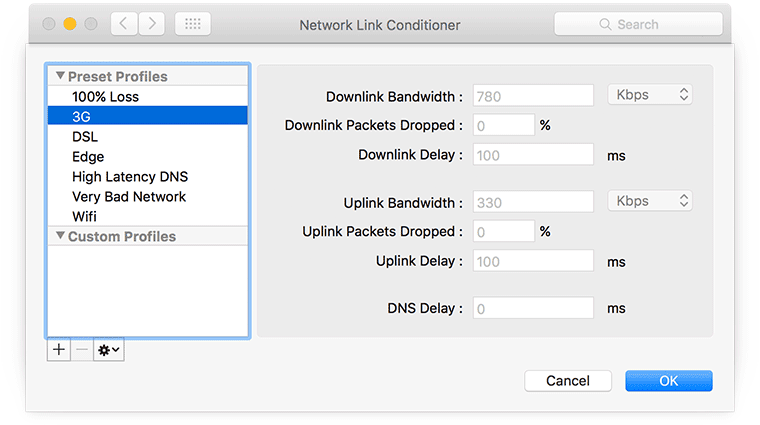
For macOS developers, Network Link Conditioner is available as a preference panel after installing Hardware IO Tools for Xcode:


Device emulation
If you develop for Android, the Android Emulator can simulate different network conditions while you run apps, including web browsers and hybrid web apps:


For iPhone testing, Network Link Conditioner (see above) is the standard approach for simulating impaired network conditions.
Testing from real-world vantage points
Bandwidth and latency matter, but so does physical distance between user and server. Testing from multiple locations across real network types gives you a clearer picture of actual user experience.
WebPagetest runs performance tests for your site from a range of host locations and network types—for example, a 2G connection on a server in India, or a cable connection from a US city.

After choosing a location, you pick a connection type from the advanced settings. WebPagetest also supports scripting (for tasks like logging in) and RESTful APIs, making it possible to fold connectivity tests into your build or monitoring pipeline. For proxy-based testing, Fiddler supports Global proxying through GeoEdge, and lets you use custom rules to simulate modem speeds:

Making network testing part of the team workflow
Individual emulation is useful, but shared infrastructure can bring real-world network testing into the daily workflow for an entire team. Tools like proxies and traffic shapers can emulate problematic conditions—bandwidth throttling, packet delay, and random packet loss.
Facebook's Augmented Traffic Control (ATC) is a BSD-licensed suite for shaping traffic and emulating impaired networks:

Facebook also introduced 2G Tuesdays, where employees see a pop-up offering to simulate a 2G connection, to help engineers experience how users in emerging markets interact with their product.
The Charles HTTP/HTTPS proxy lets you adjust bandwidth and latency. Charles is commercial software, though a free trial is available:

A tutorial on using Charles with iOS development is available from codewithchris.com.
Handling the "lie-fi" problem
The term lie-fi describes a connectivity state where your browser believes it is online, but connections are failing — sometimes very slowly. The date back at least to 2008, and the concept matters more now as cellular has become the primary connection in many homes. According to a US Census report, an increasing number of households rely on mobile internet at home rather than fixed broadband:

Lie-fi can be harder on users than being officially offline. When the device is offline, JavaScript can branch to a fallback quickly. But when connectivity fails slow, the browser persists in trying to fetch resources instead of giving up and serving a sensible offline experience.
Timeout strategies with service workers
Older approaches to detecting intermittent connectivity relied on hacky XHR tricks. Service workers provide a more robust method for setting network timeouts, and with Workbox the implementation is only a few lines of code:
workboxSW.router.registerRoute(
  '/path/to/image',
  workboxSW.strategies.networkFirst({networkTimeoutSeconds: 3}),
);
Workbox is covered further in Jeff Posnick's talk Workbox: Flexible PWA Libraries at Chrome Dev Summit. Work on abortable Fetch is in progress, and the Streams API should help by supporting progressive content delivery instead of monolithic requests. Jake Archibald discusses more lie-fi mitigation strategies in Supercharging page load.



