

Schema stitching builds one GraphQL API on top of several underlying GraphQL APIs. It matters once an application is split into microservices: each service keeps its own concerns, but clients still need data from many of them. Exposing a single unified graph is preferable, yet doing so without a tightly coupled monolithic GraphQL server is the hard part. Fauna sharpens the problem, since every database ships its own native GraphQL; running several databases means front-end code has to connect to several GraphQL instances. Stitching combines those services into one unified schema.
The walkthrough covers three cases: merging multiple Fauna instances into one GraphQL service, folding other GraphQL APIs and data sources into the same graph, and deploying the gateway serverlessly on AWS Lambda.
Merging separate Fauna databases
The starting point is three independent Fauna databases, Product, Inventory, and Review, each with its own graph — a subgraph. The goal is a gateway whose unified graph lets clients query any combination of downstream sources.
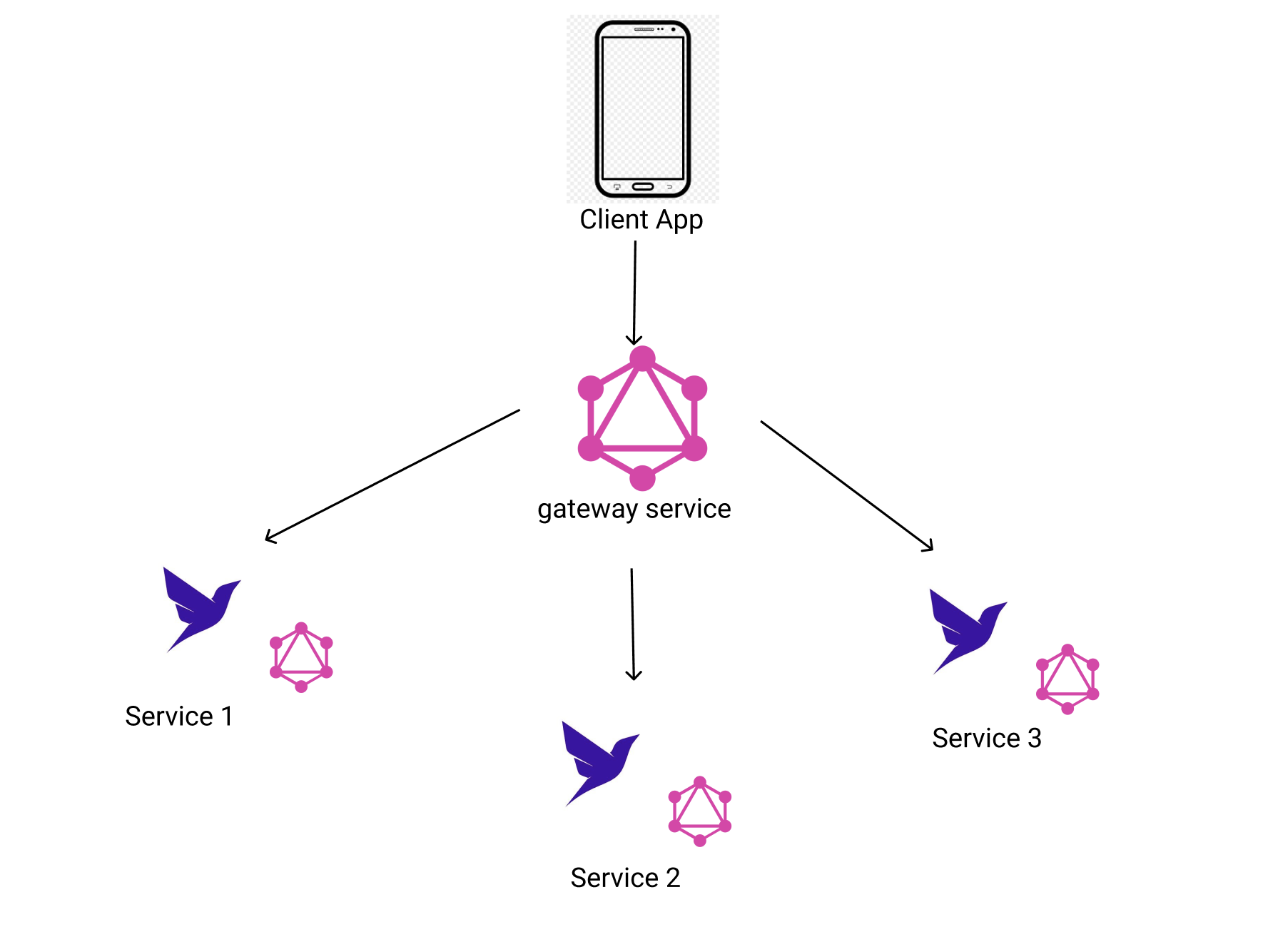
mkdir my-gateway
cd my-gateway
npm init --yes
That gives a fresh Node project for the gateway. Installing express and express-graphql produces a simple GraphQL server.
npm i express express-graphql graphql --saveBootstrapping the entry point
The main entry point is gateway.js, which begins life as a bare-bones express-graphql server with one sample query and its resolver. Running it:
const express = require('express');
const { graphqlHTTP } = require('express-graphql');
const { buildSchema }  = require('graphql');

// Construct a schema, using GraphQL schema language
const schema = buildSchema(`
  type Query {
    hello: String
  }
`);

// The root provides a resolver function for each API endpoint
const rootValue = {
    hello: () => 'Hello world!',
};

const app = express();

app.use(
  '/graphql',
  graphqlHTTP((req) => ({
    schema,
    rootValue,
    graphiql: true,
  })),
);

app.listen(4000);
console.log('Running a GraphQL API server at <http://localhost:4000/graphql>');
node gateway.jsReaching http://localhost:4000/graphql opens the GraphQL playground.

Preparing the three subgraphs
On fauna.com, create the Product, Inventory and Review databases.


Each database needs an admin key, which is what the gateway uses to reach its GraphQL API.

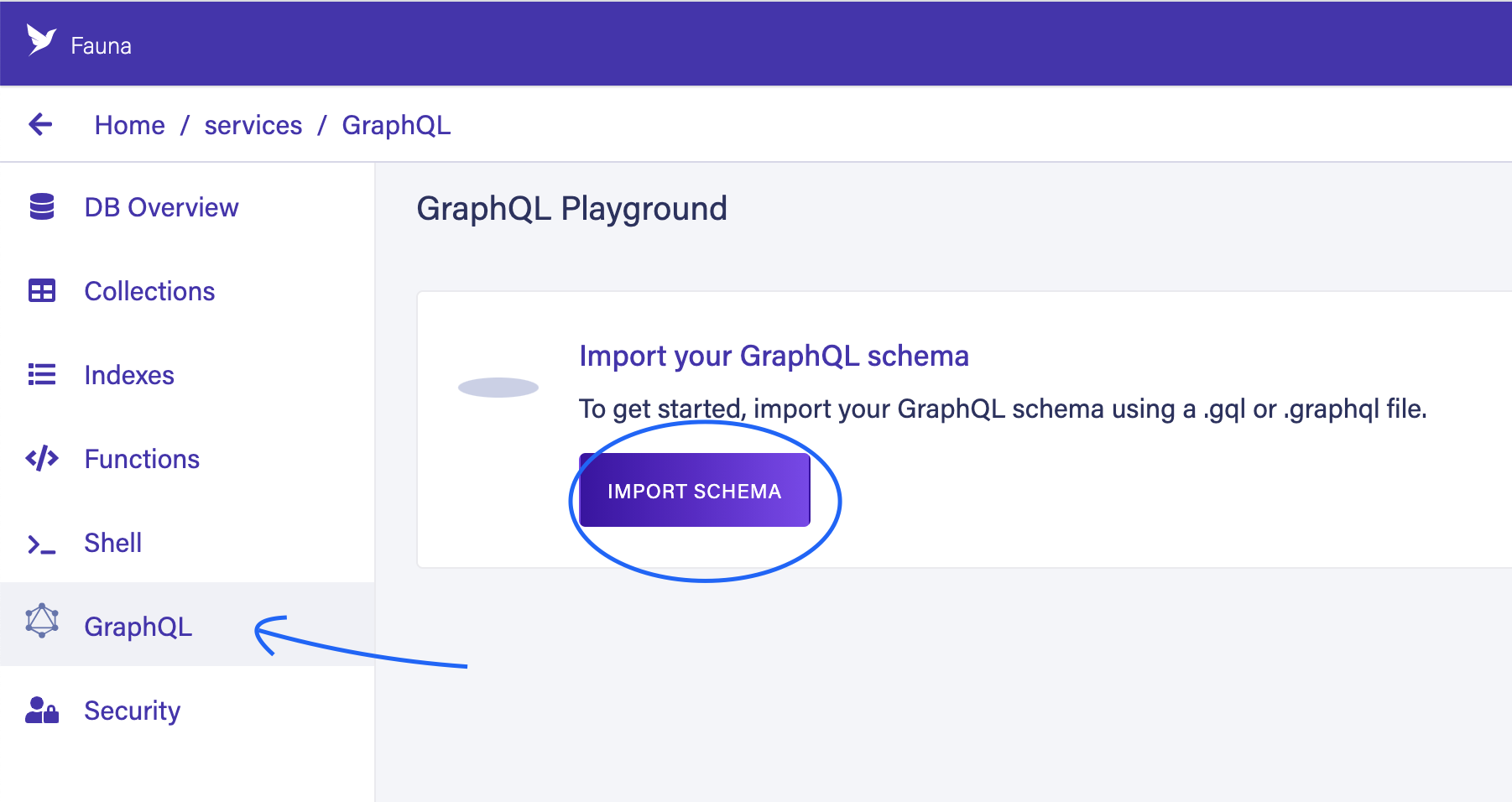
Each database also gets its own schema, uploaded through the GraphQL entry in that database's sidebar.
# Schema for Inventory database
type Inventory {
  name: String
  description: String
  sku: Float
  availableLocation: [String]
}
# Schema for Product database
type Product {
name: String
description: String
price: Float
}# Schema for Review database
type Review {
email: String
comment: String
rating: Float
}
Three GraphQL services are now live on Fauna and can be exercised in Fauna's built-in playground. Entering dummy data at this point pays off when multiple sources are queried together.
Building the stitching gateway
Stitching uses a few libraries from graphql-tools, installed on the gateway server.
npm i @graphql-tools/schema @graphql-tools/stitch @graphql-tools/wrap cross-fetch --save
A generic factory, makeRemoteExecutor, returns an asynchronous function that issues the GraphQL query API call. It accepts two parsed arguments: url, the remote GraphQL URL, and token, the authorization token.
// gateway.js

const express = require('express');
const { graphqlHTTP } = require('express-graphql');
const { buildSchema }  = require('graphql');

 function makeRemoteExecutor(url, token) {
    return async ({ document, variables }) => {
      const query = print(document);
      const fetchResult = await fetch(url, {
        method: 'POST',
        headers: { 'Content-Type': 'application/json', 'Authorization': 'Bearer ' + token },
        body: JSON.stringify({ query, variables }),
      });
      return fetchResult.json();
    }
 }

// Construct a schema, using GraphQL schema language
const schema = buildSchema(`
  type Query {
    hello: String
  }
`);

// The root provides a resolver function for each API endpoint
const rootValue = {
    hello: () => 'Hello world!',
};

const app = express();

app.use(
  '/graphql',
  graphqlHTTP(async (req) => {
    return {
      schema,
      rootValue,
      graphiql: true,
    }
  }),
);

app.listen(4000);
console.log('Running a GraphQL API server at http://localhost:4000/graphql');
A second function, makeGatewaySchema, proxies requests to the remote GraphQL APIs through the executors.
// gateway.js

const express = require('express');
const { graphqlHTTP } = require('express-graphql');
const { introspectSchema } = require('@graphql-tools/wrap');
const { stitchSchemas } = require('@graphql-tools/stitch');
const { fetch } = require('cross-fetch');
const { print } = require('graphql');

function makeRemoteExecutor(url, token) {
  return async ({ document, variables }) => {
    const query = print(document);
    const fetchResult = await fetch(url, {
      method: 'POST',
      headers: { 'Content-Type': 'application/json', 'Authorization': 'Bearer ' + token },
      body: JSON.stringify({ query, variables }),
    });
    return fetchResult.json();
  }
}

async function makeGatewaySchema() {

    const reviewExecutor = await makeRemoteExecutor('https://graphql.fauna.com/graphql', 'fnAEQZPUejACQ2xuvfi50APAJ397hlGrTjhdXVta');
    const productExecutor = await makeRemoteExecutor('https://graphql.fauna.com/graphql', 'fnAEQbI02HACQwTaUF9iOBbGC3fatQtclCOxZNfp');
    const inventoryExecutor = await makeRemoteExecutor('https://graphql.fauna.com/graphql', 'fnAEQbI02HACQwTaUF9iOBbGC3fatQtclCOxZNfp');

    return stitchSchemas({
        subschemas: [
          {
            schema: await introspectSchema(reviewExecutor),
            executor: reviewExecutor,
          },
          {
            schema: await introspectSchema(productExecutor),
            executor: productExecutor
          },
          {
            schema: await introspectSchema(inventoryExecutor),
            executor: inventoryExecutor
          }
        ],

        typeDefs: 'type Query { heartbeat: String! }',
        resolvers: {
          Query: {
            heartbeat: () => 'OK'
          }
        }
    });
}

// ...
Here three executors are created, aimed at Product, Inventory, and Review. Because this is a demo, the Fauna admin key is hardcoded. Don't repeat that in a real application — secrets should never sit in code; pull them at runtime from environment variables or a secret manager.
makeGatewaySchema returns the result of switchSchemas from @graphql-tools. Its subschemas argument takes an array of every subgraph to fetch and combine. introspectSchema, also from graphql-tools, transforms the gateway's request into a proxy API call to each downstream service. Both are documented on the graphql-tools site.
The final step calls makeGatewaySchema, replacing the earlier hardcoded schema with the stitched one.
// gateway.js

// ...

const app = express();

app.use(
  '/graphql',
  graphqlHTTP(async (req) => {
    const schema = await makeGatewaySchema();
    return {
      schema,
      context: { authHeader: req.headers.authorization },
      graphiql: true,
    }
  }),
);

// ...
After a restart, the playground at localhost exposes queries and mutations from all Fauna instances.


A query can then pull data from every Fauna instance at once.


Folding in external APIs
Third-party GraphQL APIs stitch in the same way. In the demo, the open SpaceX GraphQL API joins the gateway: create one more executor and add it to the subgraph array.
// ...

async function makeGatewaySchema() {

  const reviewExecutor = await makeRemoteExecutor('https://graphql.fauna.com/graphql', 'fnAEQdRZVpACRMEEM1GKKYQxH2Qa4TzLKusTW2gN');
  const productExecutor = await makeRemoteExecutor('https://graphql.fauna.com/graphql', 'fnAEQdSdXiACRGmgJgAEgmF_ZfO7iobiXGVP2NzT');
  const inventoryExecutor = await makeRemoteExecutor('https://graphql.fauna.com/graphql', 'fnAEQdR0kYACRWKJJUUwWIYoZuD6cJDTvXI0_Y70');

  const spacexExecutor = await makeRemoteExecutor('https://api.spacex.land/graphql/')

  return stitchSchemas({
    subschemas: [
      {
        schema: await introspectSchema(reviewExecutor),
        executor: reviewExecutor,
      },
      {
        schema: await introspectSchema(productExecutor),
        executor: productExecutor
      },
      {
        schema: await introspectSchema(inventoryExecutor),
        executor: inventoryExecutor
      },
      {
        schema: await introspectSchema(spacexExecutor),
        executor: spacexExecutor
      }
    ],

    typeDefs: 'type Query { heartbeat: String! }',
    resolvers: {
      Query: {
        heartbeat: () => 'OK'
      }
    }
  });
}

// ...
Going serverless with Lambda
A truly serverless setup deploys the gateway as a serverless function. The demo targets AWS Lambda — Netlify and Vercel are alternatives — using the serverless framework.
npm i -g serverless # if you don't have the serverless framework installed already
npm i serverless-http body-parser --save
The framework is configured in serverless.yaml, which records the cloud provider, the runtime, and the path to the lambda function; the official documentation covers the rest.
# serverless.yaml

service: my-graphql-gateway

provider:
  name: aws
  runtime: nodejs14.x
  stage: dev
  region: us-east-1

functions:
  app:
    handler: gateway.handler
    events:
      - http: ANY /
      - http: 'ANY {proxy+}'
A few code changes come before deployment.
npm i -g serverless # if you don't have the serverless framework installed already
npm i serverless-http body-parser --save
The body-parser library parses the JSON body, and wrapping the express app instance with the serverless-http library handles the underlying lambda configuration. Deployment takes a minute or two:
serverless deploy
Append /graphql to the API URL printed in the terminal once deployment finishes, e.g. https://gy06ffhe00.execute-api.us-east-1.amazonaws.com/dev/graphql. Three independent Fauna instances now sit behind one GraphQL gateway.
Schema stitching is a popular way to break up monoliths and keep data sources separated by concern. Apollo Federation is another option and works much the same way.



