
Why media search is a different engineering problem
Dropbox Dash, our universal search and knowledge management product, was built to help users find content across their work apps. But supporting images, video, and audio isn't just an extension of document search—it introduces distinct technical challenges around storage, compute, relevance, and responsiveness that forced us to rethink core parts of our infrastructure.
Media files are bigger and harder to work with than typical documents. In our system, image files are roughly 3X larger and video files about 13X larger than non-media files, which directly impacts storage costs. Extracting features from these files—and generating previews at multiple resolutions—demands significantly more compute. And because media files often lack textual context like clear titles or meaningful metadata, relevance ranking has to lean on new signals rather than the text-based cues our retrieval models previously relied on.
Responsiveness adds another layer of difficulty. Users need previews to judge whether a media result is relevant, since filenames like IMG_6798 don't help. But only a small fraction of indexed files get viewed during searches, so precomputing high-resolution previews for everything would be wasteful. We needed a system that generates previews when they're actually needed.
Indexing and retrieval via lightweight metadata
We kept compute costs down by indexing media files based on available metadata rather than analyzing full content. This includes features like file path, title, and EXIF data. These lightweight signals provide a foundation for basic search functionality at minimal processing overhead. As we expand capabilities, we plan to layer in deeper content analysis—such as semantic embeddings or OCR—while balancing accuracy against cost.
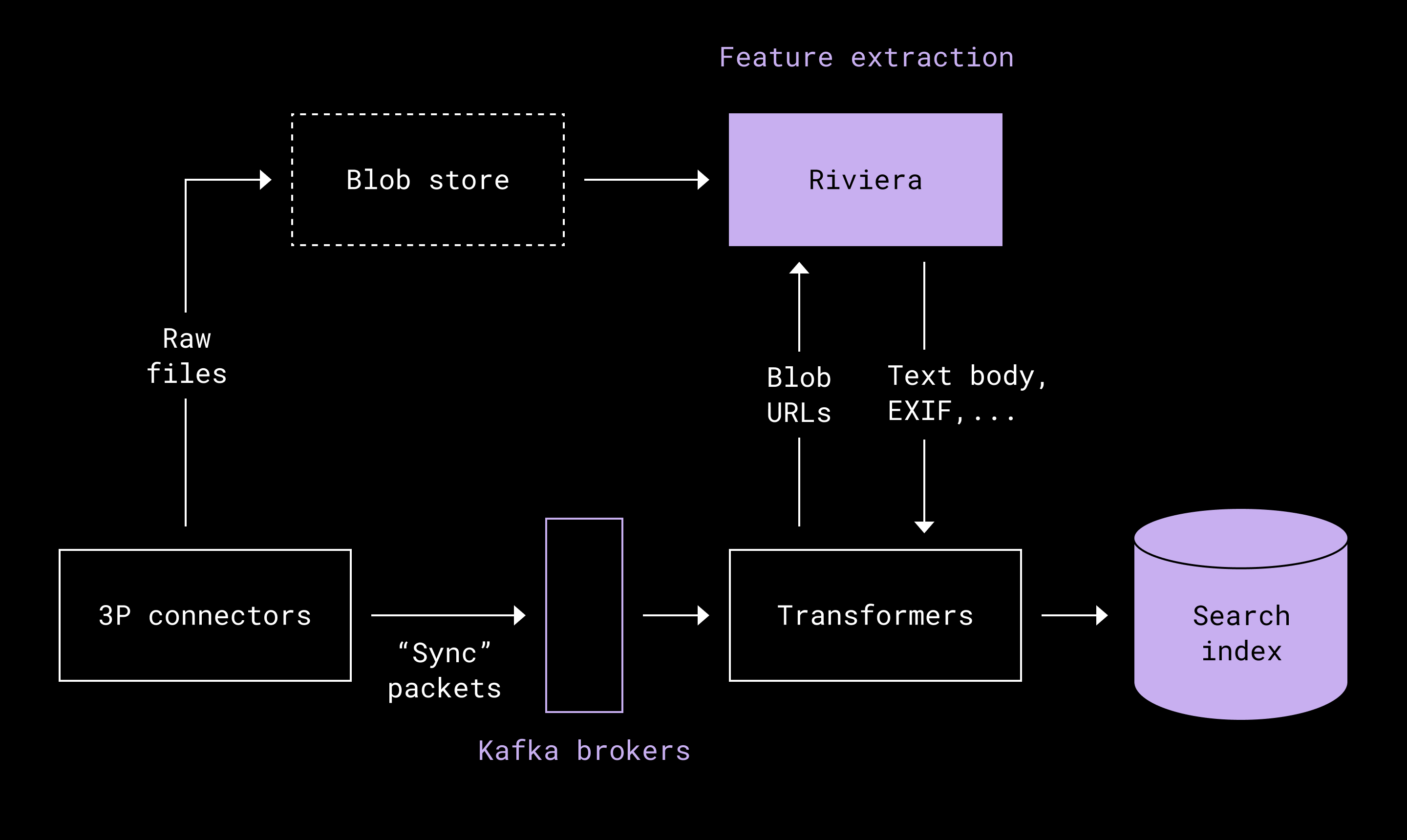
To generate metadata features at scale, we reused Riviera, our internal compute framework that already powers Dropbox Search. Riviera processes tens of petabytes daily and has mature logic for metadata extraction, giving us proven scalability and consistency with existing search infrastructure.
Before this work, our search index lacked rich media-specific features because we intentionally avoided downloading or storing raw media blobs. We added support for ingesting multimedia blob content to compute required features, and we retain the raw content for preview generation and future feature computation. Where possible, we download previews from third-party applications—design files like Canva, for example—which both reduces compute costs and allows us to serve files we can't render ourselves. We currently ingest about 97% of media files and are addressing the remaining gaps with improved lifecycle management.
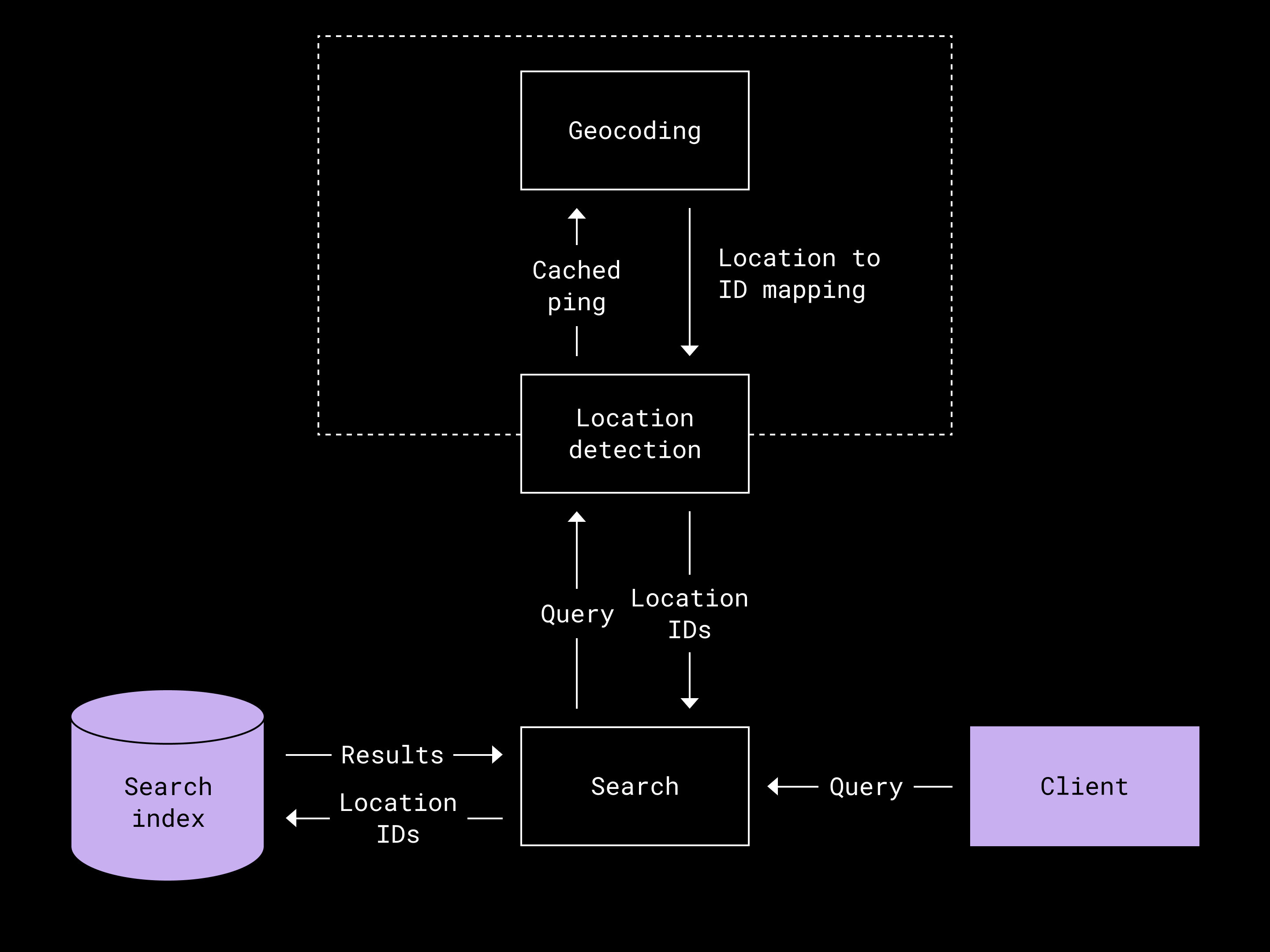
At query time, we match user input against these metadata features—filenames, file paths, and location data. For GPS data, we index a location as a chain of IDs representing the geographical hierarchy. A photo taken in San Francisco gets IDs for the city, state, and country, allowing users to retrieve it whether they search for San Francisco, California, or the entire United States. This mapping has manageable cardinality, so we load the full location-ID mapping into cache at service startup.
We also observed that media files often follow naming patterns involving camel case, hyphens, or numeric suffixes—like PhotoShoot-Revised1234.jpg. Both indexing and retrieval now tokenize these patterns to support better matching.
Just-in-time preview generation
Our ingestion rate is roughly three orders of magnitude higher than our query rate, which is why generating and storing previews for all files upfront would be cost-prohibitive. Instead, we adopted a just-in-time approach: previews are generated when a user searches, not during ingestion.
We considered precomputing previews at ingestion time to allow deletion of raw content afterward, but ultimately rejected that approach. Managing the lifecycle of additional preview artifacts would introduce code complexity, and retaining the raw content ensures we can compute new features in the future without re-ingesting originals.
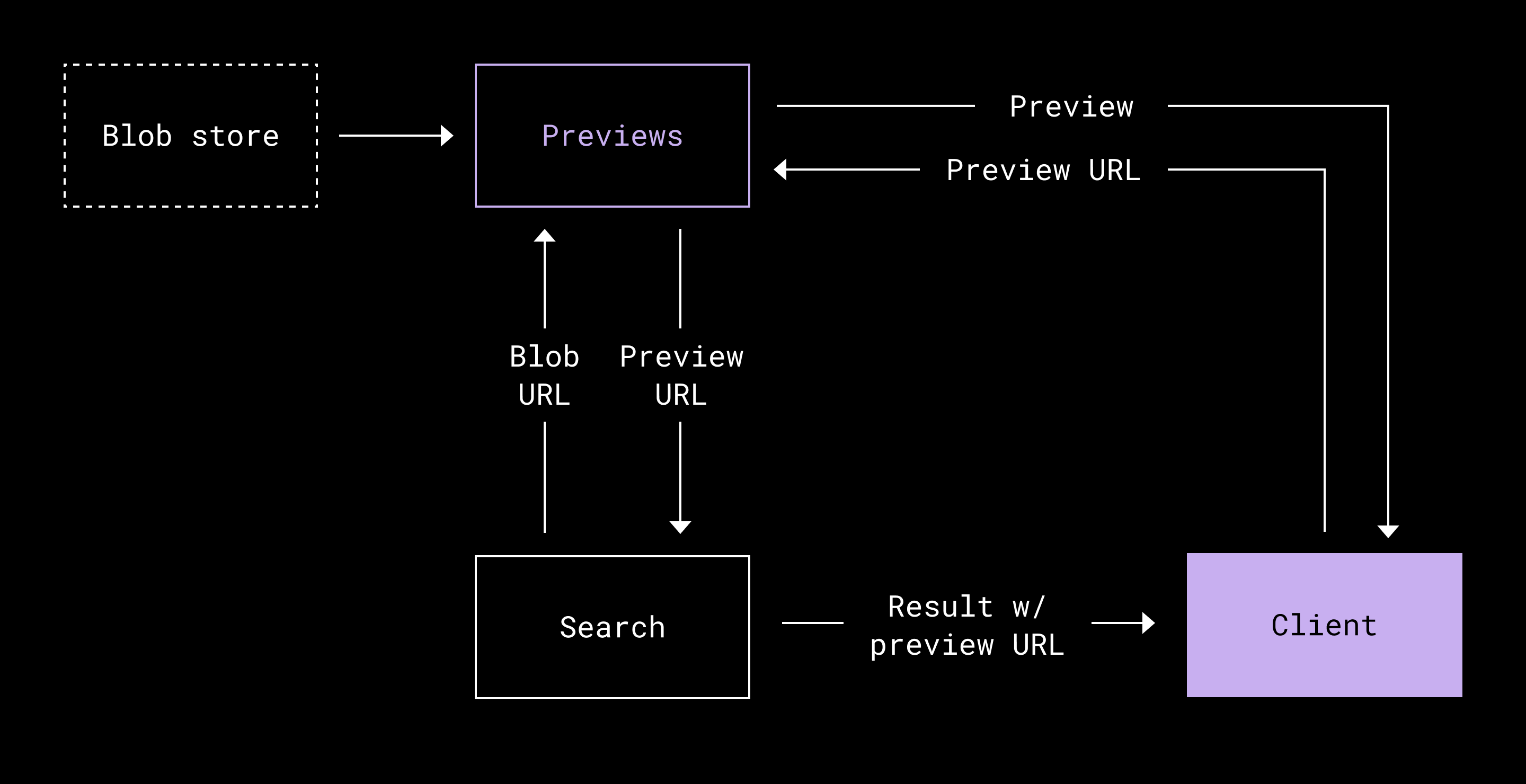
For just-in-time generation, we rely on an internal previews service built on Riviera. The service is designed for speed and efficiency, with caching that stores previews for up to 30 days so we don't regenerate them for every request. During a search, we create preview URLs in parallel with other operations like ranking, permission checks, and metadata fetching—minimizing overall response time. These URLs are passed to the frontend, which fetches and displays the previews. Since we reuse both Riviera and the previews service, we can also share frontend components across Dropbox and Dash for a consistent experience.
.png/_jcr_content/renditions/Diagram%204%20(1).webp)
Preview and metadata hydration happens on demand. When a user enlarges a preview to see camera information or timestamps, we fetch those details via a separate endpoint rather than inflating every search response with them.
UI considerations for visual content
Fast, visual previews are essential for media search because users often can't tell what a file is from its name. The layout must adapt to different shapes and sizes—tall, wide, or unusual aspect ratios—without awkward cropping. When a user wants more detail, a full-size preview shows EXIF information like capture time, camera model, and location.
The interface is designed to keep the focus on content across devices, whether on a phone or a computer. The result is a media search experience where users can browse quickly or inspect a specific file without friction.
Coordination and what we learned
A project this broad naturally touches several teams, and the risk of a strictly sequential workstream was real. We mitigated that by drawing explicit API boundaries between the systems involved. With those interfaces fixed early, teams could build and test their pieces in parallel, converging on a clean integration at the end rather than waiting on each other.
A large share of the engineering effort went into making the preview experience work end to end. The architecture was not obvious from the outset, and we needed a UI to validate the design. To unblock UX development, we temporarily proxied results from Dropbox Search through a custom endpoint. That search surface did not yet include all third-party content ingested into Dash, but it gave us enough realistic data to design and iterate on the interface. This shortcut bought time to finish the backend while the media backfill proceeded in the background.
Where we could, we relied on existing Dropbox preview infrastructure rather than building something new. That choice shortened the development cycle and left us with simpler, more maintainable code. To verify the system behaved as expected, we added metrics around preview generation latencies. Those measurements flagged where the slow spots were and guided our next optimizations. With more instrumentation and broader use of concurrency, we made substantial latency reductions and improved overall responsiveness.
What is next for media in Dash
The roadmap for multimedia search includes semantic embeddings and optical character recognition (OCR) to make results more intelligent. Both capabilities add a fresh set of engineering challenges, and we will keep making the same kind of cost-versus-value trade-offs we faced building the current system.
Every decision in this rollout, from metadata-first indexing to just-in-time previews to geolocation-aware queries, balanced cost, performance, and product value. The result is a search path that treats media with the same speed and relevance as text. Closing that gap matters because teams increasingly create and share visual content, and the tools for finding that content need to keep pace.
Multimedia search is one more step toward making Dash a universal search tool. The focus remains on removing friction for customers, leaving them more time to make and collaborate and less time spent hunting for files.


