

Why the CMS Decision Deserves Scrutiny
The move from a traditional content management system to a headless one is rarely a casual upgrade. The selection process involves balancing the needs of content editors, marketers, and developers — and each group will measure success differently. For experienced practitioners, evaluating a headless CMS can be a useful audit of what the market now offers; for teams just starting out, it serves as a checklist of must-have capabilities.
Traditional CMS platforms typically bind the content repository, back-office, and front-end website into a single monolithic architecture. Decoupled CMSes loosen that interdependence by separating the front-end from the content management back end. Headless CMSes take this further: the CMS itself becomes a software-as-a-service microservice — effectively content-as-a-service — and no longer assumes responsibility for the presentation layer.
Adopting a microservices mindset requires patience. Marketers accustomed to a single, all-in-one system may resist juggling multiple tools and vendors. In practice, teams that push through the initial friction often become advocates, because the headless model lets them adopt best-of-breed services and swap integrations without being locked into the CMS vendor’s own stack.
Communications Expectations Before You Begin
- Confirm that the vendor is reputable and the SaaS offering is credible.
- Budget time for integrating the headless CMS as one microservice among several.
- Prepare stakeholders for a landscape of complementary services — not one monolithic platform.
Omnichannel Requires Intentional Modeling
A headless CMS shows its real strength when content is published to multiple channels: web, mobile, social platforms, smart devices, IoT endpoints, and even non-digital touchpoints. But that omnichannel reach doesn’t happen automatically. Unlike traditional systems, a headless CMS requires you to define the schema for each content model from scratch. This content modeling process — establishing a sound, logical taxonomy for content items — determines how easily content can flow to different surfaces later.
A common pitfall is modeling content with only the first channel in mind. If the website is the initial target, it’s tempting to design schemas that fit that single context. That short-term convenience can become painful when mobile, voice, or other channels are added. Teams that only need a website replacement should weigh whether a traditional or decoupled CMS might be a better fit; the omnichannel promise of headless is wasted if it is never exercised.
What to Check
- The full list of channels you intend to serve — now and in the near future.
- Whether the team has the discipline and structure for sound content modeling.
Historical examples are instructive: a major airline once struggled to model content for mobile because its schemas were designed exclusively for desktop web pages. The lesson is still relevant — future-proofing means designing content models that are channel-agnostic from the start.
The Authoring Experience Is The Real Test
Any CMS — headless or not — lives or dies by how well it supports the people creating content. If authors keep drifting back to Google Docs for commenting or suggesting changes, that is a clear signal that the CMS is missing essential collaboration features. Rather than fighting this habit, the solution is to give content authors the tools they need within the CMS itself; when they have proper editing, commenting, and review capabilities, the external documents will naturally disappear.
Even small teams can feel the difference. When Luminary moved its own website to a headless CMS, all 50 team members were given access to create and edit their own profiles. There was no need for dozens of loose Google Docs; everything stayed inside the CMS.
Editing And Authoring Experience
Headless CMS procurement may start in IT, but it requires buy-in from marketers and content authors to succeed. A system that makes it easy to enter content, discover existing assets, and reuse them is the baseline expectation. That means polished editors: WYSIWYG views, text fields, dropdowns, and custom control panels. A clean, distraction-free interface that supports concurrent editing, inline commenting, and creating child content items in the same screen goes a long way toward keeping authors productive.
There is a cautionary note here. When a CMS is meant to feed many channels, relying heavily on WYSIWYG editors that generate raw HTML can undermine content reuse. If the content is too tightly bound to one visual representation, it loses the atomic granularity needed to be reassembled for a mobile view or a desktop layout. The right custom editors expose fields at a granular level so content can be adapted without rewriting it.
Headless systems do not typically organize content in the classical tree structure, which means a solid search function — with facets and tagging — is vital for helping authors locate and reuse items. Trying to impose tree navigation on content items is one bridge from traditional CMS thinking, but search is the more scalable tool. Good systems also let you nest content items inside one another for reuse, but be wary of circular references. If a lawyer profile links to an expertise, and that expertise links back to multiple lawyer profiles, you can end up with recursion problems that hurt both performance and usability. A capable headless CMS anticipates this with API depth limits and graphical views of linked items.
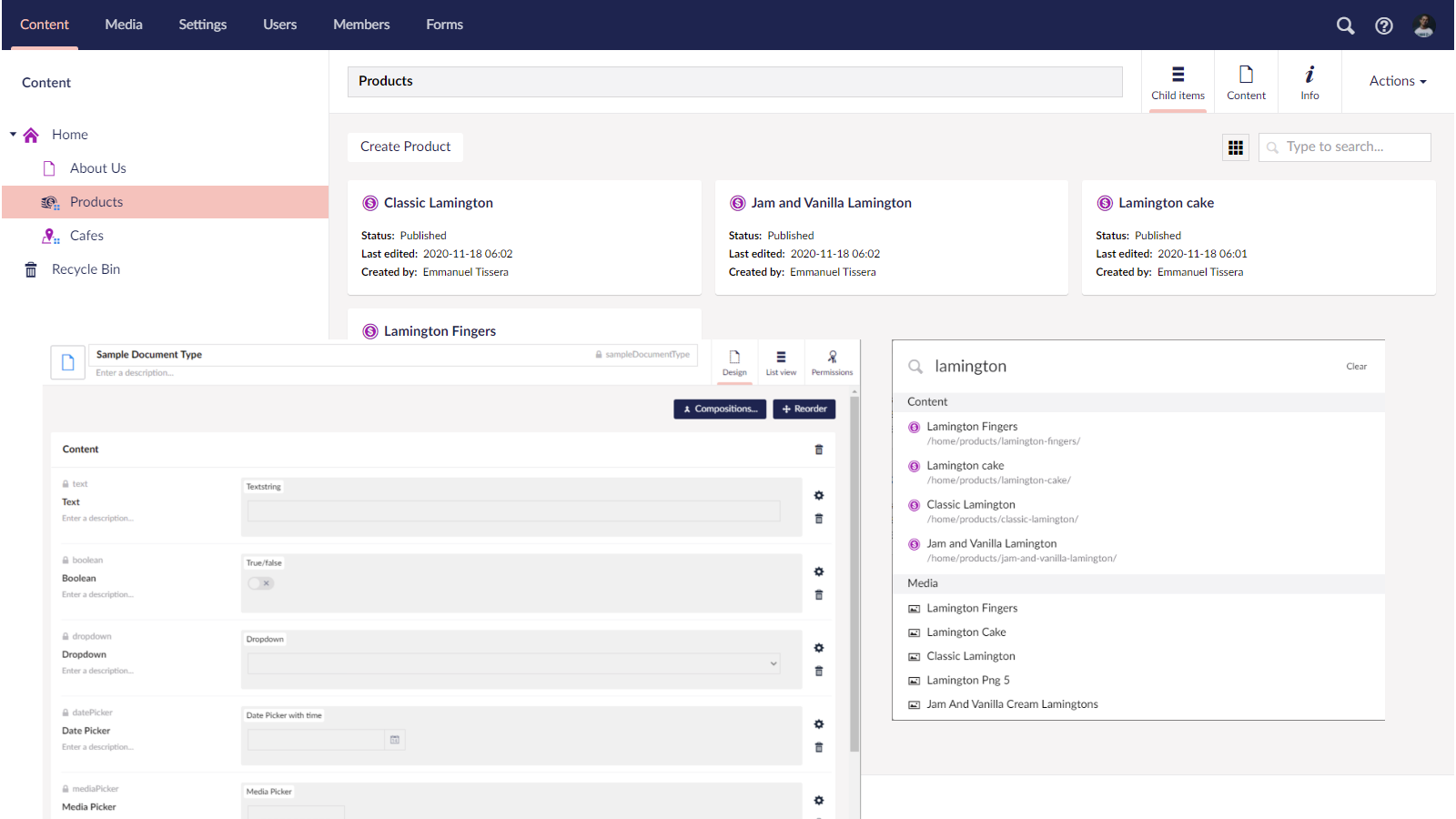
What to inspect:
- The overall authoring UI and learning curve
- How content is structured and nested
- Search power — facets, tags, filters
- Whether rich text fields exist everywhere or only where they belong
- Reuse of content across your channels
Managing Images And Media Assets
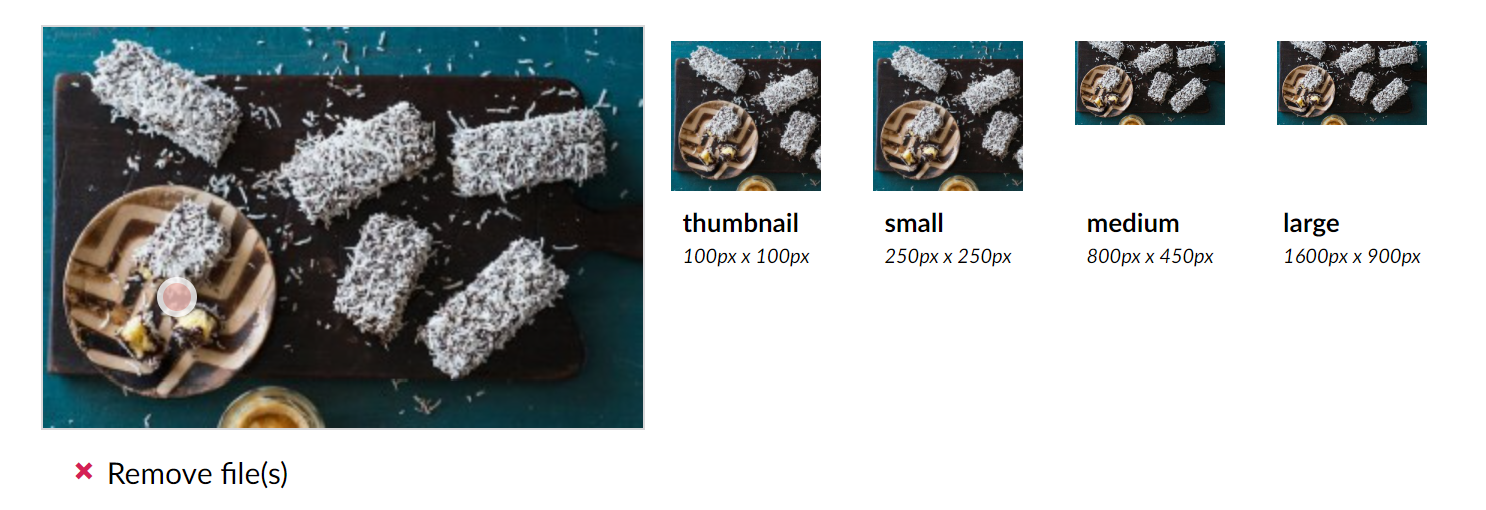
Media files are heavy, hard to organize, and easily duplicated if left unchecked. A good headless CMS should give editors a proper asset library with folders, tags, and search — otherwise you will end up with multiple copies of the same poorly named image file.
The practical workflow for an editor is to upload an image once, set a focal point, and then have the system crop, resize, and convert it to the right format for every breakpoint. Delivering those optimized assets — say, as WebP — through a CDN is another non-negotiable for a fast website. You will find these features in most headless CMS platforms, but you should map which ones you can live without.
That said, a CMS is not the place for original image manipulation. If your team produces a lot of complex edits, keep Photoshop and similar tools in the loop.
Videos are the next-heaviest asset type. It is simpler to leave actual video streaming to specialized providers like YouTube or Vimeo; you only need your headless CMS to provide a clean interface for selecting and embedding those videos. If it can pull in a provider’s library through an API, that is a nice convenience, though not a must.
What to inspect:
- Asset organization — tags, folders, metadata
- On-the-fly cropping, focal points, and CDN delivery
- First-class integration with external video services
Roles, Workflows, And Governance
As your content operation scales, so must your permission model. A small two-person team can function without formal roles, but that will not hold for ten — or forty — people who need to separate the duties of writers, translators, quality assurance, and approvers. With a large team, granular control over access is necessary, covering who can edit, approve, and publish, and what content may be published through which workflow.
Be aware that headless CMS vendors typically price by the number of seats and distinct user roles. Whatever your current staffing is, you need to plan for your growth trajectory before signing the contract.
What to inspect:
- Granular permission and role definitions
- Pricing against your current and projected content team size
Workflows And Approvals
Not every piece of content calls for a workflow, but when it does — for approvals, redirects, or publication gates — the process should be handled inside the CMS, together with audit trails. A bespoke workflow engine built into the platform is the right move for enforcing your exact business process. Third-party connections through robust APIs and webhooks will take you even further.
What to inspect:
- Full-featured workflow journeys
- Integrations for third-party event triggers
Previewing Before It Goes Live
One adjustment for a headless setup is realizing that your preview work does not happen inside the CMS back-office. With content distributed across channels, each of them needs an environment of its own — a staging build of the mobile app or a temporary publishing site — to present unpublished drafts.
For this you need vendor preview APIs that can serve up unpublished data, plus view configuration on your side to point those preview flows at your own staging environments. Notably, preview features have previously been reserved for higher tier plans, so check your chosen plan before you commit.
What to inspect:
- Support for retrieving drafts and unpublished content by API
- Plenty of separation on your end for staging and production
Preparing For Locales
Catering to various locales is one of those requirements that makes things painful if you postpone planning. If your content is destined for global audiences, decide early on how assets and text behave across languages. Start by writing a blueprint that details which regions inherit content from a default set and which have their own, and verify that the headless CMS you settle on supports that pattern — or uncover other channels to achieve the same goal.
What to inspect:
- Support for internationalization and localizable content
- Ability to map and execute your own locale blueprint
Developer-Facing Capabilities
A headless CMS requires developer involvement, but once the initial build is complete, content authors should be able to work without constant intervention. That said, the developer experience during setup and maintenance is just as important as the authoring experience. Several features directly impact how quickly your team can ship and iterate.
APIs and GraphQL
The content retrieval API is the foundation of any headless integration. Look for a mature API that supports selection, pagination, and projection of content items. Out-of-the-box GraphQL support is another strong indicator, as it lets developers define precisely the shape of the response they need. Comprehensive documentation and code samples are non-negotiable.
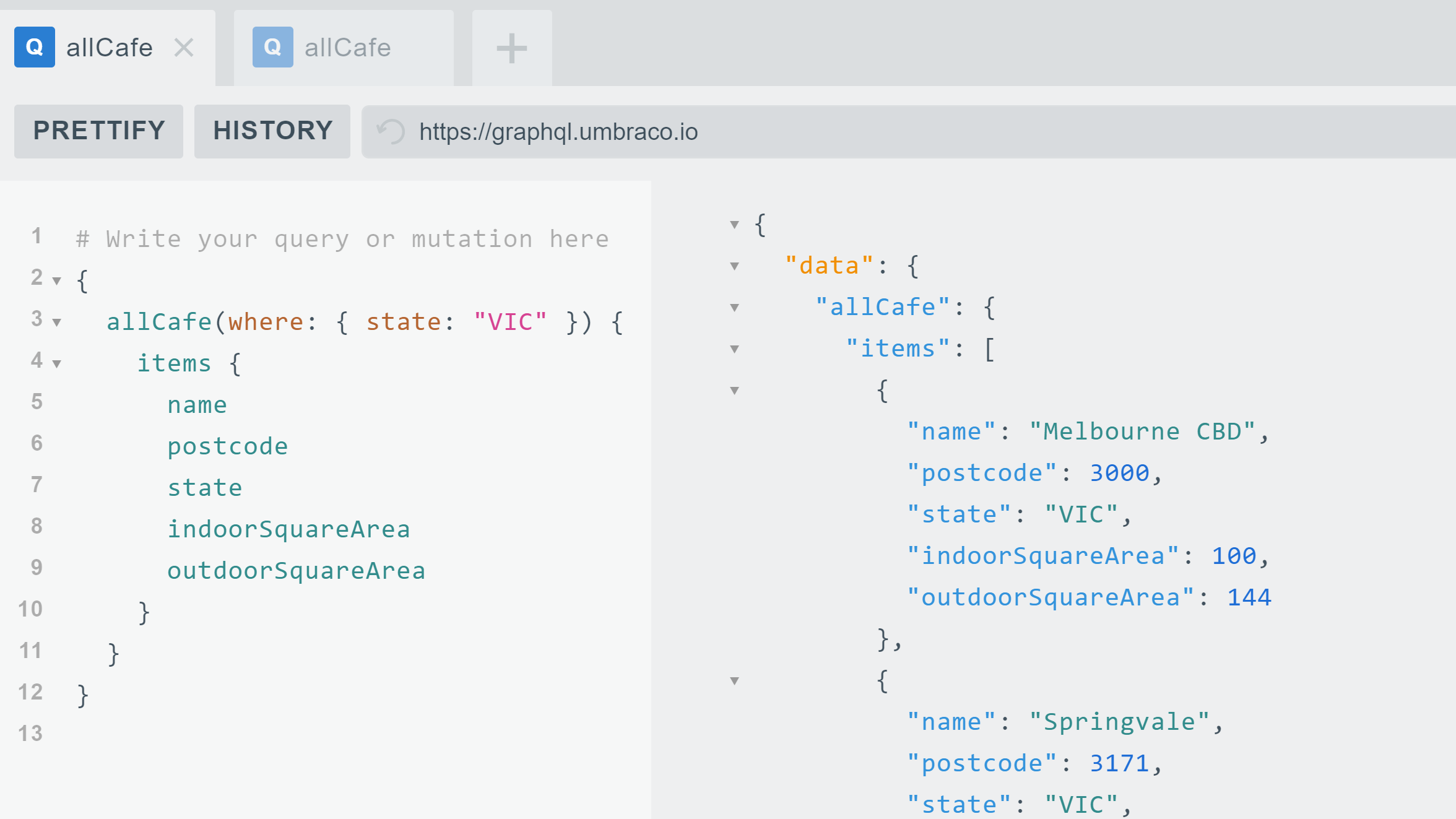
Before committing, make sure your developers are comfortable with the retrieval APIs and also consider preview APIs, secure APIs, and how easily they can be called from code. If you plan to automate content creation, evaluate content management APIs for CRUD operations. These APIs proved invaluable when we automated the import of over 2,000 blog posts and related images from WordPress into a headless CMS, requiring minimal effort from content authors. Some vendors also offer Google Sheets add-ons and similar tools for one-click import.
Most headless CMSes offer free trials, so use them to verify that the API design and content modeling fit your requirements.
Look for:
- Mature REST APIs
- GraphQL support
- Preview and secure APIs
- Content management APIs for CRUD operations
- Free trials
Native SDKs
SDKs are available directly from vendors, as open-source projects, or from third parties. Confirm that an SDK exists for the technology, language, and platform you intend to use. While RESTful and GraphQL APIs offer full querying power, a native SDK can significantly cut development time.
In our work at Luminary, native SDKs have allowed us to adopt current frameworks like Microsoft .NET Core and .NET 5 while following vendor-recommended best practices.
Look for:
- A supported SDK for your chosen technology stack
Environment Management
A single production environment may suffice for smaller sites, but as teams and features grow, multiple environments for content curation and preview become necessary. Your headless CMS needs to support multiple environments, and your consuming application must be set up to match. Also consider how content can be synchronized or ported between environments.
Look for:
- Multiple environments within the CMS
- The ability to move content across environments
Images, Files, and CDN Support
Beyond static assets, many headless CMSes cache content retrieved via REST or GraphQL APIs on a CDN, which improves performance. However, cached or older content can sometimes cause issues. Your CMS should provide a way to purge the CDN cache or fetch the latest content using specific HTTP headers. Custom domain support against a CDN may also be a requirement.
Look for:
- CDN caching for both images and content
- Custom domain support
Usage Limits and Pricing
Each subscription plan comes with usage limits: the number of content items, bandwidth, back-office users, API calls, and rate limits. Plan for both current and future usage. Upgrade paths are usually instantaneous, but it is easy to overshoot. One client incurred a large bill after unknowingly adding many users beyond their quota. Administrators should monitor usage closely.
Reduce operating costs by using client-side caching, static site generators, and efficient API or GraphQL queries to stay within limits.
Look for:
- Limits on specific features
- Potential operating expenses
Broader Considerations
Some factors affect neither content authors nor developers directly but matter for legal, financial, or operational reasons.
Data Center Location
Data residency is a common question. A headless CMS that lets you choose the geographic data center could be a deciding factor for businesses with legal or regulatory obligations. One large not-for-profit client selected a vendor specifically because it could store data in an Azure data center within Australia.
Support and Sales Presence
Support coverage in your timezone and the availability of local sales representatives can tip a decision. That same Australian client valued having on-the-ground sales support and round-the-clock technical assistance.
Look for:
- Legal and regulatory data storage requirements
- Local sales and technical support availability
Enterprise Features
Large organizations often require single sign-on (SSO) tied to their authentication systems, queryable audit logs, integrations with existing systems, or specific ISO certifications. Compile a list of enterprise-grade requirements before evaluating vendors.
Community and Ecosystem
The community around a headless CMS is easy to overlook but valuable. Look beyond the vendor's marketing: are independent developers actively sharing open-source resources and solutions? This isn’t a primary decision factor, but it helps during implementation and troubleshooting.
Infrastructure Freedom
With headless CMSes, your choice of backend technology does not constrain your front end. You can pick anything from .NET to Node.js, run on Windows, Linux, or macOS, and code in Python or C#. Similarly, you may host your site on Netlify, Azure, GCP, or AWS purely based on your needs. Some vendors also offer native integrations with services like Gatsby Cloud, opening up additional combinations. Infrastructure decisions should be made with input from practitioners experienced in headless architecture.
Look for:
- Enterprise features you cannot live without
- Community engagement with the product
- Support for your preferred infrastructure
Lessons From Implementation
At Luminary, we have partnered with headless CMSes including Acoustic, Contentful, Kentico Kontent, and Umbraco Heartcore, some since their beta stages. Public roadmaps, strong technical support, and responsiveness to feature requests have been positive highlights.
We have also tackled SEO for front-end-only headless implementations, cached large listing pages, managed extensive server-side caches, and integrated other microservices with headless CMSes. Each of these scenarios brings unique challenges. Even tasks that are straightforward on a traditional CMS—like form submissions and site search—require careful planning, along with more complex needs such as user authentication and third-party authorization.
With the right vendor and implementation partner, you can end up with a headless CMS that satisfies marketers, content editors, and developers alike.



