
From Foosball To Toy Cars
When a suddenly-remote team found itself missing its foosball table, the initial instinct was to recreate the game digitally. But the author quickly realized that a straightforward translation wouldn’t capture the fun. The breakthrough came while playing with a toddler: steering toy cars instead of kicking a ball. The concept for Autowuzzler was born.
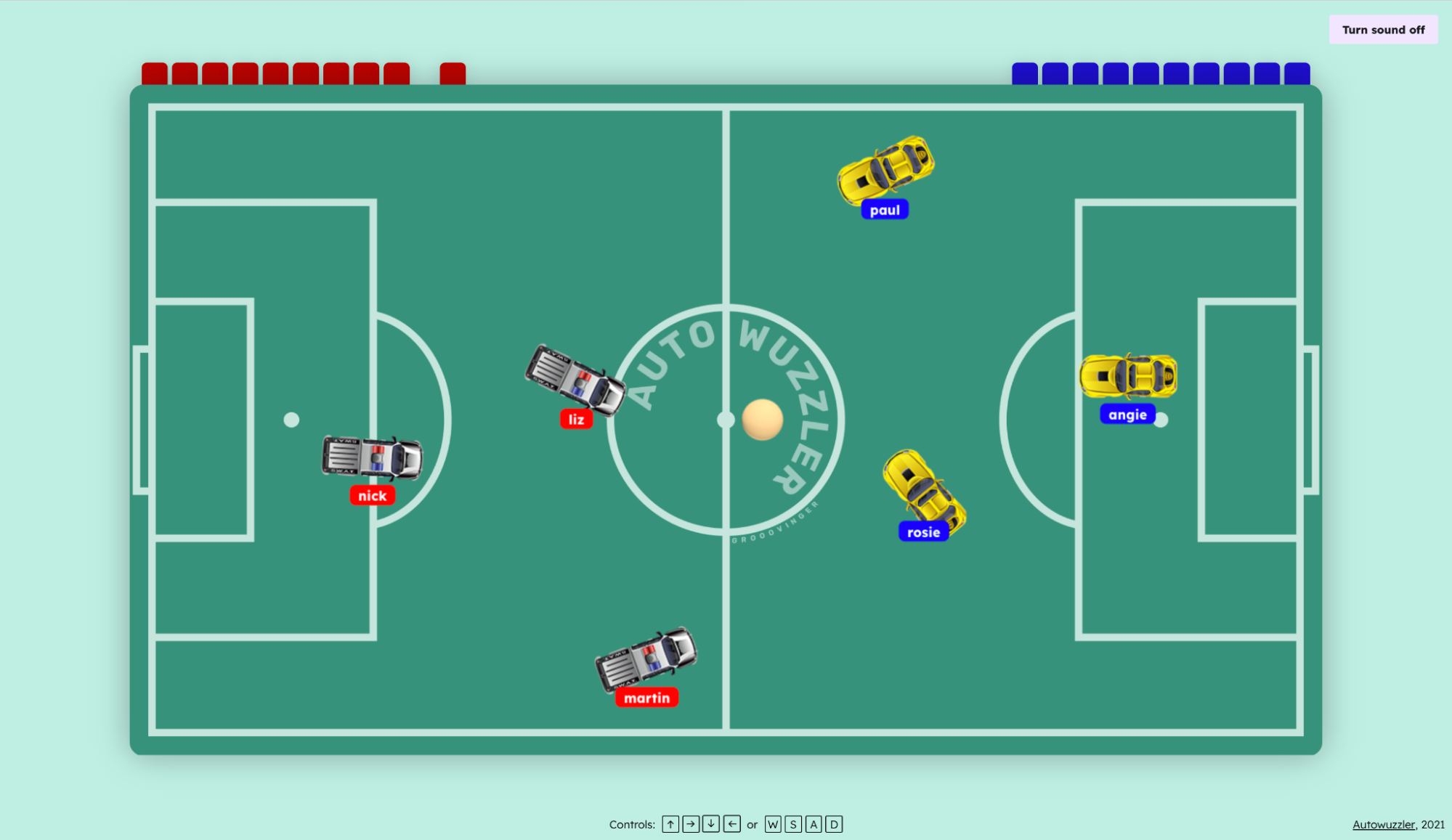
The game is a top-down, arena-based take on foosball where players control toy cars. Two teams compete, and the first to score 10 goals wins. The design centered on two key goals: replicating the tactile feel of a physical foosball table and making it trivially easy to jump into a casual game with friends or coworkers.
The First Playable Version: A Quick But Flawed Test
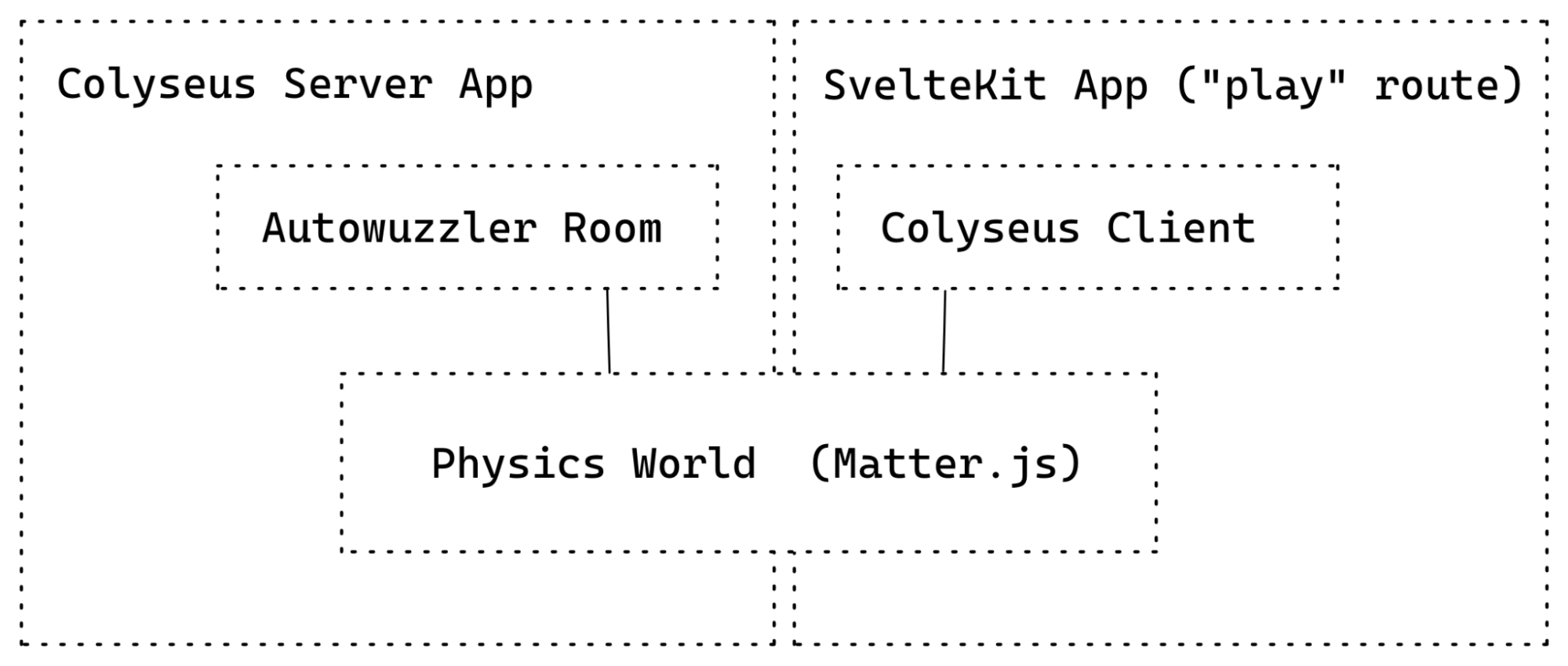
The initial prototype leveraged Phaser.js for its built-in physics engine, a choice based on prior experience. The game itself was embedded in a Next.js application for the same reason—favoring speed of development over architectural purity.
The need for real-time multiplayer required a WebSocket broker, which was implemented with Express. However, this is where the architecture took a pragmatic, if ultimately short-sighted, turn. All physics calculations run on the client within the Phaser game loop. To synchronize state, the prototype designated the first connected player as the authority. That player's client computed all game object positions and forces, then sent the results to the Express server, which broadcast them to all other clients at a rate of 30 milliseconds.
This design had an immediate and predictable consequence:
- The authoritative player experienced perfectly smooth, real-time physics since the simulation ran locally.
- All other players were subject to at least 30 milliseconds of network latency, plus any additional delays introduced by the host's upstream connection.
The author acknowledges this was poor architecture, but it was a deliberate tradeoff to get a playable build quickly and validate whether the core game concept was actually enjoyable.
Validation And Pivot
Despite the technical shortcomings, feedback from friends was overwhelmingly positive. The primary complaint was, unsurprisingly, the real-time performance for non-host players. The flawed setup also introduced an existential problem: if the host player left the game, the simulation had no clear successor to take over. Additionally, the design only supported a single global game room, forcing all players into the same match.
The prototype had served its purpose. It confirmed the game was fun but highlighted that the synchronous client-host model was unsustainable. The decision was made to discard the codebase and start anew with a clear, more robust architecture in mind.
Moving the Game State to the Server
The prototype's "first client rules all" approach had to go. The answer was Colyseus, a Node.js and Express-based multiplayer game framework that handles state synchronization authoritatively. For the other core pieces, Autowuzzler uses:
- Matter.js as the physics engine. Unlike Phaser.js, it runs natively in Node and Autowuzzler doesn't need a full game framework.
- SvelteKit for the application shell, chosen partly because it had just hit public beta.
- Supabase.io for persisting user-generated game PINs.
What Colyseus delivers out of the box: authoritative state sync across clients, efficient WebSocket communication (only changed data is sent), multi-room setups, client libraries for JavaScript and several game engines, lifecycle hooks, broadcast or single-user messages, and a built-in monitoring panel. Server setup is fast thanks to the docs, an npm init script, and an examples repository.
Defining the Synchronized State
The central entity is the game room, which holds the state for one game session. In Autowuzzler, each session has two teams, a fixed player limit, and one ball. Only properties explicitly declared in a Colyseus schema get synchronized. For the ball, that means its position, orientation, and velocity:
class Ball extends Schema {
  constructor() {
   super();
   this.x = 0;
   this.y = 0;
   this.angle = 0;
   this.velocityX = 0;
   this.velocityY = 0;
  }
}
defineTypes(Ball, {
  x: "number",
  y: "number",
  angle: "number",
  velocityX: "number",
  velocityY: "number"
});
Schema property types come in two flavors. Primitive types cover string, boolean, and number (plus more efficient integer and float variants). Complex types include ArraySchema, MapSchema, SetSchema, and CollectionSchema, mirroring JavaScript's native data structures.
Player schemas look similar but carry additional fields like a name and team number, supplied at construction time:
class Player extends Schema {
  constructor(teamNumber) {
    super();
    this.name = "";
    this.x = 0;
    this.y = 0;
    this.angle = 0;
    this.velocityX = 0;
    this.velocityY = 0;
    this.teamNumber = teamNumber;
  }
}
defineTypes(Player, {
  name: "string",
  x: "number",
  y: "number",
  angle: "number",
  velocityX: "number",
  velocityY: "number",
  angularVelocity: "number",
  teamNumber: "number",
});
Finally, the room schema ties everything together. Teams live in an ArraySchema, players are keyed by ID inside a MapSchema for fast lookup, and a single Ball instance is created in the room constructor:
class RoomSchema extends Schema {
 constructor() {
   super();
   this.teams = new ArraySchema();
   this.ball = new Ball();
   this.players = new MapSchema();
 }
}
defineTypes(RoomSchema, {
 teams: [Team], // an Array of Team
 ball: Ball,    // a single Ball instance
 players: { map: Player } // a Map of Players
});
Team class is omitted.Match-Making by Game PIN
Each game session spawns a fresh room when its first player connects and disposes when the last one leaves. Routing players to the correct room is handled by Colyseus match-making, configured via the filterBy method:
gameServer.define("autowuzzler", AutowuzzlerRoom).filterBy(['gamePIN']);
Players joining with the same gamePIN land in the same room, and all state updates and messages stay scoped to that room.
Running Physics on the Server
Colyseus handles networking but leaves game mechanics, including physics, to you. Phaser.js doesn't execute outside a browser, but its underlying Matter.js engine works fine on Node.
In Matter.js, you build a world with dimensions and gravity, then populate it with primitive physics bodies that interact through simulated mass, friction, and collisions. Apply force to move things, the same way you would in reality. This world is the heart of Autowuzzler: it dictates car acceleration, ball bounce, goal positions, and scoring behavior.
let ball = Bodies.circle(
 ballInitialXPosition,
 ballInitialYPosition,
 radius,
 {
   render: {
     sprite: {
       texture: '/assets/ball.png',
     }
   },
   friction: 0.002,
   restitution: 0.8
 }
);
World.add(this.engine.world, [ball]);
Simplified Matter.js code for adding a physics body for the ball.
Because Matter.js can run without rendering, the physics logic is shared between server and client, with distinct roles for each.
On the server, the physics world:
- receives keyboard input via Colyseus and applies force to the corresponding car;
- performs all calculations for movement and collisions;
- pushes updated object states back to Colyseus for broadcast;
- steps every 16.6 milliseconds, or ~60 frames per second, driven by the Colyseus server.
On the client, the physics world:
- never manipulates game objects directly;
- consumes state updates from Colyseus and applies position, velocity, and angle changes;
- sends input events back to the server;
- loads sprites and renders to a canvas element;
- skips collision detection by setting the
isSensorflag; - updates via
requestAnimationFrame, ideally at 60 fps.
Client-Side Interpolation
Reusing the Matter.js world on the client enables a simple performance boost. Instead of just syncing an object's position, the server also sends its velocity. By setting both, objects keep moving along their trajectory even if the next server update is delayed. The result: smooth, continuous motion instead of objects snapping between discrete positions.
The Room Lifecycle
The Autowuzzler Room class wires up Colyseus lifecycle hooks:
onCreate— fires when a new room is born, typically on the first connection;onAuth— authorization gate for incoming clients;onJoin— client has entered the room;onLeave— client disconnected;onDispose— room is being torn down.
The room instantiates the physics world in onCreate, registers incoming players in onJoin, and runs its main loop 60 times per second via setSimulationInterval:
// deltaTime is roughly 16.6 milliseconds
this.setSimulationInterval((deltaTime) => this.world.updateWorld(deltaTime));
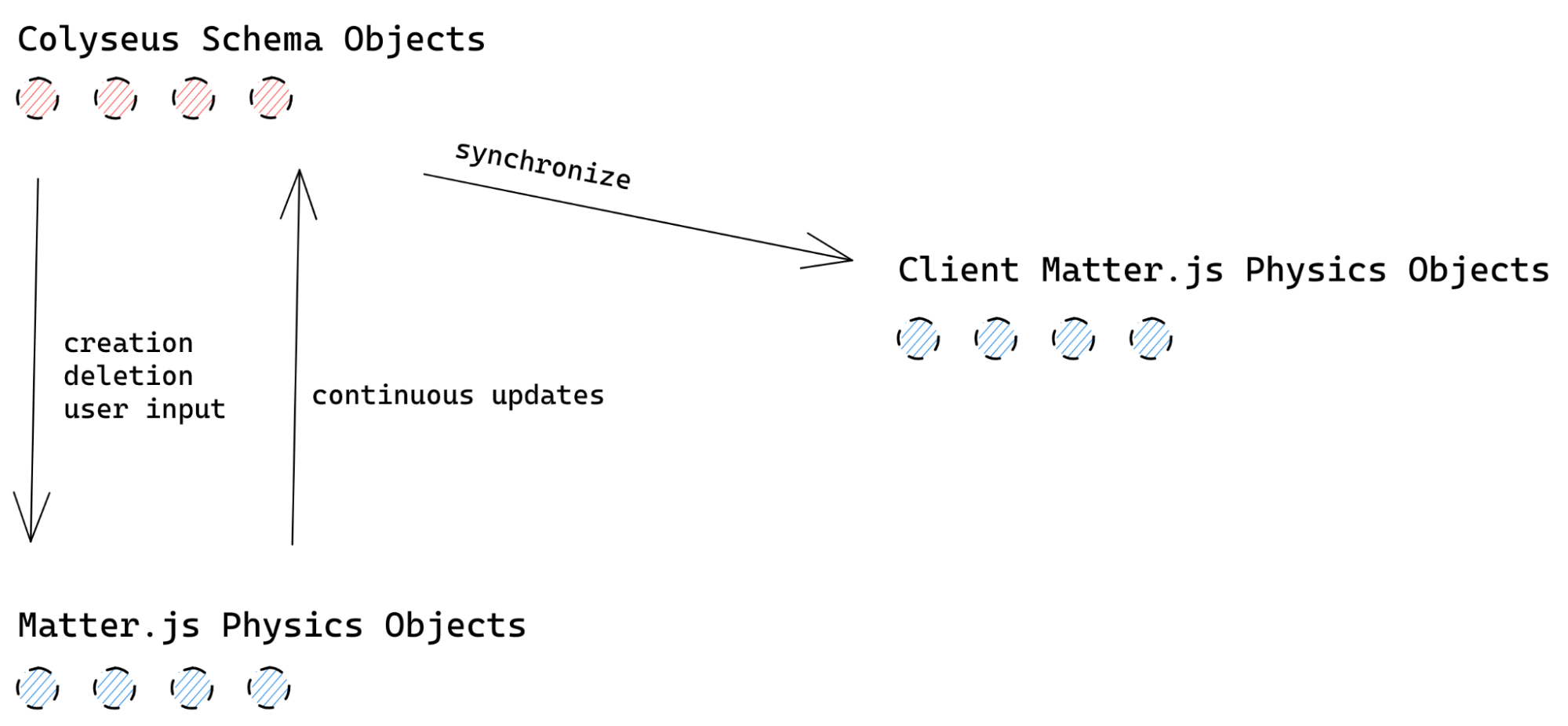
Physics objects and Colyseus objects are separate, so every game entity exists twice: once in the physics world and once as a syncable Colyseus schema instance. Keeping them in lockstep means listening to Matter.js's afterUpdate event and copying the mutated values back:
Events.on(this.engine, "afterUpdate", () => {
 // apply the x position of the physics ball object back to the colyseus ball object
 this.state.ball.x = this.physicsWorld.ball.position.x;
 // ... all other ball properties
 // loop over all physics players and apply their properties back to colyseus players objects
})
There is a third copy of each object to manage — the one the player actually sees on screen:
Frontend Architecture and Game Client
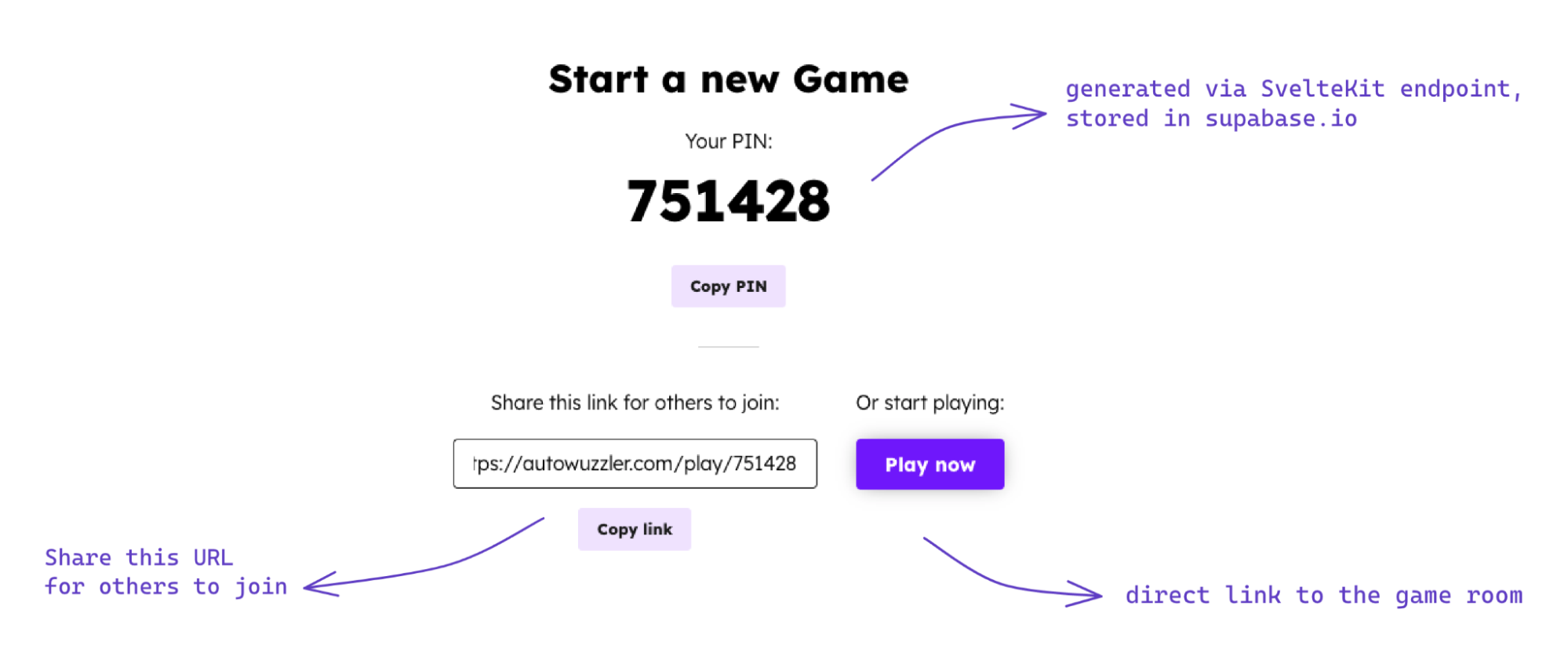
The client side of Autowuzzler is responsible for the user-facing game experience: creating and sharing game PINs, validating them on join, rendering the physics simulation, and communicating player input to the server. The frontend handles a few distinct pages, including a landing page, a game creation page, and a join-by-PIN route. Each room also gets a unique shareable URL built from its game PIN.
For this implementation, SvelteKit was chosen over Next.js. The decision was driven by several features: Svelte acts as both a UI framework and a compiler, shipping minimal code without a client-side runtime. It includes global stores, transitions, and animations out of the box, and supports scoped CSS within single-file components. SvelteKit adds server-side rendering, file-based routing with dynamic parameters, server routes for API endpoints, and layout sharing across routes — all of which fit the project's needs.
Game PIN Creation and Storage
Before gameplay begins, a user must create a game PIN that others can use to join the same room. This is handled through a SvelteKit server endpoint: /api/createcode generates a new PIN and persists it to a Supabase.io database. The page component fetches this endpoint via the onMount lifecycle function once the page loads.
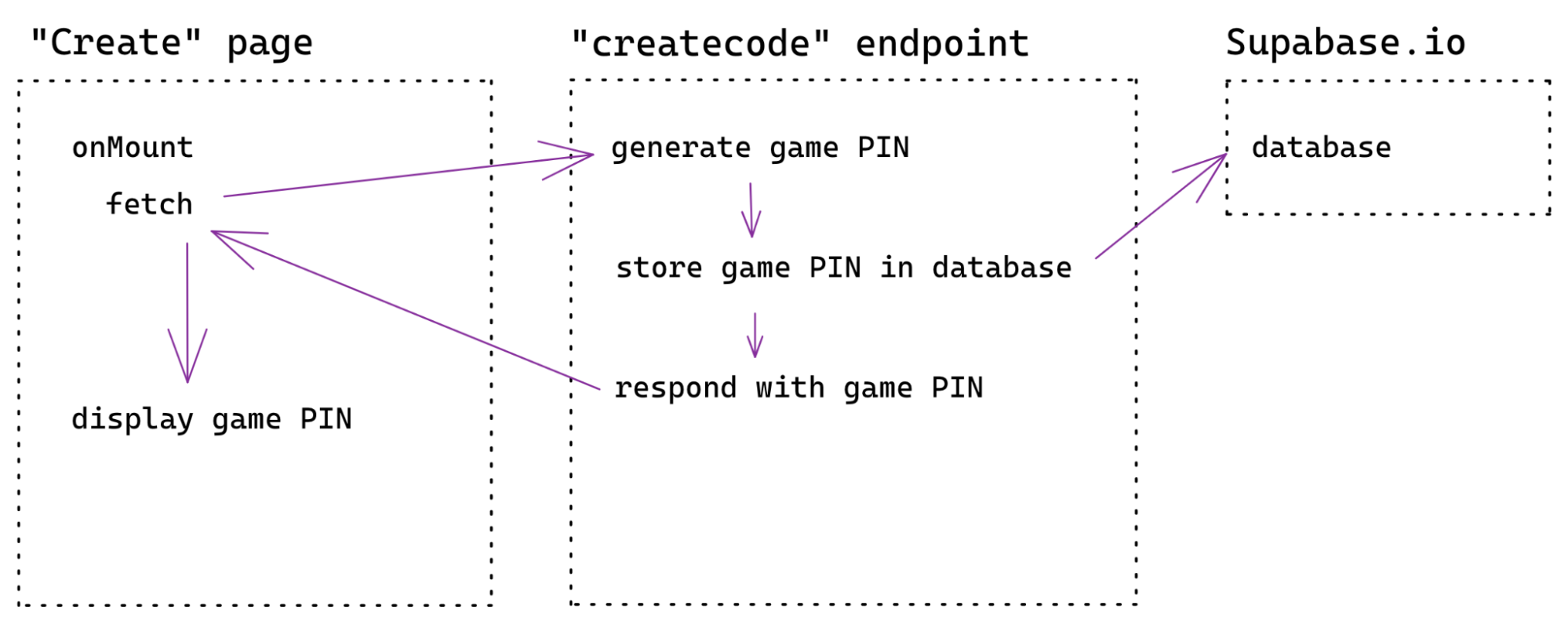
Supabase.io — an open-source Firebase alternative — provides a PostgreSQL database that can be accessed through its JavaScript client or via REST. Storing the generated PIN is a simple insert operation:
import { createClient } from '@supabase/supabase-js'

const database = createClient(
 import.meta.env.VITE_SUPABASE_URL,
 import.meta.env.VITE_SUPABASE_KEY
);

const { data, error } = await database
 .from("games")
 .insert([{ code: 123456 }]);
The Supabase URL and key are kept in a .env file. Because Vite is the build tool underneath SvelteKit, environment variables used in SvelteKit must be prefixed with VITE_.
Joining a Game via URL
Each room has its own URL derived from the PIN, such as autowuzzler.com/play/12345. In SvelteKit, dynamic route parameters are defined by bracketing the parameter name in the page file — client/src/routes/play/[gamePIN].svelte. Inside the play route, the client connects to the Colyseus server, initializes the physics world, renders game objects, listens for keyboard input, and displays the score.
Connecting to Colyseus and Handling State
Connecting the client to the Colyseus server is done with the Colyseus client library, pointed at ws://localhost:2567 during development. The client joins the room named autowuzzler, using the gamePIN from the route parameter for match-making into the correct room instance.
let client = new Colyseus.Client("ws://localhost:2567");
this.room = await client.joinOrCreate("autowuzzler", { gamePIN });
Since SvelteKit initially renders pages on the server, the connection logic is wrapped in the onMount lifecycle to ensure it runs client-side only after page load — equivalent to React's useEffect with an empty dependency array.
onMount(async () => {
  let client = new Colyseus.Client("ws://localhost:2567");
  this.room = await client.joinOrCreate("autowuzzler", { gamePIN });
})
Once connected, the client subscribes to state changes on all game objects. For example, listening for a new player's entry (onAdd) and then for updates to that player's properties:
this.room.state.players.onAdd = (player, key) => {
  console.log(`Player has been added with sessionId: ${key}`);

  // add player entity to the game world
  this.world.createPlayer(key, player.teamNumber);

  // listen for changes to this player
  player.onChange = (changes) => {
   changes.forEach(({ field, value }) => {
     this.world.updatePlayer(key, field, value); // see below
   });
 };
};
In the physics world's updatePlayer method, changed properties are applied individually because Colyseus' onChange delivers a set of all properties that changed. This update logic runs exclusively on the client's physics instance — game objects are only manipulated indirectly via messages from the server.
updatePlayer(sessionId, field, value) {
 // get the player physics object by its sessionId
 let player = this.world.players.get(sessionId);
 // exit if not found
 if (!player) return;
 // apply changes to the properties
 switch (field) {
   case "angle":
     Body.setAngle(player, value);
     break;
   case "x":
     Body.setPosition(player, { x: value, y: player.position.y });
     break;
   case "y":
     Body.setPosition(player, { x: player.position.x, y: value });
     break;
   // set velocityX, velocityY, angularVelocity ...
 }
}
The same pattern applies to the ball and team objects: their changes are listened to and applied to the client-side physics world.
Keyboard input is not sent directly as discrete keydown events. Instead, the client keeps a map of currently pressed keys and sends the set of commands to the Colyseus server on a fixed 50ms loop. This approach supports simultaneous key presses and avoids the input pause that occurs between a first and consecutive keydown event.
let keys = {};
const keyDown = e => {
 keys[e.key] = true;
};
const keyUp = e => {
 keys[e.key] = false;
};
document.addEventListener('keydown', keyDown);
document.addEventListener('keyup', keyUp);

let loop = () => {
 if (keys["ArrowLeft"]) {
   this.room.send("move", { direction: "left" });
 }
 else if (keys["ArrowRight"]) {
   this.room.send("move", { direction: "right" });
 }
 if (keys["ArrowUp"]) {
   this.room.send("move", { direction: "up" });
 }
 else if (keys["ArrowDown"]) {
   this.room.send("move", { direction: "down" });
 }
 // next iteration
 requestAnimationFrame(() => {
  setTimeout(loop, 50);
 });
}
// start loop
setTimeout(loop, 50);
This completes the game loop: keyboard input is sent to the server, the server updates the authoritative physics world, and then sends the revised object states back to clients for rendering.
Practical Lessons
Two broad challenges stand out from building a real-time physics-based game. A working understanding of physics engines matters — substantial time went into tuning physical properties and constraints, even after having built a smaller Phaser.js and Matter.js game before. And real-time synchronization remains inherently difficult: even minimal network delay degrades the player experience, and Colyseus does not eliminate computation or transmission latency.
SvelteKit Caveats
Several SvelteKit quirks appeared during early beta use:
- Environment variables require the
VITE_prefix in the SvelteKit context. - Supabase needed to be listed in both
dependenciesanddevDependenciesinpackage.json, though that may no longer be necessary. - The SvelteKit
loadfunction executes on both the server and the client. - Full hot module replacement, including state preservation, requires adding the comment
<!-- @hmr:keep-all -->to page components.
Despite these issues, SvelteKit proved stable and fast for the project. Its baked-in features — animations, transitions, scoped CSS, and global stores — plus its SSR and routing support, delivered a productive development experience.
Deployment Experiences
Hosting the Colyseus Node server initially on a free Heroku dyno consumed considerable time resolving WebSocket and CORS issues — and the dyno's performance was ultimately inadequate for real-time traffic. The server was later moved to a small Linode instance. The client application was deployed to Netlify using SvelteKit's adapter-netlify and required no special configuration.
Starting with a minimal prototype to validate the idea was the most useful early step. Colyseus handled real-time state synchronization across clients with little ceremony once the data schema was defined, and its built-in monitoring panel was valuable for debugging sync problems. The physics layer added complexity because it created a second set of mutable game objects to coordinate. Database integration with Supabase was direct, though a plain SQLite database would have sufficed — trying new technology was part of the project's appeal. Overall, SvelteKit provided all necessary building blocks and made the frontend fast to assemble.


