Form plugins rarely get a second thought on a conventional WordPress build: they render markup, validate input, persist submissions and wire up third-party integrations. A headless setup strips all of that away. Once WordPress serves mainly as a CMS behind a REST (or GraphQL) API, the front end is yours, and plugin rendering no longer factors into the decision. Submission can then go to your own custom API, to one of the many static form services, or to the REST endpoint that some form plugins already expose — Contact Form 7 and Gravity Forms among them.
Weighing a plugin endpoint against a form service
Technically there is no difference between posting to a service endpoint and posting to a plugin endpoint, so the choice comes down to other criteria. Cost is the obvious one, followed by whether the WordPress install and its REST API are publicly reachable, since an endpoint has to be available at submission time. Some setups restrict WordPress access to editing and build processes only. Where the data lives — and whether that storage satisfies GDPR — is a further consideration. On features beyond submission, plugin ecosystems are hard to match: add-ons for reports and PDFs, plus ready-made integrations with newsletter and payment services.
There are also cases where a plugin endpoint is attractive in a classic, theme-based front end — for instance, when a theme built on a utility-first CSS framework would otherwise have to restyle the fixed, BEM-like markup a plugin renders.
Either way, two problems must be solved: sending the data, and giving the user meaningful feedback.
The two endpoints
Both accept a POST request, with the form ID forming the dynamic part of the URL. Contact Form 7's endpoint is live as soon as the plugin is activated:
https://your-site.tld/wp-json/contact-form-7/v1/contact-forms/<FORM_ID>/feedbackGravity Forms uses a similar shape:
https://your-site.tld/wp-json/gf/v2/forms/<FORM_ID>/submissionsIts REST API is off by default. Enable it under the plugin's settings on the REST API page by checking "Enable access to the API". No API key is needed, because the submission endpoint does not require one.
Update (Sep. 10, 2024): Contact Form 7 hashes the IDs as of version 5.8, but they can still be found in the URL of the form's editing page.
Shaping the request body
The example form used throughout has five fields with these rules:
- a required text field
- a required email field
- a required date field that accepts dates before October 4, 1957
- an optional textarea
- a required checkbox
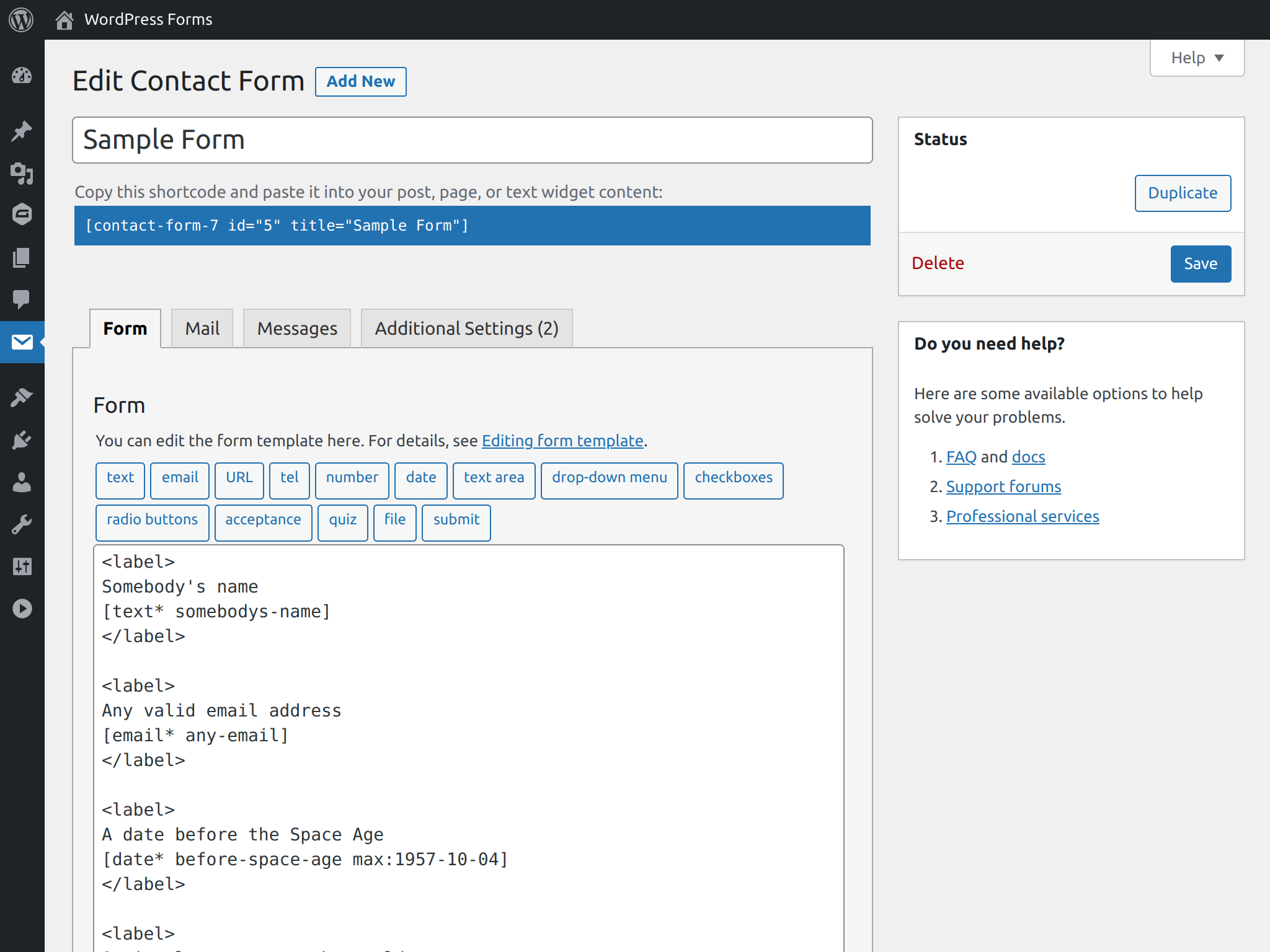
Contact Form 7 expects body keys declared with the form-tags syntax:
{
  "somebodys-name": "Marian Kenney",
  "any-email": "[email protected]",
  "before-space-age": "1922-03-11",
  "optional-message": "",
  "fake-terms": "1"
}
Gravity Forms instead wants an auto-generated, incremental field ID carrying the input_ prefix; the ID is visible while editing the field.
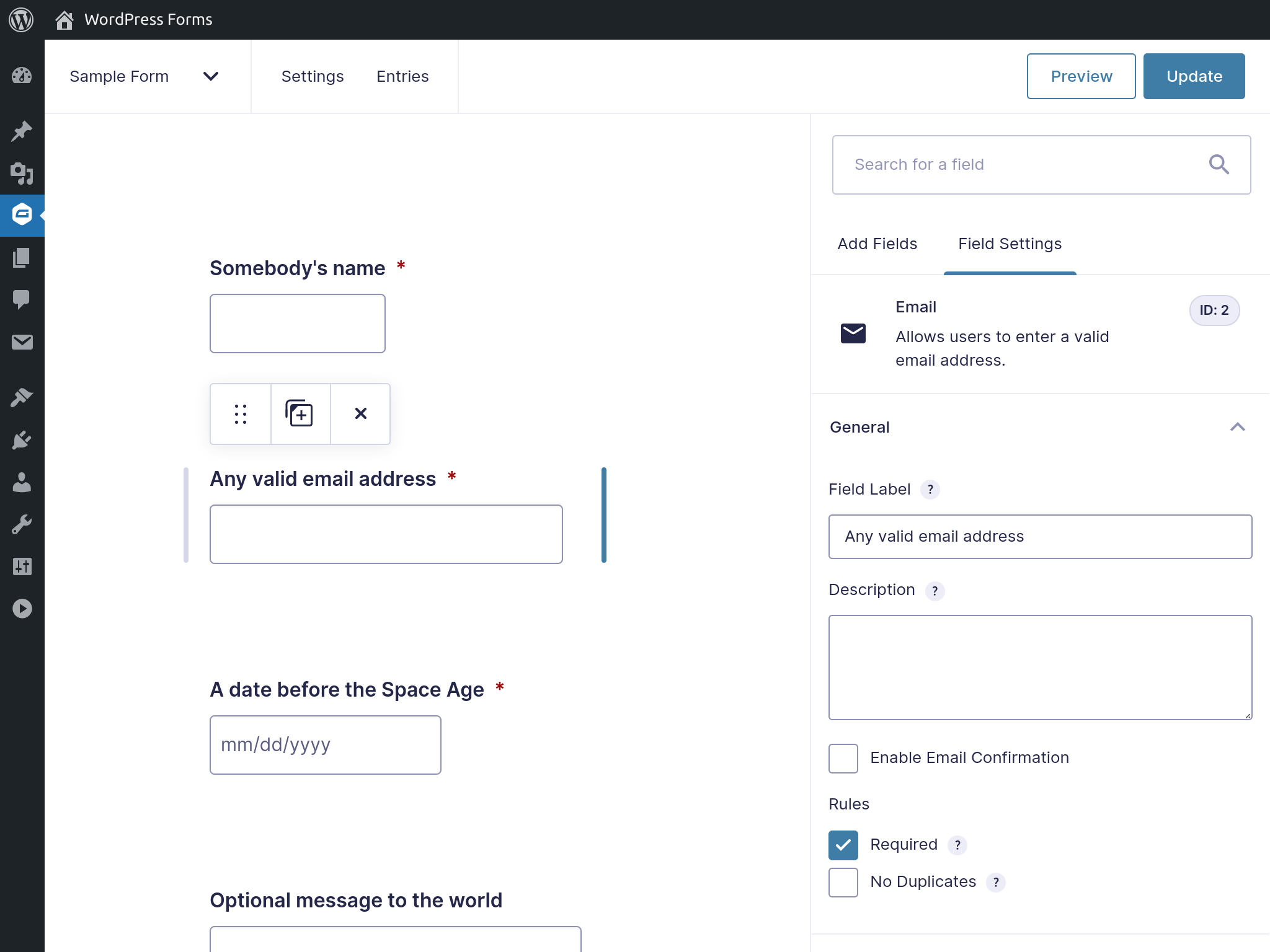
{
  "input_1": "Marian Kenney",
  "input_2": "[email protected]",
  "input_3": "1922-03-11",
  "input_4": "",
  "input_5_1": "1"
}
Naming each input with the key its plugin expects saves the work of mapping names to keys. The resulting Contact Form 7 markup:
<form action="https://your-site.tld/wp-json/contact-form-7/v1/contact-forms/<FORM_ID>/feedback" method="post">
  <label for="somebodys-name">Somebody's name</label>
  <input id="somebodys-name" type="text" name="somebodys-name">
  <!-- Other input elements -->
  <button type="submit">Submit</button>
</form>
For Gravity Forms, only the action and name attributes change:
<form action="https://your-site.tld/wp-json/gf/v2/forms/<FORM_ID>/submissions" method="post">
  <label for="input_1">Somebody's name</label>
  <input id="input_1" type="text" name="input_1">
  <!-- Other input elements -->
  <button type="submit">Submit</button>
</form>
With all required information present in the HTML, the request can be sent using FormData together with fetch:
const formSubmissionHandler = (event) => {
  event.preventDefault();

  const formElement = event.target,
    { action, method } = formElement,
    body = new FormData(formElement);

  fetch(action, {
    method,
    body
  })
    .then((response) => response.json())
    .then((response) => {
      // Determine if the submission is not valid
      if (isFormSubmissionError(response)) {
        // Handle the case when there are validation errors
      }
      // Handle the happy path
    })
    .catch((error) => {
      // Handle the case when there's a problem with the request
    });
};

const formElement = document.querySelector("form");

formElement.addEventListener("submit", formSubmissionHandler);
Sending it is easy; the user experience that comes with it is not acceptable. Users need, at minimum, a global success or error message, inline validation messages with guidance, and special classes that draw attention to fields needing correction.
Where validation happens
In addition to built-in HTML validation, JavaScript can add client-side checks and/or the server can validate. Both plugins validate on the server out of the box and include the error messages in the response, which lets you keep the rules under control from the WordPress admin. For more complex rules, such as conditional field validation, relying on the server alone can be sensible, since keeping front-end JavaScript in sync with plugin settings becomes a maintenance burden. A server-only approach reduces the task to parsing the response, extracting the relevant data, and manipulating the DOM — inserting elements and toggling class names.
Normalizing the two response formats
Contact Form 7's validation error response looks like this:
{
  "into": "#",
  "status": "validation_failed",
  "message": "One or more fields have an error. Please check and try again.",
  "posted_data_hash": "",
  "invalid_fields": [
    {
      "into": "span.wpcf7-form-control-wrap.somebodys-name",
      "message": "The field is required.",
      "idref": null,
      "error_id": "-ve-somebodys-name"
    },
    {
      "into": "span.wpcf7-form-control-wrap.any-email",
      "message": "The field is required.",
      "idref": null,
      "error_id": "-ve-any-email"
    },
    {
      "into": "span.wpcf7-form-control-wrap.before-space-age",
      "message": "The field is required.",
      "idref": null,
      "error_id": "-ve-before-space-age"
    },
    {
      "into": "span.wpcf7-form-control-wrap.fake-terms",
      "message": "You must accept the terms and conditions before sending your message.",
      "idref": null,
      "error_id": "-ve-fake-terms"
    }
  ]
}
And a successful submission returns:
{
  "into": "#",
  "status": "mail_sent",
  "message": "Thank you for your message. It has been sent.",
  "posted_data_hash": "d52f9f9de995287195409fe6dcde0c50"
}
Gravity Forms' validation error response is more compact:
{
  "is_valid": false,
  "validation_messages": {
    "1": "This field is required.",
    "2": "This field is required.",
    "3": "This field is required.",
    "5": "This field is required."
  },
  "page_number": 1,
  "source_page_number": 1
}
Its success response is larger:
{
  "is_valid": true,
  "page_number": 0,
  "source_page_number": 1,
  "confirmation_message": "<div id='gform_confirmation_wrapper_1' class='gform_confirmation_wrapper '><div id='gform_confirmation_message_1' class='gform_confirmation_message_1 gform_confirmation_message'>Thanks for contacting us! We will get in touch with you shortly.</div></div>",
  "confirmation_type": "message"
}
Both carry what is needed, but they share no convention and each has quirks. Gravity Forms' confirmation message contains HTML, and its validation message keys lack the input_ prefix that the request itself requires. Contact Form 7's validation errors include information that only matters to its own front end, and the field keys must be extracted before use.
Rather than coding against whichever response arrives, define the format you want and transform the original into it. Combining the best of both and dropping what your case doesn't need yields something like:
{
  "isSuccess": false,
  "message": "One or more fields have an error. Please check and try again.",
  "validationError": {
    "somebodys-name": "This field is required.",
    "any-email": "This field is required.",
    "input_3": "This field is required.",
    "input_5": "This field is required."
  }
}
On success, isSuccess becomes true and the validation error object is returned empty:
{
  "isSuccess": true,
  "message": "Thanks for contacting us! We will get in touch with you shortly.",
  "validationError": {}
}
Normalizing the Contact Form 7 response:
const normalizeContactForm7Response = (response) => {
  // The other possible statuses are different kind of errors
  const isSuccess = response.status === 'mail_sent';
  // A message is provided for all statuses
  const message = response.message;
  const validationError = isSuccess
    ? {}
    : // We transform an array of objects into an object
    Object.fromEntries(
      response.invalid_fields.map((error) => {
        // Extracts the part after "cf7-form-control-wrap"
        const key = /cf7[-a-z]*.(.*)/.exec(error.into)[1];

        return [key, error.message];
      })
    );

  return {
    isSuccess,
    message,
    validationError,
  };
};
Normalizing the Gravity Forms response:
const normalizeGravityFormsResponse = (response) => {
  // Provided already as a boolean in the response
  const isSuccess = response.is_valid;
  const message = isSuccess
    ? // Comes wrapped in a HTML and we likely don't need that
      stripHtml(response.confirmation_message)
    : // No general error message, so we set a fallback
      'There was a problem with your submission.';
  const validationError = isSuccess
    ? {}
    : // We replace the keys with the prefixed version;
      // this way the request and response matches
      Object.fromEntries(
        Object.entries(
            response.validation_messages
        ).map(([key, value]) => [`input_${key}`, value])
      );

  return {
    isSuccess,
    message,
    validationError,
  };
};
Displaying messages and toggling classes is still outstanding, but the data is now cleanly accessible and the inconsistencies are hidden behind a light abstraction that can drop into an existing codebase or be extended further.
The remaining work depends on the project. When the main job is reacting to state changes, a declarative, reactive library helps — Alpine.js fits well and reuses the earlier code almost unchanged, needing only the proper directives in the right places.
What this approach buys you
For straightforward forms, the front-end experience WordPress plugins provide can be recreated with relative ease, and reused across projects — even in a way that lets you swap plugins without touching the front end. Advanced features such as multi-page forms or image upload previews do take time and effort that a plugin hands you baked in, but the more unusual the requirements, the stronger the case for the submission endpoint: you are no longer working against a front-end implementation built to solve many problems and never your particular one.
Expect the pattern to spread as headless WordPress use grows, and possibly to see form plugins designed primarily for headless use, with front-end rendering demoted to an add-on rather than the core.



