What “IndieWeb” Actually Means for WordPress
The IndieWeb tends to read as a philosophy or a set of ideals until you try to put it into practice — and then it quickly becomes a collection of protocols and plugins. That shift in perspective is where most of the confusion starts. On WordPress specifically, implementation is less about a single install and more about assembling a series of building blocks. WordPress provides much of the underlying plumbing; the plugins add the protocols on top.
IndieWeb’s core idea is that your own domain establishes your identity. Once your identity is rooted in your site, that site can handle the kinds of interactions typically locked inside centralized platforms: notifying other sites when you mention them, receiving their mentions back, fetching data about a mention for display, and even authenticating your identity through your own site rather than a third-party service. Much of this may resemble pingbacks, but it is a far more robust and maintained set of standards.
Step 1: Identity via the h-card
The primary IndieWeb plugin establishes who you are in the eyes of the IndieWeb. It does not handle sending, receiving, or parsing mentions on its own. Its role is simpler: the plugin provides an h-card template and widget you can place on your site.
The plugin by itself handles establishing your identity as the IndieWeb sees it. It offers an h-card template and widget. H-Card is the markup for marking up information about a person or place. So, this is an element many people opt to put on their site anyway.
The h-card is an open format from Microformats, which David Shanske defines as “a way of marking up HTML to allow elements to be identified. It is one of several ways of doing this, but is a very simple and readable one, which is why it is popular in the IndieWeb community.”

Class names like .h-card, u-photo, and p-name carry semantic meaning about a person and their identity. When parsed, they turn into structured data ready for other IndieWeb tools to consume:
{
  "items": [{
    "type": ["h-card"],
    "properties": {
      "photo": ["https://webfwd.org/content/about-experts/300.mitchellbaker/mentor_mbaker.jpg"],
      "name": ["Mitchell Baker"],
      "url": [
        "http://blog.lizardwrangler.com/",
        "https://twitter.com/MitchellBaker"
      ],
      "org": ["Mozilla Foundation"],
      "note": ["Mitchell is responsible for setting the direction and scope of the Mozilla Foundation and its activities."],
      "category": [
        "Strategy",
        "Leadership"
      ]
    }
  }]
}
You could achieve the same result by hand-marking up your theme with the proper Microformats2 classes — the plugin is simply a convenience layer. The catch is that most WordPress themes are not marked up in a Microformats-friendly way. A dedicated Microformats2 plugin exists to address that, but it is limited in its approach. David recommends manually adding the markup to your theme for better control, and notes that the next major Webmention plugin release will likely include improved detection of images and content for Microformats2 output.
Step 2: Webmentions for Notification

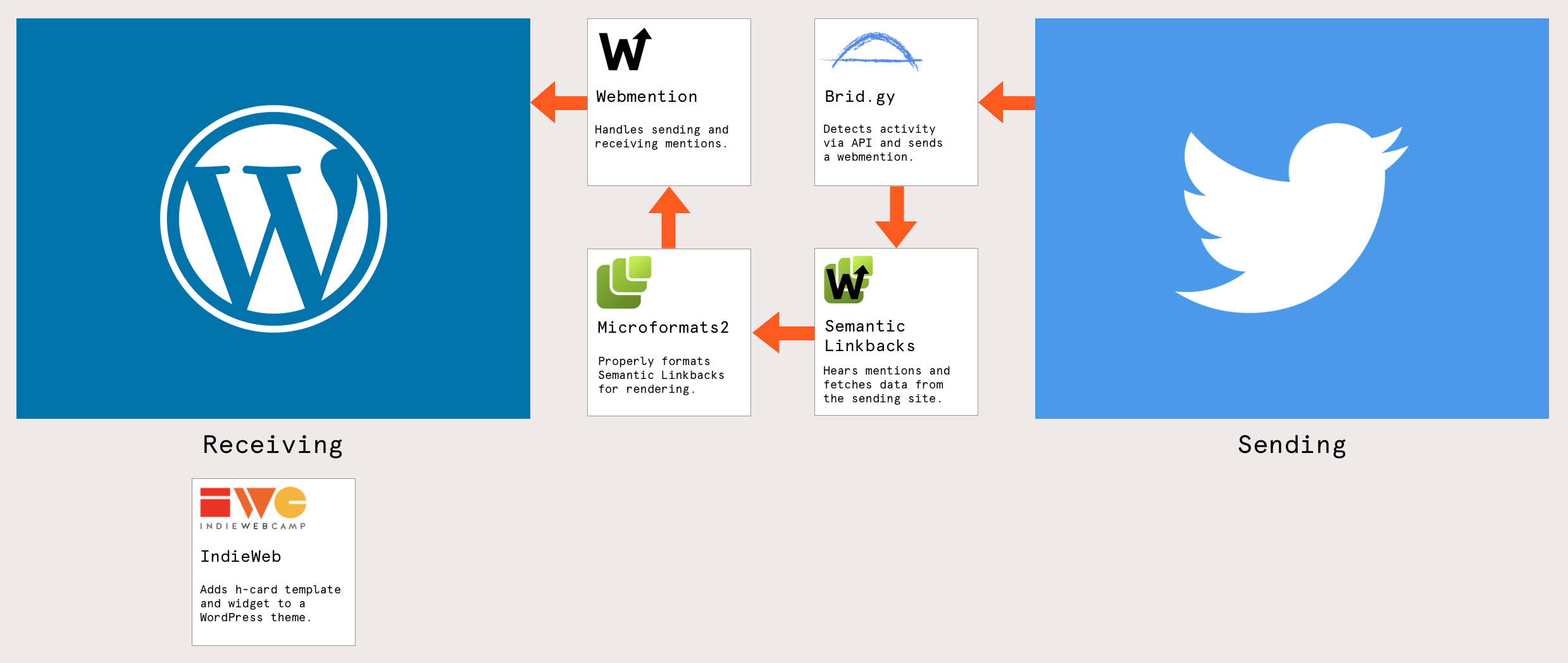
Webmentions are the transport layer. The Webmention plugin handles sending and receiving notifications when another site links to yours — or when your site links to another, it can notify that site as well. This plugin does not format, display, or interpret the mention’s content. It merely moves the notification from server to server.
Back when it was built, the plugin handled only the business of receiving and sending webmentions, not handling display to any degree. Semantic Linkbacks, a separate plugin handled that for not only webmentions, but the older pingback and trackback protocols.
Step 3: Semantic Linkbacks for Display

Display is the responsibility of the Semantic Linkbacks plugin. Once a Webmention arrives, Semantic Linkbacks fetches the referring page, parses it, and builds a presentation from it — which could range from a profile photo up to a full comment, depending on what it finds.
Semantic Linkbacks takes a webmention, which is a notification that another site has linked to something on your site, fetches the other site, and tries to render a display of the information. How that is done can vary from just a profile photo (if it can find one), to interpreting it as a full comment. It does this using Microformats.
The WordPress installs that do not have Microformats-friendly themes may find this plugin limited. However, the upcoming Webmention release is designed to address that by adding fallbacks that use OpenGraph metadata or the WordPress REST API JSON response to grab author and image info when Microformats are absent:
Since many people are not inclined, or not comfortable modifying a theme, the new version of Webmentions will include several different alternative ways to try to find an image or summary to display…from OpenGraph (which Facebook and Twitter use to display URLs provided to it) to detecting the WordPress REST API version of a page and using that to get the author name and profile image. None of them will provided as much context as Microformats, but the experience will still be something worth installing.
Step 4: Brid.gy for Cross-Platform Interactions

A Webmention does not have to originate from another website. Interactions like likes, reposts, and comments on posts you syndicate to social platforms can also be treated as Webmentions — if someone implements those platforms’ APIs. Brid.gy removes that burden.
Brid.gy is a community service that has already implemented the APIs for services such as Twitter, Facebook, and Instagram. You create an account, connect your site, grant app permissions, and Brid.gy watches for posts that interact with your distrbuted content. When it detects an action, it sends a proper Webmention back to your site, which then flows through Semantic Linkbacks for display as if it had come from a website directly.
Elsewhere in the IndieWeb Plugin Ecosystem
Beyond the core identity-mention pipeline, several supporting plugins widen what a self-hosted site can do:
- IndieAuth: A protocol based on OAuth 2. The plugin establishes an endpoint in the WordPress REST API so visitors can authenticate using their own site as the identity provider — much like logging in with Google, except the endpoint is yours.
- Micropub: Adds an endpoint that lets external, Micropub-compatible editors publish content to your WordPress site. This gives users options beyond the Block Editor for authoring content.
- Simple Location: A plugin by David Shanske that pulls current location data into posts. It can display the weather at time of writing or even render post archives on an embedded map based on geographic coordinates.
The Complete Flow
When all the pieces are in place, the architecture becomes clear: your site’s identity is established with an h-card, interaction requests arrive and leave via Webmentions, content from those requests is parsed into a displayable format through Semantic Linkbacks, and interactions from siloed platforms are funneled in through Brid.gy.

IndieWeb is not something you simply “turn on.” It is a set of options — each solving one particular problem — that you consciously decide to mix into your own workflow. That modular quality is a feature, but it is also the root of the initial confusion. Once each plugin’s boundary is sorted out, the architecture is much easier to reason about.