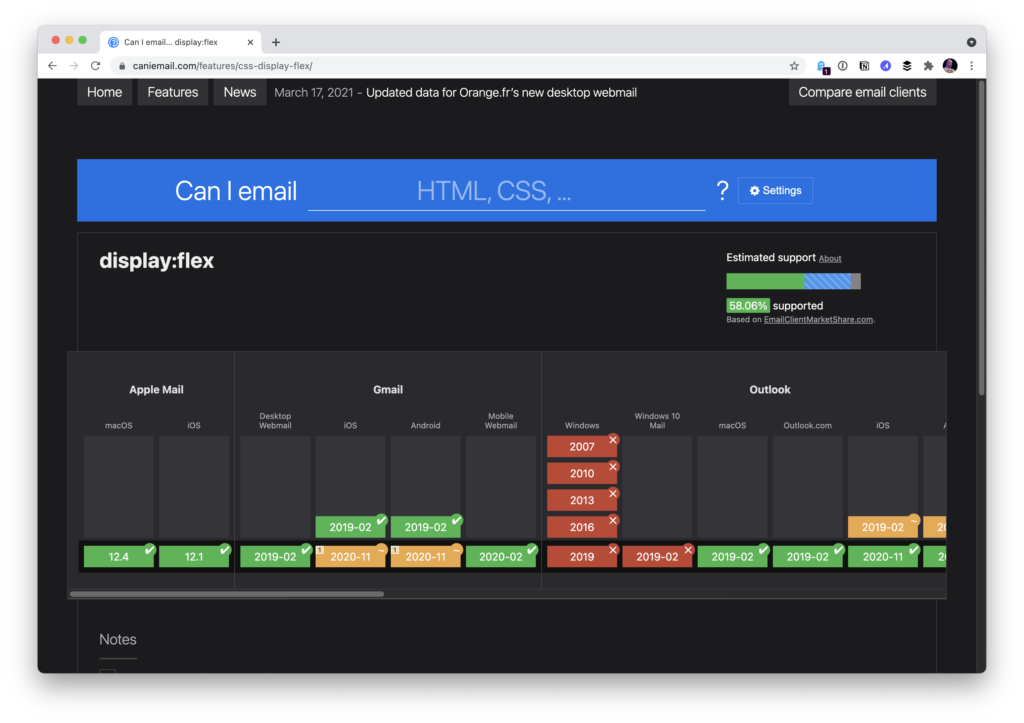
Can I Email… applies the format of Can I Use… to a different question: what CSS and HTML features email clients actually support, rather than what browsers do. Campaign Monitor has long kept its own guide to the same territory, but the Can I Use…-style presentation is easy to work with.
The state of email layout
Table-heavy markup remains the stereotype of HTML email, but that isn't a complete picture. Kevin Mandeville documented using CSS grid in an email back in 2017:
Our Apple Mail audience at Litmus is approximately 30%, so a good portion of our subscriber base is able to see the grid desktop layout.
Where CSS Grid isn’t supported (and for device/window widths of less than 850 pixels), we fell back to a one-column layout.
The same principle as web layout applies: an email doesn't need to render identically everywhere, only acceptably everywhere.
Where it fits into real workflows
For anyone who writes HTML email only occasionally, knowing which CSS features are dependable matters most on templates built entirely from scratch. Flexbox support in email, for instance, turns out to be unexpectedly good.

Less elaborate work shows the same layering of technique. The CSS-Tricks newsletter is an RSS feed feeding a MailChimp template, and the ShopTalk new-show announcement emails work similarly — mostly simple MailChimp templates customized with some CSS.
Progressive enhancement, email edition
Fallbacks deserve advance thought. Nothing prevents an email from being laid out entirely with CSS grid: some clients support it and some don't. Where it works, a more elaborate layout appears; where it doesn't, a source order that reads sensibly degrades into a single column of blocks — which is what most emails are anyway.
Progressive enhancement is arguably easier in email than on the web, since there is rarely any functionality to worry about.