
Dropbox File Requests Meet Tray.io Automation
Dropbox’s File Request API already simplifies collecting files from multiple people into a single location. But when the collection happens on a regular schedule, even that streamlined flow becomes repetitive. That’s where Tray.io comes in. As a general automation platform with pre-built connectors, Tray.io lets you build workflows for recurring Dropbox tasks without writing a full integration from scratch.
Consider a familiar scenario: every Tuesday and Thursday at 9 AM, you need to send your team a file request for their reports. And because teammates get busy, you also want to send a reminder email later that afternoon. Without automation, that’s four manual interactions per week—creating the request, sharing it, and following up twice. With Tray.io, this becomes two scheduled workflows.
The example below walks through two workflows: one that creates and sends the file request, and another that sends a reminder email.
Workflow: Create and Send a File Request
The first workflow is built around a Scheduled Trigger. Tray.io offers several trigger types; here, the "Every Day" operation is configured to run at 9:00 AM on Tuesday and Thursday, matching the requirement exactly.
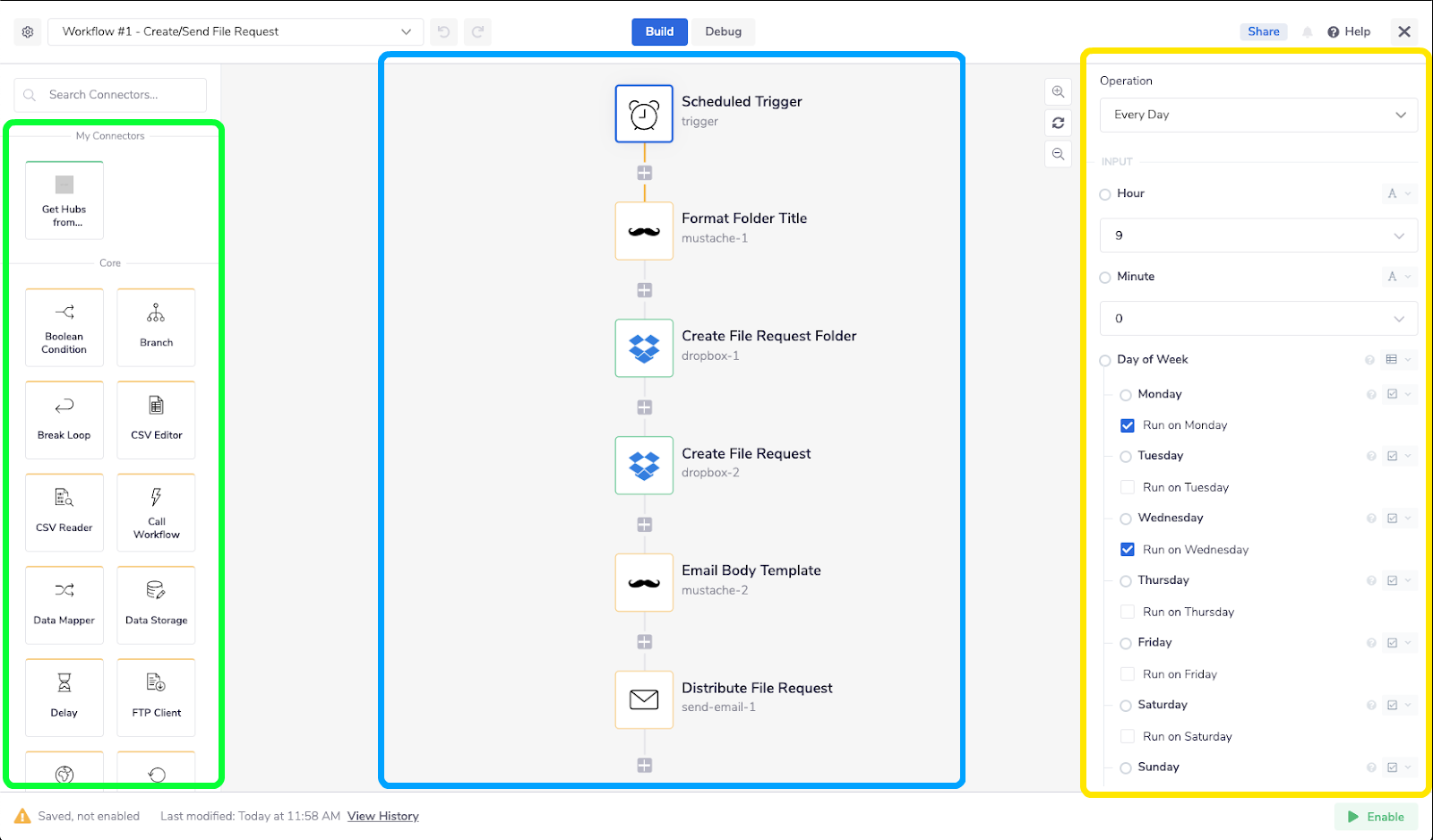
After the trigger fires, a Mustache template named Format Folder Title generates a custom folder name for that day’s request. This intermediate step makes the naming convention visible and easy to edit later without digging into connector configurations. To add variables to the template:
- Click "Add Property to Parameters".
- Name the property.
- In the Template Code field, reference it with the syntax
{{property_name}}wherever it should appear.
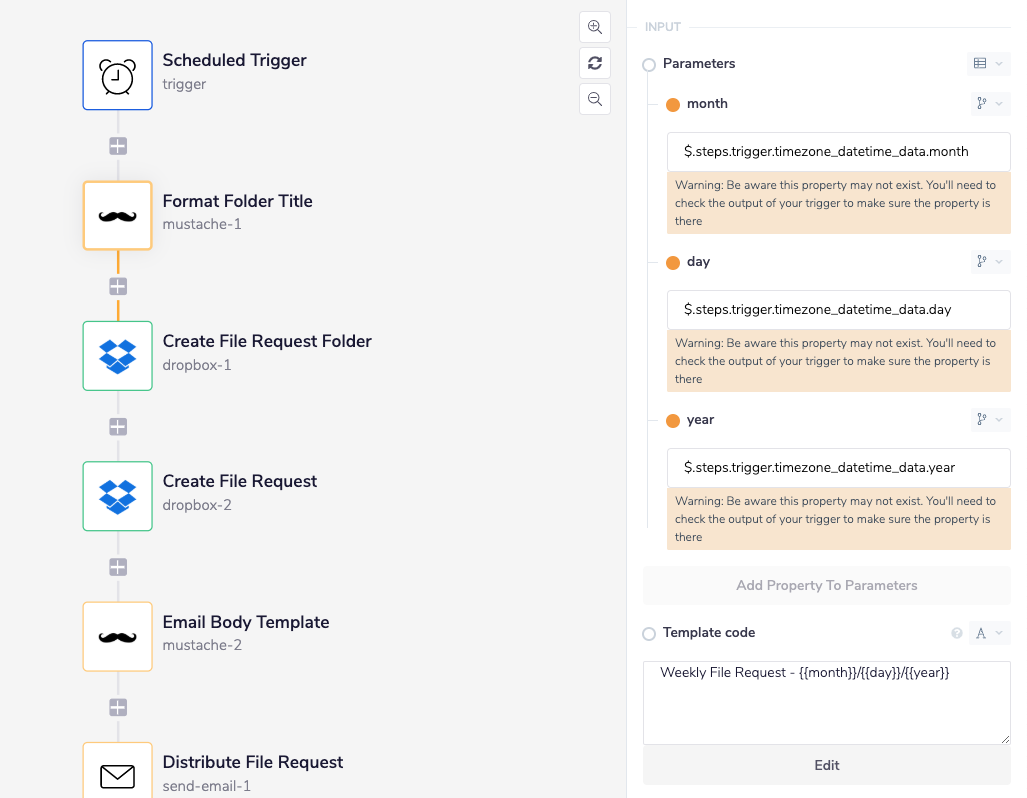
The Create File Request Folder connector then creates a new folder in Dropbox, titled 'Weekly File Request – {{month}}/{{day}}/{{year}}', using date values passed from the scheduled trigger. That date and folder path feed into the Create File Request connector, which calls the Dropbox API to generate a file request hyperlink.
A second Mustache template, Email Body Template, builds the message teammates see, including the file request link. The workflow ends with the Distribute File Request step, where the recipient list is configured. The Send Email connector also lets you specify the sender address, which determines where replies are routed.
Workflow: Send a Reminder Email
The reminder workflow reuses most of the logic from the first one. The simplest approach is to duplicate the Create/Send File Request workflow and strip it down to just the Scheduled Trigger, one Mustache template, and the Send Email connector.
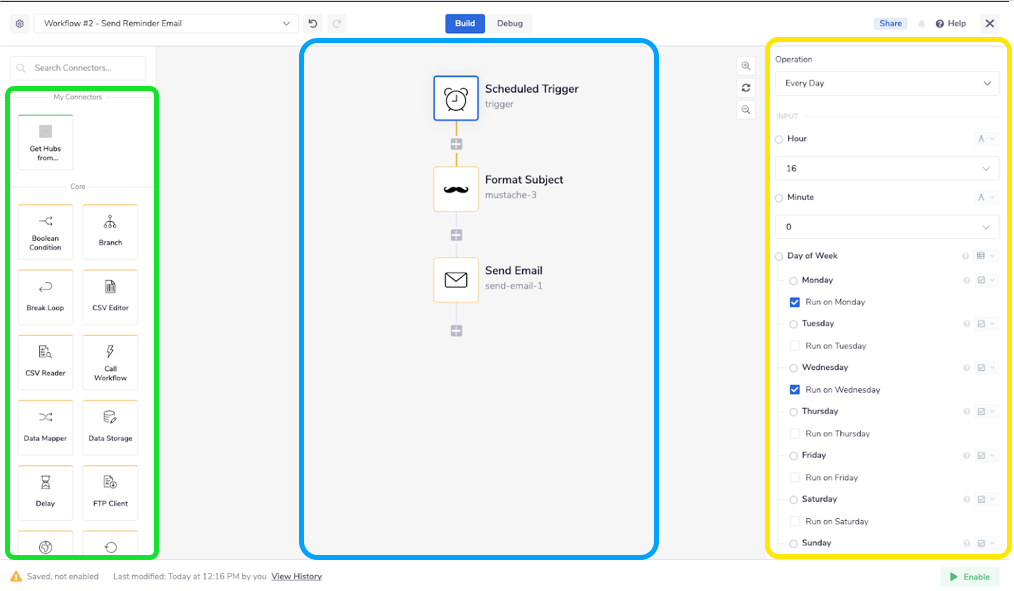
The new trigger is set to run at 4:00 PM (1600 hours) on the same days. A Format Subject Mustache template produces the subject line, "Reminder to Submit File Request for {{day}}/{{month}}/{{year}}". The Send Email connector pulls the same recipient list and sender address as the first workflow, but the email body itself is hardcoded as a reminder prompt.
Automation Without Deep Integration Work
Between the two workflows, a routine reporting system is up and running: file requests go out on schedule, reminders follow the same day, and every submission lands in an organized, date-stamped folder. By handling the scheduling, naming conventions, and recipient management with pre-built connectors, Tray.io removes most of the low-level plumbing that would otherwise require custom code. And because it’s a low-code platform, setting up flows like these is feasible for team members who aren't full-time developers do.
Together, Tray.io and Dropbox File Requests cover the repeatable parts of file collection. Whether you use Tray.io or write directly against the file request API, the key takeaway is the same: recurring file collection doesn't need to be a recurring manual task. With a little upfront setup, anyone can save themselves a few clicks each week—and reclaim a bit of that morning coffee time.


