
Bringing Figma files into v0
v0 can pull context from existing Figma files and pass it into its generation process, helping bridge design tools and AI-driven development. The key is how you prepare those files before importing them.
Treat v0 the way you would a human developer during handoff: break designs into smaller, manageable components or sections. Keeping each component in its own frame avoids size and dimension errors and lets the AI process each piece more effectively. Navigation bars, sidebars, forms, unique UI components like date pickers, and individual landing-page sections are all good candidates for separation.
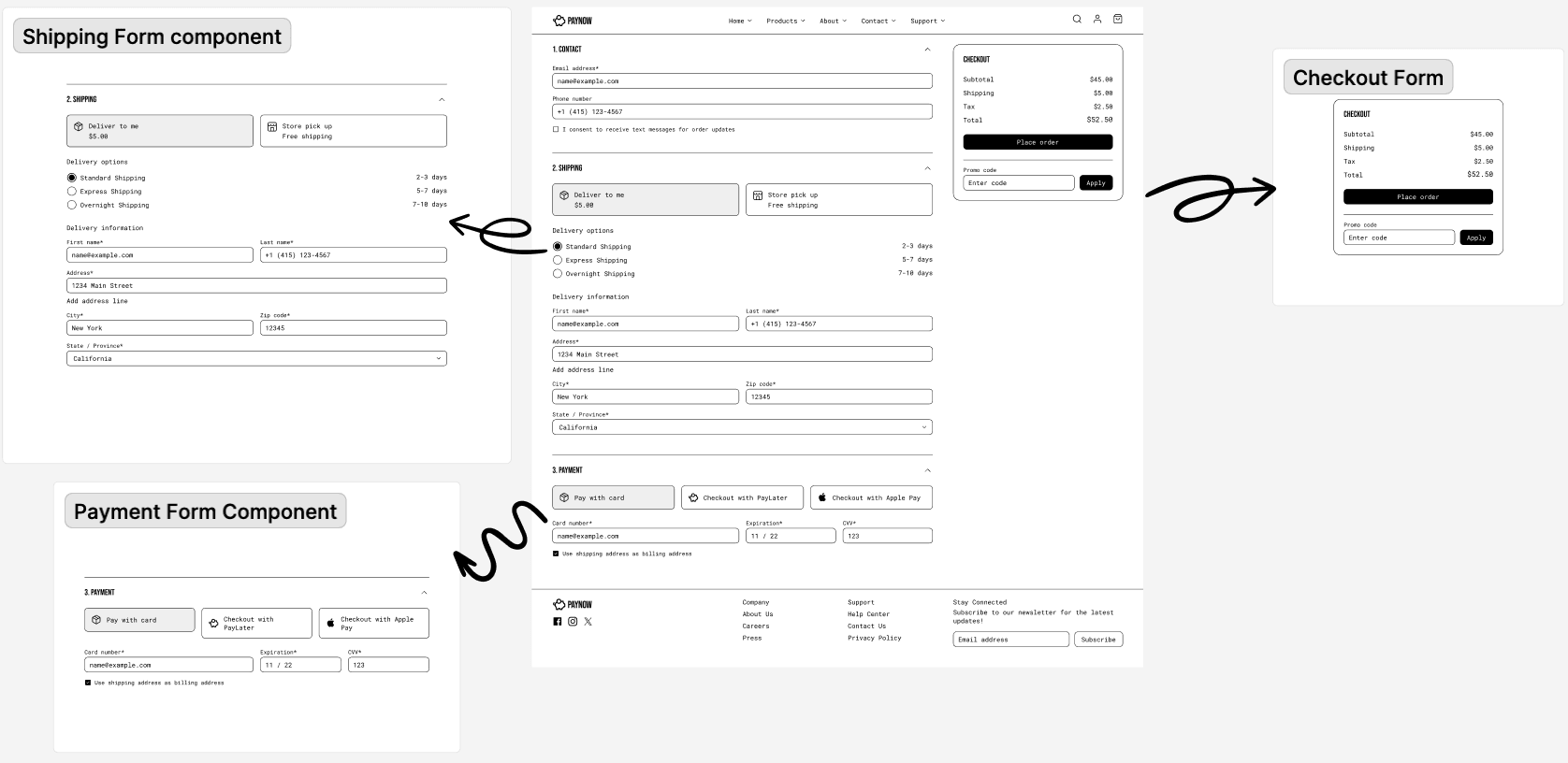
Components generated in v0 from Figma come out close to the original design. When you componentize, v0 can even infer animations because it constructs relations between elements of the design. You can combine multiple elements into a single design and import that as one unit, but with a larger surface area the visual context can overwhelm the AI. If you go that route, make sure the design and its components stay contained within a single frame.
An iterative workflow
When working with existing Figma components, an iterative approach works best.
- Start by focusing on individual components.
- Test and refine each one before moving on to the next.
- Fine-tune the smaller pieces and make sure they work well within v0's generation process.
- Gradually assemble complete landing pages by piecing components together, rather than attempting one long single-piece generation.
Build the pieces of your design first—buttons, images, and the like—and then tell v0 how to arrange them. That way v0 can reuse those pieces, making your design more efficient. The more you use v0 with your Figma designs, the better it gets at understanding your style preferences, such as favorite fonts and spacing, as it learns and adapts to your design language over time.
Aligning with existing design systems
v0 uses the shadcn/ui component library as its default design system, which provides customizable, accessible components that work with React and Next.js. Shadcn/ui is customizable enough that you can keep the look and feel of your current design system. Some teams are refactoring their design systems around shadcn/ui to work seamlessly with v0, cutting design-to-implementation time on new features by up to three times.
v0 generations can also use a custom Tailwind config file. For example, a custom Tailwind config can define a gradient button that v0 uses in a generated component. This helps v0 adapt to custom design systems by letting users define and customize their styles and primitives.

You can also work with any public npm packages in v0. If your components are published publicly, you can pull them into v0 projects like any other library. That means you can use your own libraries or third-party ones such as Material UI and React Aria.
For instance, you might ask v0 to "Create a SaaS pricing table with Material UI React components."
Get started with v0
With the ability to import from Figma, generate high-quality UIs, and leverage third-party libraries, v0 is a practical tool for frontend iteration.


