

Fifteen Years In: What I’d Tell a Beginner UX Designer Today
I started my design career in 2008. My first reference book was about Photoshop, not user experience — because the discipline itself was still forming. Junior designers today know methods that didn’t exist back then, and that's an advantage you should recognize rather than fear.
Here’s a useful reality check before you start comparing yourself to senior practitioners. Take a look at what one of the world's most successful companies was shipping in 2008, the year I was beginning:
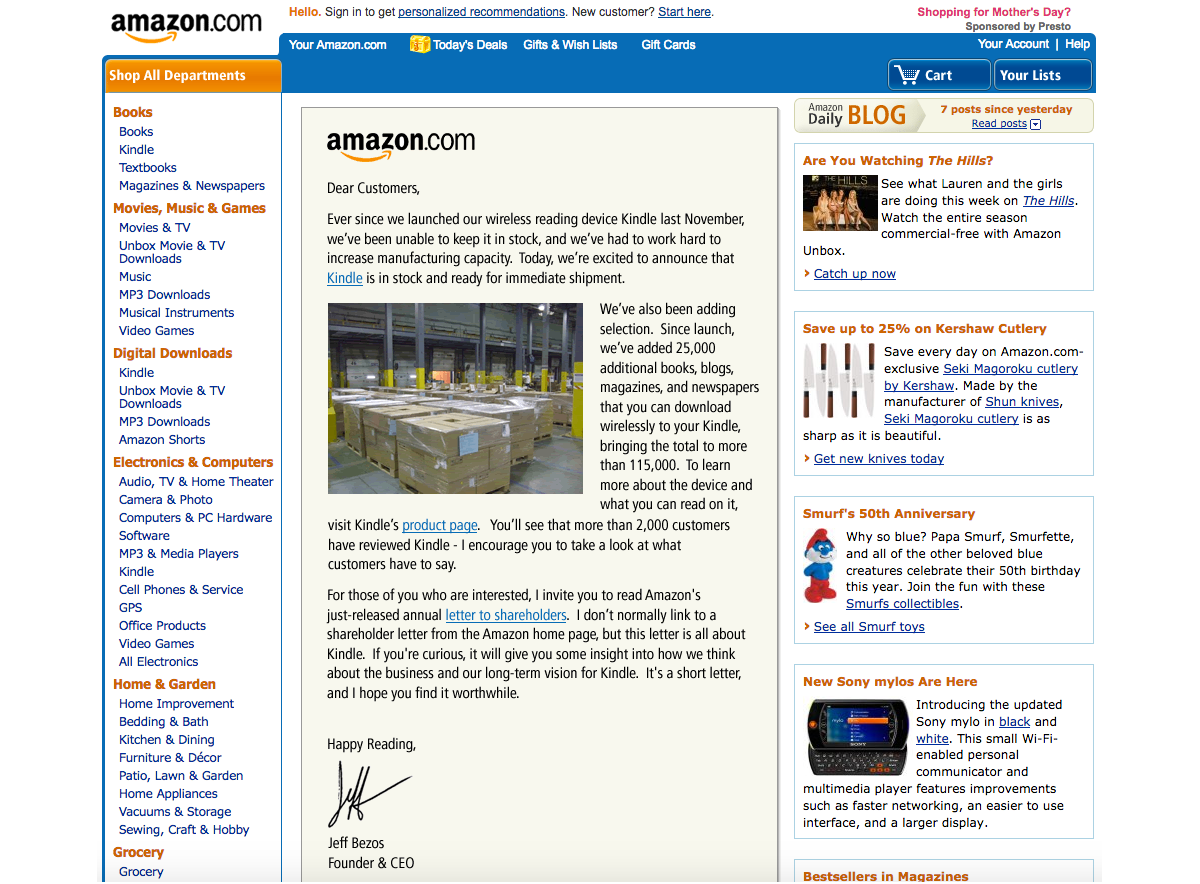
And this was the same product in 2002:

That company generated billions in annual profit, so it certainly could have afforded top design talent at the time. Yet the user experience was what you see above. The point: when you meet someone with twenty years of experience and assume they must be operating at an unattainable level, remember what the state of the art actually was when their career began in the early 2000s.
Design knowledge moves fast — most of what I learned more than five years ago is already outdated, and the learning curve gets steeper every year. What matters isn't the number of years you've been in the profession, but the challenges you've faced recently and the lessons you've drawn from them.
Approach your UX journey with patience and a sound plan, and you can progress faster than you expect. The ground is always shifting, so there's no inherent advantage to having started earlier. The best time to begin was yesterday; the next best time is now.
With that motivation in place, let's focus on the practical craft.
Master Your Tools Before Anything Else
When I was starting out, Photoshop was the main design environment. It had no components, no styles, no design libraries, no auto-layout. Each screen lived in its own PSD file, even something as trivial as creating rounded corners was a genuine struggle. Files were heavy — sometimes you'd wait thirty seconds just to open a screen and check a button label. If a button name changed across twenty screens, you could spend an hour updating twenty separate files.
Other digital design tools existed, including Fireworks, which some professionals felt was stronger than Photoshop for a number of reasons. But Photoshop had such broad adoption that mastery of it was a requirement regardless of what else you preferred.
Today the situation is inverted. Computers are fast, and tools like Figma let you change multiple screens in seconds using well-structured components and auto-layout. Responsive design prototyping is routine rather than a challenge.
Strong tool proficiency is an undervalued superpower for a junior designer. When your tool of choice — Figma Design, Illustrator, Sketch, Affinity Designer, Canva, Framer, or anything else — is second nature, you spend less time on routine production work and more time building skills that matter.
Learn your tool efficiently, and you'll free up hours every day. Memorize the important shortcuts so you aren't constantly dropping back to menus. The compounding benefit is substantial over even a few years of practice.
New features roll out to beginners and veterans at the same time, but as a junior you typically have more time to absorb them. Seize that window, learn the updates quickly, and gain a real advantage.
The Portfolio Problem
Your portfolio — really, the lack of one — will be your biggest pain point as a newcomer. People may say that they understand juniors often don't have portfolios, but in practice everyone wants to see concrete evidence of your work, even early concepts or exploratory projects. If you can show something, that is already a significant edge.
Some juniors avoid investing time in portfolio projects because it's unpaid and time-consuming. But consider the alternative costs: repeated job-search rejection consumes time as well, and the wrong first job can cost you precious early-career years. Invest in showcasing your work upfront and it will repay you with better prospects later.
The training metaphor applies well. Resistance is part of the process — push through it now so you can benefit from your preparation later.
Six Ways to Build Your First Projects
- Redesign a flawed product. Find a popular product with a difficult or outdated interface, research what users complain about most, design improved screens with core functionality explained, and share the work online while tagging the company.
- Join hackathons. Active participation can produce not just concept screens but a working product you can legitimately showcase. You may leave with connections who'll refer you when positions open up.
- Complete UXchallenge briefs. Document your process and solutions on LinkedIn. Other platforms like Instagram, Facebook, Behance, or Dribbble work, but recruiters tend to favor LinkedIn.
- Run a usability audit. Take a website you use regularly, evaluate it against the Ten Usability Heuristics for User Interface Design, and produce a detailed report on what could be improved. Share it and send it directly to the company, explaining your purpose, your process, and that you're seeking your first role.
- Find companies without design coverage. Attend developer conferences where designers are rare. Introduce yourself to startup founders and offer help — you might end up as a product team's founding designer.
- Spearhead design in a non-digital field. Agricultural technology, for example, has been transformed smartly by UX design — from precision farming interfaces to crop monitoring systems. A domain that hasn't yet benefited from good design is a fertile place to create a standout concept, as shown in this detailed example of UX in agricultural applications.
These aren't passive waiting games. There are plenty of projects that need a designer today but haven't found one. If you help them and present the results in your portfolio, you'll stand apart from candidates who have nothing to show.
Landing The First Role: Applications, Tests, And Interviews
For a junior designer, the hardest step is typically getting that first job. The goal during the application phase is narrowly defined: you are not trying to secure the offer or tell your life story in a document. You simply need to break through the initial screening and get an invitation to an interview. Recruiters are often not designers and cannot deeply evaluate your skill set; they can only assess whether your CV aligns with the job description. Therefore, your application materials must be tailored to make that match obvious.
A few practical points can significantly increase your chances of passing this first filter:
- Use a professional contact setup. Send your application from a normal email address and use your real name throughout. A quirky handle like
[email protected]raises questions about your seriousness and responsibility, which are traits seniors look for in juniors who will need guidance. - Adhere to standard representations of skill. Avoid visual diagrams or loaders to indicate proficiency levels. Use established scales, such as CEFR levels (A1–C2) for language ability. Vague graphics force the reader to interpret, which is not their job.
- Proofread everything. Spelling and grammar errors in an email, CV, or portfolio do not support a claim of attention to detail. Tools like Grammarly or ChatGPT can help check your text, but do not substitute AI-generated ideas for your own thinking.
- Consistently match the job description. Read the posting carefully and explicitly reflect the skills you have that are mention in it. Do not expect a recruiter to infer relevance; show it directly in the CV.
- Do not rely solely on the application portal. It is common to receive no response from a submitted form, yet get a positive outcome after reaching out to a company recruiter directly on LinkedIn or another channel. Being proactive is acceptable and often effective.
- Keep your portfolio easy to access. Avoid PDF files that require a download before viewing. A web link to a portfolio on a platform like Behance or a shareable Figma link is far more likely to be reviewed.
Approaching The Test Task
The test task is not solely about the visual quality of your designs. It is an assessment of how you communicate and how you propose practical solutions to real-world problems. Design work always happens under constraints like time, budget, and team capacity. Show that you understand these constraints by prioritizing proper, implementable work over flashy ideas that would be difficult to execute. Keep bright but unrealistic ideas for discussion during the interview.
To do well on a test task, focus on defining the correct problem first:
- Talk to the target audience when possible. For a popular product, ask friends about their experiences. For a less-known one, look at reviews on Reddit, the Apple App Store, Google Play, or YouTube comments for similar tools. Real user problems are the starting point for design.
- Prioritize the features you present. Whether you use a formal model like the Kano Analysis or simple common sense, do not spend all your time on secondary aspects like dark mode mockups while neglecting the core features the task requires.
- Be upfront about timeline issues. If you need more time, say so early. Communicating a problem at the last moment does not demonstrate the reliability a team needs. Telling a potential employer you were too busy to finish an assignment signals that you are not focused on the role you are applying for.
- Do less, but do it better. Presenting a large volume of weak mockups is less effective than presenting a smaller set of high-quality work. There are exceptions for rough sketching or prototyping, but overall, quality is the metric that matters.
- Focus on user goals when asked for a redesign. A redesign task is not an invitation to use shinier UI components. Analyze the goals of the user on that screen and choose the most suitable UI to serve those goals effectively.
Presenting Yourself In The Interview
Interview preparation is not one-size-fits-all, as it depends greatly on the specific company and interviewer. However, several universal practices will improve your chances:
- Be sincere above all. An interview is not a test where you need to guess the correct answer. Honesty about what you know and do not know is appreciated, and it prevents you from getting tangled in an answer that diverges from the question.
- Do your homework on the company. Familiarize yourself with their portfolio, products, and team members. Check their website for an About → The Team page or LinkedIn profiles. This research helps you identify your own relevant skills to highlight.
- Prepare for the standard questions. UX design interviews typically circle around design process, your experience, and your motivation. These are not secret questions. Write down your answers and practice saying them aloud in advance to clarify your story and reduce in-the-moment mental load.
- Listen and clarify. Answer exactly what is asked. If a question is unclear, request clarification. Providing an off-topic answer is a common and easily avoidable mistake.
- Plan for punctuality. Avoid being late at all costs. If the interview is online, verify time zones, headset, microphone, camera, and Bluetooth in advance so unexpected update delays do not cut into your meeting time. For in-person meetings, plan the route with buffer time to protect your own emotional balance as much as the interviewer’s schedule.
- Start with interviews at less critical companies. Gain experience with a few practice interviews, gather feedback, and reflect on what went well before you pursue the job at your dream company.
- Communicate your future developer self. Companies rarely hire juniors merely for today’s role; they are usually investing in a future middle-level or senior designer. Show that you have a plan. If a company does not seem to offer that growth path, you are likely better off elsewhere, as your first few years form the foundation of your career.
Where to Go From Here
If you’ve followed the advice so far, you should have a working grasp of your design tools, a portfolio that presents your work clearly, and a plan for your first interviews. Once you land that first junior UX role, a new set of challenges begins — those are covered in the second part of this series.
In the meantime, the resources below will help you keep building fundamentals and filling gaps in your knowledge before your career gets fully underway.
Core Reading for Beginners
- Joel Marsh’s UX Crash Course — a series covering the essentials: 31 fundamentals, 30 stupid questions, and user psychology.
- “What’s The Perfect Design Process?” by Vitaly Friedman.
- Jakob Nielsen’s 10 usability heuristics — a classic reference for interface evaluation.
- “10 Advanced Tips For A Design Portfolio” by Slava Shestopalov for when you need to refine how you present your work.
Nielsen Norman Group Study Guides
NN/g has published a comprehensive set of study guides that organize their articles by topic. Each is a solid entry point for exploring a subject in depth.
- Context Methods by Kate Moran and Mayya Azarova
- Design Pattern Guidelines by Samhita Tankala and Alita Joyce
- Design Thinking by Kate Moran and Megan Brown
- DesignOps by Kate Kaplan
- Facilitation by Kate Kaplan
- Information Architecture by Page Laubheimer
- Intranet & Enterprise Design by Kara Pernice
- Lean & Agile by Anna Kaley
- Mobile UX by Raluca Budiu
- Omnichannel & Customer Experience by Kim Salazar
- Personas by Kate Kaplan
- Psychology for UX by Tanner Kohler
- ResearchOps by Kate Kaplan
- Remote Usability Testing by Kate Moran
- Service Design by Sarah Gibbons
- UX Basics by Tim Neusesser
- UX Careers by Taylor Dykes
- UX Mapping Methods by Kate Kaplan
- UX Stakeholders by Sarah Gibbons
- UX Writing by Anna Kaley
- Qualitative Usability Testing by Kate Moran
- Quantitative Research by Kate Moran
- Visual Design in UX by Kelley Gordon



