
What Counts as a Chatbot?
Capital One, Adobe, and even Domino’s all have one. Chatbots are quickly becoming a standard customer touchpoint. A poor one repeats "I'm sorry, I don't understand" until you give up. A good one feels almost human and answers questions so you can skip the phone call and the FAQ deep-dive.
Before you can build a good one, it helps to get precise about what a chatbot actually is. A chatbot is a computerized program that replicates human conversation. Most rely on decision trees, either recognizing keywords to respond or offering the end-user selectable options to direct the flow. But this definition matters less than what it implies for your team’s process.
Conversational Design vs. Chatbot Content
Chatbots are one form of conversational design — content that mimics conversation. That also includes conversational UI on web pages and voice interfaces like Google Home or Alexa. The terms are often used interchangeably in early concepting, but the distinction is critical for the content team because the workload differs significantly. If your team says "we'll just tell the user to confirm their password," it may be a static instruction or a chatbot conversation; you need clarity early on.
Oscar Insurance offers a solid example of conversational UI that is not a chatbot. Their best practices include:
- Headers are complete sentences.
- Form help text gives specific instructions, not examples.
- All copy uses the second person ("you").
Voice UI presents a separate set of constraints. With no visual design, there is no way to prompt or trigger the user into action. An app can send a push notification; a voice assistant must wait to be invoked. That stark difference shapes the entire experience and the content required to support it.
When a Chatbot Is (and Isn’t) the Right Tool
Because chatbots offer visual UI and can initiate notifications, they look like the perfect communication channel. But as Michael J. Metts put it in his talk "Sorry, I Can't Help With That": first know your company's goal, then decide if a chatbot helps reach it. A chatbot is a solution to a problem, not a goal in itself.
Customer service and sales are natural fits. A chatbot answers common questions fast and frees up employee time. But nuance and complexity quickly break the model. A chatbot would struggle to diagnose health issues or track down lost paychecks across multiple employer payroll systems. With too many variables, "quick" and "accurate" cannot coexist. End-users lose trust fast when the bot hits its limits prematurely.
Content Is the Foundation, Not the Algorithm
A chatbot is only as good as its content. It is controlled by an algorithm and can be enhanced with machine learning, but it first needs a set of rules and the content to speak. Defining those rules is the content designer's job.
This is why AI ethics discussions keep surfacing. Chatbots are often flagged as biased, not because a team deliberately chose bias, but as AI ethicist Josie Young says, because they "reflect the biases in the viewpoints of the teams that built it." The antidote is deliberate content. Design your content thoughtfully before wiring in machine learning, and be conscious about the values you encode. What a chatbot does is only half the story; the real impact comes from how it does it — what questions it answers, and how it recovers when things go wrong.
Building a Chatbot People Will Actually Use
If your team has already decided a chatbot is the right solution, identified the technology stack, and mapped out what capabilities that system supports, the next step is content design. A chatbot is not just an algorithm; it needs well-thought-out interactions. Keep these five principles in mind as you build.
1. Define Your Actions
A chatbot isn’t a catch-all solution. Focus on concrete user flows. For a shipping company, those flows might be “track a package” and “update mailing address.” But the bot should also know what it *can’t* do. If an end-user mentions something sensitive, like mail fraud, the right response may be to express sympathy and hand off to a live agent—even if no technical limitation exists. This is how you build trust.
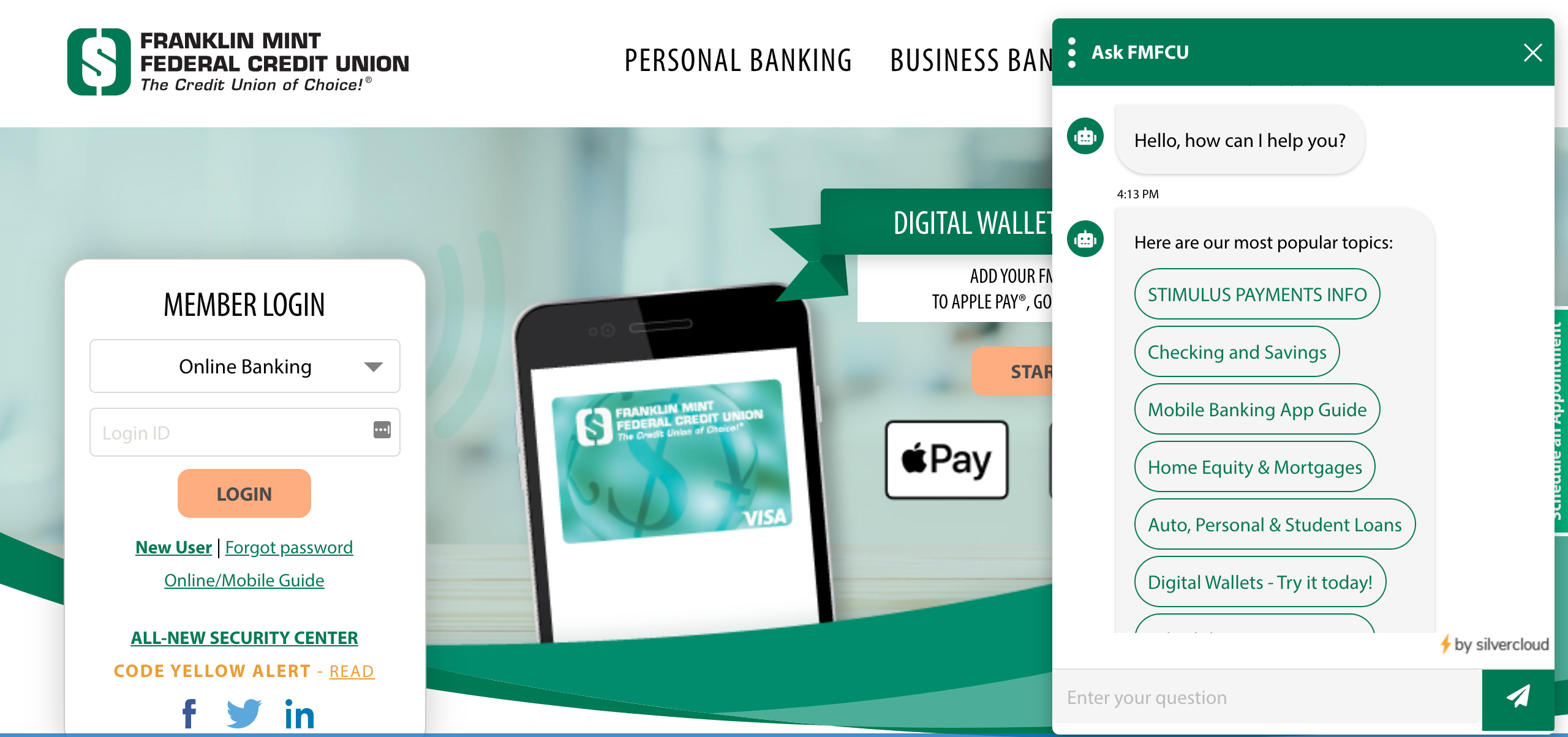
Most organizations already have value propositions or design principles to guide you here. Those, plus existing requirements, will point you toward the chatbot’s goal. For example, at Franklin Mint Federal Credit Union, the chatbot’s initial prompt suggests “popular topics.” According to VP Mike Bunner, without this bot “our call center would be getting 3x the normal amount of calls.” Their goal was to decrease customer service hours, and they achieved it by pulling content straight from existing member support documentation that nobody was reading.
2. Separate Your Response Types
Chatbots generally come in two flavors:
- A bot that responds to free text, interpreting intent through keywords and phrases.
- A bot that guides users through decision trees with predefined options.
Many bots do both, but you need to know what you’re building toward. Even with a decision-tree focus, users will go off-script. Plan how the chatbot handles input like “Help” or “Talk to a human.”
Remember that words have context. A user asking about a “phone number” while editing their profile likely wants to update their contact info. But if they just got an “I don’t understand” message, the same phrase may be a request for the support line. Engineering and content strategy need to collaborate here.
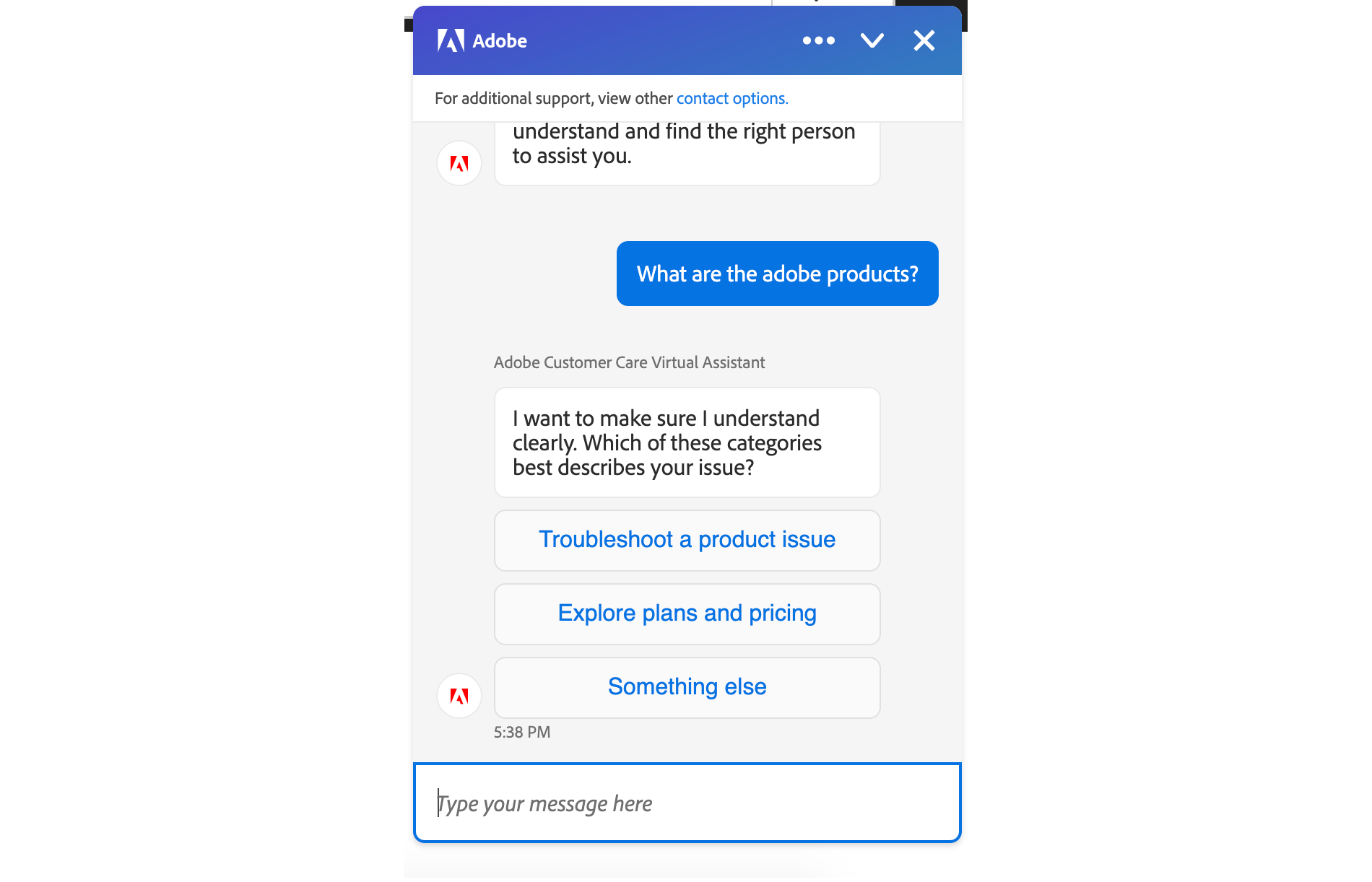
Adobe’s chatbot offers a cautionary example: it begins by asking users to free-type, but then responds by forcing them to choose from three options. After being asked to type, a user could rightly wonder why a simple keyword like “Adobe products” wasn’t understood.
3. Embrace Your Robot-Self
After defining what the bot does, think about how it does it. The first rule: don’t pretend to be human. Research with a former client showed that over 80% of people were comfortable interacting with a chatbot and liked it when the bot had a name and personality. But those same users quickly lost trust when the bot pretended to be human.
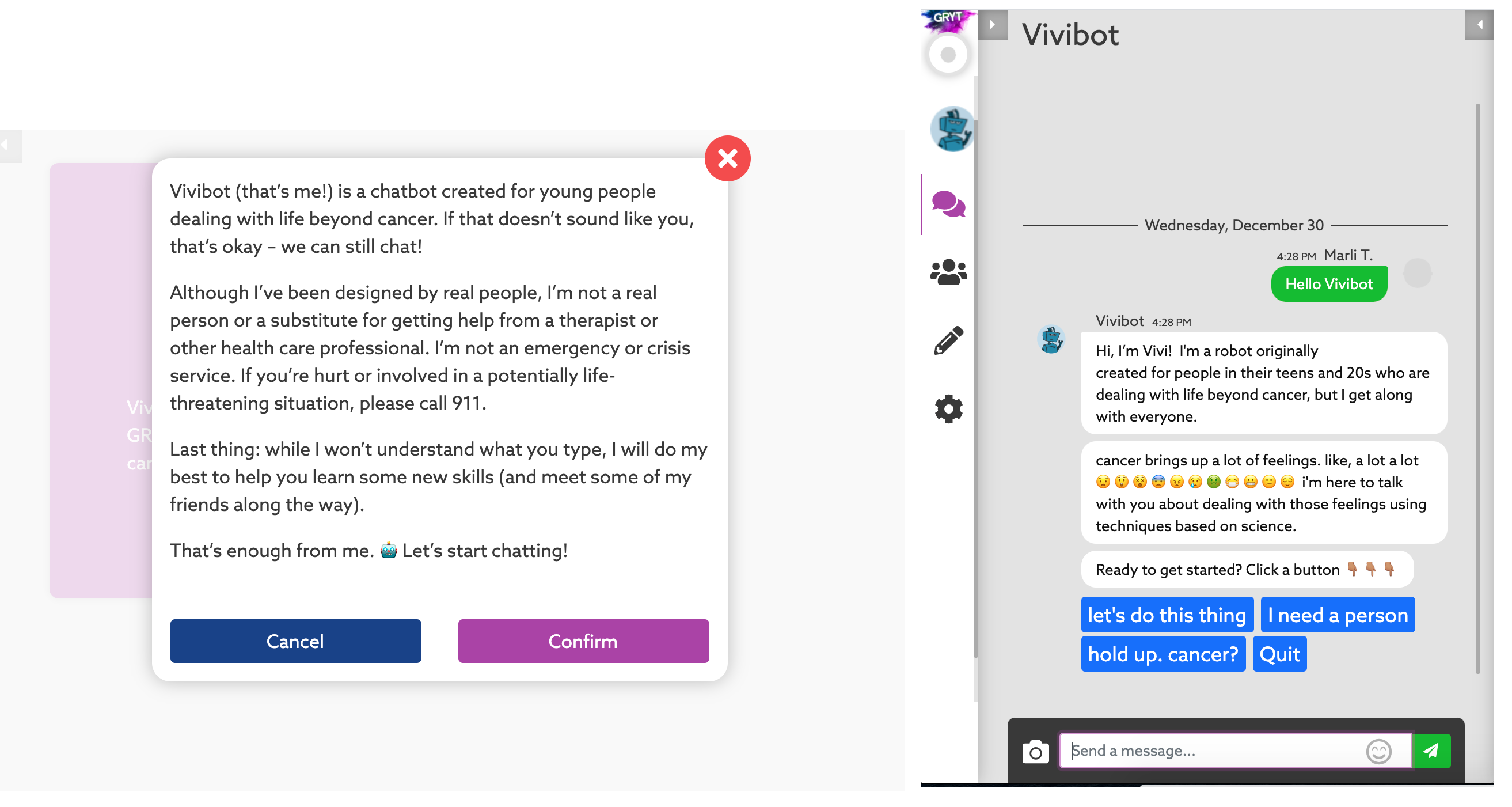
Testing also showed that reassuring users a human was available actually *increased* their comfort with the bot. That pattern held for Hopelab’s Vivibot, a chatbot for teens with cancer. A peer-reviewed study found Vivibot provided valuable emotional and psychological support. The bot needed a wide range of responses to avoid sounding repetitive, and as a health-related bot, it had to address sensitive topics transparently. A generic “sounds good” or similar thoughtless reply could alienate users who don’t feel comfortable confiding in humans—something that would be devastating in this context.
Contrast that with UX Magazine’s “UX Bear,” which responded to the statement “my grandma is dead” with a thumbs-up. That’s a confused reply, but from a bot dealing with vulnerable users, such a response would be far worse. As California’s bot disclosure law suggests, pretending to be human is not only bad practice—it may soon be illegal in sensitive areas like politics and healthcare.
4. Create A Tone For Each Scenario
Voice is brand personality; tone changes with the situation. A company’s voice may be “friendly,” but friendly sounds different in an error message than in a success message. A chatbot can take this even further, saying “oh no!” or “I’m happy for you” when the company’s own voice can’t.
Start by listing the words your chatbot uses. Because a chatbot must acknowledge user input, it will say “Got it” or “I understand” constantly. Decide whether it says “yes” or “yeah,” “Ok” or “okay.” There should be enough agreement tokens that the bot doesn’t sound robotic, but they need to be consistent—no jarring shifts from “okie smokie” to “I appreciate your time.”
Domino’s chatbot shows what happens when this planning is incomplete. It alternates between “great” and “got it” for acknowledgments, but has no error token. When it couldn’t understand a response, it simply repeated the question, making the bot seem broken.
![Chatbot [Dom]: Got it! Is this being delivered to a house, or to an apartment? Me: House. Dom:Great. What’s your street address? Me: 123 sesame street. Dom: What’s the zip code there? Me: 10010. Dom: What city is that address in? Me: New York. Dom: What city is that address in? Me: NY. Dom: What city is that address in?](https://archive.smashing.media/assets/344dbf88-fdf9-42bb-adb4-46f01eedd629/2902a879-b56b-4add-b780-54477d5ac369/designing-voice-chatbot-8.png)
5. Design For Errors
A chatbot gets one chance at a first impression. If it isn’t smooth, users won’t come back. A good error message can be as simple as “I don’t understand. Can you tell me again what you want?” But it can do more.
For an MVP, an error message might say “I can’t help you with that today, but ask me again in a few weeks.” For requests the bot will never handle, suggest an alternative, like pointing users to customer service. And if you allow free typing, make sure you don’t trap users in a loop. After two or three failed attempts, offer a human handoff.
Think beyond scripts. Consider how users perceive the tasks they want to complete, not what your system supports. In a payroll chatbot, users might ask:
- When is my next paycheck scheduled to be sent to me?
- I want to set up direct deposit.
- When can I change my 401k deductions?
The payroll team may not expect users to say things like “What benefits do I have available if I go on sick leave?” or “I didn’t receive my last paycheck.” But users don’t think in terms of system boundaries. They think in terms of needs. If the bot only says “I can’t help with that,” it has failed. Instead, it might explain that benefits are handled elsewhere and recommend the user speak to an HR representative, building goodwill.
Webflow’s support chatbot exemplifies proactive error handling. It tells users upfront, “[I]f I’m unable to solve a problem for you, a member of our Support team will get back to you by email. Note: We don’t provide support by phone or live chat at the moment.” That statement isn’t technically an error message—it prevents misunderstandings before they happen.
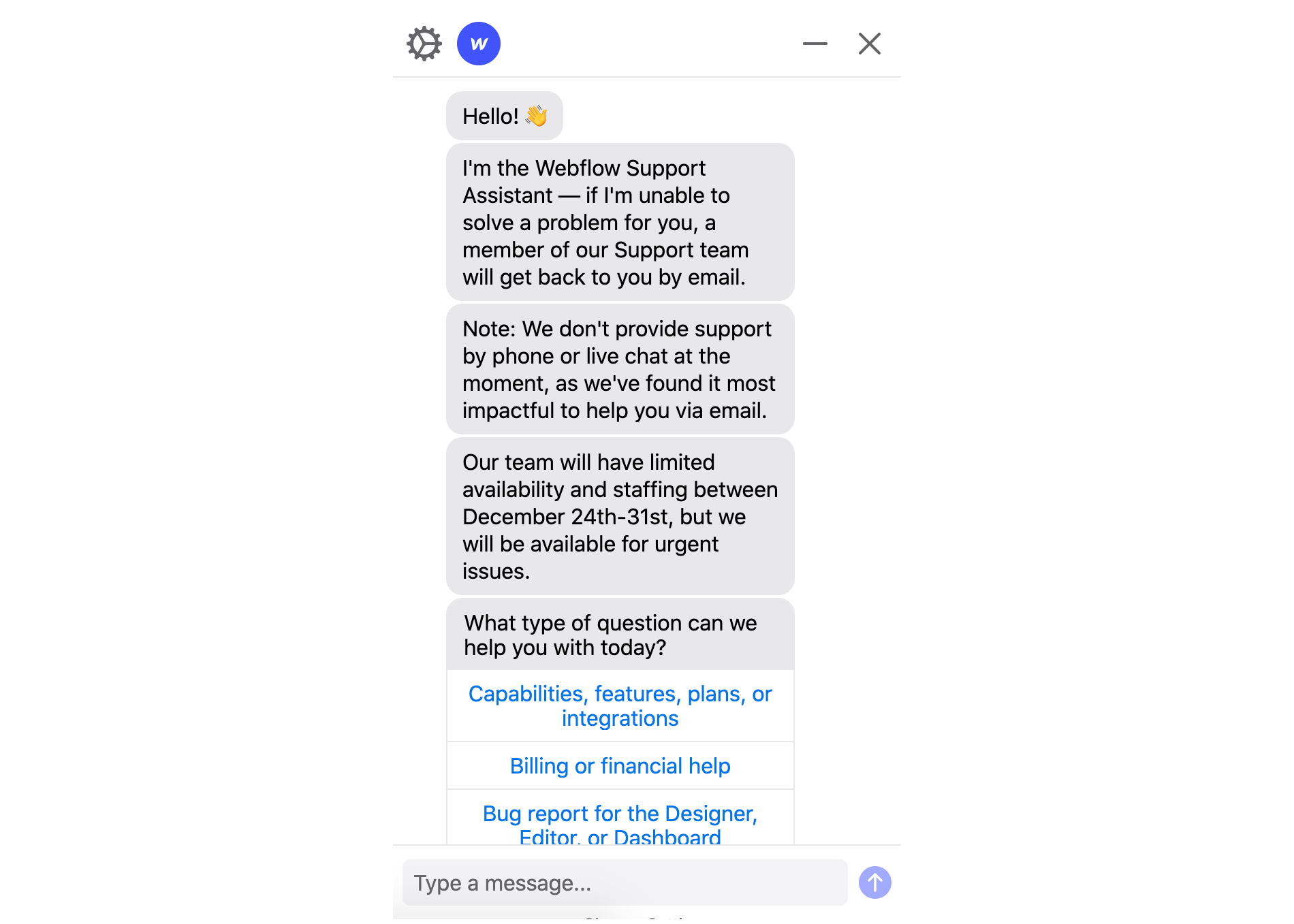
Defining user flows from the end-user’s perspective, not just the technical possibilities, matters internally too. Had Webflow thought only about its own capabilities, it never would have clarified what it *doesn’t* do, leaving users to wonder why no phone support was offered.
A Human Touch, By Design
A chatbot is software, but it should never feel like a consolation prize for not reaching a human. Done well, a bot answers questions quickly, offers a judgment-free space when someone is feeling vulnerable, and strips the friction out of cumbersome processes. In other words, it is the right tool for a wide range of situations.
That puts a real responsibility on the people building these tools. You have to write responses that account for different moods and needs, anticipate the user’s next move, and guide them through a flow that feels natural. Above all, the bot has to be transparent and trustworthy, because users must be able to rely on the information it gives them.
Five Rules For Bot Persona And Flow
- Start with purpose. Every conversation your bot supports should map to a clear business goal and a genuine user need. Know exactly what job the bot is doing before you script a single reply.
- Write a script — and plan for going off-script. A structured dialogue is your foundation, but you need a strategy for when users wander outside it. Decide in advance how the bot handles unexpected input.
- Tell the truth about being a bot. Never let your chatbot pretend to be human. Embrace its machine nature; users respect honesty far more than a bad impersonation.
- Match tone to context. The conversation should feel right for the scenario at hand. A support bot handling a payment issue and one guiding a mental-health check-in should not use the same voice.
- Graceful failure is a feature. Errors will happen. Make sure your bot can handle them smoothly, guiding the user back on track or to a human when necessary.
A chatbot isn’t a person — but a well-designed program can still bring real ease and even a little delight to your audience. Follow these five practices and your bot will get as close to a meaningful connection as a script can take it. See how your users respond. 


