
From scattered reports to a continuous loop
Accessibility feedback at GitHub used to suffer from a structural problem: it belonged to everyone and no one. A screen reader user might file a report about a workflow spanning navigation, authentication, and settings. A keyboard-only user could hit a trap inside a shared component used on dozens of pages. A low-vision user might identify a color-contrast failure present across every surface using the same design element. None of these issues map cleanly onto a single team’s backlog, yet each one represents a real blocker for a real person.
The result was predictable: feedback scattered across repositories, issues without clear owners, and users following up into silence. Improvements were perpetually deferred to a vague “phase two.” Before any automation could help, GitHub needed to fix the fundamentals — consolidating reports, building submission templates, and triaging years of accumulated backlog. Only with that foundation in place did the question become: how can AI help?
The answer is an internal workflow built on GitHub Actions, GitHub Copilot, and GitHub Models. Its goal is straightforward: every piece of user or customer accessibility feedback becomes a tracked, prioritized issue that is followed through to resolution. This is continuous accessibility — not a one-time audit, but a feedback loop designed to run indefinitely alongside development.
Designing for the people in the loop
The system is structured around three distinct audiences, each with different needs and constraints.
Issue submitters — community managers, support agents, and sales representatives — file issues on behalf of users and customers. They are rarely accessibility specialists, so the intake process must guide them through structured templates while teaching accessibility concepts in the flow of work. Accessibility and service teams, the engineers and designers responsible for remediation, need actionable data: reproducible steps, WCAG mappings, severity scores, and clear ownership. Program and product managers need visibility into recurring pain points, category trends, and progress over time to justify resource allocation.
These personas shaped the system’s two core design principles. First, feedback must be treated as data flowing through a defined pipeline rather than as isolated messages. Second, the system must be built to evolve alongside the product and the accessibility landscape itself.
How the workflow runs
The pipeline begins the moment feedback arrives. AI-powered triage steps in to do the repetitive work of reading, classifying, and routing — but deliberately stops short of making decisions on its own.
- Incoming feedback is automatically classified by accessibility category, such as screen reader compatibility, keyboard navigation, or visual contrast.
- Each issue is mapped to the relevant WCAG criteria, giving engineers immediate grounding in the standard that applies.
- The workflow assigns a severity score based on the impact and reach of the reported barrier.
- Suggested owners are identified from the engineering teams most likely to be responsible for the affected components.
No piece of feedback is auto-closed. Every report receives a human review before any prioritization or assignment is finalized, and no issue exits the pipeline without a clear owner and a path to remediation. The AI handles the classification and structuring; humans handle judgment and responsibility for the fix.
This continuously operating system has effectively replaced the old model where feedback was routed through ad-hoc processes. Where issues once disappeared into team silos, they now surface in a shared queue with consistent structure. Where submitters once needed deep accessibility expertise just to file a useful report, the intake templates now capture the right details from the start.
Listening at scale
The most important breakthroughs in accessibility rarely come from automated scanners — they come from listening to real people. The difficulty has always been doing that listening at scale. A single report about a color contrast issue may represent thousands of users silently affected by the same barrier.
The feedback pipeline addresses that by making each individual report count as data. Issues accumulate into a structured body of evidence that shows not just what is broken, but where patterns emerge. Over time, that data enables product teams to move from fixing individual complaints to addressing the underlying causes.
This approach connects directly to GitHub’s 2025 Global Accessibility Awareness Day (GAAD) pledge: strengthening accessibility across the open source ecosystem by ensuring feedback is routed to the right teams and translated into meaningful platform improvements. The pledge is not just about making GitHub properties more accessible — it is about building infrastructure that can carry accessibility improvements into every open source project that relies on the platform.
Copilot and GitHub Models handle the workload that once overwhelmed human triage — parsing free-form feedback, identifying accessibility themes, and prompting submitters for missing context. The team’s engineers no longer spend their days reading and sorting reports; they spend that time fixing the underlying product.
The shift from chaotic backlogs to a structured, continuous workflow did not require a novel AI model. It required recognizing that accessibility feedback is pipeline data, then applying existing tooling to move it from intake to resolution. The AI layer simply provides the structure, and the humans provide the judgment.
From report to resolution: the event-driven pipeline
GitHub’s accessibility workflow operates on an event-driven architecture, with each step acting as a trigger for the next GitHub Action. The team hand-built the system starting in mid-2024; today, Agentic Workflows can generate equivalent Actions from natural language descriptions, compressing the build time dramatically.
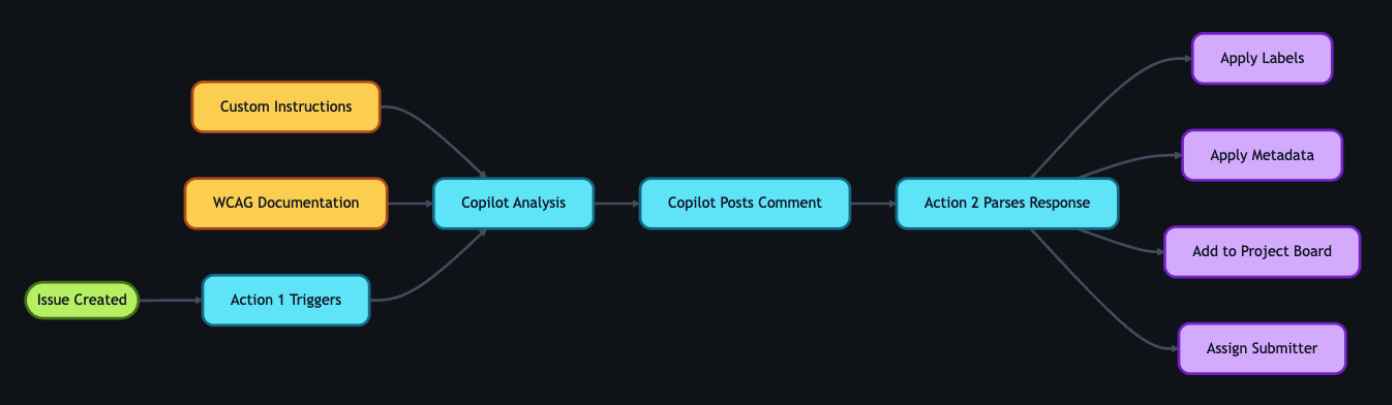
The pipeline reacts to three primary events: issue creation launches GitHub Copilot analysis through the GitHub Models API, status changes route hand-offs between teams, and resolution triggers follow-up with the original reporter. Any Action can also run manually or be re-run when circumstances change.

Intake and initial triage
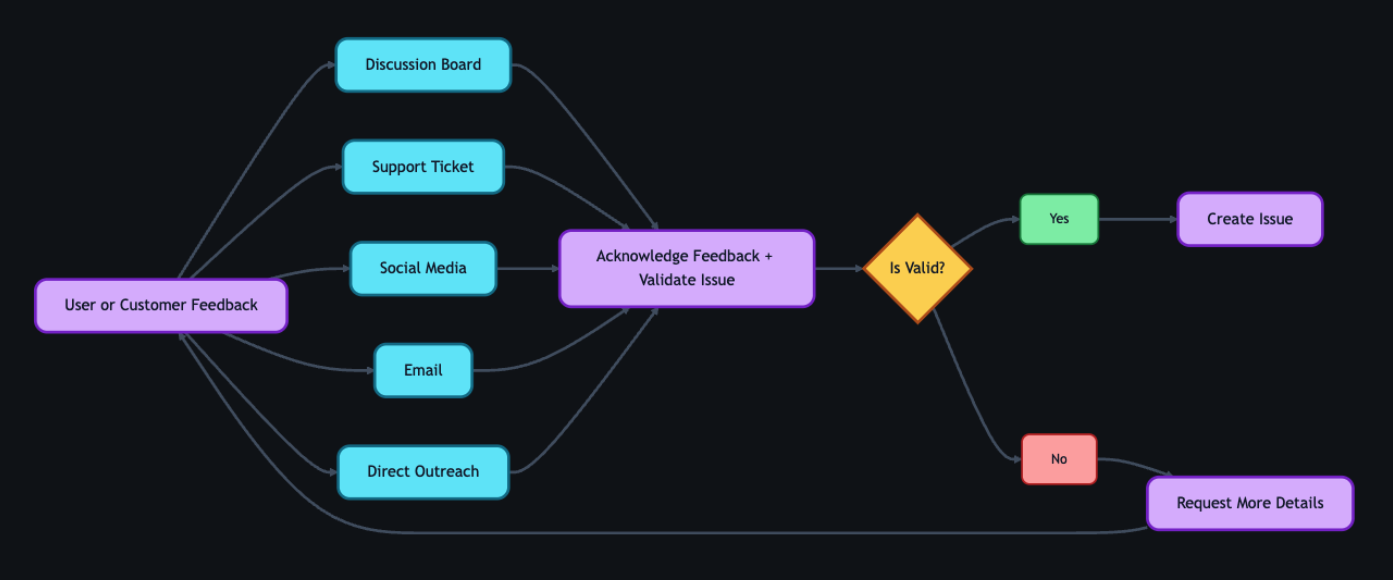
While feedback arrives through support tickets, social media, email, and direct outreach, the GitHub accessibility discussion board accounts for 90% of submissions. Public posts have a side benefit: other users can confirm problems, add nuance, or propose workarounds, often delivering richer context than a private ticket. Every piece of feedback receives an acknowledgement within five business days, and even non-actionable reports get a response pointing to relevant resources.
When internal action is needed, a team member opens a tracking issue using a standardized accessibility feedback template. The form captures the original report, its source, and affected components, preserving these details across the hand-off from intake to triage. Creating the issue triggers two Actions: one engages GitHub Copilot for analysis, and another adds the issue to a project board for centralized status tracking and trend surfacing.
How Copilot analysis is configured
The analysis step calls the GitHub Models API programmatically from a workflow. Rather than fine-tuning models, GitHub relies on stored prompts defined in custom instruction files—a design choice that lets any team member update AI behavior through a pull request, with no retraining pipeline.
The prompt, developed by accessibility subject matter experts, plays a dual role: triage analysis and accessibility coaching. For triage, it classifies issues by WCAG violation, severity, and affected user group; for coaching, it supports teams writing and reviewing accessible code. The instruction files point to GitHub’s accessibility policies, component library, and internal WCAG interpretation guidance. When standards evolve, updating the markdown and instruction files via pull request changes Copilot’s behavior on the next run.
Automation executes in two steps. First, an Action triggered on issue creation has Copilot analyze the report and populate approximately 80% of the issue’s metadata—over 40 data points covering issue type, user segment, original source, and affected components. The remaining 20% requires manual entry. Copilot then posts a comment summarizing the problem and impact, suggesting WCAG success criteria, assigning a severity (sev1–sev4, with sev1 critical), identifying impacted user groups, recommending team assignment, and providing a checklist of low-barrier accessibility tests.
A second Action fires on the comment, parses the response, applies labels based on severity, updates the project board status, and assigns the issue back to the submitter for review. Inaccuracies in Copilot’s output can be flagged by opening an issue describing the error, feeding the continuous improvement loop.
Submitter verification
Before acting on Copilot’s recommendations, the issue submitter first tries to replicate the reported problem. The checklist Copilot provides walks community managers, support agents, and sales staff through expert-level testing with plain-language steps and tool links—no accessibility background required. Sample checks include keyboard navigation (“Tab through interactive elements; can you reach all controls and see your focus?”), image alternative text (inspecting the alt attribute via the browser), and label clarity (using a screen reader or the accessibility tree in developer tools).
If the submitter reproduces the issue, they mark it reviewed and trigger the next Action. If replication fails, they request more details from the user; when new information arrives, the submitter re-runs Copilot’s analysis either manually or by removing and re-adding a label. AI drafts, but humans verify.

Expert review and resolution routing
A reviewed issue moves to a separate accessibility first responder board, alerting the full team—engineers, designers, champions, testing vendors, and managers. They validate Copilot’s severity, WCAG mapping, and labels, assuming humans are correct on discrepancies. Corrections are logged and used to refine the prompt files.
Validated issues follow one of three resolution paths: direct solution for documentation or settings updates, a pull request from the accessibility team for code fixes, or assignment to the appropriate service team, tracked through completion. Marking the issue triaged triggers an Action that reassigns it to the submitter, who communicates the plan to the user.
As part of review, the team cross-references reported issues with internal audits. Roughly 75–80% of the time, an existing audit issue already covers the report; team members add a customer-reported label instead of duplicating work. This enables reprioritization based on real-world frequency—a technically sev2 issue reported by multiple users can take precedence over a single sev1. Only genuinely novel findings create new audit issues, linked to the tracking issue.

User confirmation and the feedback loop
The pipeline deliberately withholds closure until the user confirms the fix. Submitters inform reporters of the resolution plan, then follow up when the fix ships and ask them to test it. For community discussion board reports, confirmations are posted publicly so everyone sees the outcome. If the fix falls short, the submitter gathers more details and the cycle resumes at the accessibility team review.
The system also improves itself. Inaccuracy reports—with a link embedded at the bottom of every Copilot analysis comment—translate into pull requests updating the custom instruction and prompt files. A separate weekly Action scans GitHub’s internal accessibility guide repository and integrates changes into Copilot’s instructions automatically.
Quarterly accuracy reviews refine the instructions and roll into fiscal-year reports on resolution times, WCAG failure patterns, and feedback volume. The result, as the team describes it, is a system that gets smarter over time—with data to prove it.

The resolution figures span a six-to-twelve-month window. Half of newly reported issues no longer linger past the 300-day mark; they now close far sooner, with a notable spike in 30-day resolutions and a reduction in critical sev1 counts.
When one report fixes it for everyone
A user named James wrote in to say the GitHub Copilot CLI was inaccessible. Decorative formatting was creating noise for screen readers, and interactive elements couldn’t be navigated. A team member logged a tracking issue, and GitHub Copilot went to work: it mapped James’s description to the relevant technical concepts, linked internal documentation, and produced reproduction steps so the team could experience the problem exactly as James did.
The context made the resolution obvious. The engineering team had already shipped accessible CLI updates earlier in the year — James just hadn’t seen them. The reply went out immediately. His response: “Thanks for pointing out the –screen-reader mode, which I think will help massively.”
The whole loop, from frustration to fix, closed in hours. But the real signal comes from users who confirmed the changes worked for them in practice:
- “Huge thanks to the team for updating the contributions graph in the high contrast theme. The addition of borders around the grid edges is a small but meaningful improvement. Keep it up!”
- “Let’s say you want to create several labels for your GitHub-powered workflow: bug, enhancement, dependency updates… But what if you are blind? Before you had only hex codes randomly thrown at you… now it’s fixed, and those colors have meaningful English names. Well done, GitHub!”
- “This may not be very professional but I literally just screamed! This fix has actually made my day… Before this I was getting my wife to manage the GitHub issues but now I can actually navigate them by myself! It means a lot that I can now be a bit more independent so thank you again.”
That independence is the goal. The workflows, automations, and reviews exist so those moments become the norm rather than the exception.
Why the human layer comes first
Cases like James’s underline why the fundamentals matter. Design annotations, code scanners, accessibility champions, and testing with people with disabilities are not made redundant by AI. They are what make AI-assisted workflows effective. Without them, AI just accelerates the misunderstanding.
The system is still evolving, and the team is still learning. But the loop is now continuous: each piece of feedback feeds knowledge back into the tools, the team, and the product itself.
Repository maintainers — whether running an enterprise project or a weekend open-source library — can build this today. Start small: create an issue template for accessibility, add a .github/copilot-instructions.md file with your team’s standards, and let AI handle triage and formatting so humans can focus on writing more inclusive code.
If you hit an accessibility barrier while using GitHub, share your feedback via the accessibility feedback channel. It won’t sit in a backlog. The process is now built to follow through.


