

Why dozens of MCP tools can slow Copilot down
GitHub Copilot Chat in VS Code can pull from hundreds of tools via the Model Context Protocol (MCP), ranging from codebase analysis utilities to Azure-specific add-ons. The assumption that more tools make an agent smarter doesn’t hold up in practice — often the opposite. An agent forced to reason across an excessive toolset spends more time deliberating and more time failing.

To address this, the team has introduced embedding-guided tool routing and adaptive tool clustering, and is rolling out a reduced default toolset that cuts the built-in count from 40 to 13. On benchmarks including SWE-Lancer and SWEbench-Verified with GPT-5 and Sonnet 4.5, these changes lift success rates by 2–5 percentage points. Online A/B testing shows an average latency reduction of 400 milliseconds.
Grouping tools without drowning the model
The core issue is scale. VS Code’s default toolset has around 40 built-in tools, but MCP servers can push that into the hundreds — sometimes exceeding a model’s API limits. The fix isn’t simply hiding tools; it’s presenting them more intelligently.
The approach is built around “virtual tools”: logically grouping similar tools under a single entry point the agent can expand on demand. Think of these as directories of related capabilities. The model gets a general idea of what’s available without being flooded by every individual tool name. This also lowers the cache miss rate, since tools used together are likely to be activated together.
An early attempt at grouping relied on an LLM to categorize and summarize tools, but it was slow, token-hungry, and uncontrollable — the number of groups sometimes exceeded model limits, and the model occasionally skipped tools entirely. The replacement uses the Copilot embedding model, optimized for semantic similarity, to generate embeddings for each tool and cluster them with cosine similarity. This yields stable, reproducible groups.
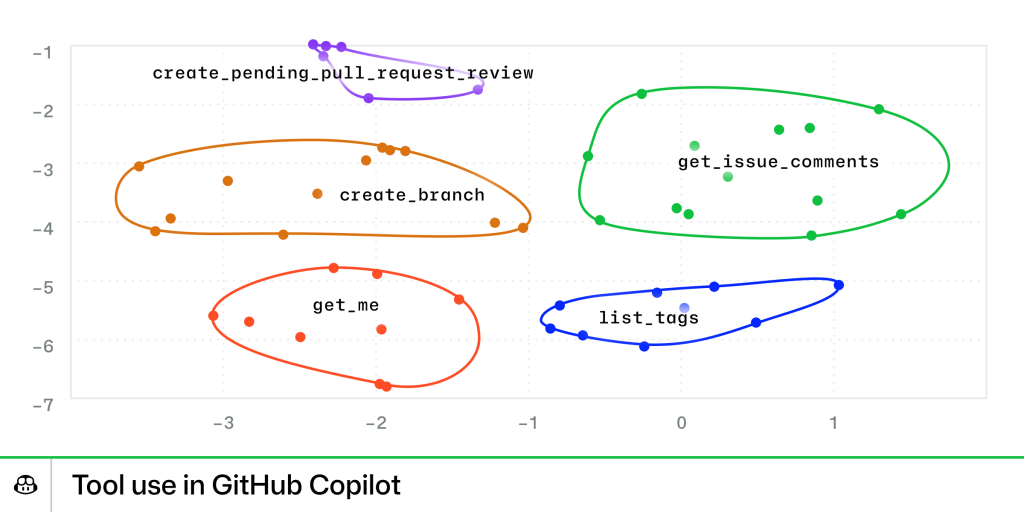
Clustering still requires a model call to summarize each group, but the cost is far lower than categorizing every tool from scratch. Tool embeddings and summaries are cached locally, so the overhead stays minimal.
Routing directly to the right tool
Grouping alone doesn’t solve the problem of knowing which group to open. Without guidance, a model may check search tools, documentation tools, and local Git tools before discovering that the merge tool it needs is inside the GitHub MCP group. Each lookup adds latency, a cache miss, and a chance for an operation to fail.
Embedding-guided tool routing tackles this. Before any group is expanded, the system compares the query’s embedding against vector representations of all tools and clusters, pre-selecting the most semantically relevant candidates even if they sit deep inside a group. The system can infer early that the merge tool is likely needed and include it directly in the candidate set, bypassing exploratory calls.
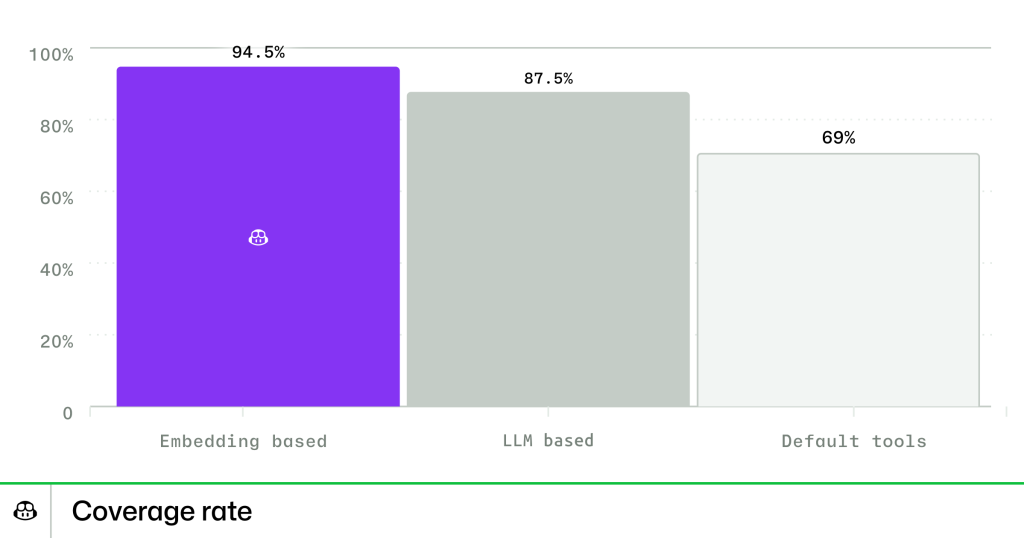
The results are measured by Tool Use Coverage: how often the model has the right tool visible at the moment it’s needed. In benchmarks, embedding-based selection achieves 94.5% coverage, versus 87.5% for LLM-based selection and 69.0% for a static tool list. Offline that’s a 27.5% absolute improvement over the static approach. Online testing confirms the pattern: 72% of Insiders tool calls were pre-expanded using embedding-based matching, compared to 19% for the old method on Stable.
Cutting the default toolset
Performance degrades even without hitting model limits. Offline benchmarks show a 2–5 percentage point drop in resolution rate on SWE-Lancer when the agent has access to the full built-in toolset. Behaviorally, the agent ignores explicit instructions, misuses tools, and calls ones it doesn’t need.
The fix was a data-driven trim. Based on usage statistics, the team identified a core set of 13 essential tools covering repository structure parsing, file read/write, context search, and terminal usage. The remaining non-core tools are grouped into four virtual categories: Jupyter Notebook Tools, Web Interaction Tools, VS Code Workspace Tools, and Testing Tools. The model sees the core set upfront and expands a group only when necessary.
The impact is measurable. Users on the shrunken toolset see an average 190 millisecond decrease in time to first token and a 400 millisecond average drop in time to final token. A leaner toolset means simpler reasoning, faster response, and better outcomes.
Tool selection as a stepping stone
MCP systems are evolving quickly, and the challenge is no longer just choosing the right tool — it’s reasoning across context and time. The team views tool selection as an early form of long-context reasoning. The mechanisms that route a model to the correct tool today may help it plan multi-step actions across thousands of turns, deciding when to act, delegate, or stop.
The next phase is exploring how embeddings, memory, and reinforcement signals combine to build agents that learn how to use tools effectively — not merely which ones to pick.


