

From abstract ideas to interactive prototypes
Product managers have always had to translate between customer needs, design intent, and engineering constraints. At ServiceNow, Ticketmaster, and Affirm, product leaders are finding that interactive prototypes built in Figma Make are replacing static mockups and lengthy PRDs as the fastest route to alignment. By building early, they can pressure-test assumptions, gather input from designers and engineers, and adjust course before too much work is invested.
That shift is about more than speed. When teams can see and interact with an idea sooner, they make better-informed decisions and ship products that more closely match user needs. We spoke with product leaders at all three companies about how they use Figma Make to turn abstract concepts into concrete direction.
Making complex flows legible before design cycles
Ram Devanathan, a Product Director at ServiceNow, ships products that help IT teams monitor systems, troubleshoot, and optimize operations. His team shares design resources across multiple product groups, which means designers often have competing priorities. "They have a big portfolio," says Ram, "so they can't always pivot directly to my project." When designers do get pulled in, they may not have the same depth of product knowledge as the rest of his team.
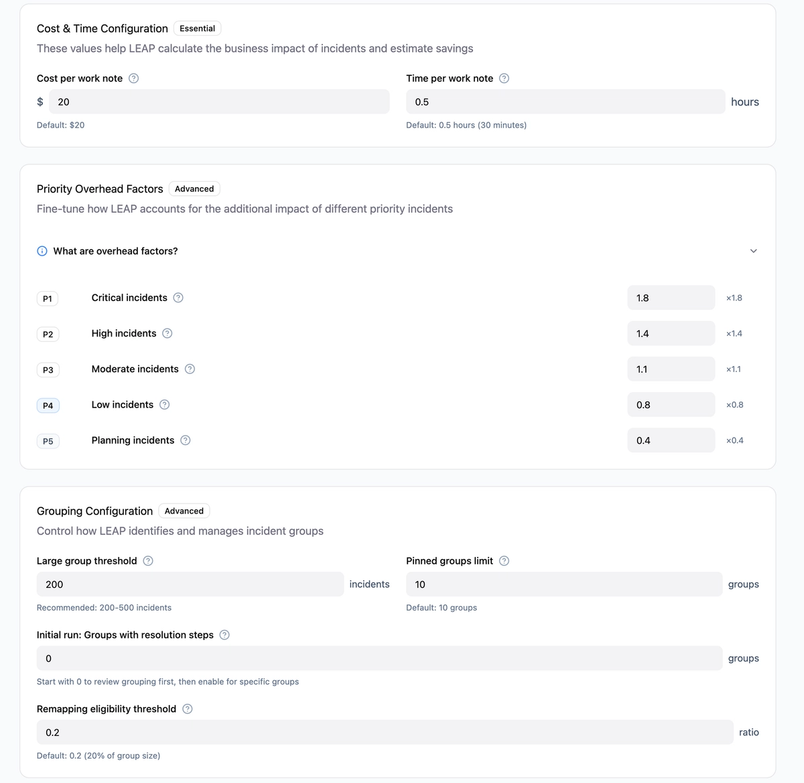
The challenge came to a head during a redesign of a complex configuration page with 15 to 20 settings, ranging from simple toggles to advanced technical options. Those settings affect how issues are raised, prioritized, and how much strain is placed on the system. Even experienced users could get confused without clear structure and in-product guidance. Ram found it difficult to convey the hierarchy and tone he wanted through conventional mockups, which were functional but missed the nuance he had in mind.
Ram brought the designer's initial mockup into Figma Make, adding specific guidance on how the settings should be structured. The generated interface grouped settings logically, placed simple configurations at the top, added tooltips for individual options, and included a clear note that users would need to restart the service after making changes. The result felt less overwhelming and gave his team a clear navigation path through a dense configuration surface. "Make helped me show what I meant rather than trying to describe it in the abstract," he says. The prototype let Ram and his designer align quickly on the UX direction, and the experience has changed how he works. "I'm able to convince people faster. That reduces the whole cycle for me."
For organizations with shared design resources, Make templates offer a similar starting point: teams can publish templates with design systems and UX patterns built in, reducing the need for designer involvement in early iterations.
Validating a feature with real users before engineering
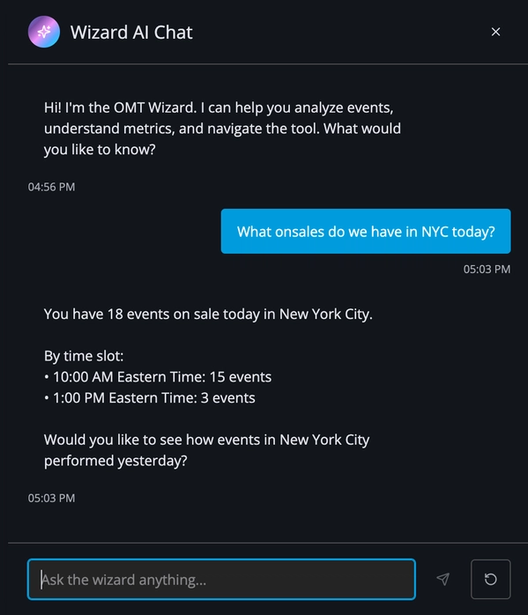
Ticketmaster Product Manager Brian Muehlenkamp is responsible for internal dashboards that roughly 400 employees rely on during high-demand ticket sales. When thousands of fans are buying tickets at once, client support teams field live questions about how the sale is performing. They need quick answers — how does this on-sale compare to the last one, or what happened during a previous sales window? Previously, that meant requesting manual data pulls, and the answer often wasn't available until after the client conversation had ended.
Brian had an idea to solve that: integrate Databricks' natural-language query tool so users could ask questions in plain English and get data back directly inside the dashboard. The feature wasn't on the roadmap, but he wanted to see if it would work. He turned to Figma Make to prototype a few directions — should the chat experience take over the screen, or live in a side panel? If a side panel, should it push the dashboard over or overlay it? "The old way of prototyping meant presenting screenshots and pretending they were a wireframe," Brian says.
His prototype, built using Ticketmaster's design patterns, gave users something that felt close to the real product. Power users confirmed that a side panel felt intuitive and let them keep monitoring the dashboard while asking questions. That feedback gave Brian the confidence to hand the feature off to engineering. The resulting tool, dubbed "The Wizard" internally, lets client-facing teams answer questions on the spot, and the engineering team has seen a meaningful drop in ad-hoc data requests. Since then, Brian has prototyped four other features in three months, and leadership has asked him to share his process across the organization.
Embedding a Figma Make prototype into FigJam, Figma Design, or Figma Slides can make it easier to align stakeholders around an idea and gather feedback in one place.
Exploring variations before making a call
Vishal Kapoor, Senior Vice President of Product at Affirm, helps translate the company's founding principle — that financial products should earn trust through transparency — into product experiences. Instead of an open-ended line of credit, Affirm underwrites each transaction in real time and presents eligible shoppers with clear payment plans at checkout, typically options like 6 weeks, 6 months, or 12 months.
Affirm's customer insights showed that shoppers chose plans for different reasons. Some wanted the 0% APR option, others preferred the shortest repayment window, and still others wanted flexibility around cash flow. The checkout flow needed badging to make those distinctions clear — but which badges to show, and all at once or selectively? In the past, exploring that problem space meant writing a PRD, waiting for design mocks, and running through engineering cycles before seeing live traffic.
Instead, a product manager used Figma Make to quickly prototype different badge variations — signals like "0% APR" or "shortest plan" — and brought them into internal design and product reviews. "Instead of it taking six weeks for me to think about an idea and then see what it looks like in action, it takes just a few hours," Vishal says. The team could test multiple iterations side-by-side, following questions into the variations, rabbit holes, and edge cases that Vishal describes as the real work of craft and quality.
Affirm also loads its design artifacts into Figma's MCP server, which connects those designs to coding tools like Cursor, making it easier to turn a prototype into a working version engineers can build from. The team eventually shipped a variation of the badge concept, but the lasting change is cultural. "Figma Make has exploded the number of ideas that we can actually explore at any given time with high fidelity," Vishal says.



