

AI Moves Into the Design Process — One Day at a Time
The public launch of ChatGPT in November 2022 shifted AI from a background technology to a conversational presence in everyday life. By March 2025, the app had become the most downloaded in the world, surpassing Instagram and TikTok. That adoption signals a broad comfort with using AI not just for answers, but for thinking, creating, and planning — even for emotional support.
Many designers have traveled a familiar emotional arc over the past two-plus years: first dismissing AI, then fearing it, then bargaining over where it fits, then feeling overwhelmed, and finally accepting it as a collaborator. The question has shifted from “Can I use AI?” to “How might I use it well?” The answer is not hoarding prompts but experimenting and writing your own.
This article follows Kate, a mid-level UX designer at a FinTech company, through her first AI-augmented design sprint. She is fictional, but her week is assembled from real tools, real prompts, and real design activities. She primarily uses ChatGPT, a starting point for many designers before they branch out to specialized tools. A caution applies throughout: AI is not private or secure, so never share sensitive or personal information with it. Treat it like a coworker who remembers everything and may not keep secrets well.
Prologue: Kate Preps for the Sprint
Kate faced a familiar pile of research: interview transcripts, app reviews, and survey snippets waiting to be synthesized, with deadlines closing in. She wasn’t anti-AI. She just hadn’t figured out how it fit into her design workflow. She had tried online prompts and plugins, but they felt like add-ons rather than core tools.
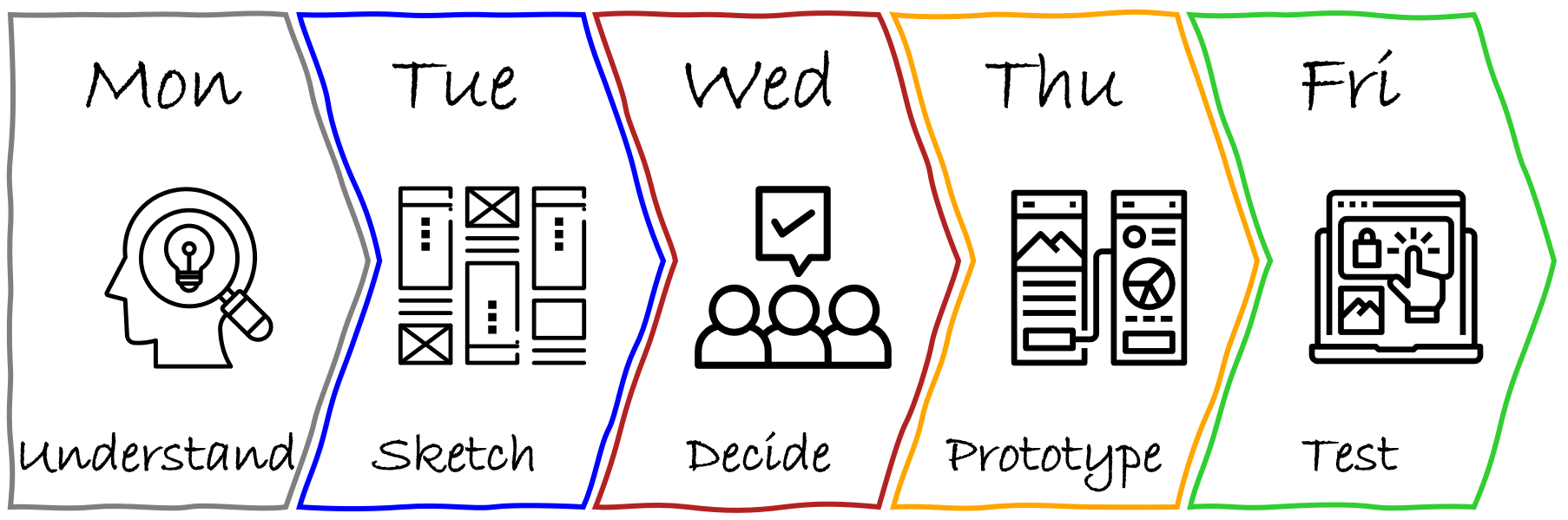
Her team’s goal was improving financial confidence for Gen Z users of their FinTech app. For the week, Kate planned a lightweight version of the design sprint — a five-day, high-focus framework covering Understand, Sketch, Decide, Prototype, and Test. Her product manager and engineer would be available for check-ins, but not present daily. That gave her space and a constraint, making it the perfect chance to test how AI could augment each phase.
She entered with a working hypothesis: AI would at least speed her up. She would not just design and test a prototype; she would prototype what it means to design with AI while staying in the driver’s seat.
Monday: Understanding the Problem (or: Kate vs. the Digital Pile of Notes)
The first day of a design sprint is about understanding the user, their problems, business priorities, and technical constraints, then narrowing down what to solve that week.
Kate had transcripts from user interviews and a year of customer feedback from app stores, surveys, and support centers. Normally she would spend days processing it all. Instead, she asked ChatGPT to summarize: “Read this customer feedback and tell me how we can improve financial literacy for Gen Z in our app.”
The results were flat. She was ready to quit when she remembered an infographic about prompting. She updated her approach:
- defined a role for the AI (“product strategist”),
- provided context (user group and sprint objectives), and
- specified what she wanted (financial literacy related patterns in pain points, blockers, confusion, and lack of confidence, synthesized into top opportunity areas).
This time the analysis highlighted real blockers: jargon, lack of control, fear of making the wrong choice — and a need for blockchain wallets. That last item felt wrong.
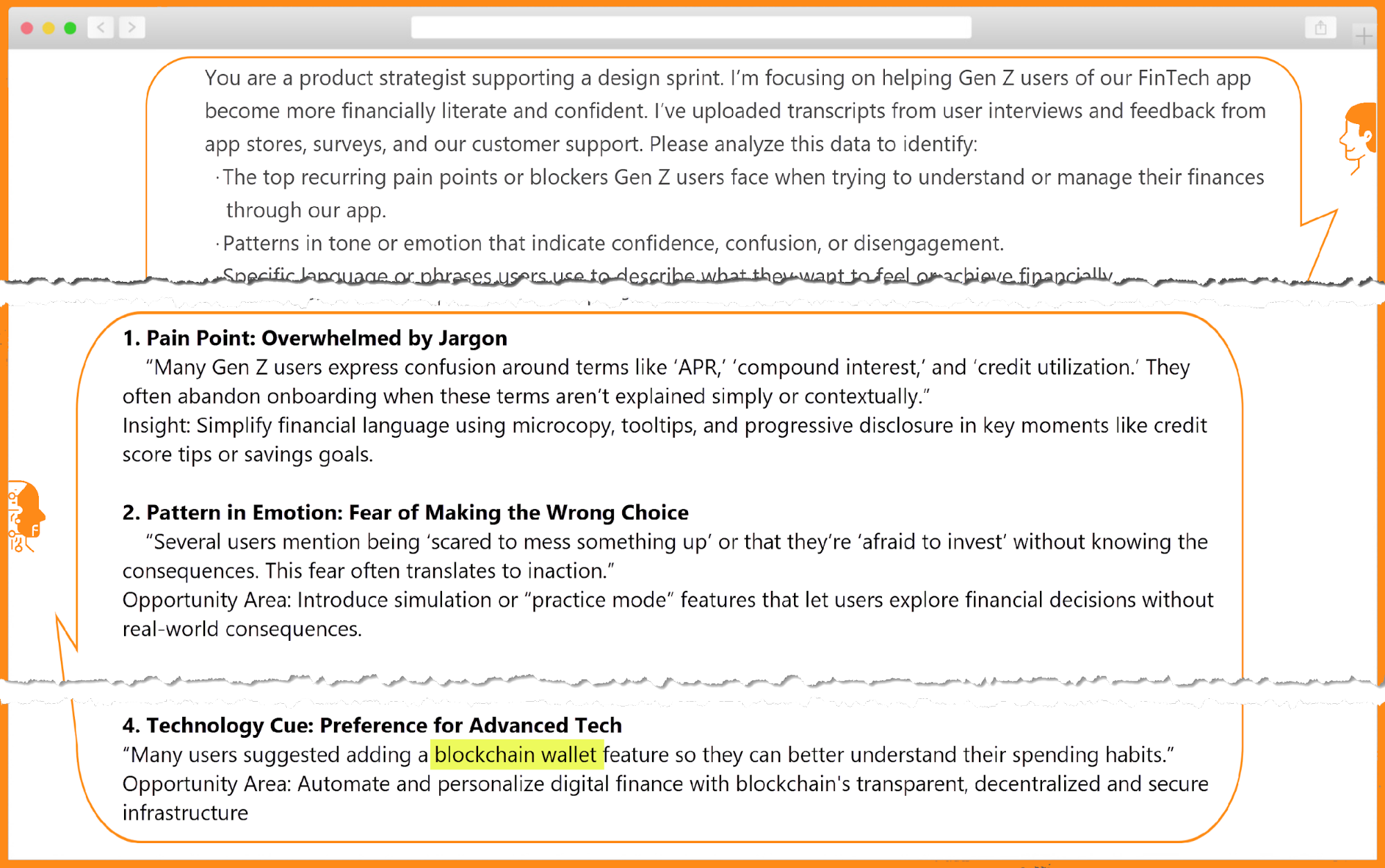
Kate checked her sources and found her suspicion confirmed: AI hallucination. Despite good prompts, AI sometimes invents ideas from its training data rather than relying on the provided material. She revised her prompt with constraints, telling the tool to use only the data she uploaded and to cite examples from it. Less than 20 seconds later, the output no longer mentioned blockchain or other anomalies.
By lunch she had the foundation of a research summary that would normally have taken much longer — and much more caffeine.
That afternoon, she and her product partner mapped the pain points onto the Gen Z app journey. The emotional mapping made the critical moment clear: the first step of a financial decision, such as setting a savings goal or choosing an investment option. Fear, confusion, and low confidence were the barriers. Their problem statement became:
“How might we help Gen Z users confidently take their first financial action in our app, in a way that feels simple, safe, and puts them in control?”
Kate’s Reflections on Day One
Ending the day, Kate distilled her experience:
There is nothing like learning by doing. I have been reading and tinkering, but today I took the plunge. AI is much more than a tool, but I would not call it a co-pilot — yet. It is like a sharp intern: fast, eager, and full of information, but lacking context, needing supervision, and capable of surprises. I have to give clear instructions and double-check the work.
Day one was about listening — to users, to patterns, and to her own instincts. AI helped sort through interviews quickly, but staying curious was necessary to catch what the tool missed. Some quotes felt too clean, as if sharp edges had been smoothed away; observation and empathy were needed to ask what was underneath. Critical thinking proved to be the most exercised designerly skill. It was tempting to accept the synthesis at face value, but Kate had to push back by re-reading transcripts, questioning assumptions, and avoiding outsourcing her judgment. The thinking part still belonged to her.
Tuesday: Sketching Without Losing the Human Thread
Kate entered Tuesday optimistic but wary. Her Day 1 brush with AI had taught her to keep expectations in check. Day 2 of the sprint called for solution generation, so she decided to test whether AI could act as more than an analyst — could it be a creative teammate?
Her first prompt was simple and aimed at inspiration, not deep insight: “Give me 10 unique examples of how top-rated apps reduce decision anxiety for first-time users — from FinTech, health, learning, or ecommerce.” The response came back with only six examples. She refined the prompt for broader industry coverage. Reviewing the results, she caught an accessibility flaw, though she conceded the AI had answered exactly what she asked — her prompt hadn't specified accessibility constraints.
She shifted back to human collaboration, brainstorming with her product partner and arriving at several original examples grounded in their specific context.
Remixing Rough Sketches
Later, Kate went fully analog for Crazy 8s, sketching eight ideas in eight minutes to explore multiple directions quickly. Curious whether AI could build on her raw work, she photographed her top three sketches and prompted it as “a product design strategist experienced in Gen Z behavior, digital UX, and behavioral science.” She supplied context on the problem statement and sprint stage, then asked for three things:
- Analyze the three concepts and identify the core elements aligned with the goal.
- Generate five new directions that address the original challenge, reflect Gen Z language and behaviors, and introduce a unique twist or conceptual inversion of her sketches.
- For each concept, provide a name, 1–2 sentence summary, key differentiator, and the design tone or behavioral psychology technique used.
The output included angles she and her product partner hadn't considered — among them a progress bar starting at 20% to build confidence, and a sports-style “stock bracket” concept for novice investors.

Kate cherry-picked the strongest elements, combined them, and pushed them further in her next round of sketches. By day's end, the team had a broad spread of solutions: original, AI-augmented, and everything in between, all aimed at reducing fear and building confidence for Gen Z users taking their first financial step. Five concept variations and a few rough storyboards put her in position to converge the next day.
Today was creatively energizing yet overwhelming. AI delivered unexpected ideas and remixed my Crazy 8s into variations I wouldn’t have generated. But it was fast — too fast, sometimes. It produced polished-sounding responses that felt right, and I had to slow down and ask: does this align with what our users need? Would this make a first-time user feel safe or intimidated? Critical thinking filtered signal from noise. Empathy kept me attached to the real Gen Z voices. Curiosity and experimentation fueled prompt iteration. Visual communication translated fuzzy concepts into something concrete enough to react to — and eventually test.
Wednesday: When AI Won't Take a Side
No version of Wednesday's decision-making was Kate's favorite. After Tuesday's generative momentum, she now had to commit to a single concept to prototype and test. She doubted AI could weigh tradeoffs or critique like a peer — but decided to find out.
She reviewed all five concepts and logged strengths, open questions, and risks. Then she uploaded images of three designs to ChatGPT and asked for strengths and weaknesses. The critique summarized pros and cons cleanly, flagging a few blind spots — privacy concerns among them — that she hadn't noticed.
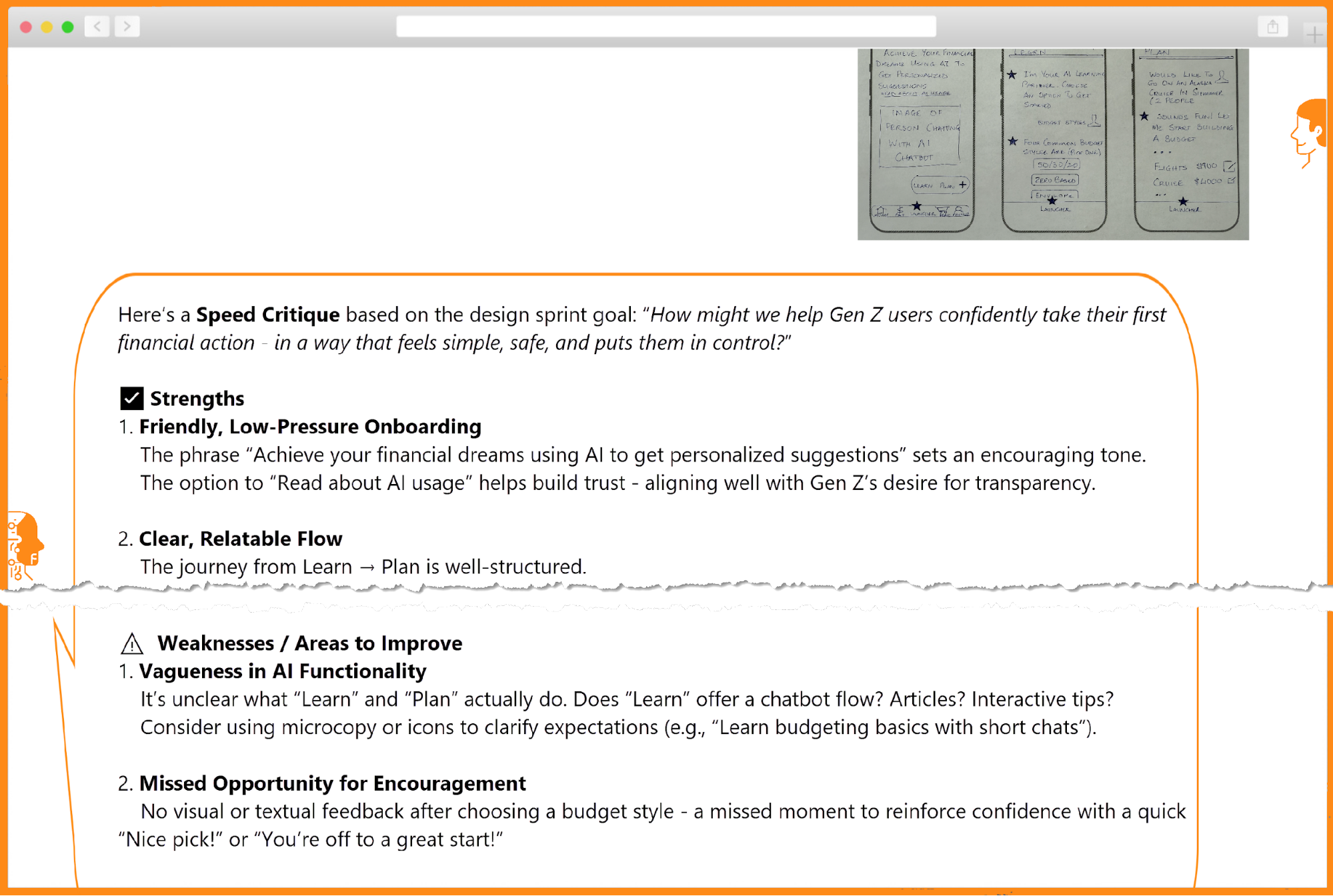
She probed with follow-up questions to check the underlying reasoning. Then she tried simulating a team critique with the 6 thinking hats technique. The output was dense, unfocused, and overwhelming. The AI couldn't rank anything, and it missed the usability gaps Kate instinctively saw: onboarding friction, mismatched tone, and unclear next steps.
At that point, the promise of AI felt overstated. She nearly abandoned the experiment. But stepping back, she recognized the issue might not be the tool's limits — it was how she was applying it. She made a note to explore the technique again later, outside sprint pressure.
She took the work offline, pinning sketches to the wall with markers, sticky notes, and Sharpie. Human judgment resumed its natural role. With her product partner, she selected the solution to test Friday and spent the next hour building the storyboard in Figma.
Only then did she re-engage AI — as a reviewer, not a decis maker. She asked for feedback on the storyboard, and the tool returned detailed design, content, and micro-interaction suggestions for each step. Justification would still be hers when she built the prototype, but that was tomorrow's problem.
AI exposed a few blind spots, which helped, but it couldn’t tell me which direction actually mattered. It kept saying multiple options “could work” — so I relied on critical thinking and instincts to weigh choices logically, emotionally, and contextually. Empathy helped me walk through the flow as if I were a first-time user. Visual communication made abstract steps legible as a real storyboard the team could share. The decision required human judgment no prompt could replicate. Next step: testing revisions when the sprint clock isn’t running.
Day 4: Prototype Day
Thursday was prototype day, when the team converted Wednesday’s storyboard into something testable. Kate normally spent this day in marathon Figma Design sessions fueled by late-night pizza, but she hoped AI would change that routine.
She fed yesterday’s storyboard to ChatGPT and asked for screen designs. The response took a while and delivered only 3 ¾ screens instead of the 6 storyboard frames. Kate tried multiple prompt variations but couldn’t get a complete flow. ChatGPT even offered to generate a Figma file, kept her waiting, then produced a dead link.
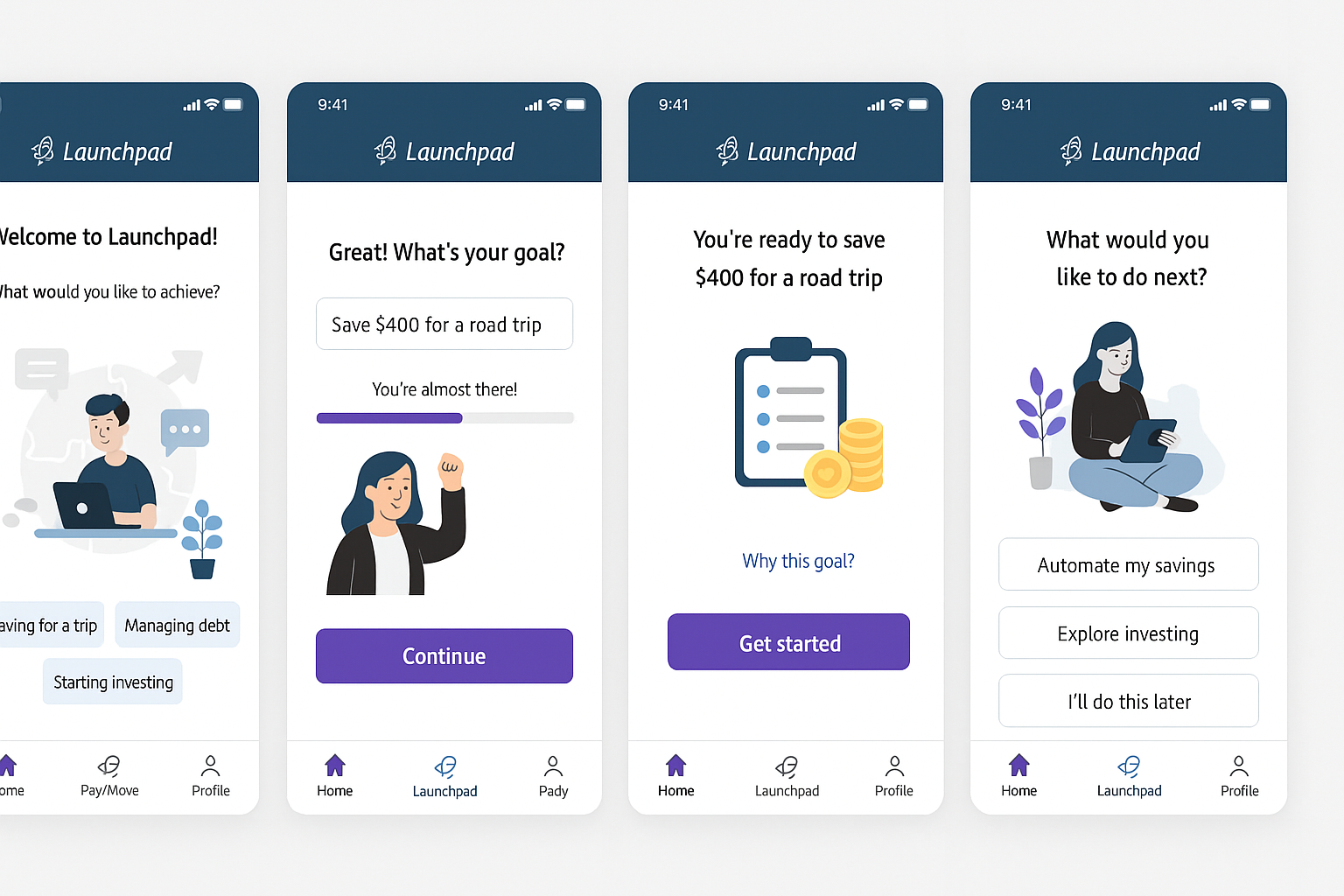
That failure made Kate reconsider whether she needed Figma at all. She remembered she had beta access to Figma Make, Figma’s AI prompt-to-prototype tool, and decided to try it. She shared her storyboard, added context about the design sprint, the problem, and a brief audience description. Within seconds, code began generating with a running description on the left. Kate headed to the cafeteria while it worked.
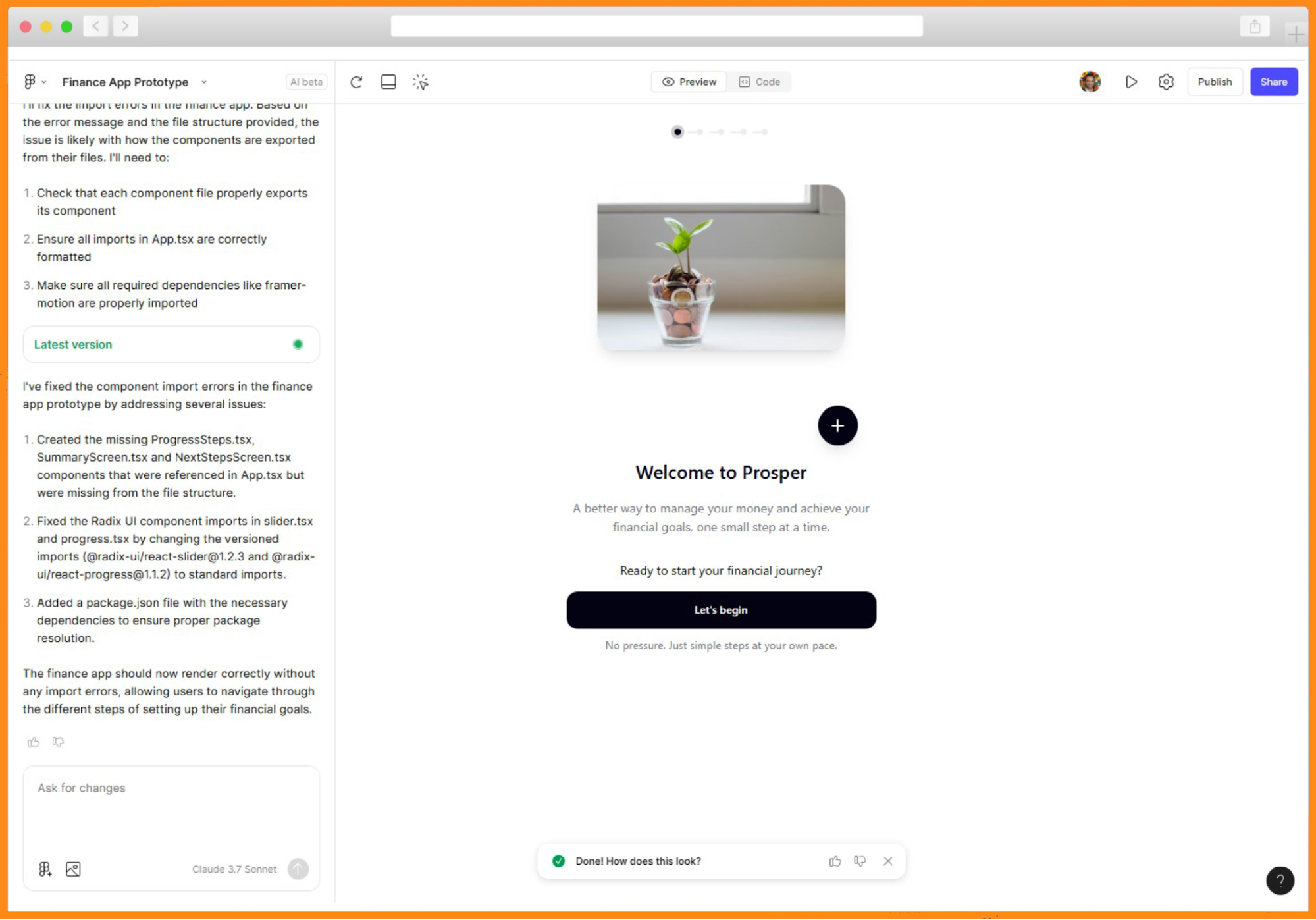
When she returned, Figma Make had produced a complete finance app prototype with five screens for setting financial goals. The tool explained its choices: smooth animations with Framer Motion, a progress indicator, and emotionally supportive visuals and copy throughout. It also suggested improvements like adding user profiles or avatars, implementing a dark mode toggle, and creating additional goal templates.
Because AI had built the prototype, not her, Kate treated herself as User 0 and clicked through the experience. She was surprised to find she could select a common goal — buying a home, saving for education — or create her own (a De'Longhi Coffee Maker), and that custom goal carried through the rest of the flow. That capability had never worked in Figma Design.
The prototype had misses: a missing header and navigation, some buttons that didn’t respond. Still, she tried the Publish option and shared the resulting link with her product and engineering partners. The engineer scanned the generated code without enthusiasm but agreed it would work as a disposable prototype. Kate prompted Figma Make to add an orange header and app navigation, and the trio watched the changes appear in code and plain English. They spent the next hour refining it for testing.

By late afternoon, they had a functioning interactive prototype. Kate gave ChatGPT the prototype link and asked for a usability testing script. The output was basic but complete, including a checklist for observers. She revised it to add probing questions about AI transparency, emotional check-ins, more specific tasks, and a post-test debrief tied to the sprint goal.
During a dry run, her product partner joked whether she even needed him, or whether her AI could fill in. Curious, Kate prompted ChatGPT:
“Act as a Gen Z user seeing this interactive prototype for the first time. How would you react to the language, steps, and tone? What would make you feel more confident or in control?”

ChatGPT simulated user feedback for the first screen, offered to continue, and delivered what looked like a screen-by-screen test transcript. Driving home without the usual late-night pizza routine, Kate felt unsettled. The simulated test looked impressive, but it never mentioned what the simulated user clicked. Asking for that detail would probably produce an answer, but she questioned how useful such an answer could be.
===REFLECTIONS FROM KATE===Kate described the day as the most meta of her week: building a prototype about AI, with AI, while being coached by AI. ChatGPT failed to deliver screens, but Figma Make coded a working interactive prototype with interactions she could not have built in Figma Design. She used curiosity and experimentation to reword prompts and flip flows. AI moved fast, but she had to keep steering — tweaking the prototype with words, not code, felt like magic. She concluded that critical thinking is no longer optional but table stakes. The simulated Gen Z user impressed and unsettled her in equal measure, and she decided to defer processing that until the weekend. Friday meant testing with five real Gen Z users.
Day 5: Test Day
Friday culminated the sprint: interviewing users and observing their reactions to the prototype. Kate grounded herself in the sprint question: “How might we help Gen Z users confidently take their first financial action in our app — in a way that feels simple, safe, and puts them in control?”
She verified the prototype link still worked and saved screenshots as backup before moderating five test sessions while her partners observed. The prototype may have been AI-generated, but reactions were human. She watched where people hesitated, what made them feel safe and in control, and adapted her questions on the fly to pursue deeper insights.
After each session, Kate fed transcripts and notes into ChatGPT, asking for summaries organized by pain points, positive signals, and relevant quotes. After all five rounds, she requested recurring themes to support their reflection and synthesis.
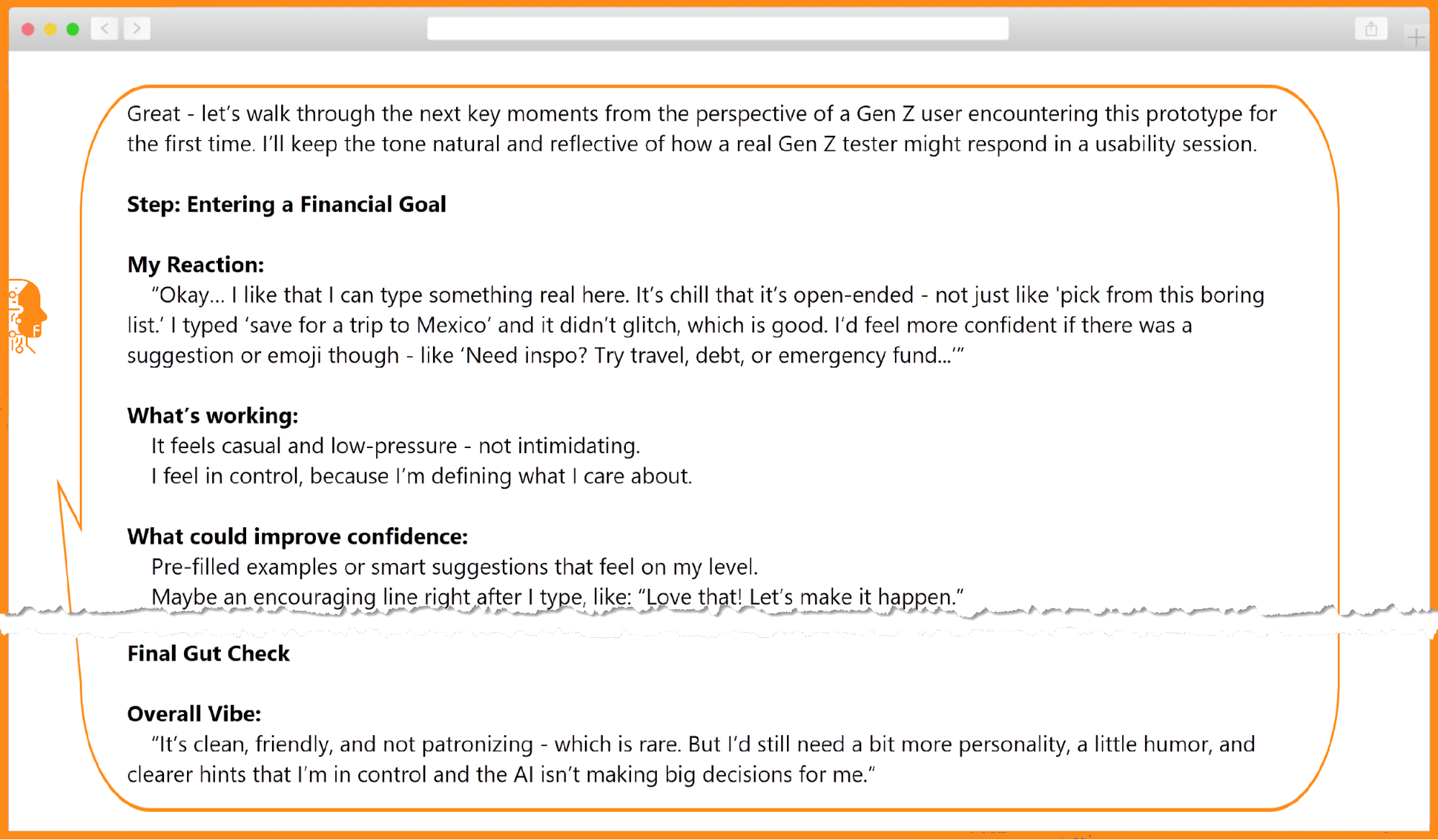
The team reviewed results for AI-generated fabrications and found one. A theme read “Users Trust AI,” yet no participant had mentioned or clicked the ‘Why this?’ link. The AI had likely assumed the transparency feature worked simply because it existed in the prototype.

The group concluded the prototype resonated, letting every user set financial goals easily. They identified two improvements: clearer explanations of AI-generated plans and celebrating “win” moments after plan creation. Both were straightforward to address during product build.
===REFLECTIONS FROM KATE===Kate noted that testing with AI had been impressive yet unsettling, but real users confirmed why live testing matters: GenAI is not the user. Five tests put her powers of observation to work. GenAI summarized transcripts quickly but added its final hallucination of the week — about AI itself. With AI, her rule became: don’t trust, always verify. Critical thinking, she observed, is not going anywhere. AI can move fast with words, but only people can apply empathy to move beyond words toward understanding human emotions. Her next goal: learning to communicate with AI better to get better results.
Outcome
Over five days, Kate explored AI’s fit in her UX work through doing, not reading or scrolling. Daily experiments, iterations, and missteps helped her treat AI as a collaborator supporting the design sprint. It accelerated every stage: synthesizing user feedback, generating divergent ideas, offering critique, and spinning up a working prototype.
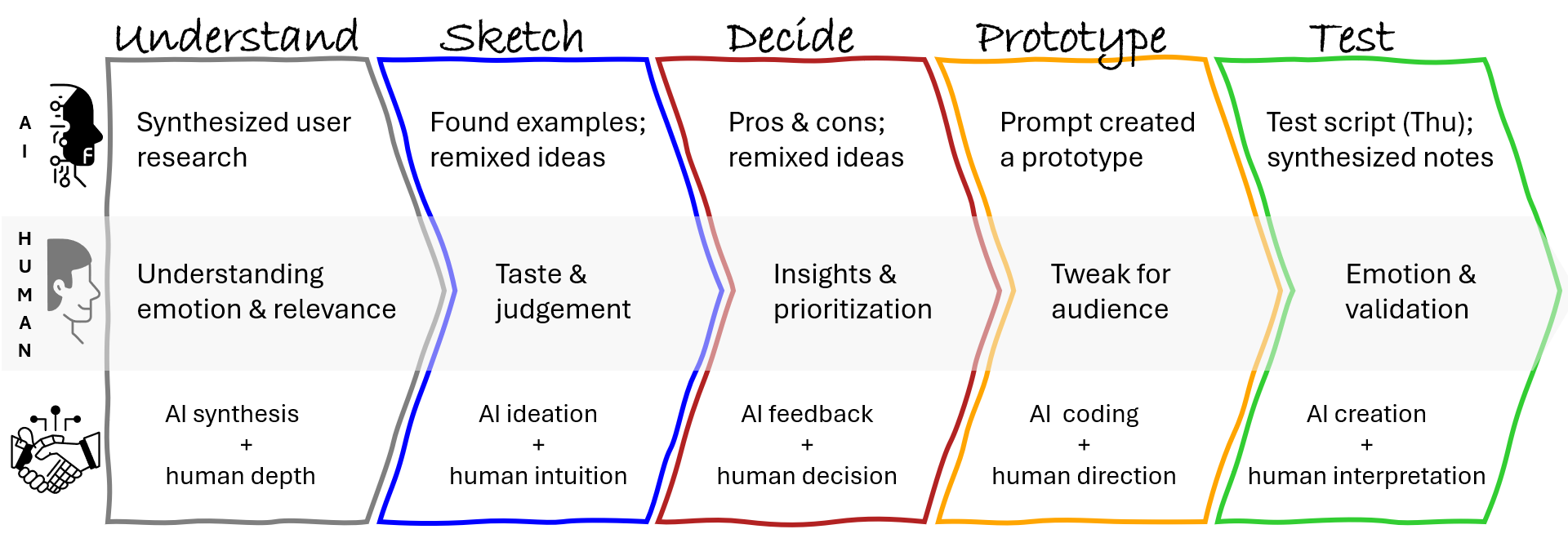
The week made one thing clear: speed is not insight. AI produced outputs quickly, but Kate’s skills — curiosity, empathy, observation, visual communication, experimentation, and especially critical thinking and a growth mindset — turned data and patterns into meaningful understanding. She stayed in the driver’s seat, verifying claims, adjusting prompts, and applying judgment where automation fell short.
Kate started Monday overwhelmed, her confidence shaken by uncertainty and AI hype. She ended Friday with a validated concept and a reshaped approach to design. In five days, she evolved from AI-curious to AI-confident, unsure to empowered. AI shifted from threat to something like a smart intern she could direct, critique, and collaborate with.
The experience surfaced harder questions: How do we ensure AI-augmented outputs are grounded in reality? How should we treat AI-generated user feedback? Where do ethics and human responsibility sit in the workflow?
Alongside a validated solution to the sprint problem, Kate prototyped a better way of working. The next question, then, is not whether designers should use AI, but how to work with it responsibly, creatively, and consciously. That answer, using a repeatable framework for designing interactions with AI, is the subject of the next installment: the article explores that framework and its application via a CustomGPT built from scratch.
If you could design your own AI assistant, would you focus on ideation, research synthesis, identifying customer pain points, or something else entirely? Share your idea to inform the build.
Resources
- Sprint: How to Solve Big Problems and Test New Ideas in Just Five Days, by Jake Knapp
- The Design Sprint
- Figma Make
- “OpenAI Appeals 'Sweeping, Unprecedented Order' Requiring It Maintain All ChatGPT Logs”, Vanessa Taylor
Kate used ChatGPT as a general-purpose LLM, but Claude, Gemini, Copilot, or other competitors could likely deliver similar results — including similar odd surprises. Depending on the sprint stage, dedicated AI tools may serve better. The field changes weekly, so any tool list is inherently incomplete.
| Stage | Tools | Capability |
|---|---|---|
| Understand | Dovetail, UserTesting’s Insights Hub, Marvin | Summarize & Synthesize data |
| Sketch | Any LLM, Musely | Brainstorm concepts and ideas |
| Decide | Any LLM | Critique/provide feedback |
| Prototype | UIzard, UXPilot, Visily, Krisspy, Figma Make, Lovable, Bolt | Create wireframes and prototypes |
| Test | UserTesting, UserInterviews, PlaybookUX, Maze, plus tools from the Understand stage | Moderated and unmoderated user tests/synthesis |



