
Putting a general-purpose accessibility agent in the GitHub codebase
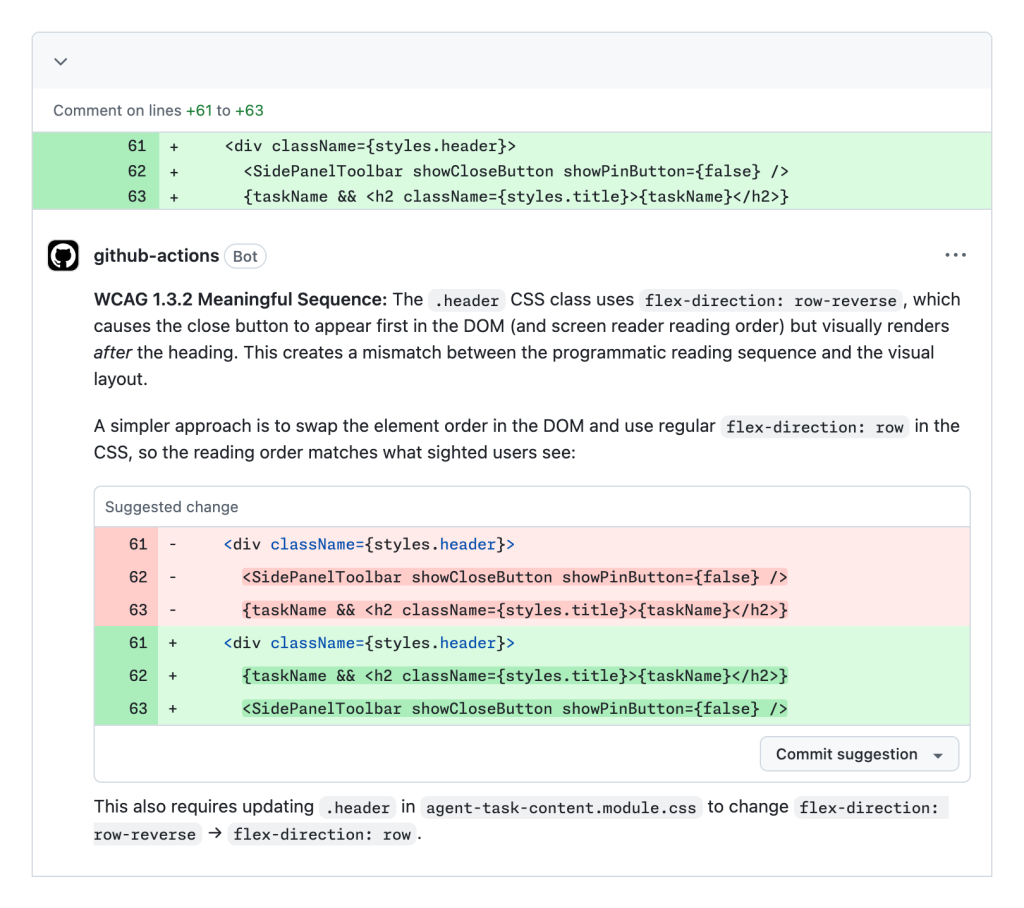
Agent-based workflows have become a core part of how developers build and edit code at GitHub. The company has piloted that same pattern for its accessibility commitments, launching an experimental, general-purpose accessibility agent with two primary goals: giving engineers reliable, just-in-time answers to accessibility questions through Copilot, and catching objective accessibility issues automatically before code reaches production. To serve the second goal, the agent evaluates any changes that touch front-end code.
So far the agent has reviewed 3,535 pull requests with a 68% resolution rate. The five most frequently caught issues, in order, are:
- Structure and relationships not clear to assistive technologies (WCAG 1.3.1)
- Interactive controls lacking clear, concise names (WCAG 4.1.2)
- Users not informed of important status announcements (WCAG 4.1.3)
- Missing text alternatives for non-text content (WCAG 1.1.1)
- Keyboard focus not moving through pages in a logical order (WCAG 2.4.3)
Framing the agent's role
The social model of disability holds that impairment arises from how environments are built, not from the individual. Digital experiences carry the same principle. Accordingly, this work does not aim to "solve" accessibility in isolation; it is an attempt to augment engineers' efforts and remove the barriers that can emerge from how GitHub's UI is constructed.
It's equally important to treat the agent as anything but a silver bullet. That framing sets realistic scope and sped up the pilot's launch, leading to greater buy-in across the organization.
What past investment made the pilot possible
Regulatory pressure is building in this space. The European Accessibility Act is now in effect, and under Title II of the Americans with Disabilities Act, meeting WCAG 2.1 AA becomes the legal definition of compliance in April 2027. LLM agents can read and act on the accessibility tree, which makes them viable tools for working against those deadlines.
The counterintuitive conclusion is that organizations that have not already invested in manual accessibility auditing and remediation will be at a disadvantage when it comes time to build an agent. GitHub entered the pilot with a mature process for logging and verifying accessibility issues, including:
- A structured reporting template
- Steps to reproduce each issue
- Metadata on severity, service area, and WCAG success criteria
- Crosslinks to the fixing pull request
- Acceptance criteria
All issues are centralized in a single repository. Although this logging system predates mainstream LLM tooling, its consistent structure made it ideal training material for the agent. The agent is instructed to mine those historical issues and their associated pull requests for reusable code and language snippets. Here, the non-deterministic "fuzzy matching" of LLMs works in favor of the pilot, rather than against it.
The value of old, vetted examples
Vague skill-file instructions do not work in a specialized domain. Telling the model to "use accessibility best practices," with only a handful of examples, yields poor results. LLMs carry a bias toward accessibility antipatterns in their generated code because every major model trains on decades of inaccessible code.
The countermeasure is quality reference content. Manual issue cataloging and remediation are prerequisites, not optional extras, because those records give the agent highly contextual, in-convention examples to extrapolate from. This corpus is the single strongest asset the agent relies on.
Taming token consumption
Accessibility is inherently cross-cutting, intersecting code, design, and copy, and much of the work is highly contextual, so a general-purpose agent can burn tokens quickly. That leads to three problems: more unreliable output, slower responses, and higher operational cost. The agent's structure is designed to avoid those outcomes.
Keep only two sub-agents
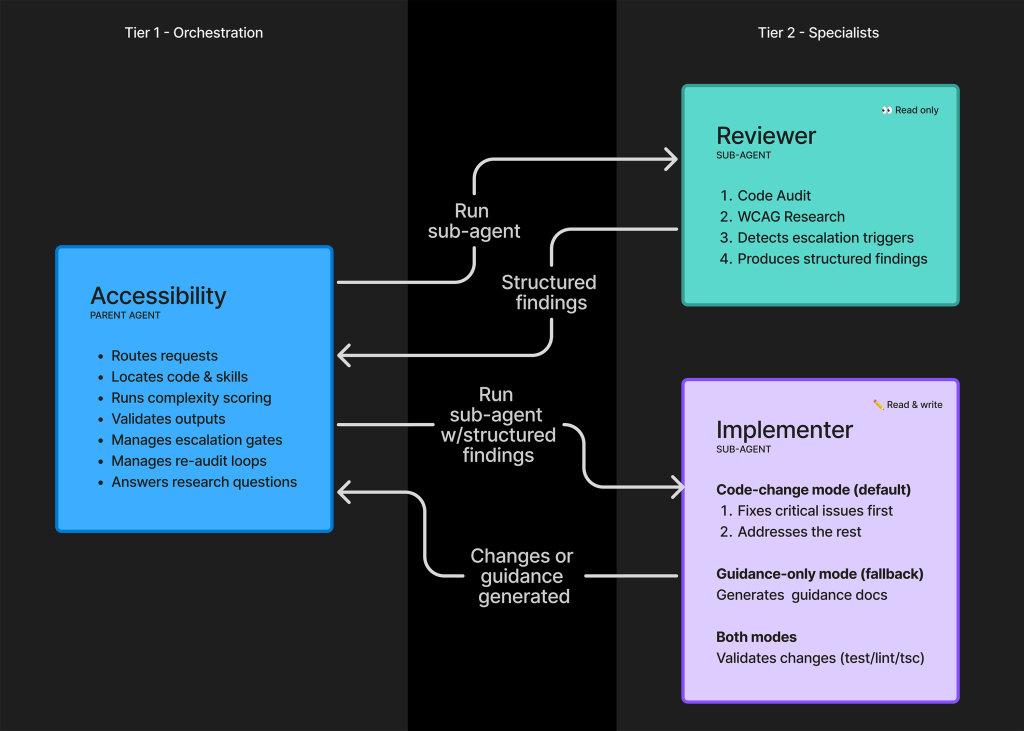
The accessibility agent started as a monolith, then outgrew that design. A commonly recommended evolution is a large suite of narrowly scoped sub-agents running in parallel, with the main agent reconciling outputs. That approach backfired here. The working end state uses just two dedicated sub-agents, one a passive reviewer and researcher, the other an active implementer.
Both sub-agents run in a sandbox and cannot communicate directly. Instead, each emits structured, templatized output that the parent accessibility agent consumes, validates, and routes. This architecture buys four benefits:
- Escalation checkpoints. The reviewer flags patterns likely to require human judgment, such as compounding high-severity WCAG failures and historically difficult accessibility patterns.
- Complexity-based behavior. When underlying code is too complicated, the parent switches to guidance-only mode. The reviewer is "opinionless," reporting findings without judgment, while the parent arbitrates.
- Filtering. The reviewer reports everything it finds; the parent applies resources and skills to determine what is relevant before any implementation happens.
- Traceability. Direct sub-agent chatter would destroy the audit trail of user and agent decisions, which matters when the work depends heavily on context.
Linearity beats parallel speed
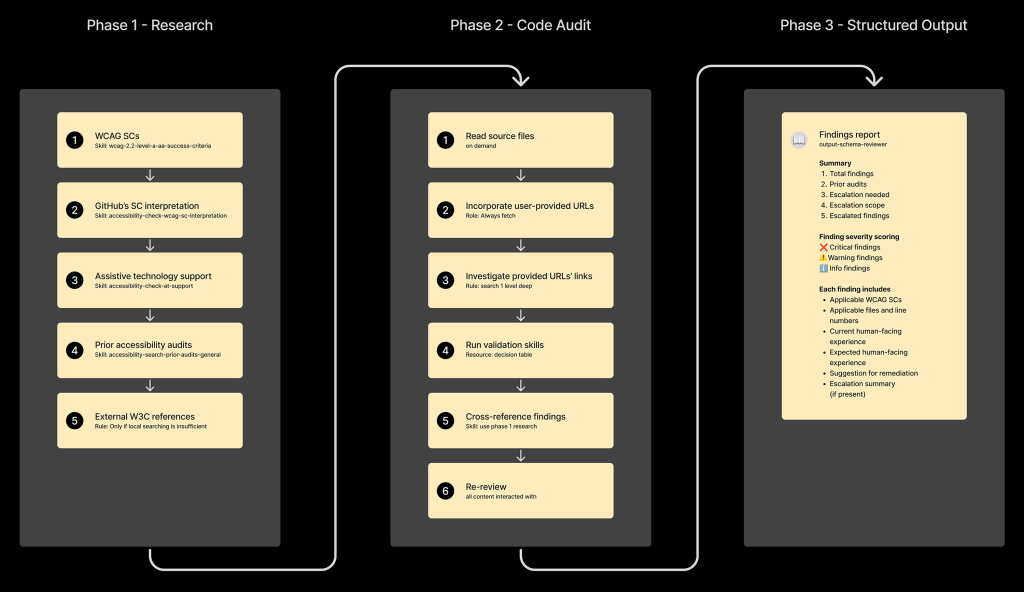
Accessibility work is methodical by nature, so the team inverted the usual parallel-execution playbook. The agent is forced to execute its parent instructions in fixed, ordered phases, each containing child-ordered steps tied to relevant files. The ordering mirrors how a human auditor, remediator, and reporter would sequence the work, and accuracy is treated as more valuable than reply speed.
Schema files keep sub-agents honest
The pass-around between sandboxed sub-agents is governed entirely by template schema files, which are critical for consistency and focus. Two exist:
- Reviewer template schema: Defines what to audit and how to find applicable information.
- Implementer template schema: Defines what to fix and the fixing approach.
Without those files, the agents would attempt unstructured chat with one another, producing wasted tokens, hallucinations, unsolicited code edits, and agent logs that would be difficult or impossible to audit.
Where the agent stops and humans take over
An accessibility agent is not a turnkey fix for digital accessibility. Poorly interrogated output from an agent can be dangerous, especially when the person using it is not well-versed in accessibility practices. To keep that risk in check, the team built safeguards into the agent so it knows when not to act.
Scoring code complexity before touching it
The first line of defense is a small shell script that analyzes the code the agent is about to modify. The script applies a handful of basic heuristics to produce a relative complexity score. The agent ingests that score and, if it crosses a set threshold, refuses to make changes. Instead, it tells the user to contact the accessibility team for consultation.
The goal is to avoid costly rework on inaccessible solutions the agent believes are fine. Where the code is too complex for confident automated remediation, escalation is the safer path.
Blocklisting high-risk interaction patterns
Code can pass automated accessibility checks and still be functionally unusable. That distinction matters. The agent is therefore instructed to avoid generating code for patterns the accessibility team has flagged as high-risk, including:
- Drag-and-drop interfaces
- Toasts and accessible notifications
- Rich text editors
- Tree views
- Data grids
These patterns demand focused attention and detail that current LLM capabilities cannot reliably deliver in a form that works with assistive technology. Allowing the agent to attempt them would create unnecessary rework and damage the accessibility team’s credibility. Shutting off that pathway prevents the problem before it starts.
Countering the urge to produce
LLMs share one quality: a strong inclination to generate content. For a coding agent, that often means generating code—even when it should not. To counter this, the team added anti-gaming instructions to prevent the agent from finding creative workarounds around its own intervention rules, ensuring it could not quietly violate its own guidance against generating code when human expertise is required.
The automated-detection ceiling
Automated checks have a hard limit. Of the 55 WCAG level A and AA Success Criteria, only 35 can be detected by deterministic automated code checkers. That leaves roughly 36% of those criteria undetectable by automation.
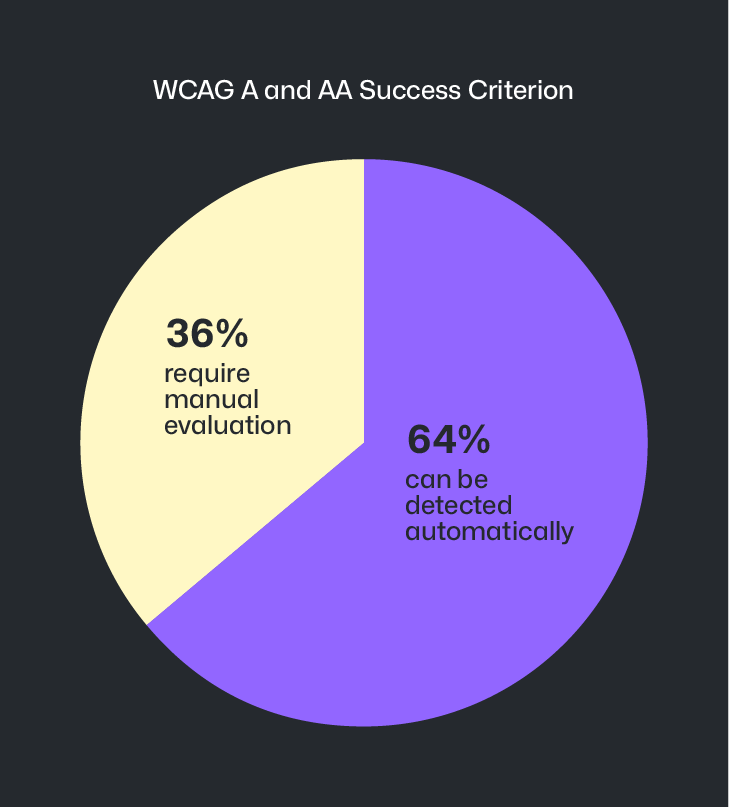
LLM-powered agents are starting to close that gap, but it is not yet a perfect science. Given that the majority of accessibility issues originate during design and prototyping, the team still relies on manual identification of barriers early in the process. The agent’s escalation logic reflects this: accessibility team members step in to pair with designers on alternate approaches that meet business goals without compromising accessibility. Stopping issues before they reach code prevents downstream redesigns that are costly and time-consuming.
Reviewing the reviewer
The team periodically evaluates agent output for accuracy and effectiveness. They also run tooling to capture pull request reviewer sentiment. Both feed back into improving the agent’s instructions and providing it with new resources and skills where gaps appear.
Key takeaways so far
The accessibility agent is best understood as an aid to existing efforts, not a replacement. Several lessons have shaped its design:
- It is most effective when trained on manually audited and remediated accessibility issues from the specific experience it is serving.
- Sub-agents dramatically reduce token consumption.
- Instructions executed methodically and linearly yield more accurate results.
- Preformatted templates for passing information improve consistency.
- Defined limitations route users to appropriate human support when needed.
- Periodic output review identifies where better instruction is required.
The work is ongoing. The agent continues to be iterated on, with the hope of eventually open-sourcing it as part of the pledge to improve accessibility of open source software at scale. For now, the team’s published learnings serve as a reference for other organizations undertaking similar accessibility efforts.


