
Why SQL notebooks exist
At Meta, SQL has long been the primary path into analytics data, covering the bulk of queries against Presto, Spark, and MySQL databases. Internal tools evolved from the early HiPal (Hive + Pal), which inspired the open-source Airpal, to Daiquery, a more general tool supporting any SQL-based data store with built-in visualization. Daiquery remains the go-to query interface for 90 percent of data scientists and engineers at the company.
Yet SQL alone has limits. Complex analysis often needs incremental steps, rich output, or Python post-processing, which is where Jupyter-style notebooks shine. But notebooks bring their own problems at scale.
Notebook limitations at scale
Jupyter Notebook has been transformative for data work, and Meta integrated it with its ecosystem through the Bento project. But notebooks are not ideal for every analytics workflow:
- Scalability. Notebook execution runs locally, so it is bounded by the memory and CPU of a single machine. Large data sets are effectively off-limits.
- Sharing and snapshotting. A notebook is tied to one machine; sharing results means saving them with the entire notebook, which creates two distinct problems.
- Security. Saved outputs may include data protected by table-level ACLs. Enforcing those ACLs on snapshots would require re-executing the code, and careless access control can leak data.
- Staleness. A snapshot does not refresh unless someone runs the notebook manually, producing misleading results or demanding constant upkeep.
What SQL Notebooks changes
SQL Notebooks combines the modular structure of notebooks with the safety and scalability of SQL editor workflows. Rather than running code locally, each cell produces a self-contained SQL statement that executes on a distributed back end.
Modular SQL without nested mess
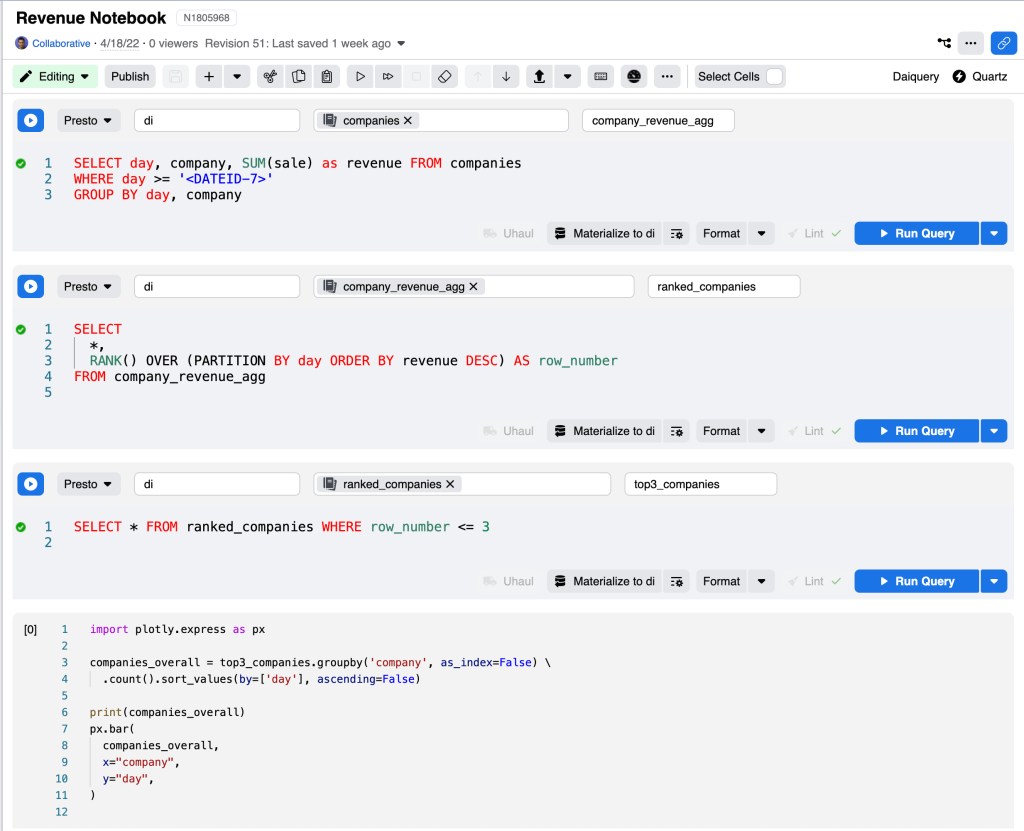
Long SQL queries are notoriously hard to maintain. Common table expressions (CTEs) help, but not everyone writes them cleanly. SQL Notebooks extends Daiquery to support named, interdependent cells: each cell can reference earlier cells as if they were tables.
A typical three-cell workflow might start by aggregating revenue by company and day:
company_revenue_agg:

SELECT day, company, SUM(sale) as revenue FROM companies
WHERE day >= '<DATEID-7>'
GROUP BY day, company

The next cell assigns a rank to each company within each day using a window function:
ranked_companies:

SELECT
  *,
  RANK() OVER (PARTITION BY ds ORDER BY hits DESC) AS row_number
FROM company_revenue_agg

A final cell filters to the top three per day:
top3_companies:

SELECT * FROM ranked_companies WHERE row_number <= 3

Behind the scenes, the SQL sent to the server for the ranked results expands to:
WITH
company_revenue_agg AS (
  SELECT day, company, SUM(sale) as revenue FROM companies
          WHERE day >= '<DATEID-7>'
          GROUP BY day, company
      )
 	SELECT *,
      RANK() OVER (PARTITION BY day ORDER BY revenue DESC) AS row_number
      FROM company_revenue_agg
And for the top-three query:
WITH
company_revenue_agg AS (
  SELECT day, company, SUM(sale) as revenue FROM companies
    WHERE day >= '<DATEID-7>'
    GROUP BY day, company
),
ranked_companies AS (
  SELECT *,
  RANK() OVER (PARTITION BY day ORDER BY revenue DESC) AS row_number
FROM company_revenue_agg
)
SELECT * FROM ranked_companies WHERE row_number <= 3
Each intermediate cell can run independently for inspection. Someone unfamiliar with CTEs might otherwise build the same logic as a deeply nested query that is far harder to read.
Because cells are transformed into full standalone queries, no data is held in memory between cells. The distributed query engine does all the heavy lifting, sidestepping the single-machine scalability barrier of classic notebooks.
The front end appends a LIMIT 1000 by default when printing or visualizing results, but only for the cell whose output is requested. Downstream cells that reference an earlier cell are not capped by that limit.
Python for last-mile work
SQL Notebooks supports markdown cells and UI-based visualization similar to Vega. It also includes sandboxed Python execution for data manipulation that is awkward in SQL but natural in Pandas, or for using custom visualization libraries such as Plotly.
For example, to chart the output of the top-three query:
import plotly.express as px
px.bar(
  top3_companies,
  x="day",
  color="company",
  y="hits",
  barmode='group'
)
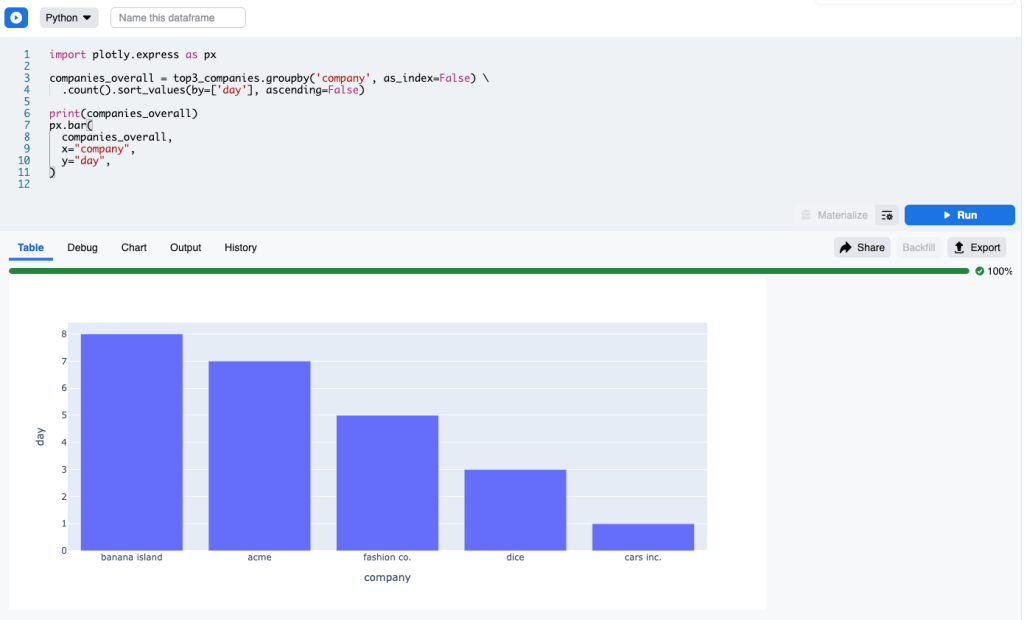
The runtime detects top3_companies as an input, runs that SQL cell first, and provides its output to Python as a Pandas dataframe. Fetching data directly from Python or performing any operation that requires authentication is prohibited. Python cells must depend on upstream SQL cells to get data — a crucial constraint for security.
Safe, fresh sharing
Because SQL is syntactically constrained, it is possible to determine statically whether a user can execute a given query. The same is virtually impossible for a dynamic language like Python. Outputs are saved, but only reused if the requesting user could have run the originating SQL themselves. Table and column ACLs remain the single source of truth, so accidental data leakage is prevented. Python cells are safe under the same rule: check whether the user can run all the dependency SQL cells; if so, cached output is safe to use.
This design also solves staleness. Scheduled asynchronous jobs refresh the snapshots, so readers always see up-to-date results.
Full SQL editor experience
SQL Notebooks retains the Daiquery editing features: auto-complete, a metadata pane with column names, types, and sample rows, SQL formatting, and the ability to assemble cells into dashboards.
What lies ahead
SQL Notebooks is not a universal replacement for Python notebooks. Querying still requires SQL, and the Python sandbox is intentionally restrictive. Bento/Jupyter remains better suited for machine learning jobs or rapid interaction with backend services through their Python APIs.
Internally, the resemblance to Bento notebooks was obvious from the start. The teams are now working to merge SQL Notebooks and Bento into a single tool, letting users make trade-offs within one interface rather than being locked into a separate choice. Once Daiquery is deprecated, the combined notebook will be the unified route to analytics data at Meta.


