
IssueOps: branch deployments without the chat bot
GitHub has relied on branch deployments as its standard model for shipping code to production for years, originally implemented through ChatOps. But branch deployments shouldn't require a full chat infrastructure. The branch-deploy Action brings the same workflow to any repository using GitHub Issues and pull request comments instead.
Why deploy before you merge?
The traditional deploy-to-merge flow looks familiar: create a branch, open a pull request, get reviews, merge to main, then deploy. The problem is that main is only proven stable after a deployment succeeds. If something fails in production, rolling back means starting the whole process over.

Branch deployments invert that sequence. The pull request itself becomes the deployment unit:
- Create a branch and open a pull request.
- Gather feedback and reviews.
- Deploy the branch directly.
- Validate the deployment in production.
- Merge to
mainonly after success.

This keeps main permanently deployable. A rollback is simply another branch deployment pointing at main. The model is essentially the GitHub flow, applied to production releases.
From ChatOps to IssueOps
ChatOps executes commands by talking to a bot in Slack, Discord, or similar. IssueOps is the same concept, but commands are issued as comments on GitHub Issues and pull requests, with GitHub Actions as the runtime.
The branch-deploy Action listens for those comments and orchestrates the deployment, giving any repository branch deployment capability without a ChatOps stack. GitHub uses it internally, particularly for Infrastructure as Code repositories running Terraform, and it has seen adoption at npm and across public open source projects.
A minimal setup
Getting started takes two files and a comment. First, add a workflow under .github/workflows/branch-deploy.yml:
name: "branch deploy demo"

# The workflow will execute on new comments on pull requests - example: ".deploy" as a comment
on:
  issue_comment:
    types: [created]

jobs:
  demo:
    if: ${{ github.event.issue.pull_request }} # only run on pull request comments (no need to run on issue comments)
    runs-on: ubuntu-latest
    steps:
      # Execute IssueOps branch deployment logic, hooray!
      # This will be used to "gate" all future steps below and conditionally trigger steps/deployments
      - uses: github/[email protected] # replace X.X.X with the version you want to use
        id: branch-deploy # it is critical you have an id here so you can reference the outputs of this step
        with:
          trigger: ".deploy" # the trigger phrase to look for in the comment on the pull request

      # Run your deployment logic for your project here - examples seen below

      # Checkout your project repository based on the ref provided by the branch-deploy step
      - uses: actions/[email protected]
        if: ${{ steps.branch-deploy.outputs.continue == 'true' }} # skips if the trigger phrase is not found
        with:
          ref: ${{ steps.branch-deploy.outputs.ref }} # uses the detected branch from the branch-deploy step

      # Do some fake "noop" deployment logic here
      # conditionally run a noop deployment
      - name: fake noop deploy
        if: ${{ steps.branch-deploy.outputs.continue == 'true' && steps.branch-deploy.outputs.noop == 'true' }} # only run if the trigger phrase is found and the branch-deploy step detected a noop deployment
        run: echo "I am doing a fake noop deploy"

      # Do some fake "regular" deployment logic here
      # conditionally run a regular deployment
      - name: fake regular deploy
        if: ${{ steps.branch-deploy.outputs.continue == 'true' && steps.branch-deploy.outputs.noop != 'true' }} # only run if the trigger phrase is found and the branch-deploy step detected a regular deployment
        run: echo "I am doing a fake regular deploy"
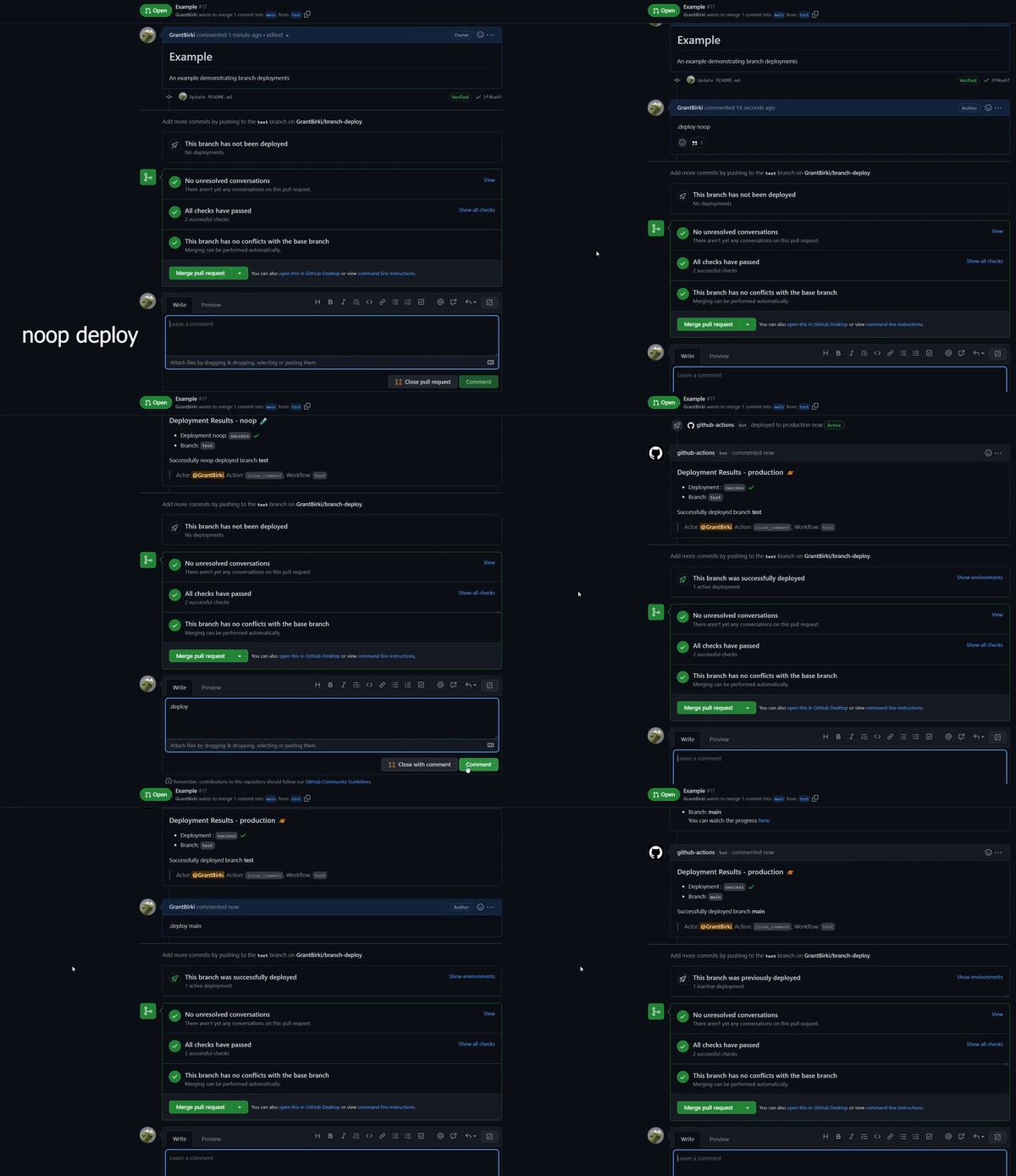
With that workflow in place, commenting .deploy noop on a pull request triggers a noop deployment. The Action validates permissions, sets the continue output to true for authorized users, and detects the noop trigger so only the fake noop deploy step runs. After validating that step, you would comment .deploy to execute the real deployment.
What the Action handles
The Action is designed to be deployment-target agnostic and configurable. Among its capabilities:
- Detects IssueOps commands on pull requests.
- Configurable command syntax, environment, noop trigger, base branch, and reaction emoji.
- Respects existing branch protection rules.
- Comments and reacts to commands automatically.
- Can trigger GitHub Deployments with minimal configuration.
- Provides deploy locks to prevent concurrent deployments from conflicting.
- Supports configurable environment targets.
The repository includes a usage guide for teams, along with documented examples covering simple deployments, Terraform, Heroku, Railway, SSH, Cloudflare Pages, and Cloudflare Workers.
When to adopt it
Branch deployments are worth considering whenever you want the main branch to stay continuously deployable, need faster feedback on changes in production, or want a rollback path that doesn't involve reverting commits. With the branch-deploy Action, that workflow is available in any GitHub repository without standing up a chat bot.


