
Slack agents without the plumbing
Slack already gives agents everything they need as an interface: messages, threads, buttons, and events. The hard part isn't the UI—it's everything around it. Standing up a Slack agent by hand means creating an app in the Slack API console, wiring OAuth scopes and event subscriptions, writing webhook handlers with signature verification, and deploying to infrastructure that can respond within Slack's 3-second window.
Coding agents such as Claude Code, OpenCode, Cursor, and GitHub Copilot are well suited to that coordination work. They can read docs, reason through dependencies, and generate code quickly. The Slack agent skill builds on that strength, pairing with the Slack Agent Template to take you from a blank terminal to a deployed Slack agent on Vercel in a single session. It automates the steps it can and prints precise click-by-click instructions when manual action is required.
Running the wizard
Install the skill and launch the wizard from your coding agent:
npx skills add vercel-labs/slack-agent-skill
For example, with Claude Code:
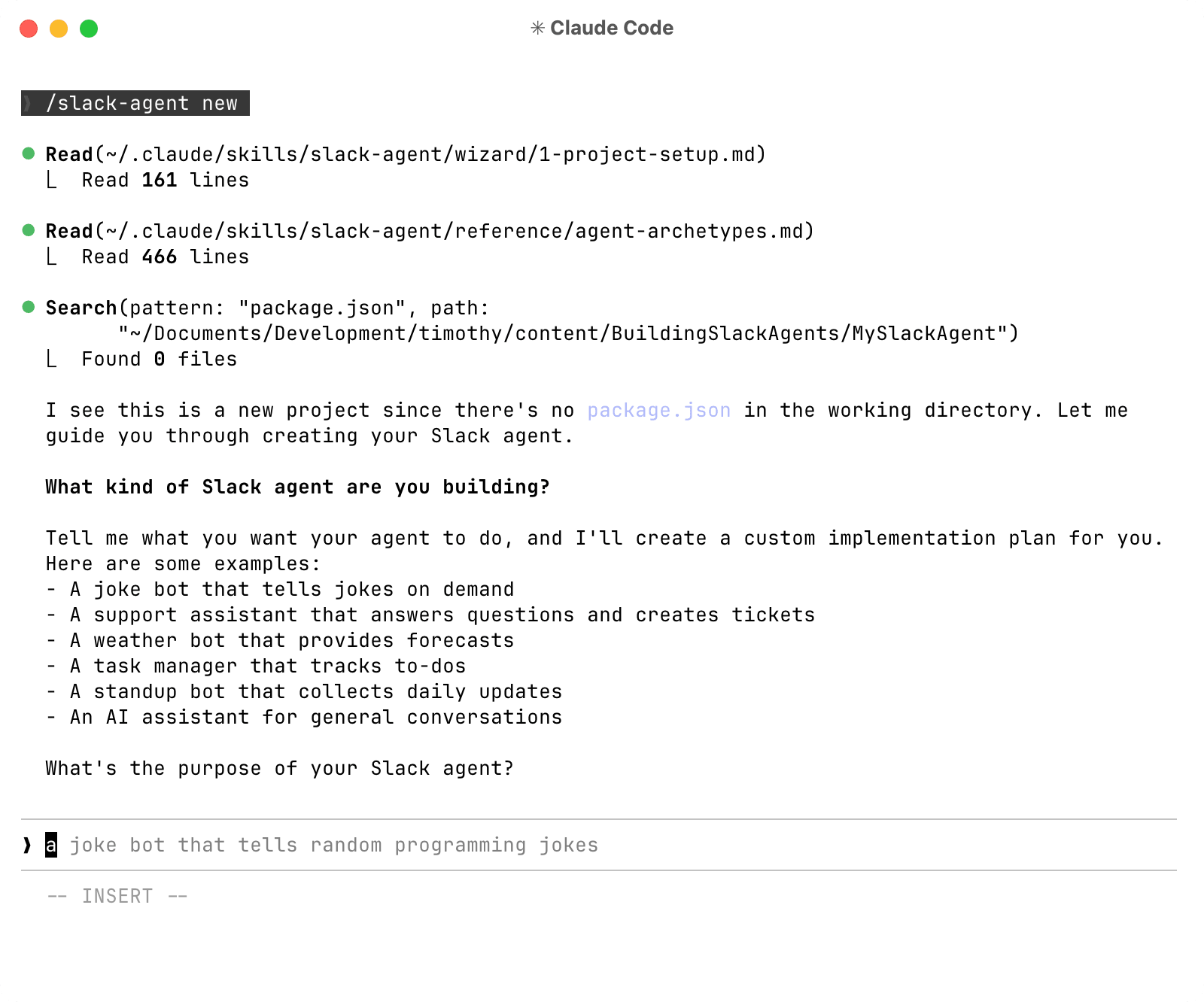
/slack-agent new
The wizard first asks what kind of agent you want built. A typical answer might be "a support agent that answers from our internal docs" or "a standup bot that collects team updates each morning." From that description it produces a custom implementation plan, which you review and approve before any code is generated.
The build then proceeds through five stages:
- Project setup: Choose your LLM provider and the agent scaffolds the project from the Slack Agent Template.
- Slack app creation: The agent customizes
manifest.jsonwith your app name, description, and bot display settings, then opens Slack's console and guides you through app creation and workspace installation. OAuth scopes, event subscriptions, and slash commands come preconfigured. - Environment configuration: Walk through setting the signing secret, bot token, and any API keys your project needs.
- Local testing: The agent starts the dev server and connects it to Slack so you can message the bot and watch it respond in real time before any production traffic.
- Production deployment: Deploy to Vercel, set environment variables, and from then on every git push triggers a new deployment.

What you get out of the box
The resulting agent can hold multi-turn conversations across messages and threads, pause for human approval on sensitive actions, stream responses to Slack in real time, and read channels and threads independently.
That capability is exposed through tools, functions the agent calls to act or retrieve information. The template ships with tools for reading channel messages, fetching thread context, joining channels (pending human approval), and searching channels by name, topic, or purpose.
Custom tools are straightforward to add. Tell your coding agent to connect the agent to your own systems, and each becomes a callable tool, like looking up a customer record by email:
import { tool } from "ai";
import { z } from "zod";
const lookupCustomer = tool({
description: "Look up a customer record by email",
inputSchema: z.object({
email: z.string().describe("Customer email address"),
}),
execute: async ({ email }) => {
"use step";
const customer = await db.customers.findByEmail(email);
return { success: true, customer };
},
});
Durability comes from the Workflow SDK. Slack conversations often span many messages or sit waiting hours for approval, so the agent must be able to suspend mid-conversation, wait for external input, and resume where it left off. Tool calls retry automatically on failure and responses stream back to Slack live.
Human-in-the-loop checks are built in. For sensitive operations, such as joining a channel, the agent posts a message with Approve and Reject buttons and suspends. Because billing is per active CPU time, waiting costs nothing even if approval takes days. The same pattern applies to any action that needs sign-off: sending messages, modifying data, or calling external APIs.
AI Gateway makes model choice flexible. It exposes hundreds of models from every major provider behind a single API key. Switching models is a one-line change, and if a provider fails, AI Gateway routes around it automatically.
import { gateway } from "@ai-sdk/gateway";
const result = await generateText({
model: gateway("anthropic/claude-sonnet-4.6"),
prompt: userMessage,
});
Going further
Once the agent is live, three resources extend the setup:
- The Vercel Academy Slack Agents course covers the full lifecycle, from Slack app configuration through event handling, interactive messages, AI SDK development, and production deployment.
- Preview deployments let you test before production, though Slack bots may need deployment protection bypassed so Slack's webhook verification can reach the endpoint. The testing guide explains that setup.
- Vercel Sandboxes let the agent run user-provided code like spreadsheet analysis, chart generation, or data transformation in isolated environments, without exposing your infrastructure.


