

Why Data Onboarding Determines Product Success
Companies that pay for business software rarely start with a blank slate. They bring established processes, documented workflows, and—critically—large volumes of existing data they need to move into the new system. That makes the buying decision risky: internal processes must change, employees must adopt a new tool, and integration with existing systems and compliance requirements adds further friction.
If your software requires customer data to deliver value, the onboarding experience is make-or-break. When customers struggle with data import, formatting, and cleanup, they question the purchase and churn quickly. A smooth, intuitive data onboarding flow, on the other hand, directly shapes how customers perceive the rest of the product.
What a Good Onboarding Process Delivers to End Users
When users can get their data into your software without friction, several things follow:
- Confidence in the purchase decision. Seeing their own complete, accurate data reflected in your product early on leaves little room for buyer’s remorse. Users who feel the software works for them right away are more likely to stick around and spend more.
- Stronger team buy-in. Data onboarding sets the tone. When the process is painless, company teams get value from the product sooner and judge the rest of the application less harshly.
- Better product outcomes. Instead of troubleshooting import errors and wrestling with file formats, users spend their energy exploring features and extracting insights from their data.
What the Software Provider Gains
Getting data onboarding right is not only about the customer experience. The provider benefits equally:
- Higher retention and lower churn. When non-technical users can successfully load data without help, they are more likely to become loyal, long-term customers.
- Less support overhead. A faulty import process turns your engineering and support teams into data cleanup crews. Eliminating that burden frees resources for customer relationships and product improvement.
- A more flexible product. A robust import solution removes the constraint of asking only for data that is simple to ingest. Kelly Abbott, Co-Founder and CTO of data analysis startup Tablecloth, describes the effect: he says the team is more willing to experiment with different data types because they no longer worry about the cleanup burden. That experimentation leads to insights that produce marketplace value.
- Real cost savings. Though a third-party onboarding tool costs money, custom-built importers are expensive to build and maintain. Tablecloth reports saving tens of thousands of dollars after switching to Flatfile, while cutting file-wrangling time by an estimated 95%. As Abbott puts it:
"We have cut the amount of time we spend wrangling with files by 95%. We basically had all hands working to solve those problems at times."
The stakes are high. When your onboarding process forces users to solve formatting problems themselves or wait while your team cleans up their data manually, you are paying for it in churn, support time, and lost opportunities. The solution needs to scale when import volumes grow, users multiply, and security and compliance demands tighten—without pushing that burden onto your customers.
Why Data Import Is The First Real Test Of Your Product
The moment a new customer tries to move their existing data into your software is often the moment they decide whether to stay or churn. A data importer that struggles with messy spreadsheets, multiple file formats, or contributions from several team members doesn't just slow down onboarding — it actively pushes users away.
During that initial setup, users expect a little administrative work: filling in account details, configuring settings, adding teammates. They do not expect a manual data migration project. The harder it is to bring data into your product, the less likely they are to reach the point where they can see the value your software provides.
Data Aggregation: More Than Just A Spreadsheet Upload
Consider a CRM that targets established businesses rather than brand-new startups. Those users will arrive with substantial external data that has to come along: client and vendor contacts, customer accounts and sales history, prospect communication logs, pipeline details, and team goals. Unless your product has native integrations with every CRM your users previously relied on, they face the question of how to transfer all of it — often from different sources across the organization, including payment gateways, team drive spreadsheets, and emailed or faxed contracts.

The fix isn't simply accepting a wider range of file types, though that helps. Users need to drop in plain CSV, TSV, XLS, XML, and other files without first converting everything to one canonical format and cleaning up the inevitable conversion errors.
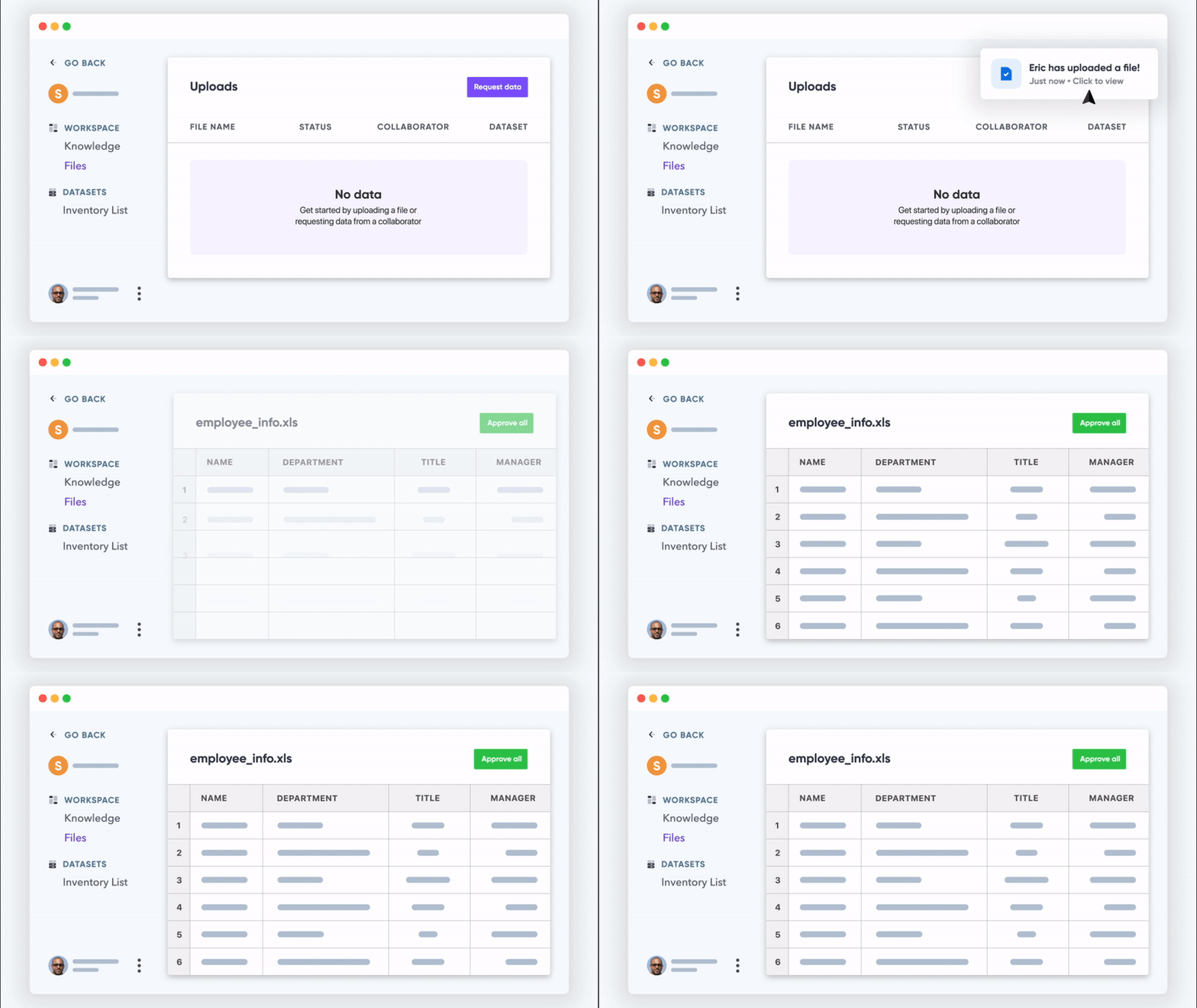
Organization is a separate piece of the puzzle. Each imported file and its dataset should be traceable: who submitted it, when, under which file name, with how many rows and in what version. Collaborative workspaces provide that structure. When a teammate adds data, the workspace records the upload date, file name, submitting user, row count, version history, and any upload errors — visible from a centralized dashboard, so nothing slips in anonymously and errors can be corrected collectively without forcing a full re-upload.
Messy Data Is The Default, Not The Exception
Your customers will not spend an afternoon reformatting their spreadsheets to match your template. Most will be in a hurry to use your product and will treat the data importer as the software's problem to solve. Spreadsheet templates and knowledge base articles assume a level of patience most users don't have.
Many data onboarding tools fail here precisely because the data model doesn't match their own schema. Columns get rejected, data goes unrecognized, and the user — whatever the actual cause — blames your product. The practical requirement is an importer that can figure out what the data is and where it should go on its own.
An AI-powered importer with advanced validation logic can automate column matching and map imported data to your software's actual fields. Before any data flows into the system, though, the user gets a chance to confirm the mapping is correct.
That automation depends on a bit of upfront configuration on the backend:
- Define target data models so the importer can navigate the complex spreadsheet formats and datatypes your users are likely to bring.
- Create templates with validation rules so the AI mapping knows the expected destination for each field.
- Validate imported data against other databases so the importer gains context and cleans up over time.
The bulk of the work happens once that model is in place. With machine learning and a fuzzy matching system, roughly 95% of imported columns map automatically. For the remainder, users review erroneous parts and repair them within the importer interface itself — not by editing a spreadsheet and re-importing from scratch.
If Data Onboarding Isn't Collaborative, Data Quality Suffers
When multiple people are involved in importing data, two failure modes emerge. In one, data remains scattered on individual team member computers or gets passed around by email — a serious security risk for sensitive information. In the other, anyone with access imports whatever they want, and the shared database fills with errors and duplicate entries because there's no review framework.
In the data onboarding scenario below, admins can invite specific collaborators to add data to designated workspaces. That invitation is not a free pass:

Admins retain control over the process at several levels:
- Request specific datasets from individual team members.
- Limit which workspaces each collaborator is permitted to import into.
- Review every data submission before approved records flow into the main platform.
There's also the option for an admin to import data on the customer's behalf. This managed approach keeps the right data entering the software, and the controlled flow naturally yields cleaner, more accurate records — without making the importing user feel stuck.
Security Can't Be An Afterthought In Data Import
Software products already carry a security burden for their own customer data. Data onboarding magnifies it: as in the CRM example, the data migrating into the product frequently belongs to your customers' customers.
An unsecured onboarding channel creates a glaring point of vulnerability. Two steps mitigate it. First, the import solution itself should pull users away from email, FTP, and other unencrypted transfer methods by offering a genuinely usable alternative. Second, the platform that handles the transfer needs its own compliance and access controls.
A reasonable data onboarding tool should offer at minimum these protections:
- Each collaborator gains access through an authenticated invitation.
- Data is encrypted in transit and stored in an encrypted cloud storage bucket — Amazon S3 in this case.
- The onboarding platform is GDPR compliant.
- The vendor itself is HIPAA and SOC2 compliant and can meet other regulatory requirements on request.
One additional safeguard matters: once a migration succeeds, the imported data should be deleted from the onboarding platform. That way, you're only responsible for securing data where it lives in your product — not on every platform it moved through on the way in.
The Cost Of Getting Data Onboarding Wrong
An inadequate data importer creates friction everywhere, not just at the initial signup. Every future upload or transfer from an existing customer becomes a manual chore of cleaning and validating spreadsheets. Too many custom-built importers simply can't reliably move user data at all. In the worst cases, churn rises and a product that delivers real value in everyday use still gets abandoned over a bad first-month experience. A polished, AI-assisted onboarding path is more than a convenience. In practice, it's the deciding factor between new customers who quickly recognize the product's worth and those who give up before ever reaching it.



