
Audit Logs: What They Record and Who Can See Them
Slack’s Enterprise Grid audit logs capture when entities perform actions — login attempts, profile updates, file downloads, and many more. The full list of actions is long and worth checking periodically for new additions. The API documentation walks through an example event and explains each field. A sample log entry for reference:
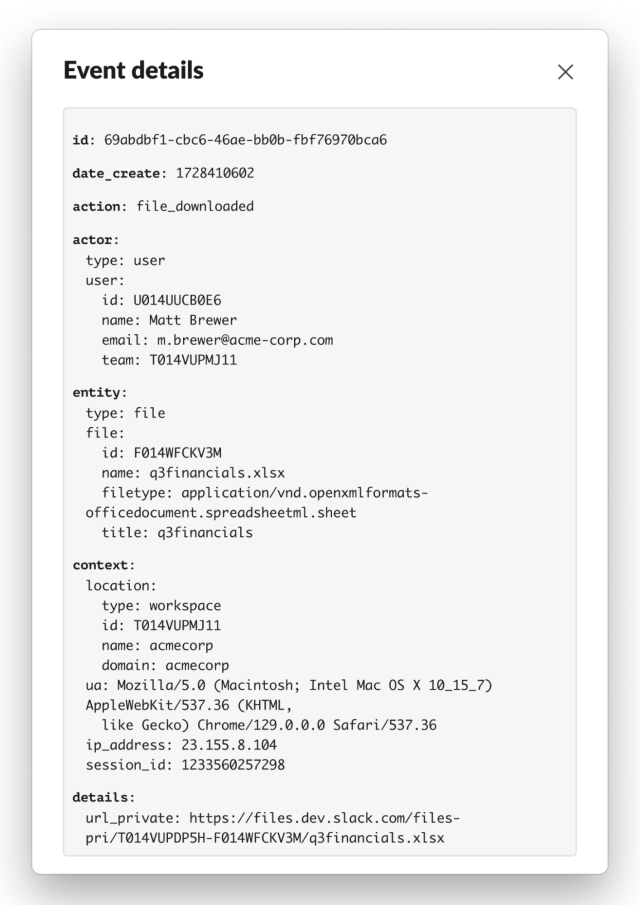
Audit logs are accessible to Org Admins, Owners, and users with the Audit Logs Admin role. They appear in the Audit Log Dashboard under Tools and Settings → Manage Audit Logs, and are also exposed through an API that many vendors ingest:
The Audit Log API supports filtering by log time, action (up to 30 per request), actor, and entity. For example, an organization that only wants user login events can set the action parameter to user_login. Further details are in the API docs.
Anomaly Events: Signal Beyond Standard Actions
Mixed into the audit log stream are anomaly events — entries with an action of anomaly. Unlike normal audit events, these don’t record a specific platform action. They indicate that Slack’s analysis pipelines flagged an entity’s actions, or the circumstances under which they occurred, as anomalous. The documentation lists currently deployed anomalies and how to interpret them.
Anomalies aren’t designed to be raised directly as incidents. They signal that something unexpected happened and merits investigation. Their importance depends on the organization’s policies. For instance, a user_agent anomaly showing Go-http-client/2.0 may suggest automated tool use rather than the standard Slack client. If unsanctioned clients are prohibited, that warrants a follow-up; in a more permissive environment, it may be less interesting.
Allowlisting Trusted Networks
If certain IP ranges or ASNs are known to be legitimate, organizations can use the allowlist API endpoints to add trusted CIDR ranges and reduce anomaly volume.
Correlating and Aggregating Anomalies
Multiple anomalies in combination can reveal more serious issues. A user_agent anomaly near an excessive_downloads anomaly could point to a scraping tool — a scenario also covered by the newer high-fidelity unexpected_scraping anomaly. If an ip_address or session_fingerprint anomaly appears alongside those, it may indicate an external party using a stolen cookie to scrape data, which most organizations would treat as a priority.
Aggregation can surface patterns that single events miss. Suppose users occasionally generate excessive_downloads anomalies that turn out to be benign outliers. If no user historically exceeds three such events per day, a user who generates four or more becomes a worthwhile investigation target.
Context From the Full Audit Log
Anomaly events are sparse compared to audit logs — typically at least two orders of magnitude fewer. If an organization can’t ingest the full audit stream, it can filter for anomalies only using the method above. However, consuming the complete stream is strongly recommended, since surrounding events provide essential context. For example, file_downloaded events around an excessive_downloads anomaly reveal exactly which files were accessed. In incident response, local access to queryable audit logs can save both time and stress.
Working Through a UI Example
The Audit Logs UI, reachable from Tools and Settings → Manage Audit Logs, can be used to investigate a hypothetical scenario: Matt, a departing salesperson at Acme Corp. First, load the main Audit logs tab:
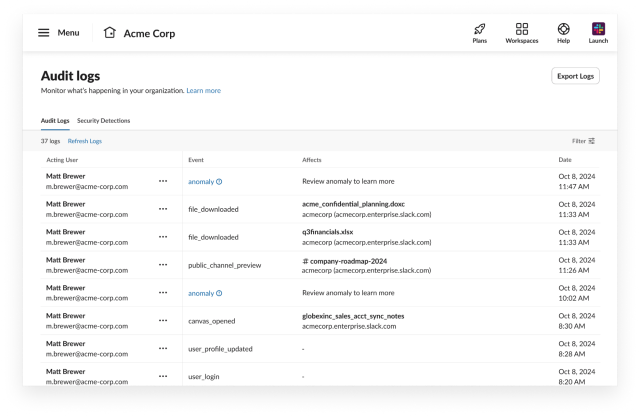
Then switch to the Security Detections tab to view anomalies generated for Matt:
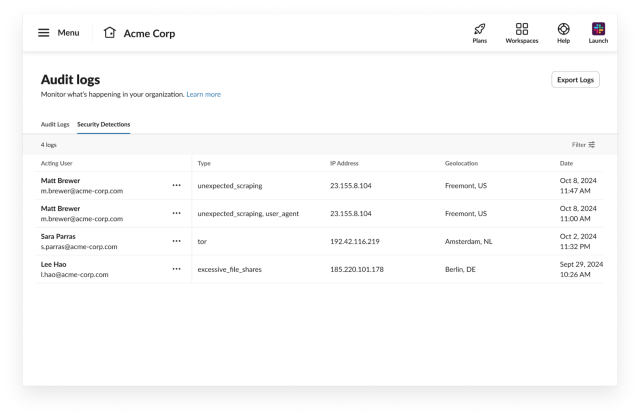
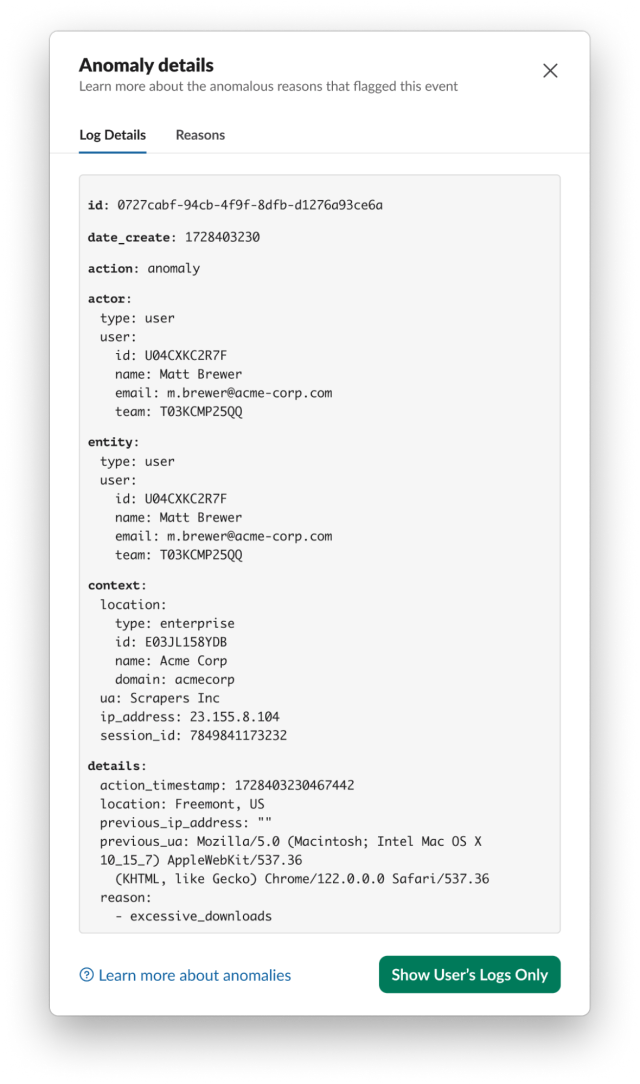
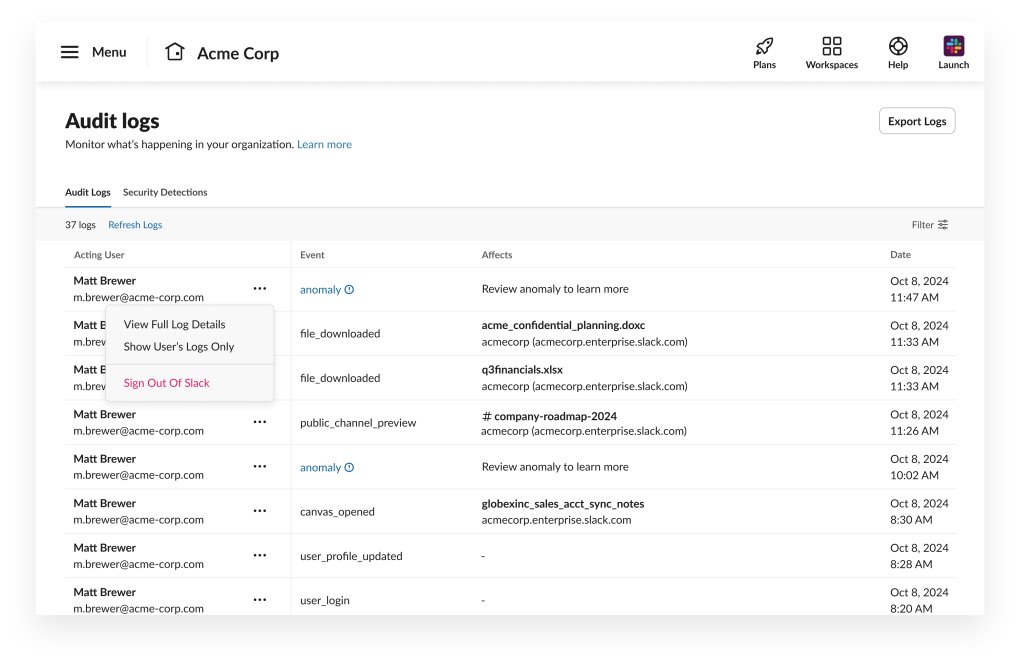
The UI shows Matt generated several anomalies. Opening the ••• menu and choosing View Full Log Details provides more information. The first anomaly carries two reasons: unexpected_scraping and user_agent. The former indicates scraping was detected; the latter indicates Matt’s user agent changed — here, to Scrapers Inc., which is not associated with any sanctioned Slack client. Note that the user agent would still appear in the unexpected_scraping anomaly alone, making the separate user_agent anomaly somewhat redundant.
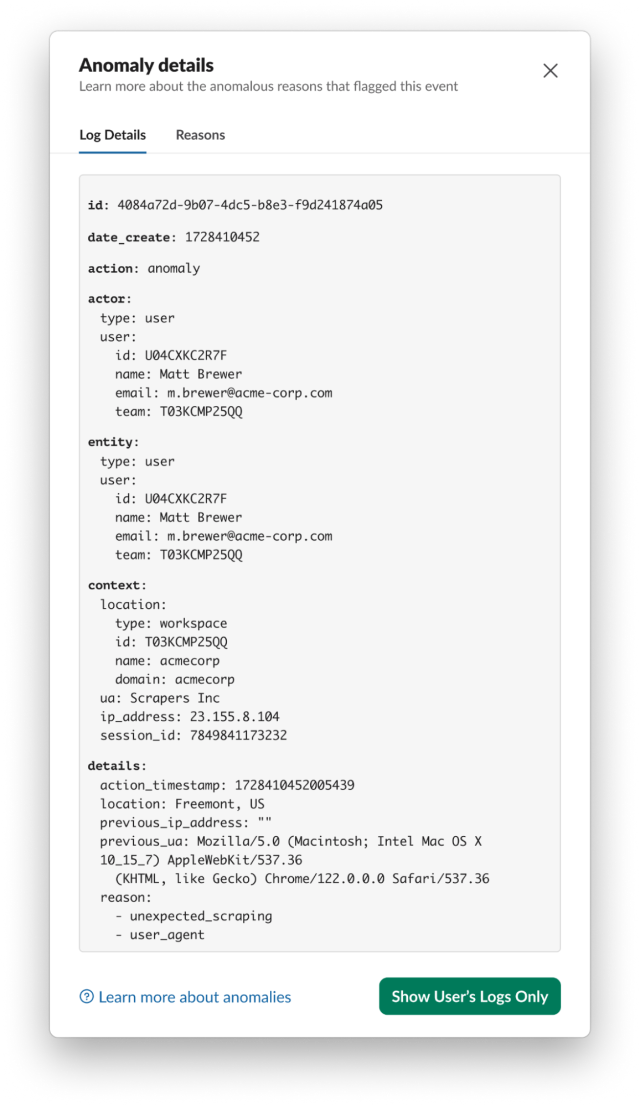
Matt’s other anomaly is excessive_downloads, further evidence of data scraping. The associated user agent is again Scrapers Inc.
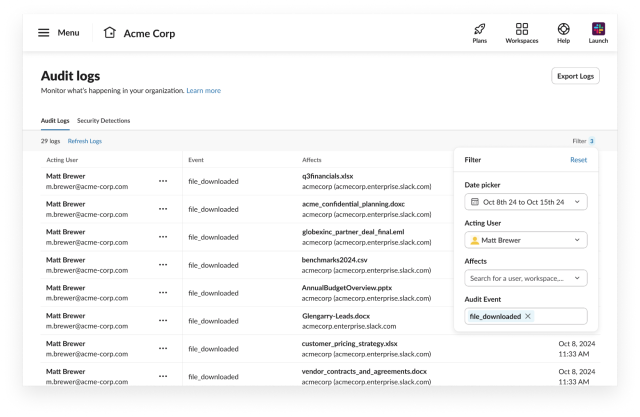
To see which files Matt downloaded, return to the Audit Logs tab and filter for file_downloaded events:
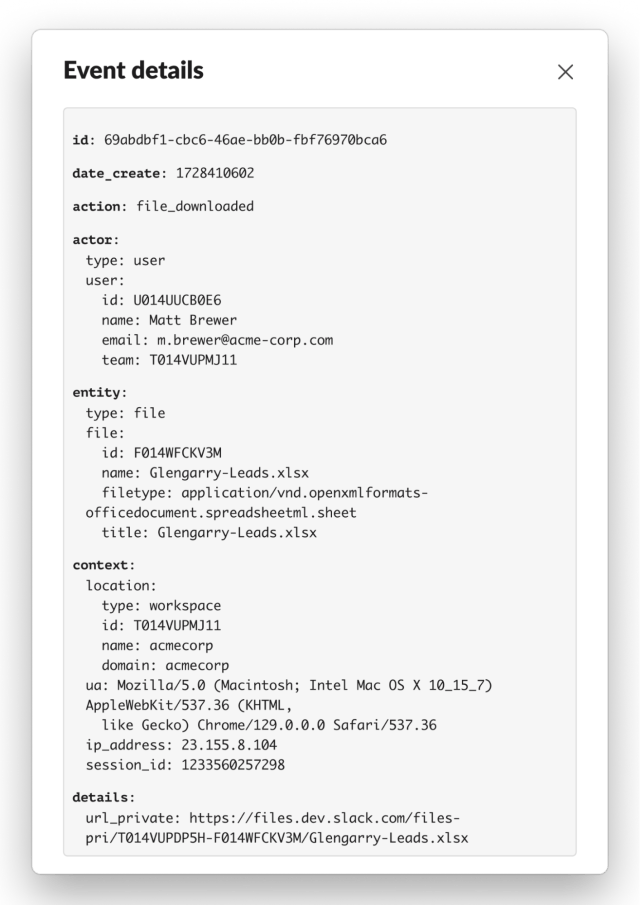
Open one entry via the ••• menu and View Full Log Details. The file is named Glengarry-Leads.xlsx — not a file Acme Corp would likely want a departing salesperson to retrieve.
Immediate Response: Terminating Sessions
If suspicious account activity is identified, active sessions can be terminated directly from the dashboard. From the relevant anomaly log entry, open the ••• menu and select Sign Out Of Slack. This invalidates all sessions for the user, forcing re-authentication on every device. For more granular control, sessions can be terminated by device type (mobile or desktop only).
Additional Detection Strategies
In this scenario, no ip_address anomaly was generated for Matt. Had one appeared, an analyst would check whether the trigger IP matches Matt’s historical usage — a company VPN endpoint, for example — or whether it’s known to be malicious. If the IP is unexpected, it could mean a malicious actor has compromised Matt’s account and is scraping data. Regardless of whether an ip_address anomaly fires, it’s prudent to inspect the IP in any anomaly under investigation.
A session_fingerprint anomaly around the same time would suggest Matt’s session cookie was exfiltrated and is being used by an attacker. In that case, confirming Matt is the actual actor would require checking endpooint telemetry, such as agent logs, alongside the IP from the anomaly.
User agents tied to events like excessive_downloads, user_agent, and ip_address anomalies can signal scraping or other unwanted activity. Rather than enumerating an ever-growing list of suspicious agents, it’s more practical to compare against an allowlist of expected user agents for the organization.



