
Third-party scripts and your site's load path
When first-party code is already optimized but pages still feel slow, third-party scripts are often the culprit. These embedded resources—social buttons, video players, ad iframes, analytics, A/B testing tools, helper libraries—bring useful functionality but arrive with real costs. They can degrade performance, introduce privacy or security risks, and behave unpredictably. The key is preventing them from derailing the critical rendering path.
Common failure modes include:
- Excessive network requests spread across multiple servers, extending load time.
- Large JavaScript payloads that keep the main thread busy, delaying DOM construction, rendering, and user interaction, and draining battery.
- Unoptimized images or video that burn through user data budgets.
- Single-point-of-failure risk when a page depends on a script that fails to load.
- Weak HTTP caching or missing server compression, forcing redundant downloads and slow transfers.
- Scripts that block content display until they finish, even when marked
asyncordefer—some embeds can delaywindow.onloadif their servers respond slowly. - Legacy APIs such as
document.write()that harm the user experience. - Excessive DOM nodes or expensive CSS selectors.
- Multiple embeds pulling in duplicate frameworks or libraries, compounding existing bottlenecks.
Finding the culprits
Start by identifying which third-party resources are on your pages and how much they cost. Chrome DevTools, PageSpeed Insights, and WebPageTest all surface this kind of diagnostic detail. WebPageTest's waterfall view and domain breakdown (sorted by bytes and request count) make it easy to see how much of your page's weight comes from outside origins versus your own content.
Once a costly script is spotted, figure out what it actually does and whether your site needs it. If it's essential, consider an A/B test to weigh its value against its effect on engagement and performance metrics.
Measuring performance impact
Lighthouse audits
Two Lighthouse audits directly address third-party overhead. The JavaScript boot-up time audit flags scripts with expensive parse, compile, or evaluation phases. The Network payloads audit identifies requests—including third-party ones—that inflate load time and mobile data costs.
Chrome DevTools request blocking and the Performance panel
DevTools' network request blocking lets you simulate what happens when a specific script, stylesheet, or other resource isn't available. Right-click any request in the Network panel and choose Block Request URL; a tab in the DevTools drawer manages the blocked list.
The Performance panel offers another angle on load behavior. Record a page load, open the Bottom-up view, and group by product to sort third-party scripts by their load time.
For measuring impact, a practical workflow:
- Load the page in the Network panel with network and CPU throttling enabled—lab conditions with fast connections hide the real cost of expensive scripts.
- Block the URLs or domains behind the suspect scripts.
- Reload and measure again. Repeating at least three times helps account for third parties that fetch different resources per load; the Performance panel supports multiple recordings.
WebPageTest domain blocking and SPOF simulation
WebPageTest's Advanced Settings > Block feature lets you specify domains (advertising domains, for example) to exclude from a test run. A recommended approach:
- Run a test with all third parties loading.
- Repeat with selected third parties blocked.
- Pick the two results from Test History and click Compare.
The resulting filmstrip comparison shows load sequences with and without active third-party resources—useful for isolating which origins matter most. WebPageTest also supports blockDomains (block a list of domains) and blockDomainsExcept (allow only the listed domains) commands at the DNS level.
Distinct from hard blocking, the SPOF tab simulates a slow timeout or total failure for a resource. That's helpful for seeing how pages hold up when third-party services are overloaded or unavailable, since the failure mode is gradual rather than immediate.
Detecting expensive iframes with Long Tasks
Third-party iframes with long-running scripts can block the main thread, delaying handlers and dropping frames. For Real User Monitoring, the PerformanceObserver API observes longtask entries; each entry's attribution property reveals which frame context caused the task, including when it's an "expensive" iframe.
Practical ways to speed up third-party script loading
A slow third-party script can drag down an entire page. The most direct fixes target how and when the script is fetched and executed.
- Add the
asyncordeferattribute so parsing isn't blocked. - Self-host the file if the vendor's server is the bottleneck.
- Drop the script entirely if it isn't providing clear value.
- Use Resource Hints such as
<link rel=preconnect>or<link rel=dns-prefetch>to warm up the connection to the third-party origin.
Control execution with async and defer
By default, JavaScript is parser-blocking. The browser stops building the DOM, hands the script to the JavaScript engine, and waits for execution to finish before parsing resumes. The async and defer attributes both change that behavior, but in different ways.
asyncdownloads the script in the background while parsing continues. Once the download completes, parsing pauses while the script runs.deferalso downloads in the background, but execution is held off until the document has finished parsing.
Unless a script is needed for the critical rendering path, it should be loaded with one of these attributes. async suits cases where earlier execution matters, like some analytics snippets. defer is a better fit for lower-priority resources, such as a video player that appears below the fold.
If performance is the priority, wait until after the critical content has rendered before adding asynchronous scripts. Avoid async for essential libraries like jQuery.
Some scripts simply can't be deferred or made asynchronous. Core UI libraries and CDN frameworks that the page can't function without must load synchronously. Check the vendor documentation before changing the loading behavior of any script. Note that some providers recommend synchronous loading even when their script would work fine with async.
Also keep in mind that async isn't a cure-all. A page loaded with many tracking scripts for advertising will still suffer a slowdown even if all of them are asynchronous.
Cut connection setup time with Resource Hints
Connecting to a third-party origin involves DNS lookups and possible redirects, which adds significant time on slow networks. Resource Hints can move the DNS lookup earlier in the page load process so the connection is ready when the script is requested.
<link rel="dns-prefetch" href="http://example.com" />
When the target origin uses HTTPS, preconnect goes further. In one step it handles the DNS lookup, the TCP round-trips, and the TLS negotiation, including SSL certificate verification. Those steps are often slow, so preconnecting can noticeably reduce load time.
<link rel="preconnect" href="https://cdn.example.com" />
Isolate scripts in an iframe
Loading a third-party script inside an iframe keeps it off the main thread's execution path. AMP uses this pattern to keep JavaScript out of the critical path. Be aware that the iframe still blocks the onload event, so don't attach critical features to that event.
Chrome also supports Permissions Policy (formerly Feature Policy). These policies let a developer selectively disable browser features, which can prevent third-party content from activating unwanted behaviors on a site.
Consider self-hosting
Hosting a critical script yourself gives you control over DNS time and HTTP caching headers. The tradeoff is maintenance. Self-hosted scripts won't receive automatic updates for API changes or security fixes. That can mean lost revenue or exposed vulnerabilities until you update the file manually.
An alternative is to cache third-party scripts with a service worker. That approach gives you control over how often the script is fetched over the network. Service workers can also throttle nonessential third-party requests until the page reaches a key user moment.
Limit A/B testing to a smaller sample
A/B testing compares two page versions across user samples to measure conversion rates. The mechanism itself, though, delays rendering while JavaScript checks whether a user belongs to an experiment and activates the correct variant. Users who aren't in the experiment still pay that cost.
To avoid slowing down the majority of users, serve the A/B testing scripts only to a small sample of traffic and move the variant-selection logic to the server.
Lazy load embedded content
Poorly constructed ads and videos are a common cause of slow pages. Lazy loading defers these resources until they're actually needed — for example, an ad in the footer loads only when the user scrolls near it. Third-party content can also be loaded after the main content is ready but before the user is likely to interact with it.

Lazy loading depends on JavaScript, so flaky network connections can break it. Google's DoubleClick documentation offers specific guidance on lazy loading ads.
Use IntersectionObserver for reliable detection
Older approaches to visibility detection listened for scroll or resize events and then called DOM methods like getBoundingClientRect() to calculate an element's position. These techniques were error-prone and slowed the browser down. The IntersectionObserver API detects when an observed element enters or leaves the viewport far more efficiently. The lazySizes library has optional IntersectionObserver support.
Don't lose early analytics data
Deferring analytics scripts too long means losing the data from the initial page view. One workaround is detailed in Phil Walton's article on a Google Analytics setup that initializes analytics lazily without sacrificing early data.
Keeping third-party scripts safe
Loading third-party code safely requires attention to a few well-known failure modes.
Steer clear of document.write()
Older services sometimes inject scripts via document.write(). The method behaves inconsistently and its failures are hard to debug. The fix is simply not to use it. Chrome 53 and later logs console warnings for problematic use.
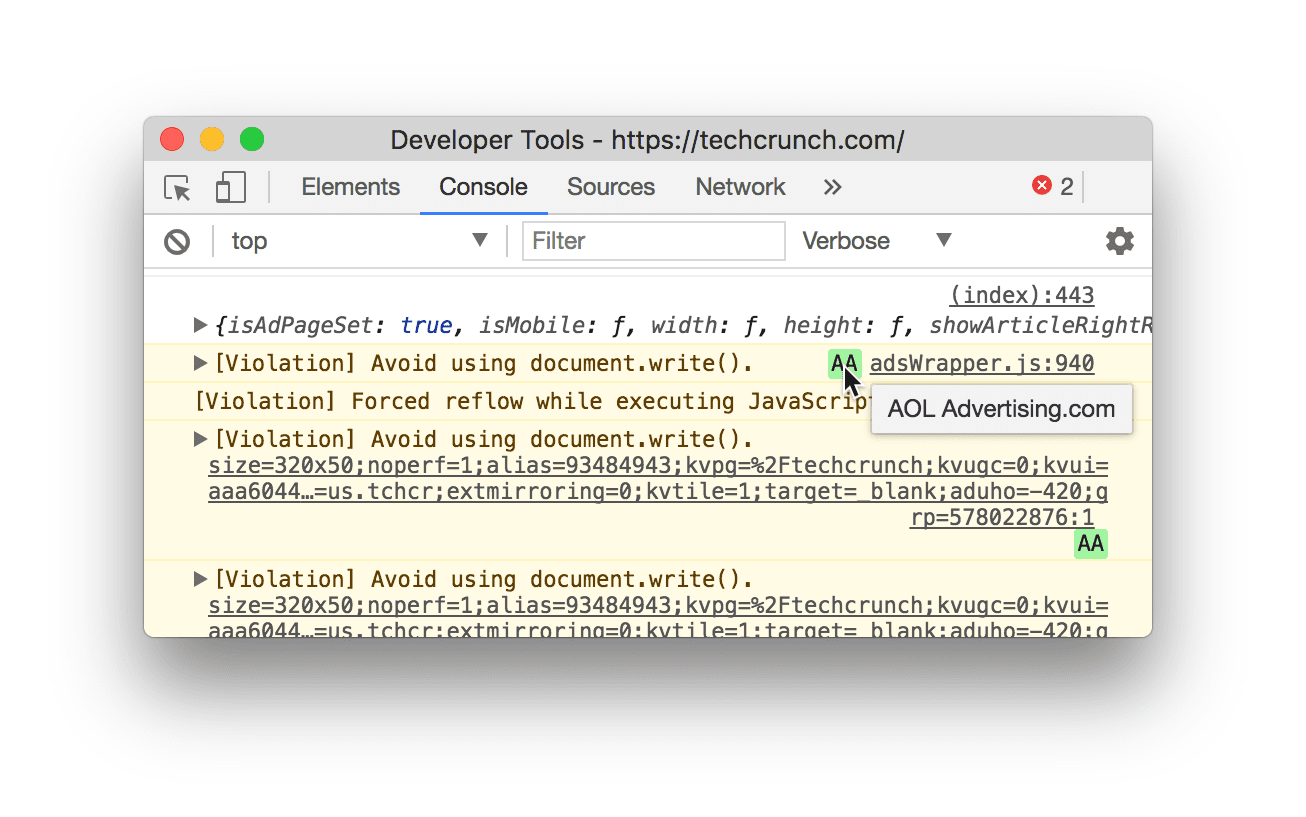
document.write() usage.To find offending code on your own site, check the HTTP headers sent to the browser. Lighthouse also flags third-party scripts that still rely on document.write().

document.write().Be deliberate with tag managers
A tag is a code snippet for collecting data, setting cookies, or embedding third-party content. Each tag adds network requests and JavaScript to a page, so performance becomes harder to protect as tags multiply. A tag manager like Google Tag Manager (GTM) helps by deploying tags asynchronously, reducing the number of network calls the browser needs to execute, and organizing tag data in its Data Layer UI.
Know the tag manager risks
Tag managers can backfire if used carelessly. Too many tags and auto-event listeners increase network requests and slow event response. Also, anyone with access to the tag manager can inject JavaScript. That raises both performance and security concerns. Limiting who has credentials to the tag manager reduces these risks.
Watch the global scope
Third-party scripts can break a page in a few ways: dependency code that pollutes the global scope and conflicts with your own code, unannounced vendor updates that introduce breaking changes, and in-transit modification that makes the code behave differently between testing and production. Regularly audit the third-party scripts you load. Subresource integrity, secure transmission, and self-testing all help keep your page safe.
Defense-in-depth: limiting what third-party code can do
Reducing the performance and security risk of third-party scripts isn’t just about loading them faster — it’s also about controlling what they’re allowed to do once they’re on your page. The most effective measures combine network-level policies with client-side restrictions.
- HTTPS everywhere: If your site is served over HTTPS, it must not rely on any third-party resources loaded over plain HTTP. Mixed content — where a secure page fetches insecure subresources — is both a performance and security hazard. Modern browsers increasingly block it outright, so audit your third-party endpoints to ensure they’re all on
https://. For details, see the documentation on Mixed Content. - Sandboxed iframes: When you can’t fully trust a third-party script, consider running it inside an
iframewith thesandboxattribute. This restricts the embedded code’s capabilities — for example, preventing it from accessing the parent page’s DOM or cookies. It’s a strong boundary, but be aware that some scripts require full page access and won’t function correctly in a sandbox. - Content Security Policy (CSP): A CSP, delivered via HTTP headers, lets you define an explicit allowlist of trusted script sources for your site. It’s a critical tool for detecting and mitigating attacks like Cross Site Scripting (XSS), because the browser will refuse to execute any script that doesn’t match your policy.
The following example shows how to use CSP’s script-src directive to declare the only JavaScript origins your page is allowed to load:
// Given this CSP header Content-Security-Policy: script-src
https://example.com/ // The following third-party script will not be loaded or
executed

<script src="https://not-example.com/js/library.js"></script>
Digging deeper
Third-party script optimization goes beyond initial load. The resources below cover stress-testing third-party resilience, understanding the full impact of JavaScript on rendering, and navigating the security trade-offs of supply-chain trust:
- Performance and Resilience: Stress-Testing Third Parties
- Adding interactivity with JavaScript
- Potential dangers with Third-party Scripts
- How 3rd Party Scripts can be performant citizens on the web
- Why Fast Matters — CSS Wizardry
- The JavaScript Supply Chain Paradox: SRI, CSP and Trust in Third Party Libraries
- Third-party CSS isn’t safe



