
Why LCP matters
Largest Contentful Paint (LCP) is a stable Core Web Vital that measures perceived load speed by marking when a page's main content has likely rendered. Older metrics like load or DOMContentLoaded don't reliably indicate what users actually see. First Contentful Paint (FCP) captures the first paint but can land too early, particularly when a splash screen or loading spinner is shown.
Earlier attempts at capturing more of the loading experience, such as First Meaningful Paint (FMP) and Speed Index (SI), proved complex and frequently failed to identify when primary content appeared. Work in the W3C Web Performance Working Group and research at Google led to a simpler proxy: the render time of the largest visible content element.
How LCP works
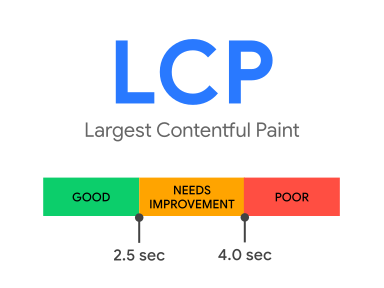
LCP reports the render time of the largest image, text block, or video visible in the viewport, relative to the start of navigation. A target of 2.5 seconds or less at the 75th percentile of loads (segmented by device type) indicates a good user experience.
Per the Largest Contentful Paint API, candidate elements are:
<img>elements — for animated content like GIFs, the first frame presentation time is used<image>elements inside an<svg>element<video>elements — the earlier of the poster image load time or first frame presentation time- Elements with a background image loaded via the
url()CSS function, excluding CSS gradients - Block-level elements containing text nodes or inline-level text element children
Chromium-based browsers additionally apply heuristics to filter out elements users typically wouldn't consider contentful. These include elements at opacity 0, elements covering the full viewport, and low-entropy placeholder images. Notably, these heuristics differ from those used by FCP, which may still register such elements. The distinction reflects different goals: FCP signals any content painted, while LCP aims for the main content.
Element sizing and reporting
The reported element size is the portion visible in the viewport. Any area outside the viewport, clipped by overflow, or otherwise not visible is excluded. For resized images, the smaller of the visible or intrinsic size is reported. For text, LCP uses the smallest rectangle enclosing all text nodes. CSS margins, padding, and borders don't count toward the size.
The browser dispatches a largest-contentful-paint PerformanceEntry after the first frame, then issues another entry whenever a different element becomes the largest. An element qualifies as largest only once it has rendered and is visible. Images not yet loaded, or web-font text still in the font block period, don't count. If the current largest element is removed from the viewport or DOM, it remains the largest unless a larger element renders. For analytics, report only the most recently dispatched entry.
Load time versus render time
Render timestamps for cross-origin images lacking the Timing-Allow-Origin header were historically hidden for security reasons, exposing only the load time, which can trail the actual render. This could make LCP appear to occur before FCP, an artifact of the restriction, not reality.
The issue was resolved in late 2024. As of Chrome 133, a coarsened render time is exposed even without Timing-Allow-Origin. Where possible, still set the header for fully accurate metrics, especially for browsers that haven't adopted the change.
Layout and size changes
To keep overhead low, post-initial changes to an element's size or position don't generate new LCP candidates. The browser only considers an element's original size and position. Thus, images rendered off-screen that later transition into view may never be reported, while elements initially in the viewport that later scroll out still report their initial in-viewport size.
LCP in practice
Late-loading content is often, but not always, larger than content already on the page. Two common patterns illustrate how LCP can arrive before full load completes. On one type of page, new DOM additions repeatedly replace the largest element as loading progresses. In another, layout shifts push a previously dominant element out of the viewport entirely. Conversely, on a page where a logo loads early and remains the largest element, LCP occurs well before other content appears. Similarly, a search results page where a text paragraph outweighs all subsequent images will see LCP fire once that text renders.
Measuring LCP
LCP can be measured in both the lab and the field. In the lab, you can use Chrome DevTools, Lighthouse, PageSpeed Insights, or WebPageTest. For field data, turn to the Chrome User Experience Report, PageSpeed Insights, the Search Console Core Web Vitals report, or the web-vitals JavaScript library.
Measuring LCP with the JavaScript API
To measure LCP in JavaScript directly, use the Largest Contentful Paint API. The following creates a PerformanceObserver that listens for largest-contentful-paint entries and logs them:
new PerformanceObserver((entryList) => {
  for (const entry of entryList.getEntries()) {
    console.log('LCP candidate:', entry.startTime, entry);
  }
}).observe({type: 'largest-contentful-paint', buffered: true});
Each logged largest-contentful-paint entry represents the current LCP candidate. Generally, the startTime of the last entry emitted is the LCP value, but not every largest-contentful-paint entry is valid for the metric. The API and the metric have a few key differences:
- The API emits entries for pages loaded in a background tab; these should be ignored entirely when calculating LCP since a backgrounded page means the page wasn't in the foreground for the full duration of the load.
- The API continues to dispatch entries after a page is backgrounded, which should also be ignored. Only elements painted while the page is in the foreground count.
- The API doesn't report entries when a page is restored from the back/forward cache, but LCP should still be measured in these cases because users perceive them as distinct page loads.
- The API ignores elements inside iframes, while the metric counts them as part of the page experience. When the LCP element lives in an iframe (such as a video poster), this shows up as a discrepancy between CrUX and RUM. Sub-frames can report their
largest-contentful-paintentries to the parent frame for aggregation. - The API measures from navigation start, but for prerendered pages LCP should be measured from
activationStart, which corresponds to the user-observed timing.
Rather than managing these edge cases yourself, use the web-vitals library to measure LCP; it handles the subtle differences for you (except for the iframe issue, which it can't cover):
import {onLCP} from 'web-vitals';

// Measure and log LCP as soon as it's available.
onLCP(console.log);
For a full example, see the source for onLCP().
When the largest element isn't what matters most
Sometimes the most important element on a page isn't the largest. To measure the render times of other elements, use the Element Timing API, which is covered in the article on custom metrics.
Improving LCP
For a step-by-step guide on identifying in-the-field LCP timings and using lab data to drill down into optimizations, see optimizing LCP.
Tracking changes to the metric
Bugs are occasionally found in the APIs used to measure metrics, and sometimes in the metric definitions themselves. Fixes can surface as improvements or regressions in your internal reports and dashboards. All changes to the implementation or definition of LCP are tracked in the LCP Changelog. You can provide feedback on these metrics in the web-vitals-feedback Google group. For historical discussion, see the performance.now() 2019 talk by Annie Sullivan on lessons from performance monitoring in Chrome.



