

The Cost of a Slow Start
Modern frontend applications have grown in size, and every extra kilobyte of JavaScript shipped to the client comes at a price. The browser must download, parse, and execute all of it before the page becomes interactive. Research shows that users will abandon a site that takes longer than three seconds to load. That means the first request you make is often the difference between retaining a visitor and losing one.
To understand where the delays come from, you need to look at the resource loading waterfall — the timeline of every file downloaded from the network to the client. You can inspect this in your browser’s Networking tab, where each row shows the sequence of requests and the time each takes. The bottom of the panel also tells you the total kilobyte footprint that your client has to consume, which is a useful baseline for later optimization work.

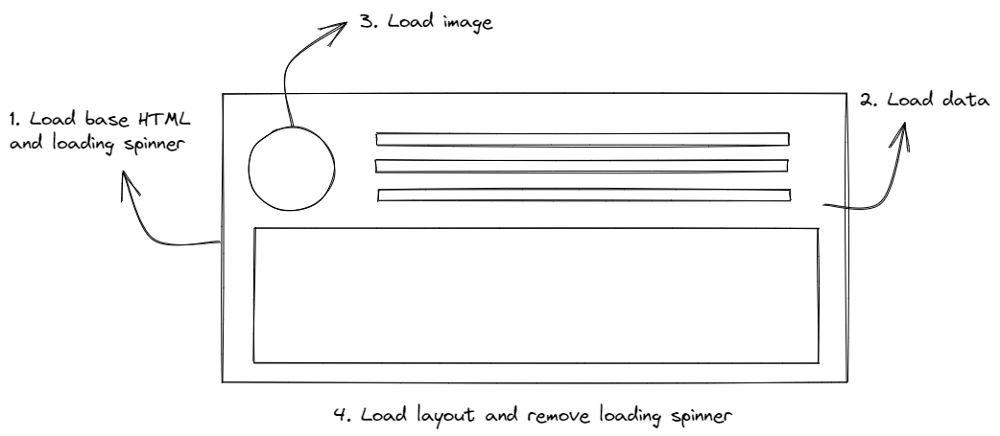
When the waterfall is slow, developers usually add a spinner or skeleton loader as a placeholder. That is better than a blank screen, but it can lead to "spinner hell" if the loader stays up too long. In many cases, the loader is waiting for an asynchronous call to an API to return a URL, after which the layout is built on the client side. That is a lot of work just to display basic content on the first load.
Five Ways to Load Data Faster
Frameworks like React, Vue, and Angular have become the default for building applications, but they bring a lot of bundled code that may not be needed. Some of that weight comes down to how and when data is fetched. The five patterns below address different parts of the loading problem.
Client-Side Rendering
Client-side rendering (CSR) is the default pattern for many JavaScript frameworks. The browser receives a JavaScript bundle alongside static HTML, then renders the DOM and attaches listeners for reactivity. Once rendered, the app makes an API call to the server to retrieve any dynamic data. The page remains blocked until all components have rendered successfully.
Server-Side Rendering
Server-side rendering (SSR) serves plain, static HTML to the client, with the prerequisite data already embedded in the template. Frameworks like WordPress, Ruby on Rails, and ASP.NET have long relied on SSR. The benefit is that the client does not need to make an additional API request to populate the page.
Newer frameworks such as Next.js use hydration, where the static HTML is made interactive on the client side. Think of it like instant coffee — the HTML is the coffee powder, and the JavaScript is the water that turns it into a reactive drink. Next.js and Nuxt.js are increasingly popular over vanilla React and Vue because they support SSR and provide better flexibility for SEO, allowing search bots to traverse the HTML more easily than a fully JavaScript-dependent CSR bundle.
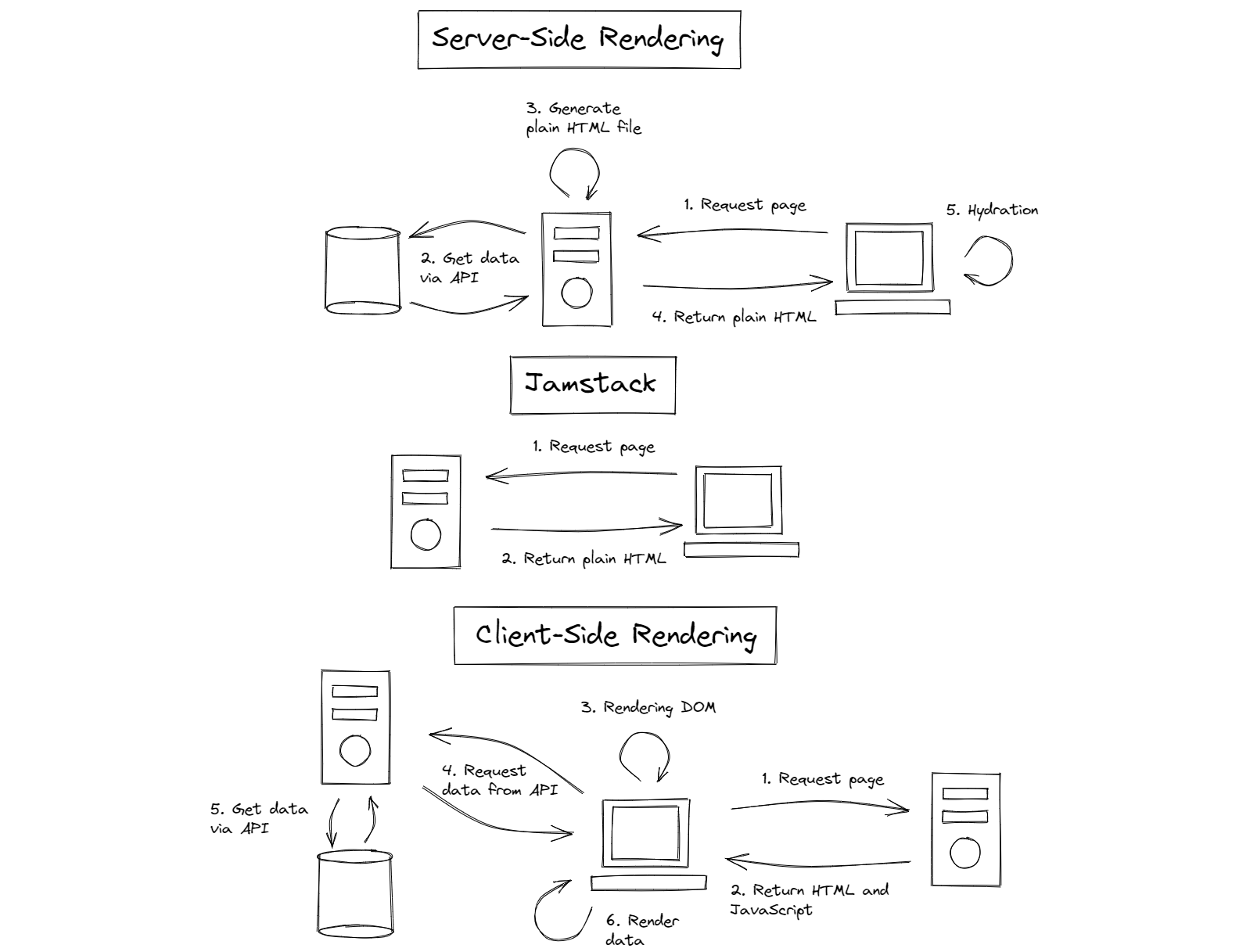
In an SSR application, templating engines inject variables into the HTML before it reaches the client. In Next.js, for example, you can preload a list of data directly on the server.
export default function Home({ studentList }) {
  return (
    <Layout home>
        <ul>
          {studentList.map(({ id, name, age }) => (
            <li key={id}>
              {name}
              <br />
              {age}
            </li>
          ))}
        </ul>
    </Layout>
  );
}
Jamstack
Jamstack is similar to SSR in that the client retrieves plain HTML, but the HTML is pre-generated and served directly from a CDN rather than from a server on each request. This makes Jamstack pages load faster and is a popular choice for documentation sites, where content is often written in Markdown and compiled to HTML before deployment.
---
author: Agustinus Theodorus
title: ‘Title’
description: Description
---
Hello World
Jamstack works well for pre-generated content, but heavy client-side JavaScript can make it harder to justify compared to CSR. That said, both SSR and Jamstack avoid burdening the client with rendering the entire page from scratch.
Active Memory Caching
Caching is how you get data you have already retrieved without fetching it again. It is not meant for permanent storage, but for storing recently used data so subsequent requests are faster. Two common approaches are a server-side cache like Redis — a fast key-value store — and the browser’s local storage.
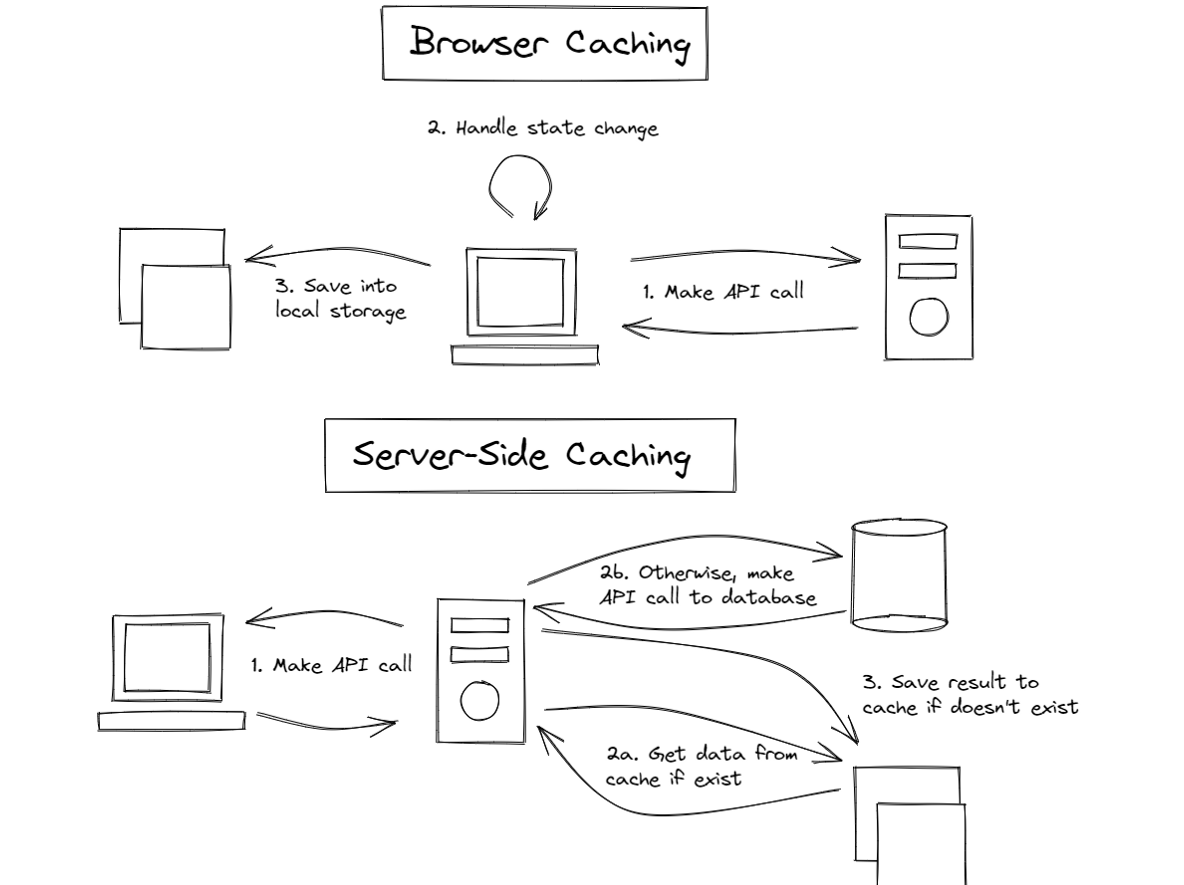
Server caches lower the latency between the frontend and backend because key-value databases respond faster than traditional relational SQL databases. Local caches, meanwhile, improve state management by letting the app persist state across page refreshes and reducing the number of API calls for data that does not change frequently. Both caches can operate at the same time, but they serve different roles: use a server cache to speed up API responses, and a local cache to preserve app state on the client.
Data Event Sourcing
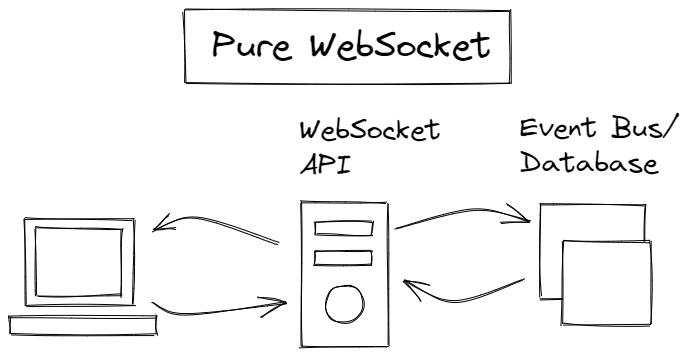
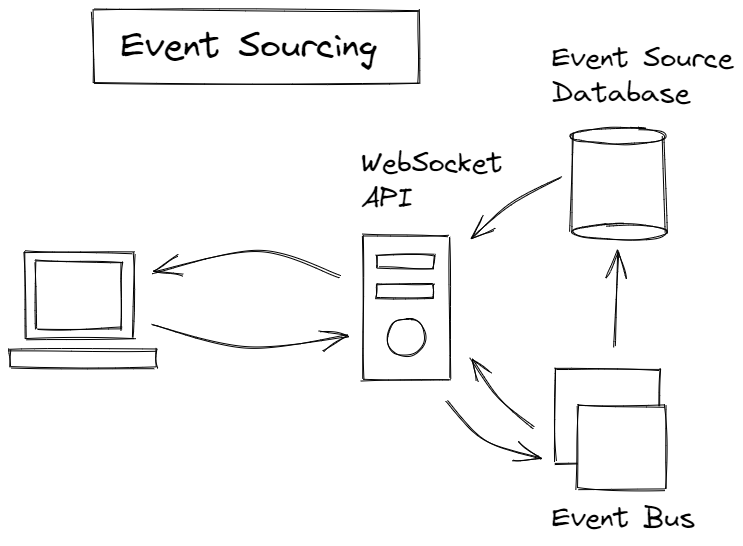
WebSockets provide a two-way, real-time connection between the frontend and backend that relies on events rather than repeated HTTP requests. They are especially useful in cases like chat applications, where polling the server every few seconds is inefficient. The browser's WebSocket class opens a connection that you can listen to for messages, errors, and connection status changes.
const ws = new WebSocket('ws://localhost');
ws.addEventListener('message', (event) => {
    console.log('Message from server ', event.data);
});
You can attach event listeners to react to incoming server events with a callback, and use the send function to push messages back to the server. This pattern combines well with local browser caching to create a real-time application that updates state as events arrive.
ws.send('Hello World');
However, a pure WebSocket setup is not without drawbacks. A slight connection issue can degrade the user experience, and performance suffers if the backend queries a database on every get request. Event sourcing — a pattern where state changes are logged as a sequence of events — can support more reliable real-time applications. It may not guarantee overall app speed, but it gives users a better experience through a responsive, real-time UI. The examples above draw from the MDN WebSocket documentation.
Prefetching and Lazy Loading: Managing When Data Loads
Once the infrastructure is in place, the next lever is controlling when resources are fetched. Prefetching and lazy loading are two complementary strategies that make efficient use of bandwidth and client resources.
Prefetching: Using Idle Time
Prefetching lets you take advantage of idle bandwidth by loading resources and pages the client is likely to need next. When a prefetch link is present, the browser silently downloads the content and stores it in its cache, resulting in significantly faster load times when the user clicks through.
<link rel="prefetch" href="https://example.com/example.html">
Prefetch URLs are specified in the link HTML element, via the rel attribute. The pattern has clear trade-offs:
- Uses idle network: Prefetching waits until the browser's network is free and stops when the user triggers navigation or a lazy load begins.
- Speeds transitions: Caching data in the browser makes page-to-page navigation near-instant.
- Privacy risk: The technique can be used to download trackers, undermining user privacy.
Lazy Loading: Deferred Retrieval
Lazy loading shifts the client to an on-demand model: instead of pulling everything upfront, resources are fetched as they enter the viewport. This focuses initial loading on what's visible, so on-screen content renders faster.
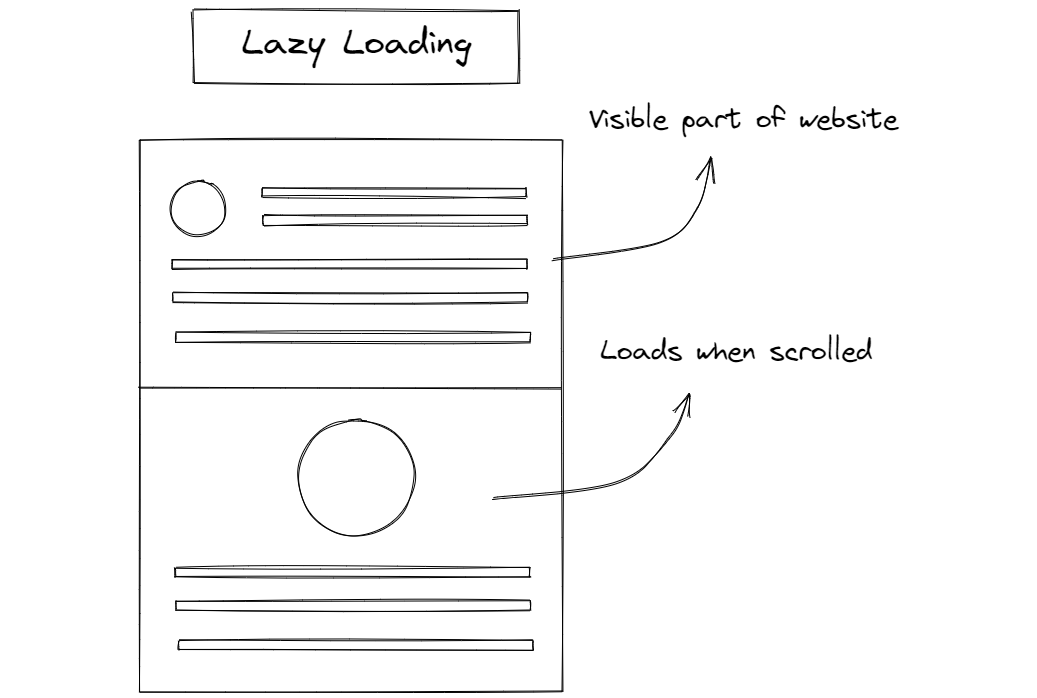
However, lazy loading is a delay tactic, not a size reducer. It postpones downloads but doesn't make resources lighter or cheaper to serve. The approach only goes part of the way toward efficiency; it is often paired with or replaced by technologies that address resource size itself.
Resumability: Offloading the Heavy Lifting
A less familiar pattern is Resumability, a concept coined by Misko Hevery, founder of the Qwik framework. Instead of sending a full JavaScript bundle for the client to hydrate, the server performs a partial render, serializes the final state, and sends it along with the HTML. The client then resumes rendering without re-executing all the logic.
The core idea is serializing application state from the server to the client. Nothing is reloaded; the state is simply deserialized from the injected HTML. The result is near-instant page startup and lower memory usage, particularly beneficial on mobile.
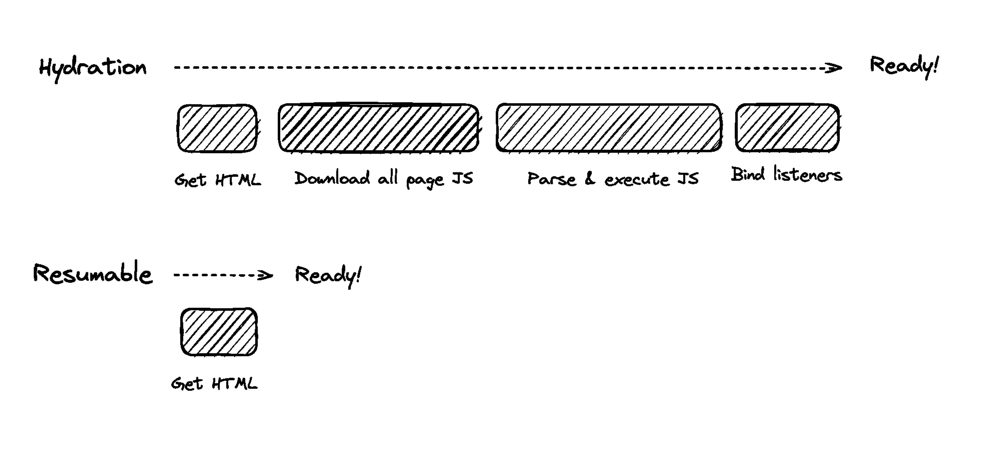
Qwik is the primary implementation, built from the ground up around this architecture. The framework uses asynchronous, fine-grained lazy loading for its components. This stands in contrast to mainstream frameworks like React and Vue, whose synchronous design prevents them from adopting Resumability without breaking backward compatibility.
import { App } from './app';
export const Root = () => {
  return (
    <html>
      <head>
        <title>Hello Qwik</title>
      </head>
      <body>
        <App />
      </body>
    </html>
  );
};
The root of a Qwik application is plain HTML, with a dependency on an lazy-loaded component, such as App:
import { component$ } from '@builder.io/qwik';
export const App = component$(() => {
  return <p>Hello Qwik</p>;
});
Component syntax is deliberately similar to React. The distinction appears on the server side:
import { renderToString, RenderOptions } from '@builder.io/qwik/server';
import { Root } from './root';
export default function (opts: RenderOptions) {
  return renderToString(<Root />, opts);
}
Here, the renderToString method serializes the root component on the server. The client only parses the HTML and deserializes the JavaScript state, eliminating the need to re-run the full application bundle.
Choosing a Data-Loading Pattern
These five patterns address different constraints, and each suits a particular class of application:
- Server Side Rendering (SSR) and Jamstack fit applications with minimal client-side state, reviving the template-driven approach of older MVC frameworks and static HTML.
- Active memory caching accelerates API data retrieval by storing results in remote caches like Redis or the local browser cache, and it forms the basis of prefetching.
- Data event sourcing complements WebSocket-based real-time feeds, isolating retrieval into a separate database to prevent bottlenecks from recurring API calls.
- Prefetching and lazy loading are the simplest to implement, managing when the client gets the data it needs.
- Resumability extends lazy loading to its limit, moving rendering work to the server and serializing state into HTML.
Optimization is an ongoing effort, and knowing the potential pitfalls before restructuring your application is essential. For deeper exploration, the Qwik documentation and articles on frontend performance patterns offer useful starting points.



