
AI Models: Buy, Tune, or Build?
The AI landscape is changing fast, and picking a single provider—OpenAI, Anthropic, Google—can feel like a bet against tomorrow's model leader. Fortunately, you don't have to settle on one. The Vercel AI SDK abstracts the provider layer, giving you a common interface for models from multiple vendors. That gives you a few concrete freedoms:
- Swap providers based on task strengths (speed, coding, world knowledge).
- A/B test models in production via environment variables or feature flags.
- Match model price to workload complexity.
- Keep your app ready for the next state-of-the-art release.
That portability also opens the door to future interface patterns. With recent updates, the AI SDK can stream UI components directly from a model—think generative UI, where the interface adapts in real time to context. Multi-modal support extends this further, handling image analysis, audio transcription, and text-to-speech against the same data backbone. Wiring a model into an app is only a few lines of code:
import { generateText } from "ai";
import { anthropic } from "@ai-sdk/anthropic";
const { text } = await generateText({
model: anthropic("claude-3-5-sonnet-20240620"),
prompt: "What is the best way to architect an AI application?",
});
Before committing to a strategy, weigh your options. Pre-trained models have become extremely capable out of the box, often with strict data-security controls—test those first. Fine-tuning most major providers' models is a straightforward path for specialized tasks on your own data. Only go custom if a truly unique workload demands it (or privacy regulations in banking or healthcare leave you no choice). Custom models carry serious complexity costs in training, hosting, and expertise.
Data: The Refinement Loop
Model selection is only half the battle. Your data pipeline determines whether the output is useful or noise, regardless of which model sits behind it.
Treat data preparation as a continuous loop, not a one-time job. The cycle starts with cleaning and normalizing to remove inconsistencies, then moves into targeted handling for missing values and outliers. Beyond the cleanliness of individual rows, you need your dataset to reflect the real-world distribution your AI will encounter—over-representing one scenario leads to overfitting. Finally, design for scale from the start so your storage and processing infrastructure doesn't throttle your ingestion pipeline.


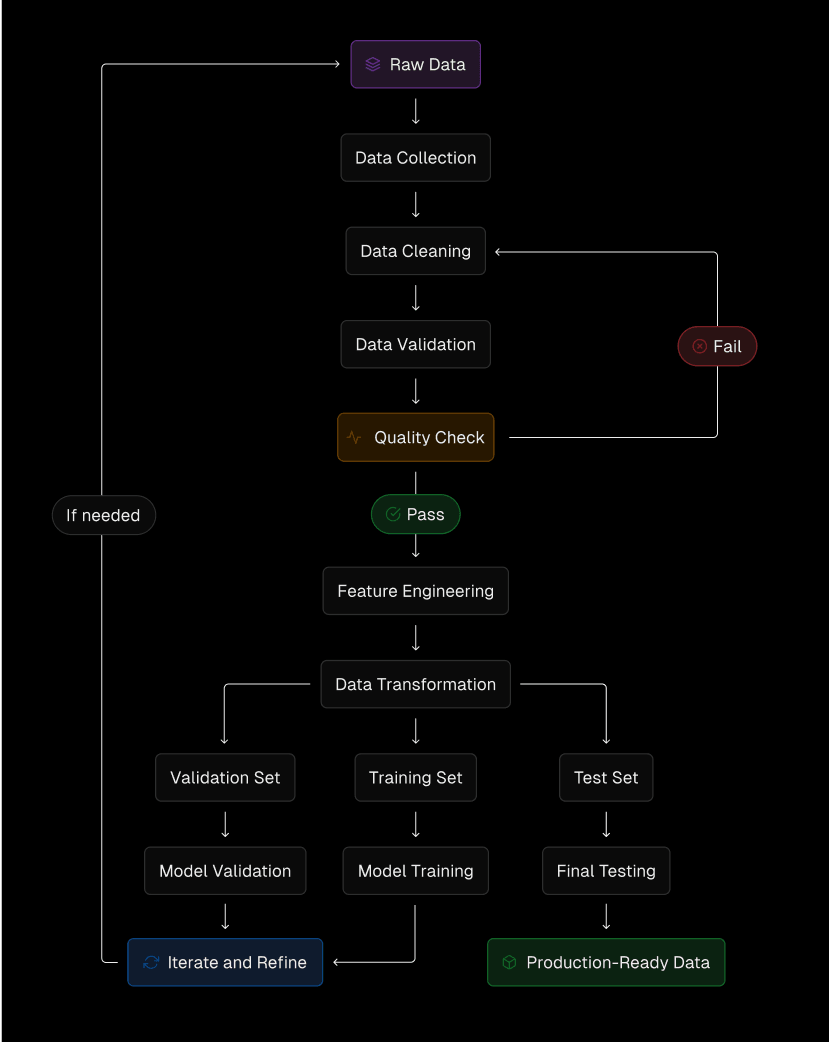
Well-structured RAG—retrieval-augmented generation—is often a more practical alternative to fine-tuning for grounding an out-of-the-box LLM in domain data. The baseline approach works, but advanced techniques push it further:
- Multi-modal RAG expands your knowledge base beyond text to images, audio, and video, pulling relevant visuals alongside text context.
- Dynamic RAG keeps your vector store fresh in real time, so the model always clusters around current information.
- Personalized RAG tailors retrieval per user, using individual vector stores or filters to match context.
- Explainable RAG wraps each chunk with metadata so the LLM can cite sources and reveal its reasoning.
Each layer adds fidelity to responses without the latency or cost of retraining. And since agentic workflows can orchestrate these data preparation steps themselves, you can automate a lot of the plumbing once your initial pipeline is stable.
Infrastructure: The Operational Layer
The right infrastructure keeps latency low, handles workload spikes, and manages long-running AI tasks. Evaluate candidates against a checklist: streaming support for real-time responses, caching to cut redundant compute, scalable memory and compute for resource-hungry models, and developer experience—config overhead eats delivery speed.
Cost gets complicated in AI. Per-token pricing from providers is transparent, but the hidden costs of self-hosted infrastructure across cloud basics add up quickly. Custom training pushes that further, requiring GPUs and cross-functional teams. Weigh all of it against the improvement in output quality.
Vercel is designed to remove much of that wiring burden. Its Edge Network routes dynamic AI workloads through a global CDN, and serverless functions support streaming responses for incremental LLM output as well as long-running tasks outside typical function limits. Automatic scaling handles traffic spikes without configuration, with 99.99% uptime coverage. The framework-definition model means your frontend stack—from nearly any framework in the 35+ supported—declares its own infrastructure, leaving developers to focus on product logic, not deployments.
Data integration slots into the same pipeline. Serverless-enabled storage plus integrations with third-party data providers means you can shape your datastore to the application, not the other way around. For pieces that can't run serverless—most notably training and hosting custom models—Secure Compute lets you reach back into your own VPC for private access.


That architecture puts the AI layer directly between your frontend and backend data while allowing development teams to stay in their lanes: one platform manages the user experience, the AI routing, and the data connectors connecting them.
Performance tuning for AI workloads
Solid infrastructure is only one half of the equation. Even the best-provisioned AI app will feel sluggish and burn through budget if the runtime path is not tuned. The optimizations below target the two most impactful areas: streaming and caching.
Streaming responses
Streaming is the default pattern for modern AI user interfaces because it shows partial results as they are generated. The Vercel AI SDK exposes a streaming toolkit that works across supported frameworks and models. A minimal route handler looks like this:
app/ai/route.ts
import { openai } from "@ai-sdk/openai";
import { convertToCoreMessages, streamText } from "ai";
// Allow streaming responses up to 30 seconds
export const maxDuration = 30;
export async function POST(req: Request) {
// Extract the `messages` from the body of the request
const { messages } = await req.json();
// Call the language model
const result = await streamText({
model: openai("gpt-4o"),
messages: convertToCoreMessages(messages),
});
// Respond with the stream
return result.toDataStreamResponse();
}
That setup forwards model output to the frontend incrementally, making the interaction feel immediate. Three additional techniques push streaming efficiency further:
- Chunking — Splitting large datasets into smaller units reduces per-request processing time and trims memory pressure on both the server and the client.
- Backpressure handling — A client that cannot keep up with the stream will waste resources. The AI SDK's backpressure handling governs the data flow between model and consumer so your app stays responsive without over-consuming compute.
- Multiple streamables — For dashboards or complex UIs with independent components, splitting the response into multiple streams lets each section update on its own schedule rather than waiting for one monolithic payload.
Apply these patterns with profiling. Whether an optimization yields a measurable win depends on your prompt size, model latency, and UI complexity.
Caching AI responses
Caching prevents identical or near-identical requests from hitting the model more than once. Vercel offers several storage tiers, each suited to a different class of cached data.
Incremental Static Regeneration (ISR) with the Data Cache is appropriate when generated content does not need to be current to the second. ISR integrates with Vercel's edge Data Cache, which stores data-fetch responses and supports time-based, on-demand, or tag-based revalidation. Frequent readers of an ISR page are served from cache, cutting call volume to upstream AI and backend services.
Redis (Vercel KV) is the tool of choice for runtime caching of JSON. It handles AI response storage, session state, and other frequently accessed data. While Vercel KV is fully managed from the dashboard, teams with more specific requirements can point the same caching layer at a self-managed Redis instance.
Blob storage (Vercel Blob or Amazon S3) is not a cache in the strict sense, but it is essential when AI processes generate or return large artifacts that must be stored and later served.
The following Next.js route combines model generation with a Vercel KV cache check, skipping inference when a fresh result already exists:
app/cached-ai/route.ts
import { openai } from "@ai-sdk/openai";
import { convertToCoreMessages, formatStreamPart, streamText } from "ai";
import kv from "@vercel/kv";
// Allow streaming responses up to 30 seconds
export const maxDuration = 30;
// simple cache implementation, use Vercel KV or a similar service for production
const cache = new Map<string, string>();
export async function POST(req: Request) {
const { messages } = await req.json();
// come up with a key based on the request:
const key = JSON.stringify(messages);
// Check if we have a cached response
const cached = await kv.get(key);
if (cached != null) {
return new Response(formatStreamPart("text", cached), {
status: 200,
headers: { "Content-Type": "text/plain" },
});
}
// Call the language model:
const result = await streamText({
model: openai("gpt-4o"),
messages: convertToCoreMessages(messages),
async onFinish({ text }) {
// Cache the response text:
await kv.set(key, text);
await kv.expire(key, 60 * 60);
},
});
// Respond with the stream
return result.toDataStreamResponse();
}



