A New Rendering Path for the Infinite Canvas
When Figma Design launched in 2015, the team bet on WebGL—a browser graphics API designed for 3D—to power a smooth, real-time collaborative canvas in the browser. In 2023, Chromium shipped support for WebGPU, the successor to WebGL. That opened up new optimization opportunities: compute shaders that move work off the CPU onto the GPU, avoidance of WebGL's error-prone global state, and more performant error handling.
Adopting WebGPU required designing a new rendering backend with performance in mind, maintaining WebGL compatibility, and rolling out changes carefully. Here are the highlights from the major phases of the project.
Modernizing the Graphics Interface
Figma's engine already had an interface layer between higher-level rendering code and low-level OpenGL, but it mapped closely to the WebGL API. Key improvements were needed to ensure the transition to WebGPU would improve—not regress—performance.
Explicit Draw-Call Arguments
WebGL relies heavily on global state, "binding" resources to global binding points before issuing draw calls. The initial interface mirrored this behavior:
// set up different types of data/settings that will be used for a draw call
context->bindVertexBuffer(vertexBuffer, ...);
context->bindTextureUniform(texture, ...);
context->bindMaterial(material, ...);
context->bindFramebuffer(framebuffer, ...);
// … set up any other resources
context->draw();
After draw() is called, the resources stay bound, making it easy to forget updating an input and introduce a bug. To make state explicit and WebGPU-like, the API was changed to pass resources partly as function arguments:
context->draw(vertexBuffer, framebuffer, {texture}, material, …);For WebGL, the draw() implementation lazily updates bindings for each resource type only as needed. Since the resources are now function arguments, forgetting to update them is impossible. This interface change fixed a handful of WebGL renderer bugs before WebGPU work even began.
Shader Processing
Shaders are GPU programs that produce the pixel output on screen. WebGL shaders are written in GLSL; WebGPU uses its own language, WGSL. Since WebGL support remains necessary, duplicating every shader in both languages wasn't feasible. The existing GLSL shaders were also written for WebGL 1, which is structurally very different from WGSL (and newer GLSL), including specifying uniforms individually versus in blocks.
Open-source conversion tools exist, but they don't support the older GLSL format. Figma combined an existing open-source tool with a custom shader processor: the processor parses the GLSL shaders, translates them to a newer GLSL version, then runs the open-source tool naga to convert them to WGSL. The processor generates both GLSL and WGSL, extracts information like input types and data layouts for use within the app, and supports file includes for code modularity.
Batch Uploads for Uniform Buffers
Uniforms are like global variables passed to shaders—for example, a color supplied to a shader compiled once and used to draw many colors. WebGL lets you set uniforms individually:
const locationAlpha = gl.getUniformLocation(program, "alpha");
const alphaValue = 1.0;
gl.uniform1f(locationAlpha, alphaValue);

const locationTransform = gl.getUniformLocation(program, "transform");
const transformValue = [1.0, 0.0, 0.0, 0.0, 1.0, 0.0, 0.0, 0.0, 1.0];
gl.uniformMatrix3fv(locationTransform, false, transformValue);
...
The graphics interface mirrored this:
material->setUniform1f(ALPHA, 1.0);
material->setUniform3fv(TRANSFORM, transform);
context->draw(material, ...);
WebGPU requires all uniforms in a single buffer, written and uploaded at once:
// create a Float32Array with multiple uniform values
const uniformData = new Float32Array(sizeOfAllUniforms);
// write data into the array at the right offsets...
uniformData.set(0.0, offsetOfAlpha);
uniformData.set([1.0, 0.0, 0.0, 0.0, 1.0, 0.0, 0.0, 0.0, 1.0], offsetOfTransform);

// set up a uniform buffer
const uniformBuffer = device.createBuffer({
size: uniformBufferSize,
usage: GPUBufferUsage.UNIFORM | GPUBufferUsage.COPY_DST,
});

// upload the data to the GPU
device.queue.writeBuffer(uniformBuffer, /*offset*/0, uniformValues);

// now we can use the uniformBuffer in a draw call
Naively following those steps on every setUniform call would allocate GPU memory and upload data frequently—both expensive operations expected to regress performance. Instead, Figma batches uploads: uniforms for multiple draw calls are set up, all data is uploaded at once, and draw calls are "submitted" in order:
context->encodeDraw(uniformStructData, material1, ...)
context->encodeDraw(otherUniformStructData, material2, ...)
// encode more draws...
context->submit()
When using WebGPU, submit() uploads all uniform data for encoded draw calls to a single buffer, then executes the draw calls with offsets into that buffer. When using WebGL, the existing individual uniform functions are called. This interface update reduced the risk of WebGPU performance regressions.
Building the WebGPU Implementation
The WebGL implementation consisted of several classes wrapping parts of WebGL state. Since the interface had been updated to map more closely to WebGPU resources, implementation time was saved.
The renderer is written in C++. It compiles to WebAssembly (Wasm) with Emscripten for the main Figma app, and compiles natively to x64/arm64 for server-side rendering, testing, and debugging. Code had to use the WebGPU C/C++ API and work in both environments with minimal per-platform branching.
For Wasm, Emscripten's built-in WebGPU bindings were used, meaning C++ WebGPU calls ultimately use the browser's WebGPU JavaScript API. Custom C++/JS bindings were written where the built-in bindings weren't performant enough. Work is now underway to move to Dawn's emdawnwebgpu bindings since Emscripten's WebGPU bindings support is deprecated.
For native builds, Figma incorporated Dawn—the WebGPU implementation used by Chromium—into its build. Both the Wasm and native apps use Dawn to translate WebGPU into lower-level graphics APIs.
WebGL supports synchronous pixel readback; WebGPU only allows asynchronous readback. This major API difference requires adaptation for any existing WebGL application. Other differences included internal coordinate systems, error handling, and sync versus async readback. In WebGL, error checks are synchronous and checking too frequently can severely hurt performance; in WebGPU, errors are asynchronous and carry helpful messages.
From WebGL to WebGPU: The Rollout
Once a working WebGPU implementation was in place, Figma measured its performance against the existing WebGL baseline using the same internal testing framework described earlier. Tests ran across Windows, Mac, and ChromeOS devices, where performance varied significantly from one class of hardware to another.
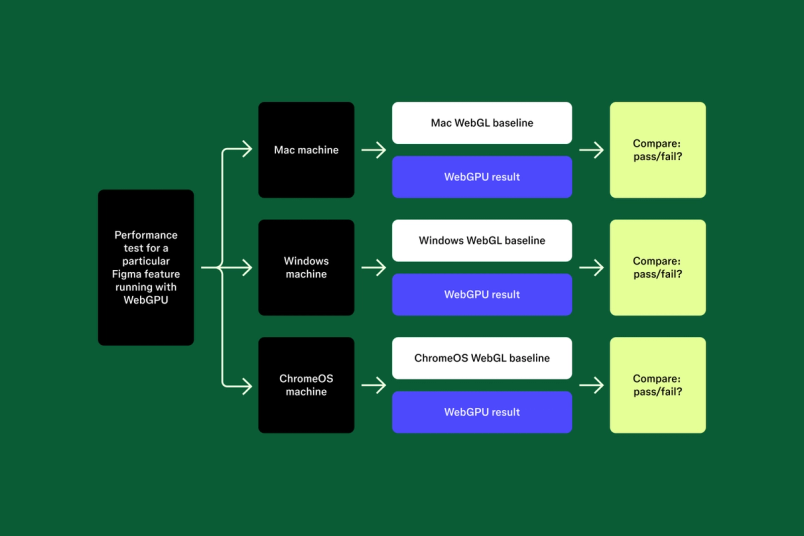
After identifying the scenarios with the largest regressions, the team focused on optimization work. Key changes included caching and reusing bindGroups aggressively, and improving how draw calls were batched into renderPasses. With major regressions resolved, production rollout began with careful monitoring at each rollout percentage, breaking down metrics by GPU type, OS, and browser. The results showed performance gains on some device classes and neutral results on others, but no regressions.
Handling Windows Device Compatibility
With WebGL, Figma runs synchronous tests that render pixels to a texture and read them back to detect buggy graphics cards or drivers. Replicating this approach for WebGPU proved impractical because WebGPU only supports asynchronous readback, which would add hundreds of milliseconds to load times.
The initial solution was a two-part rollout: first, ship compatibility tests that run after a session starts without blocking load, and use the results to identify and blocklist problematic devices before enabling WebGPU more broadly. However, this approach still fell short. On Windows, failures could occur mid-session—such as losing the WebGPU device without being able to request a new one, where requestDevice or requestAdapter start throwing errors. Pre-load tests couldn't catch those cases.
Figma pivoted to a dynamic fallback system. Sessions can now start with WebGPU rendering and switch to WebGL later if needed. This reuses the existing mechanism for handling WebGL context loss and WebGPU device loss, but instead of re-creating the context with the same backend, it swaps backends entirely. The fallback triggers on asynchronous test failures or any other WebGPU-related failure mid-session.
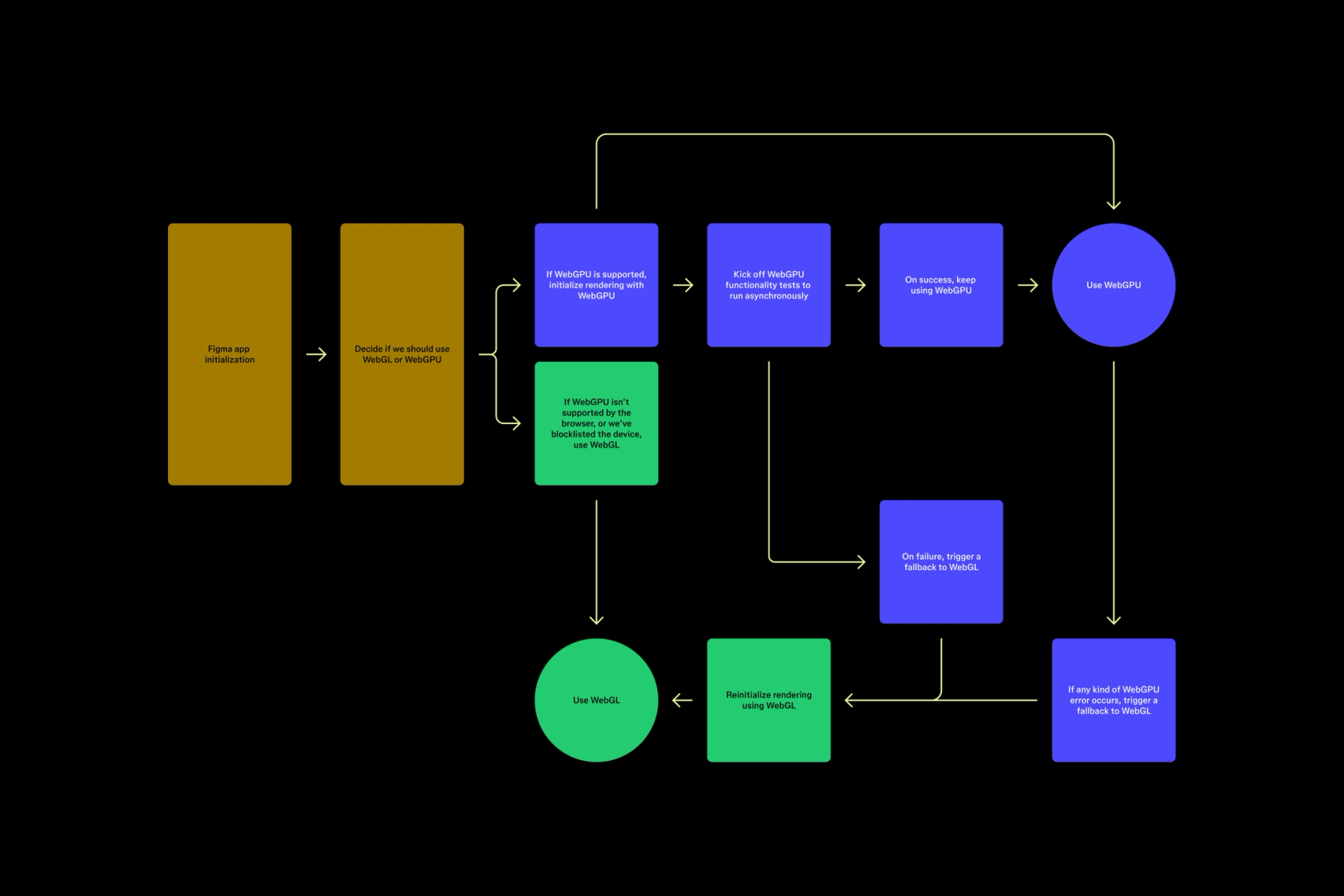
With the dynamic fallback in place, rollout resumed. This time, devices were blocklisted based on their average fallback rates, since the switch from WebGPU to WebGL can cause a noticeable hitch. This approach finally allowed Figma to complete the rollout.
What WebGPU Unlocks Next
WebGPU opens up several performance paths that weren't available with WebGL. These include optimizing blur rendering with compute shaders, using WebGPU's MSAA (Multi-Sample Anti-Aliasing), and leveraging WebGPU's RenderBundles feature to reduce the CPU overhead of submitting work to the GPU.



