

Why the new code view starts with reading habits
Reading code isn’t scrolling a file top to bottom. It’s a non-linear hunt: jumping across files, following references, and assembling a mental model of how pieces connect. That reality shaped the code view GitHub set out to rebuild about a year ago. The goal was a reading experience—not an IDE—with a file tree, symbol navigation, code search, sticky lines, and collapsible sections. Three constraints were non-negotiable: the new features had to genuinely change how code is read, the UI had to stay approachable for millions of users, and it had to be fast.
First implementation, predictable trade-off
The initial build was intentionally straightforward—no premature optimization. The team chose React for rapid UI iteration. The architecture was simple: a syntax highlighting service returned the file as a list of HTML strings, one per line, each added directly to the document. It worked, until file size grew.
Performance degraded measurably around 500 lines and became clearly noticeable near 2,000 lines. The team tracked this via LCP and TTI metrics, which matter for two reasons: they reflect real user experience, and they influence search ranking—a code view is how many developers expose their work to the web.
The diagnosis pointed to three compounding costs:
- Large DOMs slow style calculation and painting.
- Large DOMs slow queries and inflate memory use.
- Large React trees slow rendering and reconciliation.
None of this is specific to React—any JS-managed DOM at that scale hits the same walls. Mitigation followed standard practice: memoization, debounced input, and an observer pattern to limit state updates. These helped, but they only reduced the frequency of expensive work. The initial render itself stayed heavy.
Proof came from a real target: GitHub.com’s own CODEOWNERS file, roughly 18,000 lines and near the 2MB display limit. With these optimizations only, React’s first DOM build took nearly 27 seconds. With more than half of users abandoning pages that take over three seconds, this was unshipable.
Virtualization works, then breaks find-in-file
Virtualization seemed like the answer: render only what fits in the viewport, adding and removing lines on scroll. It delivered. Initial render dropped under one second, even when artificially testing with hundreds of megabytes of text. Scrolling felt near-native.
But virtualization has a blind spot: the browser’s built-in find—Ctrl+F/⌘+F—only searches rendered DOM. With most of the file absent from the page, matches outside the viewport vanished. That breaks an expectation users take for granted on any page.
The first fix was a custom find-in-file handler. GitHub added UI in the sidebar to show results, pairing it with symbol navigation and code search integration.
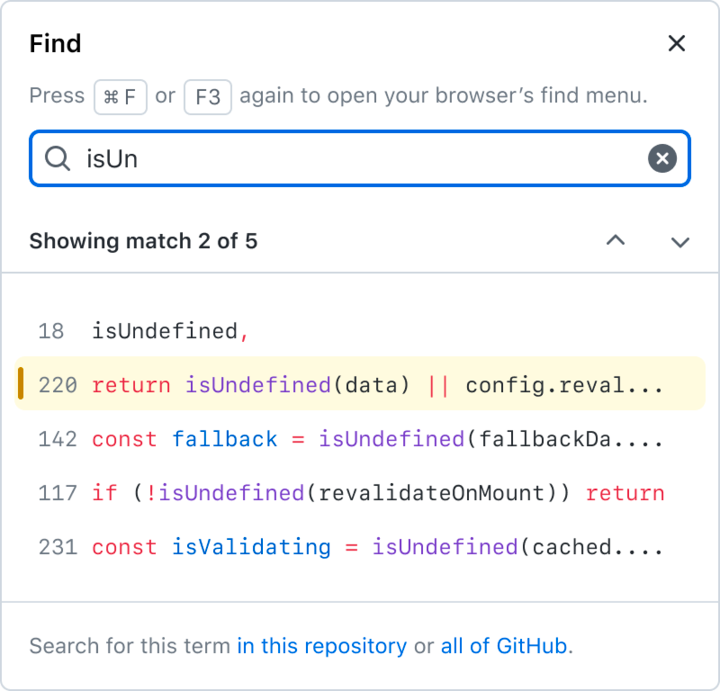
This approach has strong precedent. Monaco, the editor behind VS Code, does exactly this, as do Repl.it and CodePen. Some editors, like the official Ruby playground, simply accept that find is partially broken in their virtualized views. At first, GitHub leaned on that precedent—apps in the browser are expected to implement their own controls. This felt like a step toward making code view more application, less page.
Private beta feedback at GitHub Universe corrected that assumption. Users treat GitHub as a page, not an app. The team tried to clone the native find experience as closely as possible, but overriding browser behavior carries real costs:
- Assistive technology users rely on Ctrl+F to navigate the page, and scoping it to file contents broke those workflows.
- Custom shortcut handling means chasing browser-specific keyboard behavior to match muscle memory.
- The native implementation is simply faster than anything hand-rolled.
The output was a working feature, but at the cost of intuitive behavior. Virtualization remains essential to the final design—but it is only one layer of it. The team’s conclusion points to a different approach, one that lets the browser handle what it already does well instead of replacing it.
Two layers, one document view
GitHub’s revamped code view pairs two elements: a textarea holding the full raw file, and a virtualized, syntax-highlighted overlay that renders only what’s in the viewport. The textarea is invisible but interactive—keyboard navigation, copying, and the browser’s find all work against it. The overlay is visible but excluded from both mouse events and find.
The result is a code-reading surface with more features than the static HTML page that served GitHub for over a decade—and one that renders faster.
The textarea underneath
The textarea didn’t start as a performance play. It came from an accessibility problem. The prior code view rendered a document as a table, which was confusing for screen-reader users. A code file isn’t a table, but it isn’t a plain paragraph either. Placing an invisible textarea beneath the highlighted lines gives everyone a familiar, keyboard-navigable way to move through the file.
It also happens to be a rendering win. Browsers handle megabytes of text inside a textarea far more cheaply than JavaScript-managed, syntax-highlighted HTML. And with the complete raw file in a textarea, GitHub could drop its custom find-in-page implementation in favor of the browser’s native Ctrl+F.
Keeping duplicate text out of find
Two copies of every visible line now exist: one in the textarea, one in the overlay. Without intervention, native find returns each match twice. The fix was hiding the overlay’s text from the browser’s search—which took two iterations.
print("Hello!")
The old code view turned that into HTML where the text nodes themselves were findable:
<span class="pl-en">print</span>(<span class="pl-s">"Hello!"</span>)
First attempt: move all text into a data- attribute and inject it via :before pseudoelements, which sit outside the DOM and shouldn’t appear in find results.
<span class="pl-en"></span>
<span></span>
<span class="pl-s"Hello!""></span>
<span></span>
[data-code-text]:before {
   content: attr(data-code-text);
}
That didn’t hold up everywhere. Firefox’s find is robust enough to locate text inside :before content. The second approach exploited a behavior all major browsers share: adjacent pseudoelements are not treated as one contiguous block. Firefox may find print in the first example, but it won’t match print(. So the overlay breaks code into individual characters:
<span class="pl-en">
   <span></span>
   <span></span>
   <span></span>
   <span></span>
   <span></span>
</span>
<span></span>
<span class="pl-s">
   <span"></span>
   <span></span>
   <span></span>
   <span></span>
   <span></span>
   <span></span>
   <span></span>
   <span"></span>
</span>
<span></span>
That granularity looks expensive, but it exists only for the few hundred virtualized lines in the viewport at any time.
Cheaper syntax highlighting
The syntax-highlighting service previously returned one HTML string per line:
[
   "<span class=\"pl-en\">print</span>(<span class=\"pl-s\">"Hello!"</span>)"
]
A new output format instead describes highlighted segments by position and CSS class:
[
   [
       {"start": 0, "end": 5, "cssClass": "pl-en"},
       {"start": 6, "end": 14, "cssClass": "pl-s"}
   ]
]
That compact description lets GitHub generate whatever HTML structure is needed—and skip React’s reconciliation for this part of the page entirely. The gain shows in an extreme case: scrolling through the 18,000-line CODEOWNERS file. With React managing the DOM, pressing “end” left the browser spending 870 milliseconds on the keyup event and 3,700 milliseconds of main-thread blocking JavaScript. With the HTML generated directly as strings, those drop to 80 milliseconds and roughly 700 milliseconds, respectively.
The new view is built around the full arc of reading code—navigating, searching, copying, and understanding context—and those capabilities now sit on a page that renders faster than the one it replaces.



