
RAG for Design Research: Context Beats Volume
The most common complaint about using AI for ideation is that it returns generic, clichéd suggestions. The usual remedy — dumping all available documentation into the chat — often backfires. Modern models may technically process large inputs, but accuracy degrades as content grows, particularly for information located in the middle of a long prompt. This “lost in the middle” problem means the AI misses the very details that would make its output useful.
The solution isn’t more information; it’s better-structured information, delivered through retrieval-augmented generation (RAG). Instead of feeding the entire knowledge base to the model each time, RAG first indexes documents into a vector database by creating semantic “bookmarks” for each chunk. When you ask a question, only the most relevant chunks are retrieved and sent to the language model.
This differs from pasting a document into the chat in a key way. A direct paste forces the model to read everything, with attention spread thin. RAG narrows the focus, improving speed and accuracy. However, it introduces new risks:
- Ambiguous queries. A question like “How can we make the project safer?” may retrieve cybersecurity documents when you meant financial risk.
- Mixed chunks. If a chunk contains marketing, design, and engineering notes, the model can’t identify the core topic clearly.
- Semantic gaps. The model may not connect a query about “speeding up the app” with a document that says “optimize API response time.”
These issues are manageable with careful knowledge-base preparation. A practical starting point is to compile three short, focused documents, each limited to a single topic and roughly 300–500 words: an overview of the product and core user scenarios; a description of target audience segments and their goals; and key findings from research, interviews, or analytics.
Language choice also matters. RAG performs best when both queries and documents are in English. Testing combinations reveals a clear pattern: English prompts with English documents yield consistently accurate results, while non-English inputs — whether with English or non-English documents — cause quality to drop sharply. Vector search relies on semantic maps that are predominantly English-trained. For regular chat interactions, other languages are fine; for RAG specifically, English-only is the safer setup.
With proper context, AI shifts from an outsider to a teammate. It can flag blind spots and challenge assumptions like a senior designer would. A structured prompt asking for comparative feature analysis — including potential overlaps, confusion points, architectural conflicts, UI separation suggestions, and onboarding needs — produces results far beyond what a bare request would yield. The key principle applies even without a full RAG system: well-organized content plus a clear question dramatically improves the AI’s usefulness.
AI in Prototyping: Focused Tasks, Not Full Flows
Skepticism about AI’s prototyping ability is justified when the goal is a complete, multi-screen flow. AI still struggles to assemble coherent user journeys at scale. But for individual UI elements and micro-interactions, it can save significant time and unlock ideas that are hard to execute manually.
One example involved prototyping a gamified promotion with a lottery ticket that users “flip” to reveal a prize. Recreating the 3D animation in Figma was impractical, both manually and with existing plugins. Describing the concept to Claude 4 in Figma Make produced the working animation within minutes, without writing code.
AI works well as a creative partner in two specific areas at this stage:
- UI element ideation. Generating varied interactive patterns you may not have considered.
- Micro-animation generation. Producing polished animations for stakeholder demos or as engineering handoff references.
Multi-screen prototypes remain a challenge: complexity requires manual fixes and fine-tuning. The value concentrates in focused tasks — single screens, discrete elements, animations — where AI can jumpstart the process.
Another promising application is using AI to stress-test existing interfaces. Google Research’s PromptInfuser plugin, introduced in 2023, let designers attach prompts to UI elements and simulate interactions within real mockups. The goal was not to generate new layouts, but to test how well AI handled content placement, edge cases, and logic gaps inside actual designs. Designers using it were up to 40% more effective at catching UI issues. The lesson mirrors the prototyping experience: AI operating within an established structure is far more reliable than AI starting from a blank canvas.
Visual Polish Is Still Hand Work
Pushback: “AI can’t match our visual style. It’s easier to just do it by hand.”
This is a common point of frustration. Even with an uploaded color palette, fonts, and components, AI output rarely feels native to your product. Results tend toward one of two extremes: overly decorative or overly simplified. Today’s models struggle to reliably apply a design system, even when given component structure or JSON style files. Experiments with different approaches show a clear hierarchy of effectiveness:
- Direct integration with a component library. Using Figma Make (powered by Claude) with our library was the least effective. The AI attempted to use components but often produced broken layouts and overly conservative visuals. Other designers report similar issues, with library support in Figma Make described as limited and unstable.
- Uploading styles as JSON. Exporting only styles (colors, fonts) as JSON improved results. Layouts appeared more modern, but style application still contained errors.
- Two-step approach: structure first, style second. This worked best. First, generate layout and composition without styling. Once the structure was solid, follow up with a request to apply the correct styles from the JSON. The result was the most usable — still far from pixel-perfect.
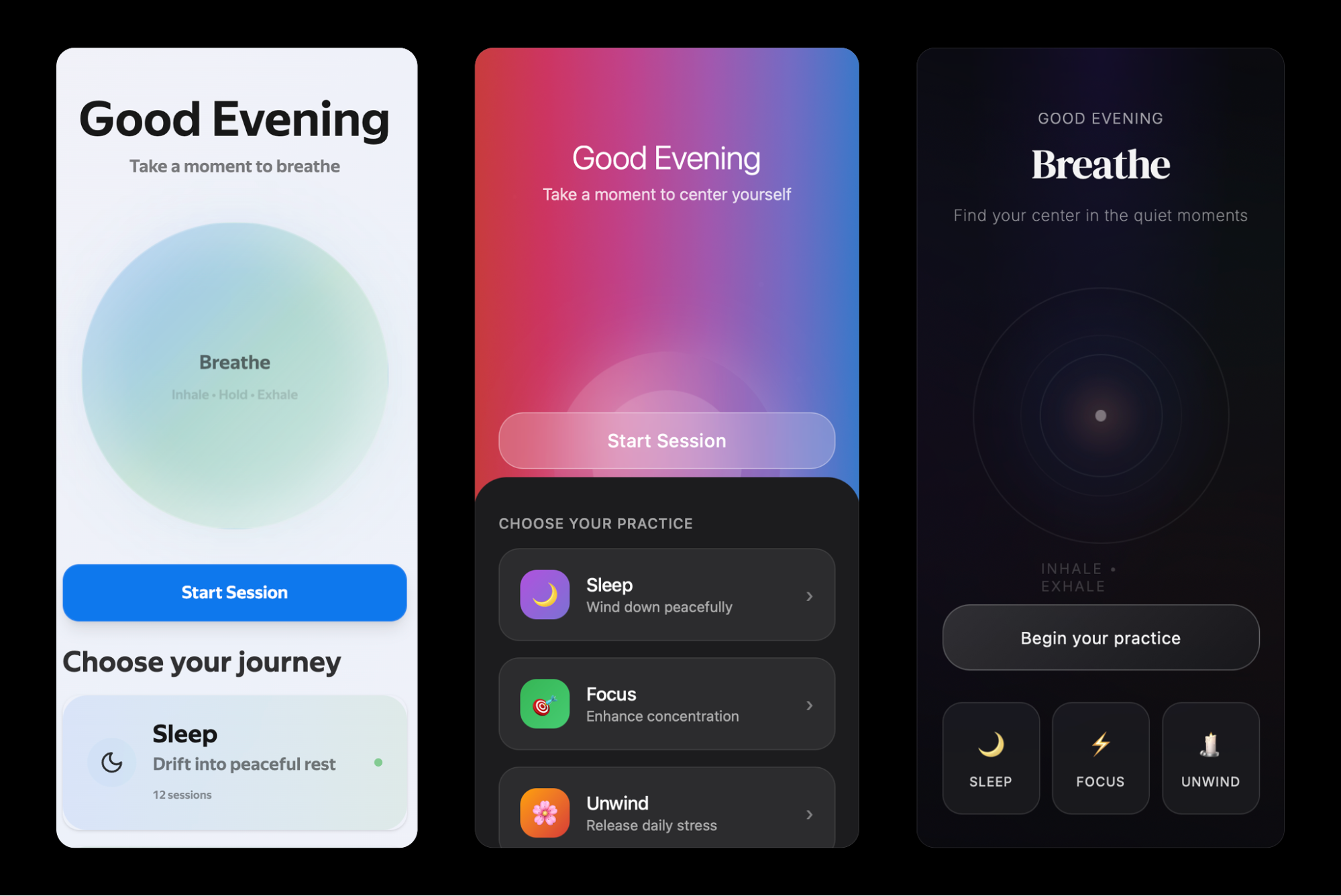
AI still cannot finalize your UI or replace hand-crafted design work. But it holds clear value in other ways:
- Visual concepts created quickly for discussion.
- “What if” alternatives to existing mockups.
- Explorations of how your interface might look in a different style direction.
- A second pair of eyes, giving feedback that points out inconsistencies or overlooked issues when you are tired or too deep in the work.
AI won’t save you five hours of high-fidelity design time, since you’ll probably spend that long fixing its output. But as a visual sparring partner, it’s already strong. If you treat it like a source of alternatives and fresh perspectives, it becomes a valuable creative collaborator.
Analytics: AI As A Thinking Exosuit
Product design has evolved from building interfaces in Photoshop to deeper UX work — mapping flows, interviewing users, and understanding behavior. AI adds another layer: data analysis, once reserved for product managers and analysts. As Vitaly Friedman pointed out, replacing real UX interviews with AI can lead to false conclusions, because models tend to generate an average experience rather than a real one. The strength of AI lies not in inventing data but in processing it at scale.
A real example: launching an exit survey for departing users yielded over 30,000 responses across seven languages within a week. Counting percentages for five predefined reasons was not enough. There were deeper questions:
- Do specific times of day correlate with higher churn?
- Do reasons differ by region?
- Is there a correlation between exits and system load?
The real challenge was determining which cuts and angles were worth exploring. The entire technical process — analysis through visualization — was handled by Gemini inside Google Sheets. The task took about two hours. Without AI, reaching that level of insight would have been difficult if not impossible.
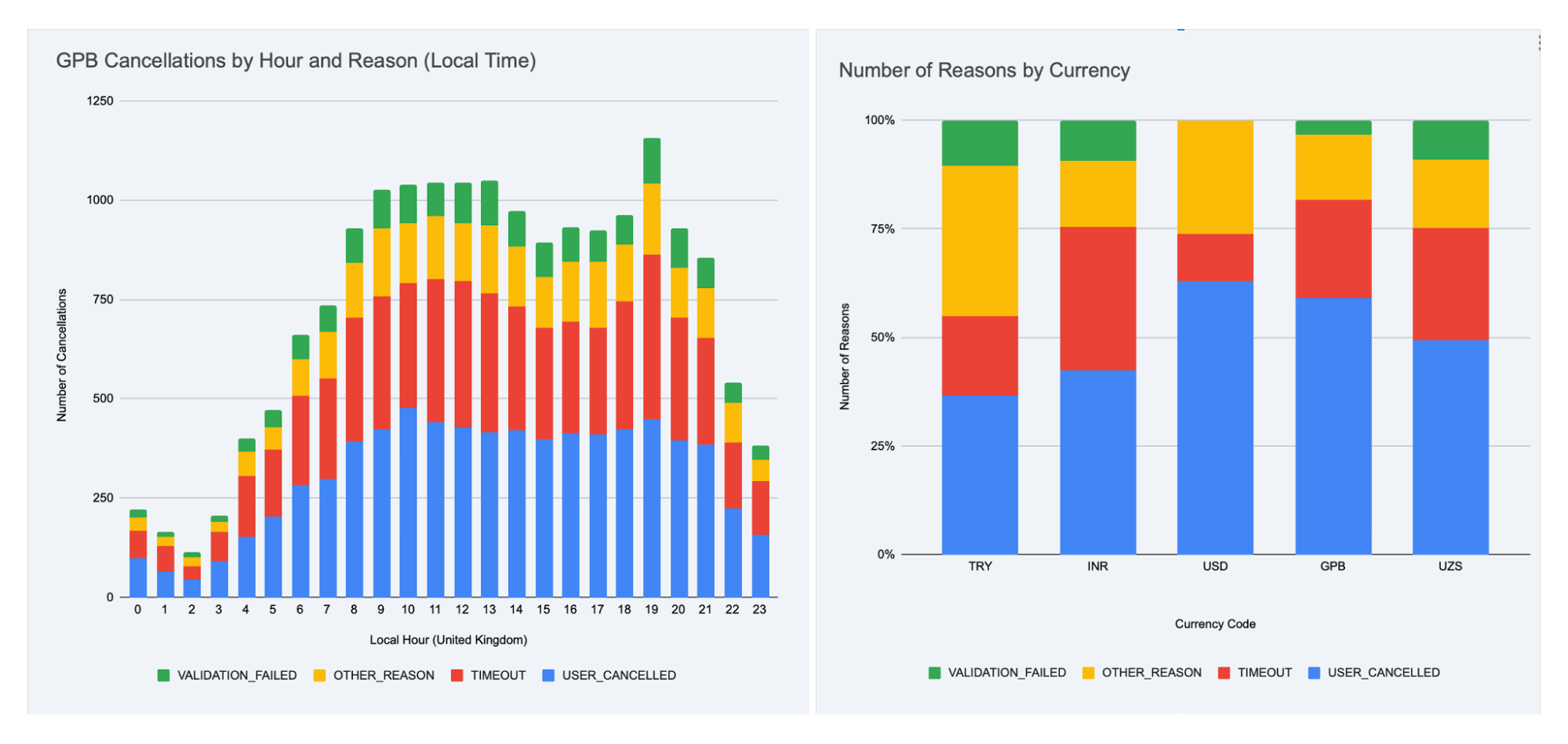
AI enables near real-time work with large data sets. But most importantly, it frees up your time and energy for what’s truly valuable: asking the right questions.
A few practical notes: large data sets remain challenging for models without strong reasoning capabilities. In experiments, Gemini embedded in Google Sheets worked well, with results cross-checked using ChatGPT o3. Other models, including standalone Gemini 2.5 Pro, often produced incorrect outputs or refused the task.
The Co-Pilot, Not The Autopilot
AI in design is only as good as the questions you ask. It does not do the work for you or replace your thinking. What it does is help you move faster, explore more options, validate ideas, and concentrate on hard problems instead of repetitive ones. Sometimes hand-crafting is quicker; sometimes delegating to a junior designer makes sense.
Increasingly, AI serves as the one who suggests, sharpens, and accelerates. The path forward is not to wait for the perfect AI workflow. Start small. That may be the first real step toward turning AI from a curiosity into a trusted tool in your product design process.
Summary Of Findings
- Pasting a full document into chat often causes the model to miss important points, especially those buried in the middle. This is the “lost in the middle” problem.
- The RAG approach helps by pulling only the most relevant pieces from documents, yielding responses that are faster, more accurate, and grounded in real context.
- Clear, focused prompts work better. Narrow scope, define output, and use familiar terms to keep the model on track.
- A well-structured knowledge base makes a significant difference. Short, topic-specific documents reduce noise and keep answers sharp.
- Use English for both prompts and documents. Even multilingual models are most reliable in English, especially for retrieval.
- Most importantly, treat AI as a creative partner. It will not replace your skills, but it can spark ideas, catch issues, and speed up tedious parts.
Further Reading
- “AI-assisted Design Workflows: How UX Teams Move Faster Without Sacrificing Quality”, Cindy Brummer
A prequel to this article, explaining how to start integrating AI into your design process and which tasks it can reasonably take on. - “8 essential tips for using Figma Make”, Alexia Danton
Broadly applicable advice, even beyond Figma Make, especially for visual tools and structured prompting. - “What Is Retrieval-Augmented Generation aka RAG”, Rick Merritt
A plain-language breakdown of how RAG works, covering vector search and retrieval and why these methods outperform long prompts.




